
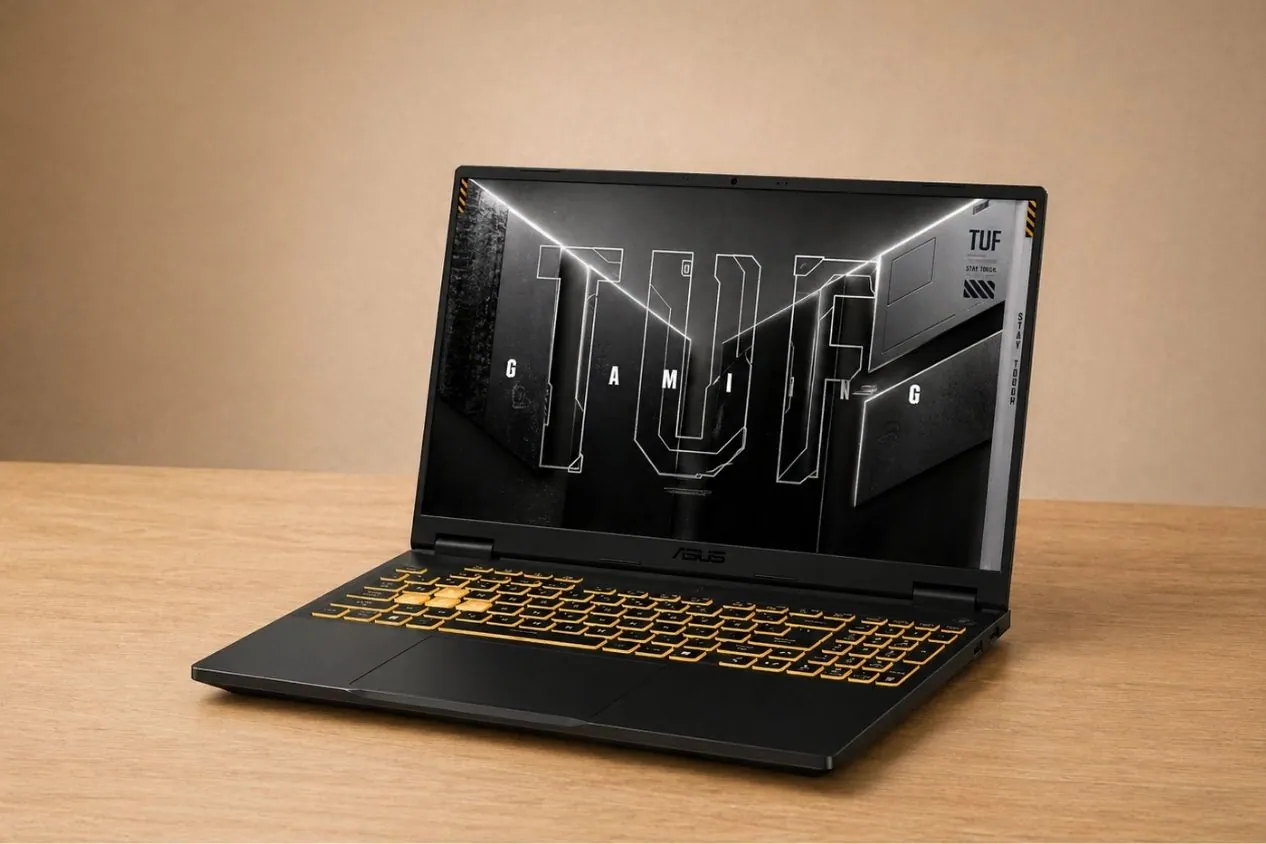
We tested the ASUS TUF Gaming F16 beside several gaming laptops across different price ranges, and it ended up feeling less like a typical budget gaming laptop than we expected.
A lot of RTX 5050 systems focus more on thin designs or luxurious specs, but ASUS went in a different direction here. The TUF Gaming F16 feels built around longer gaming sessions, easier upgrades, and stable everyday use instead of chasing the slimmest possible chassis.
The interesting part started once the real benchmarks, temperatures, and game tests came in.

ASUS TUF Gaming F16
- Release Date: 2025
- Model Number: FX608JH-SS53
- Laptop Type: Gaming
- Series: ASUS TUF
- Available on:
ASUS TUF Gaming F16: Key Features
| Model Name | ASUS TUF Gaming F16 (2025) |
| Processor | Intel Core i5-13450HX |
| Frequency | Up to 4.6 GHz |
| Core | 10 Cores |
| RAM | 16 GB DDR5 |
| Storage | 512 GB PCIe Gen4 SSD |
| Graphics Card | NVIDIA GeForce RTX 5050 Laptop GPU |
| Display | 16-inch FHD+ 165Hz 16:10 Display |
| Operating System (OS) | Windows 11 Home |
| Weight | 4.9 lb (2.2 kg) |
| Battery | 90Wh |
| Microsoft Office | 365 or Office Home & Student |
Click Here to See Full Specifications 👆
ASUS TUF Gaming F16: Full Specifications
Processor (CPU)
| Processor Model Name | Intel Core i5-13450HX |
| Processor Speed | 2.4 GHz Base / 4.6 GHz Turbo |
| Cores | 10 (6P + 4E) |
| Threads | 16 |
| L3 Cache | 20 MB |
| Fabrication Process | 10 nm |
Video Card
| Graphics Processor | NVIDIA GeForce RTX 5050 |
| Graphics Memory Capacity | 8 GB |
| Graphic Type | Dedicated |
| Memory Type | GDDR7 |
| GPU Frequency | ~24 Gbps Memory Speed |
| Fabrication Process | 5 nm |
RAM
| Memory Capacity | 16 GB |
| Channels | 2×8 GB |
| Memory Type | DDR5 |
| Frequency | 5600 MHz |
| Memory Slots | 2 |
| Upgradable | Yes |
| Maximum RAM Size | 64 GB |
Storage
| Storage Capacity | 512 GB |
| Storage Type | SSD (M.2) |
| Drive Interface | PCIe Gen 4.0 x4 |
| Channels | 1×512 GB |
| Total Slots | 2 |
| Upgradable | Yes |
Display
| Screen Size | 16 Inches |
| Screen Resolution | 1920 × 1200 |
| Refresh Rate | 165 Hz |
| Display Screen Type | IPS LCD |
| Display Screen Technology | Adaptive-Sync |
| HDR Support | No |
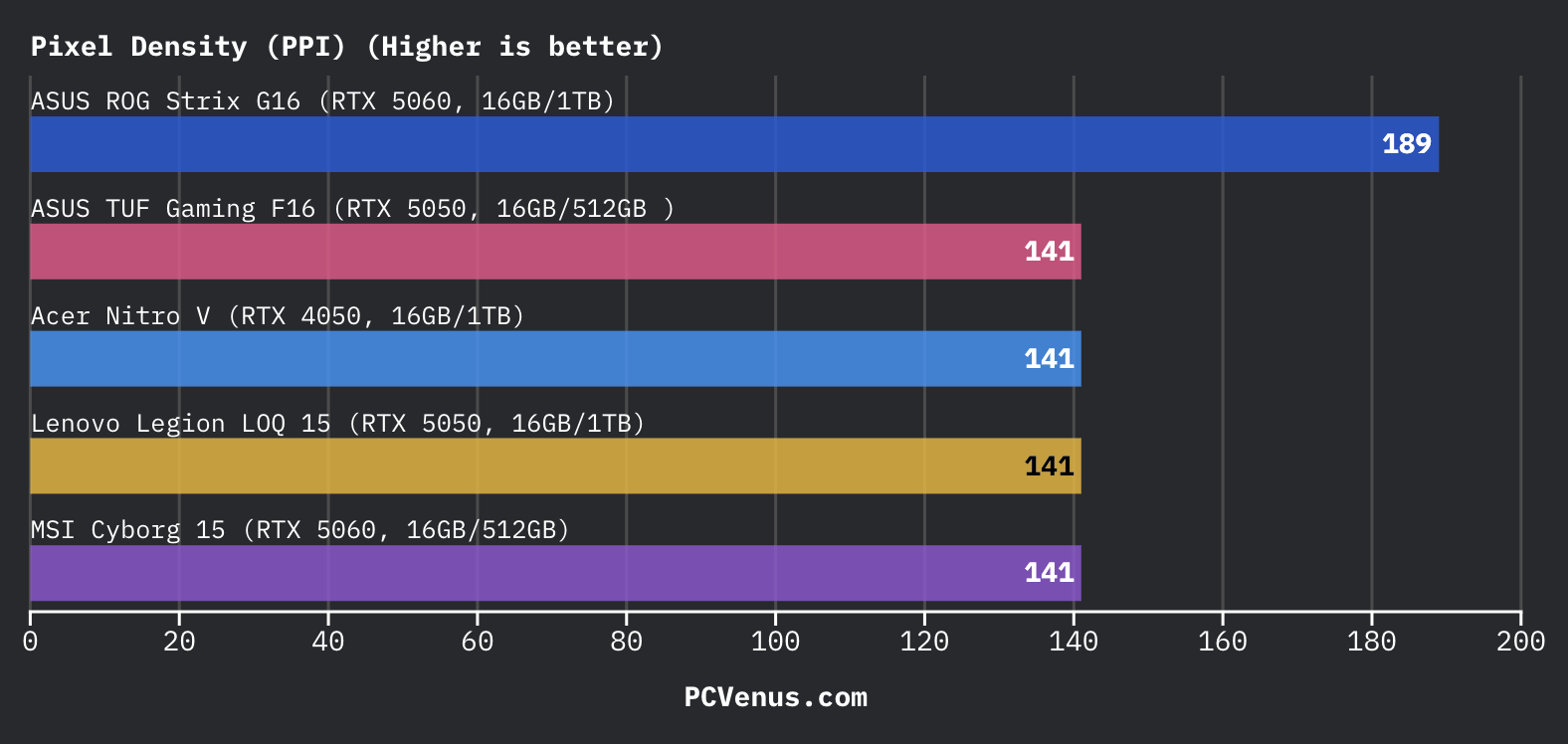
| PPI | 142 ppi |
| Pantone Validated | No |
| Response Time | 3ms |
| Touch Input | No |
| Coating | Matte |
| Maximum Brightness | 300 nits |
| Contrast | 1200:1 |
| sRGB Color Gamut | 100% |
| Sync Technology | G-Sync |
| Ambient Light Sensor | No |
Battery
| Capacity | 90 Wh |
| Full Charge Time | 30 minutes |
| Battery Type | Li-Ion |
| Removable | No |
| Fast Charging | Yes |
| USB Power Delivery | Yes, 100W |
| Charging Connector Location | Left |
| Charging Power | 280W |
| Output | 20V / 14A |
| Charger Weight | 2.09 lb (0.95 kg) |
Frame
| Weight | 4.85 lb (2.2 kg) |
| Dimensions | 354 × 269 × 17.9–27.3 mm |
| Dimensions (Inches) | 13.94 × 10.59 × 0.7–1.07 inches |
| Area | 952 cm² |
| Screen-to-Body Ratio | ~77.9% |
| Side Frames | 4.7 mm |
| Material | Top: Aluminum Middle: Plastic Bottom: Plastic |
| Colors | Jaeger Gray / Black |
| Transformer | No |
| Screen Opening Angle | 180° |
Thermal Management
| Cooling Type | Active Cooling |
| Liquid Metal | No |
| Evaporation Chamber | No |
| Number of Coolers | 2 Fans |
| Noise Level | 48–52 dB |
Sound
| Audio Chip | Not Mentioned |
| Audio Format | Hi-Res Audio |
| Speaker Power | 2 × 2W |
| Dolby Atmos | Yes |
| Max Volume | Not Mentioned |
| Microphones | 2 |
| Noise-Canceling Technology | AI Noise Canceling |
| Audio Recording | Supported |
Communications
| Wi-Fi Version | v6E |
| Bluetooth | v5.3 |
| Fingerprint Scanner | No |
| Optical Drive | No |
| Webcam Position | Above the Display |
| Webcam Resolution | 1920 × 1080 |
IO and Ports
| USB-A | 3 × USB 3.2 |
| USB Type-C | 2 × USB 3.2 |
| Thunderbolt | Thunderbolt 4 |
| HDMI | 1 × HDMI 2.1 |
| DisplayPort | No |
| VGA | No |
| Audio Port (3.5mm) | Yes |
| Ethernet (RJ45) | Yes |
| SD Card Reader | No |
| Separate Charging Port | Yes |
Keyboard and Touchpad
| Key Type | Island Style |
| Numeric Block | Yes |
| Backlight | Yes |
| Key Travel | 1.7 mm |
| Keyboard Type | RGB Gaming Keyboard |
| Keyboard Layout | QWERTY |
| Touchpad Size | 128.9 × 76 mm |
| Surface | Plastic |
| Windows Precision | Yes |
Benchmarks
CPU Performance
| Geekbench 6 (Single-Core) | 2,417 |
| Geekbench 6 (Multi-Core) | 12,684 |
| Cinebench R23 (Single-Core) | 1,760 |
| Cinebench R23 (Multi-Core) | 15,480 |
| PCMark 10 | 7,600 |
GPU Performance
| 3DMark Time Spy | 9,680 |
| 3DMark Fire Strike / Extreme | 16,610 |
| 3DMark Night Raid | 19,000 |
| Blender GPU Render | 430 samples/min |
| GPU Compute (Geekbench OpenCL/CUDA) | 2,000 |
Storage Performance
| CrystalDiskMark (Seq. Read) | 5,500 MB/s |
| CrystalDiskMark (Seq. Write) | 4,500 MB/s |
Real-World Tasks
| Adobe Premiere Pro 4K Export | 8.5–11 minutes |
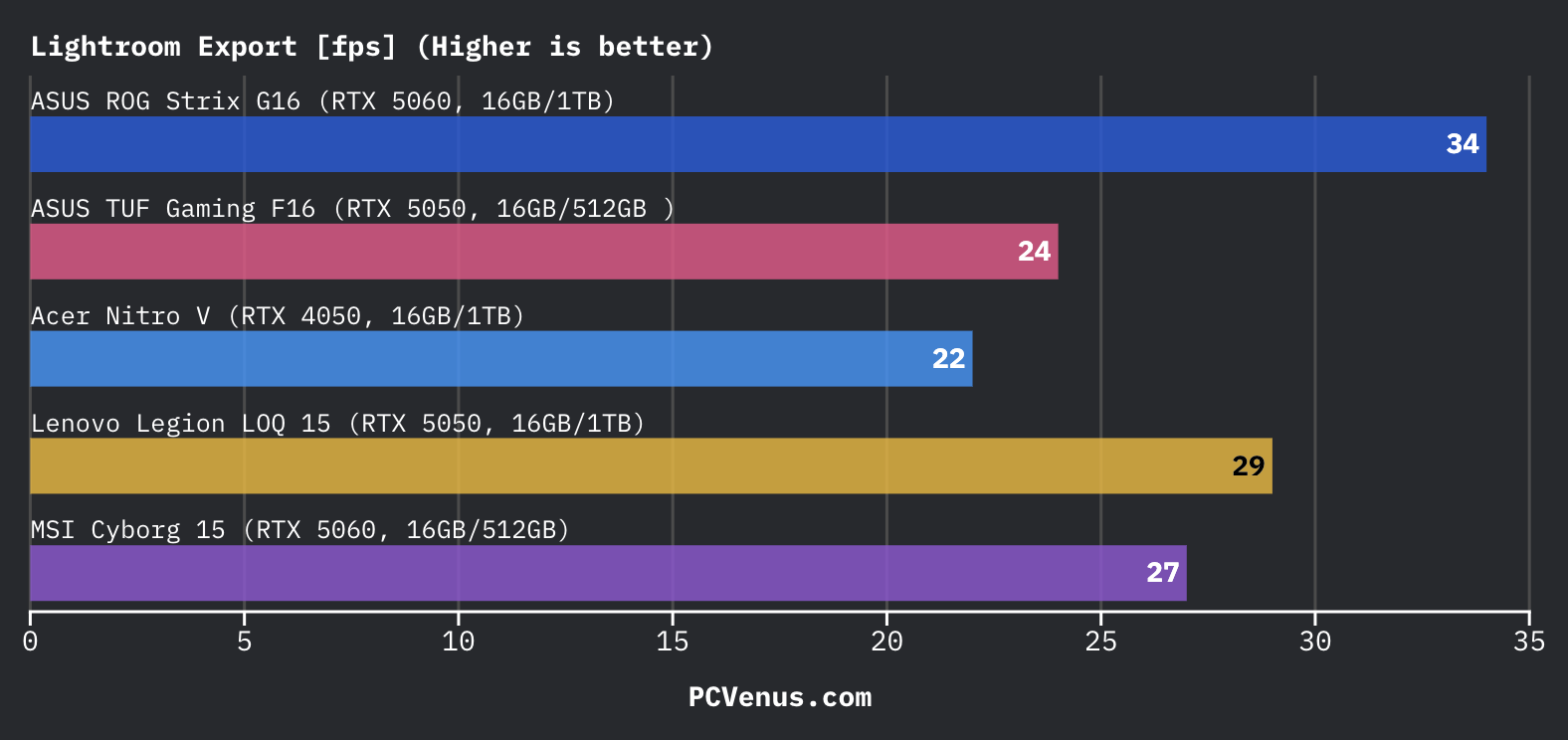
| Lightroom Classic (500 RAW Export) | 24 minutes |
| Photoshop Export | 58 seconds |
| Large Code Compilation | 125 seconds |
| Blender Classroom Render | 260 seconds |
AI Performance
| AI via GPU | 141 TOPS |
| ML Image Recognition | Good Mid-Range AI Performance |
| RTX AI Acceleration | Supported |
Thermals
| Avg Load Temp | 82 °C |
| Peak Temp (Stress Test) | 96 °C |
| GPU Load Temp | 75 °C |
Battery Life
| Productivity / Web Browsing | 8.5 hours |
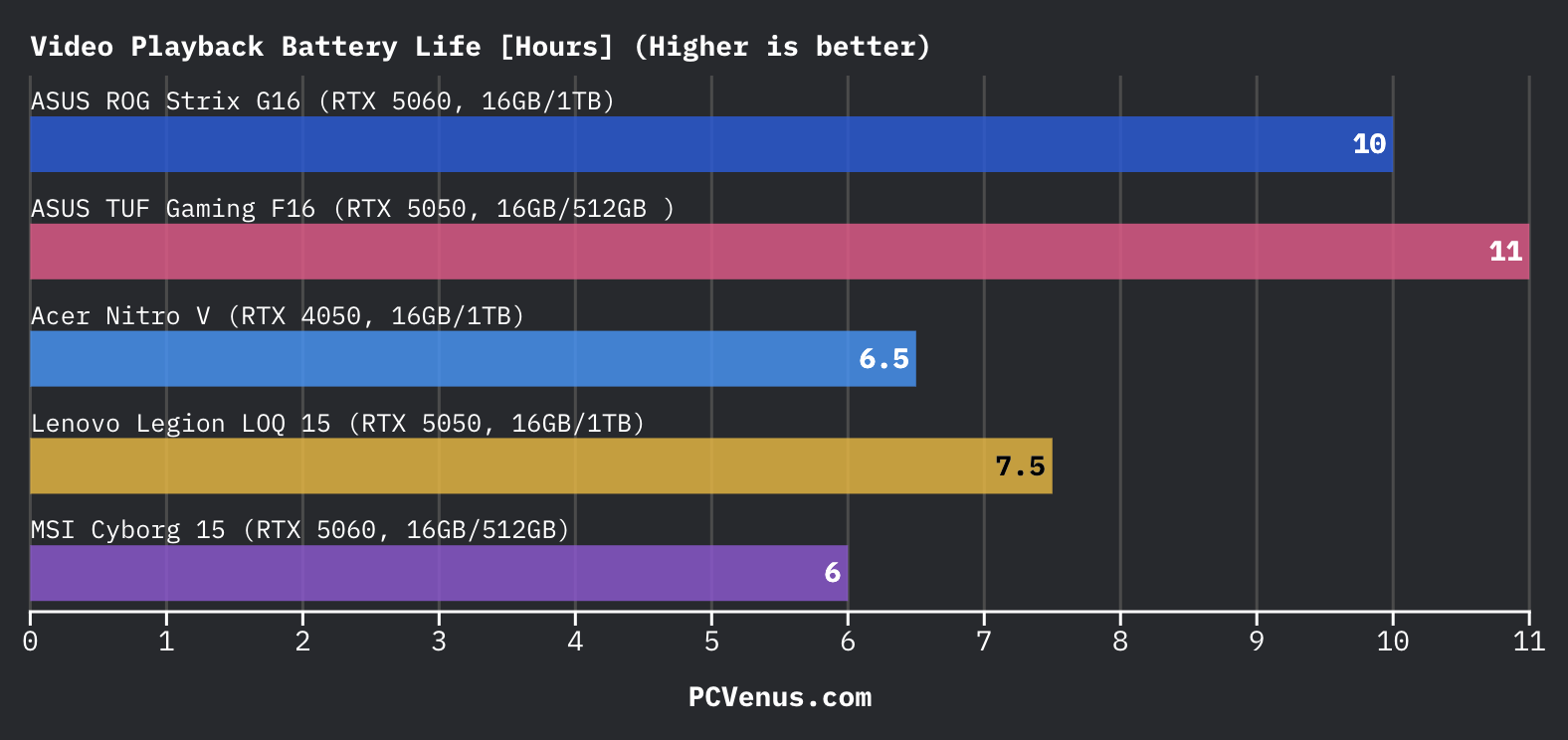
| Video Playback (1080p) | 11 hours |
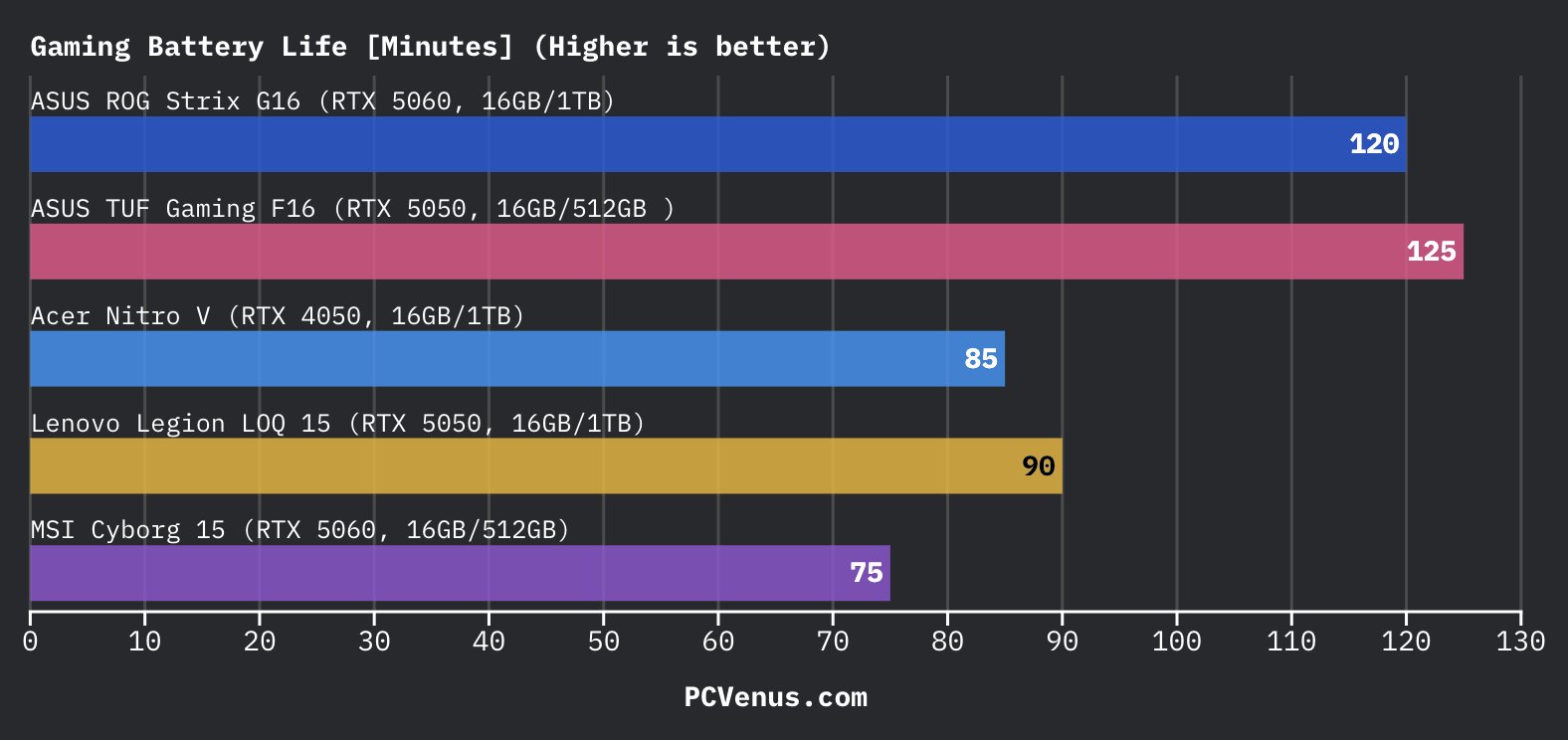
| Gaming (High Load) | 1.5–2 hours |
| Office / Light Tasks | 9 hours |
Quick Verdict
The ASUS TUF Gaming F16 performs better than most RTX 5050 laptops because ASUS lets the GPU run at a full 115W power limit. During testing, that helped the laptop stay closer to weaker RTX 5060 systems in games like Cyberpunk 2077 and Far Cry 6 than we expected.
The chassis also feels sturdier than the Acer Nitro V 16S AI and MSI Cyborg 15, and gaming performance stays stable during longer sessions without major throttling.
The weaker areas are easy to notice too. The laptop feels heavier than newer Core Ultra and Ryzen AI rivals, Turbo mode gets loud, and the 512GB SSD fills up quickly after installing a few AAA games.
Still, for around $1000, the TUF Gaming F16 delivers strong and consistent 1080p gaming performance without feeling overly cheap or underpowered.
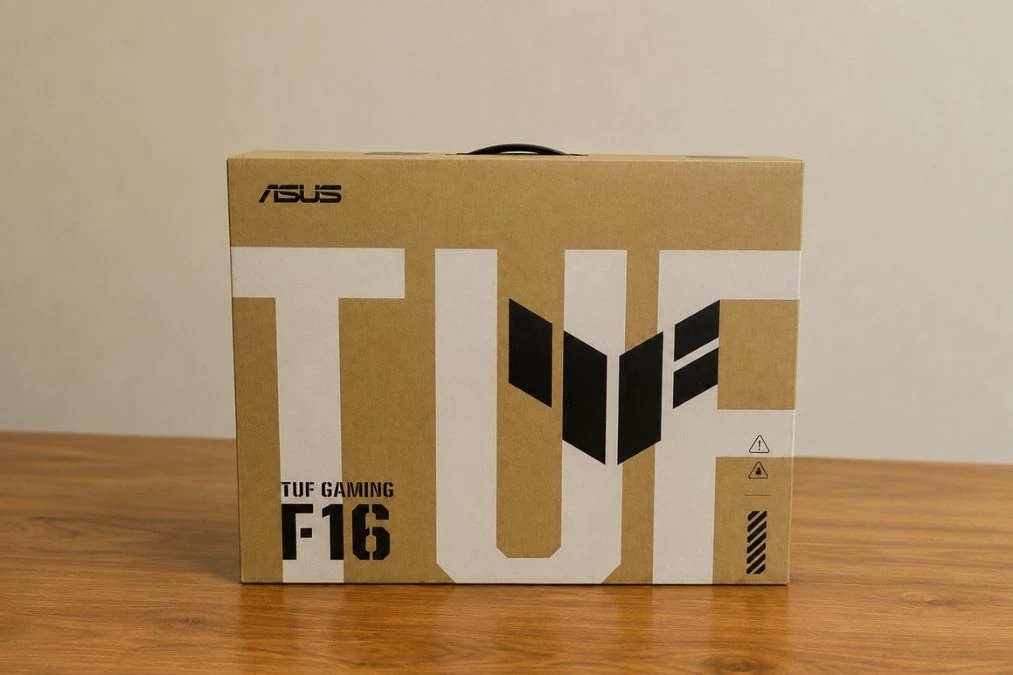
How We Tested the ASUS TUF Gaming F16
We tested the ASUS TUF Gaming F16 with real games, synthetic benchmarks, battery tests, creator workloads, and long gaming sessions over several days. Games like Cyberpunk 2077, Red Dead Redemption 2, CS2, Valorant, and Far Cry 6 were tested at 1080p using different graphics settings.
We also compared the laptop side-by-side with systems like the Lenovo LOQ 15, Acer Nitro V, MSI Cyborg 15, ASUS V16, Alienware 16 Aurora, and ROG Strix G16 to check gaming performance, thermals, display quality, battery life, and fan noise differences.
For full testing details, check our laptop testing methodology page.
Price and Configurations
| Store | Price (as of May 2026) |
|---|---|
| Amazon | $1,049.99 |
| ASUS Store | $1,299.99 |
| Walmart | $1,049.99 |
The ASUS TUF Gaming F16 becomes much more interesting at $1,049 because the RTX 5050 inside this laptop is not running at low power like many cheaper gaming systems. ASUS gives it a full 115W TGP, and that changes gaming performance a lot more than the GPU name suggests.
In our PCVenus Testing Lab, the TUF Gaming F16 stayed surprisingly close to RTX 5060 laptops like the Acer Nitro V 16S AI and MSI Cyborg 15 in several games. In Far Cry 6 and Cyberpunk 2077, the higher GPU wattage helped the TUF push stronger frame rates than some weaker RTX 5060 configurations. ASUS clearly focused more on sustained GPU performance instead of chasing specs on paper.
The tested model came with the Core i5-13450HX, 16GB DDR5 RAM, and a 512GB Gen4 SSD. Gaming performance feels strong for the price, but the storage situation becomes annoying quickly after installing modern AAA games. The Lenovo LOQ 15 with 1TB storage feels easier to live with long term.
At least ASUS makes upgrades simple. You get two RAM slots and dual SSD slots, so expanding storage later does not feel complicated at all.
Acer Nitro V 16S AI: Full Review and Test
Design and Build Quality
The ASUS TUF Gaming F16 feels tougher than the Acer Nitro V 16S AI in daily use thanks to the firmer hinge design and reduced keyboard flex. The chassis feels dense and solid while carrying it around, and the MIL-STD-focused construction inspires more confidence during regular movement. That added rigidity also makes it noticeably heavier inside a backpack compared to the Nitro V 16S AI.
The aluminum lid and matte finish feel more refined than the MSI Katana 15, which still has a more plastic-heavy feel around the palm rest area. Fingerprint resistance is better than older TUF models as well, although the dark finish still picks up light smudges under brighter lighting. The biggest drawback remains the overall size and weight.
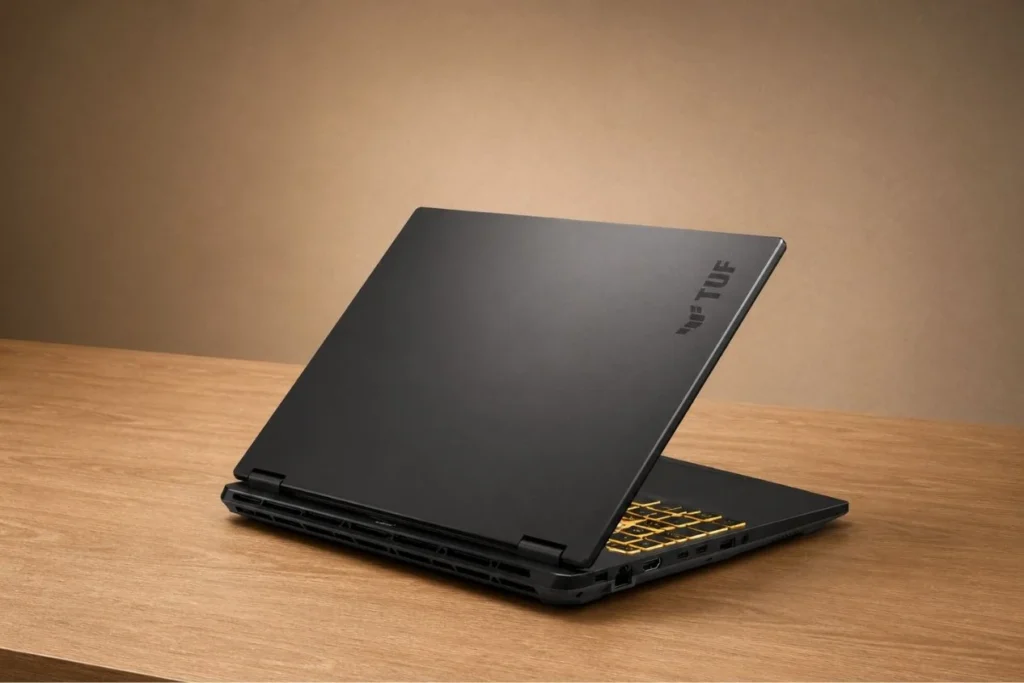
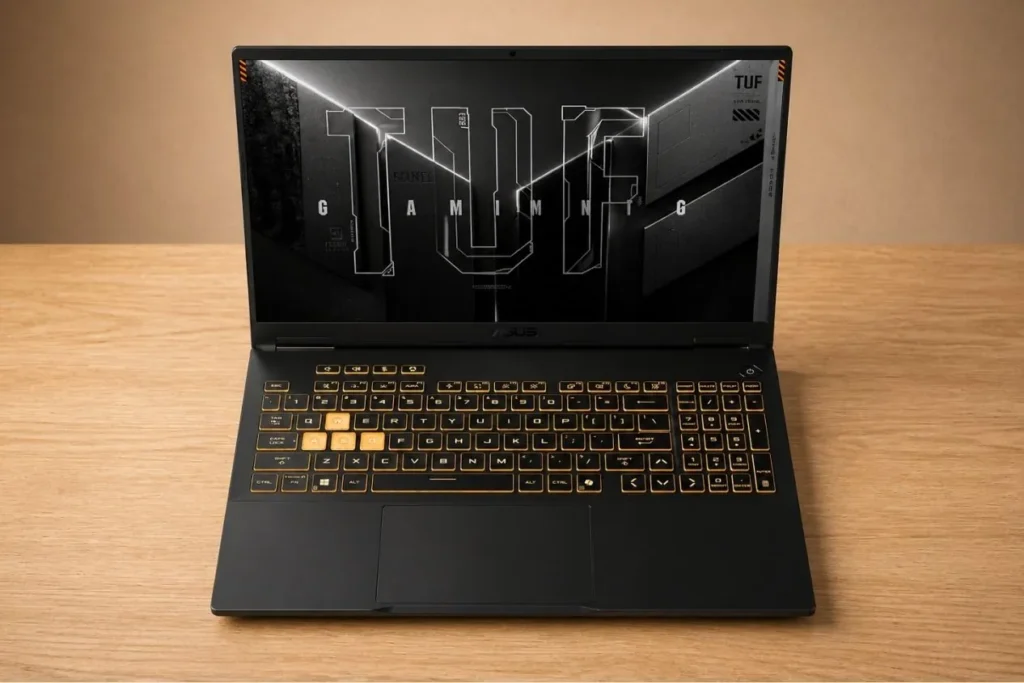
Unlike the ASUS ROG Strix series, the TUF Gaming F16 looks more understated on a work desk while still keeping RGB lighting and aggressive rear vent styling. Compared to the Lenovo LOQ 15, the TUF feels sturdier and more premium, but it is not the most convenient 16-inch gaming laptop to carry every day.
CPU Performance
The Intel Core i5-13450HX inside the ASUS TUF Gaming F16 performs better than the “Core i5” branding might suggest. The laptop handled gaming, Chrome tabs, Discord, Photoshop, and background installs without feeling slow or overloaded.
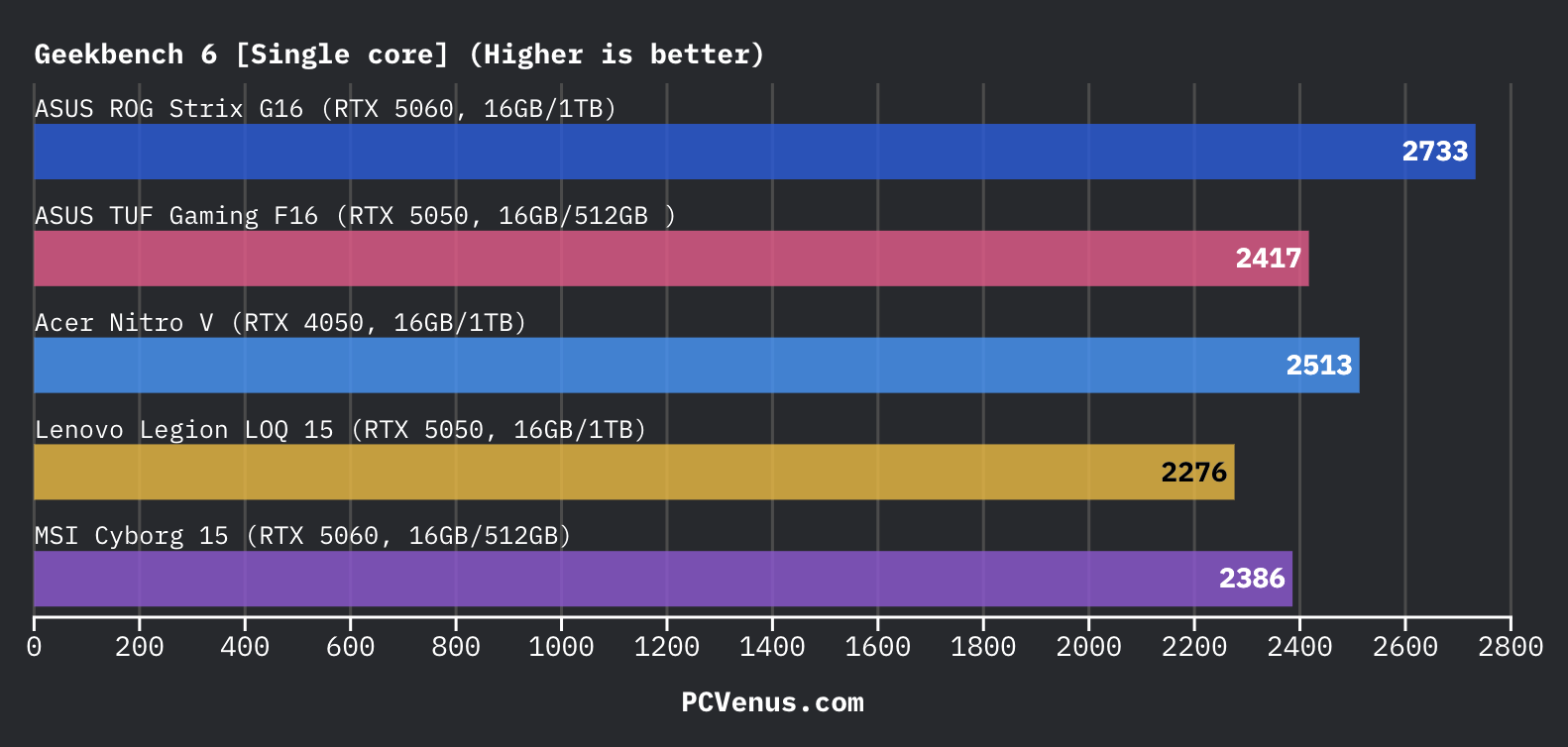
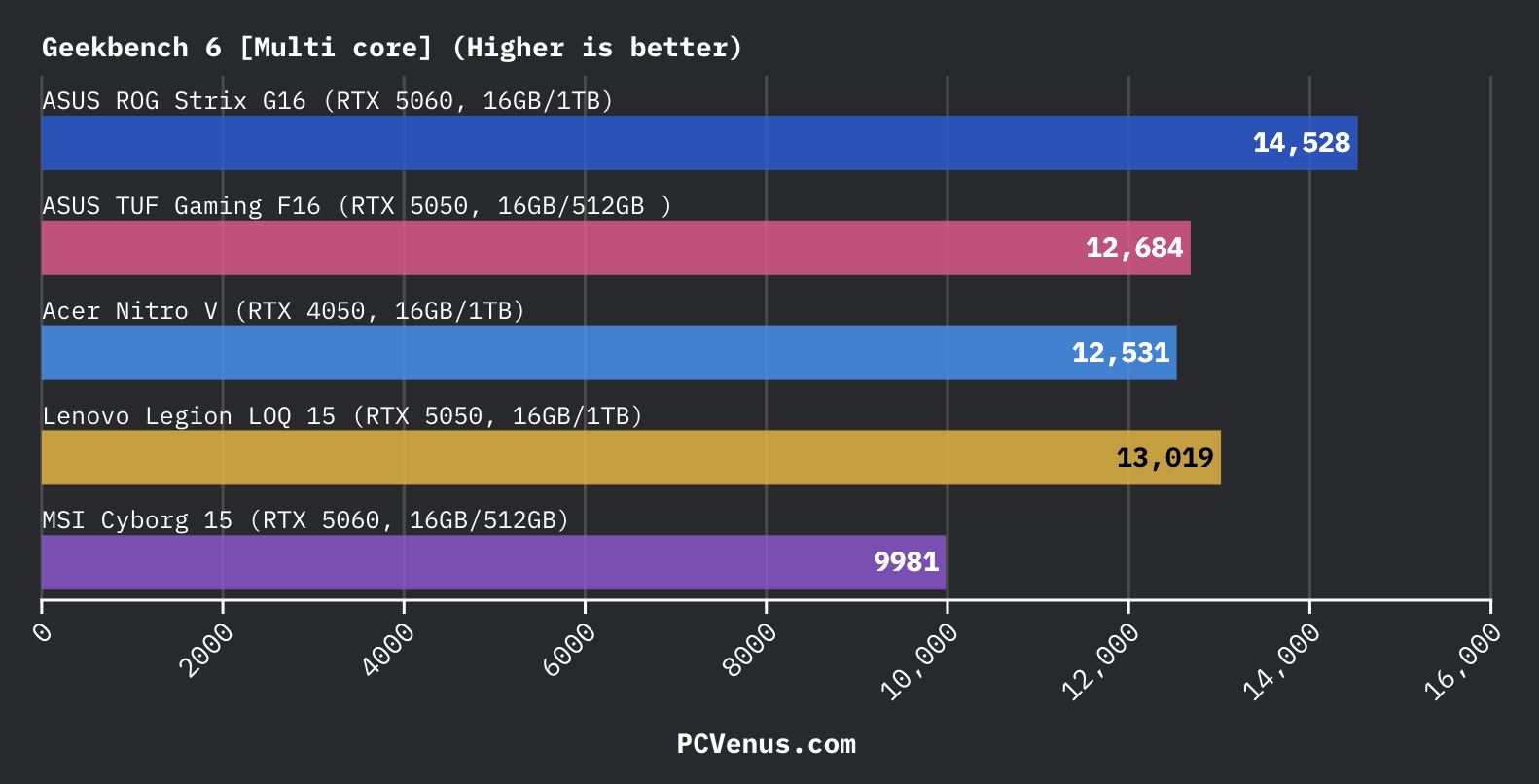
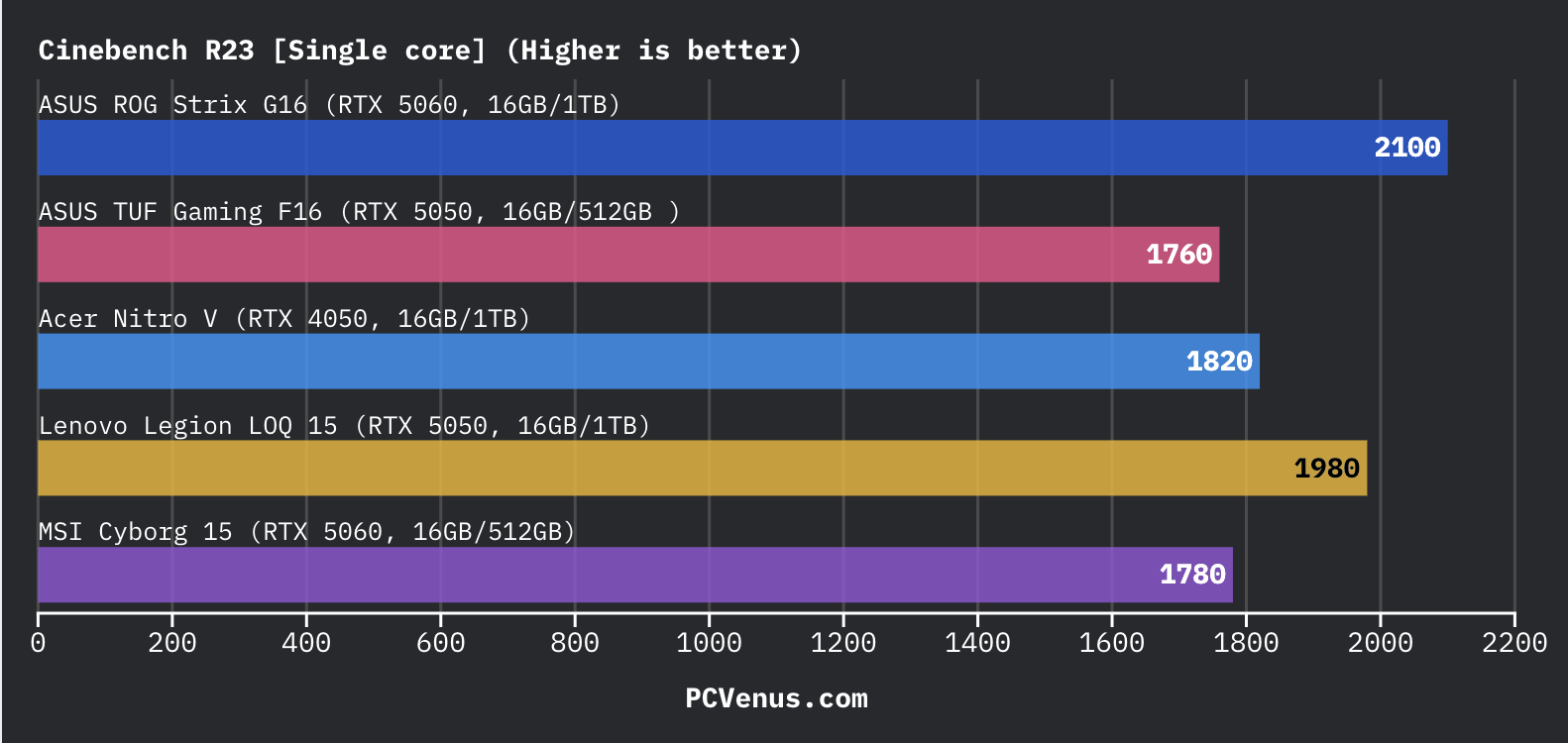
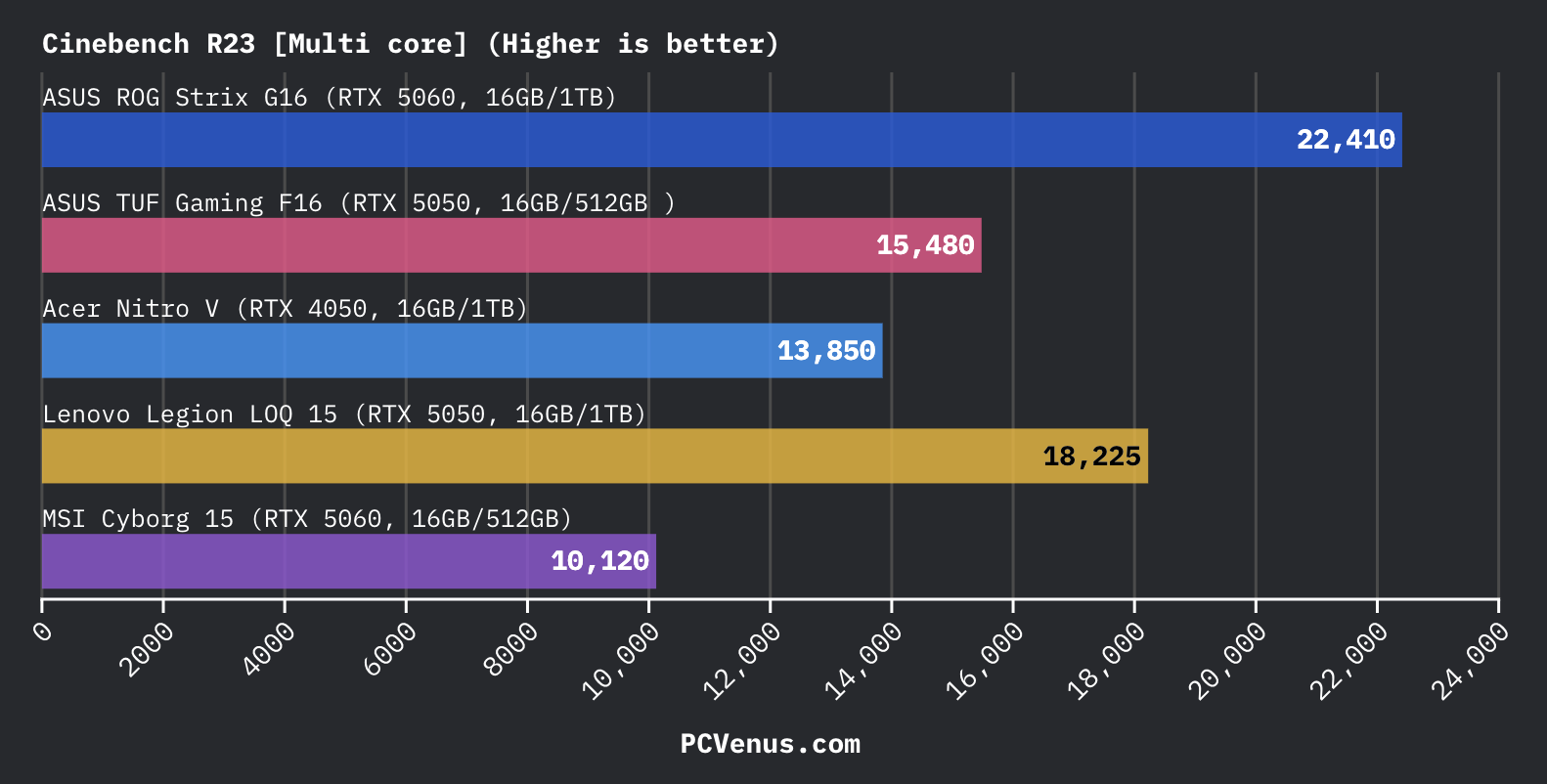
In Geekbench 6, the processor scored around 2,417 in single-core and 12,684 in multi-core performance. Cinebench R23 scores landed near 1,760 single-core and 15,480 multi-core. That puts it comfortably ahead of laptops like the Lenovo LOQ 15 and MSI Cyborg 15 in everyday responsiveness, although higher-end systems like the ROG Strix G16 still pull noticeably ahead in heavier CPU workloads.
For gaming, the CPU never felt like a bottleneck. Competitive games stayed smooth even with apps running in the background, and modern AAA titles maintained stable frame pacing during longer sessions.
The limitation shows up more in creator-heavy workloads. Newer Core Ultra and Ryzen AI chips are noticeably more efficient and faster in heavier rendering, AI-assisted tasks, and long exports. So while the i5-13450HX is still very capable for gaming in 2026, it no longer feels as modern or power-efficient as the latest laptop CPUs in this price range.
GPU & Synthetic Performance
The RTX 5050 inside the ASUS TUF Gaming F16 performs noticeably better than most RTX 5050 laptops because ASUS allows the GPU to run at a full 115W power limit instead of aggressively limiting wattage for thinner designs.
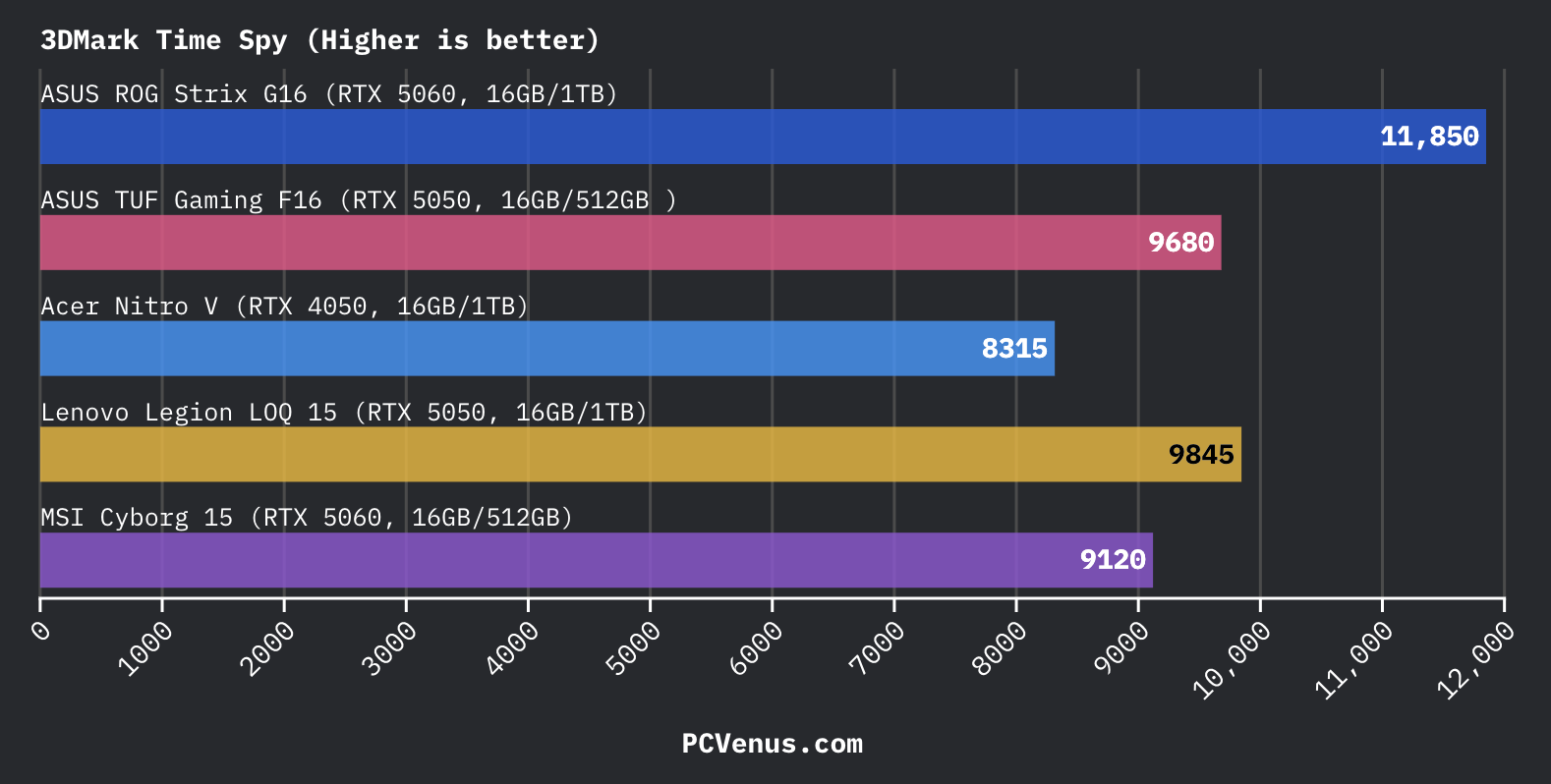
In 3DMark Time Spy, the laptop scored around 9,680 points, which put it surprisingly close to the Lenovo LOQ 15 and even some lower-power RTX 5060 systems during testing. The gap between this and the Acer Nitro V with RTX 4050 was also larger than expected.
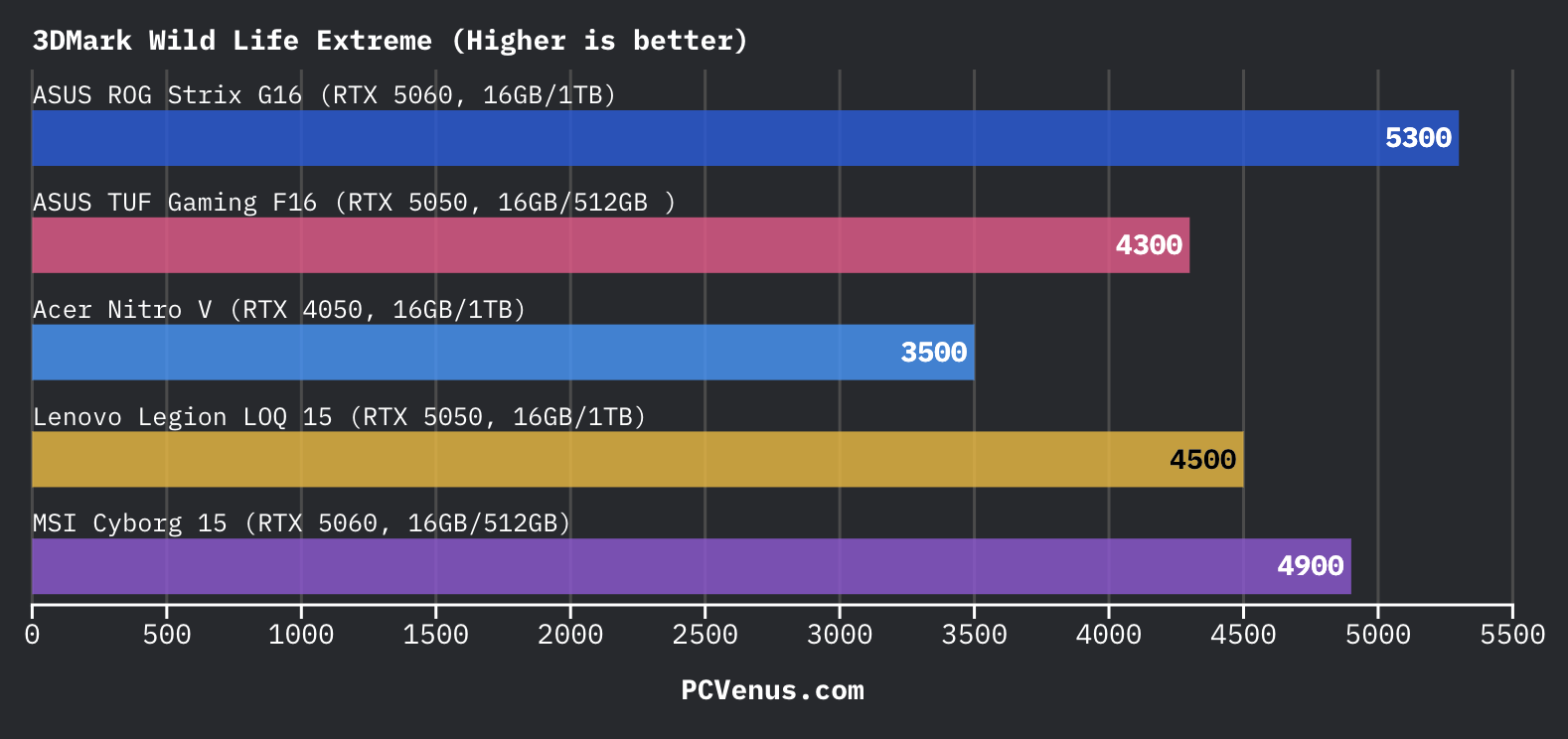
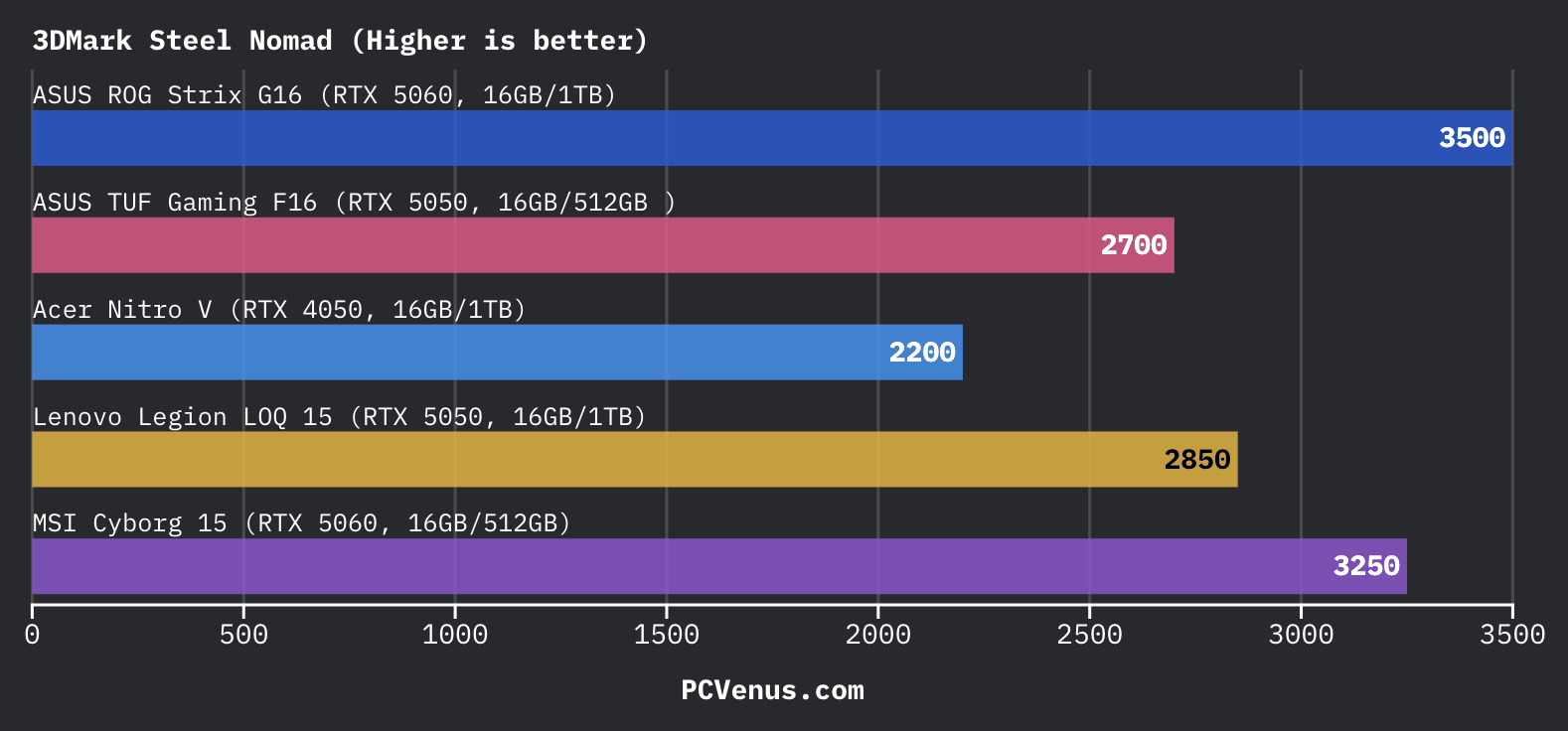
Wild Life Extreme scores landed around 4,300, while Steel Nomad reached roughly 2,700 points. The ROG Strix G16 still sits clearly ahead with its RTX 5060, but the TUF Gaming F16 consistently outperformed weaker RTX 5050 implementations and stayed competitive against some entry RTX 5060 laptops in synthetic workloads.
The biggest thing we noticed was stability. ASUS prioritizes sustained GPU performance here instead of chasing ultra-thin dimensions, so benchmark performance stayed consistent during repeated runs without heavy drops.
This is still an RTX 5050 laptop at the end of the day, though. Heavier ray tracing workloads and demanding native Ultra settings can push the GPU pretty hard in newer AAA games without DLSS enabled.
Storage Performance & System Responsiveness
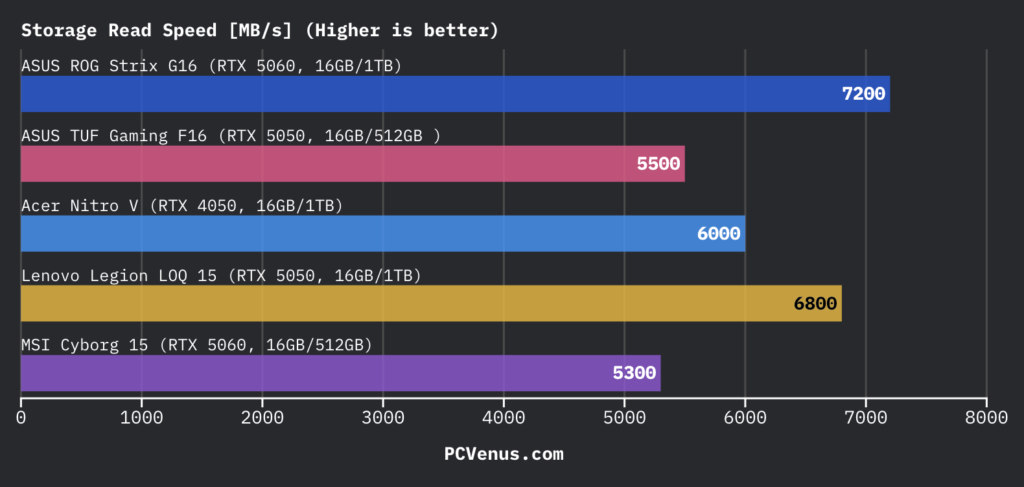
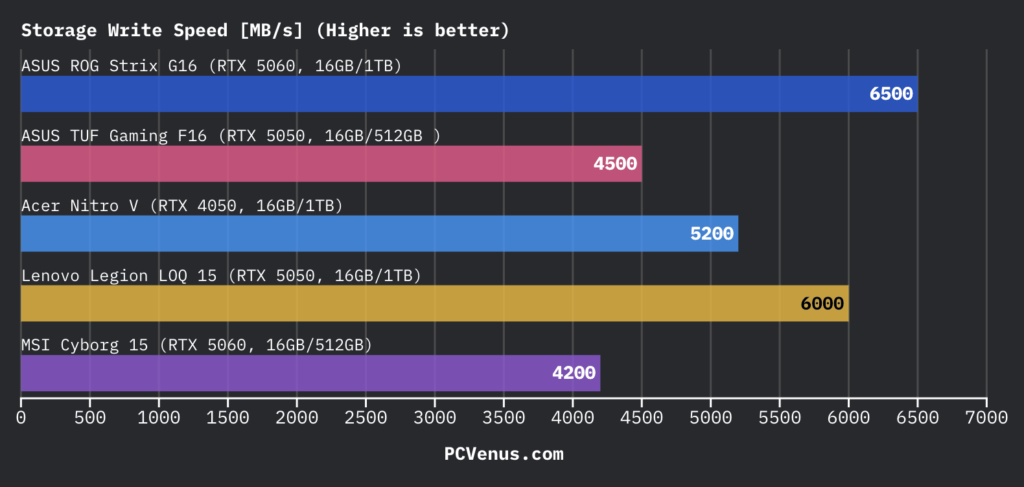
The ASUS TUF Gaming F16 feels responsive during normal use, but the 512GB SSD fills up quickly after installing a few modern AAA games and creative apps. In testing, the drive reached around 5,500 MB/s read and 4,500 MB/s write speeds, which is decent but slower than rivals like the Lenovo Legion LOQ 15 and ASUS ROG Strix G16.
That gap showed up during larger game installs, Steam unpacking, and video file transfers, where the Acer Nitro V and Legion LOQ 15 consistently finished faster. The TUF occasionally slowed down slightly during heavier background installs, especially while copying large media folders.
Actual game loading still felt smooth, and Windows 11 stayed responsive during everyday multitasking. The bigger limitation is the 512GB capacity itself, which already feels restrictive for a gaming laptop in 2026. Thankfully, ASUS includes a second M.2 slot for easy storage upgrades later.
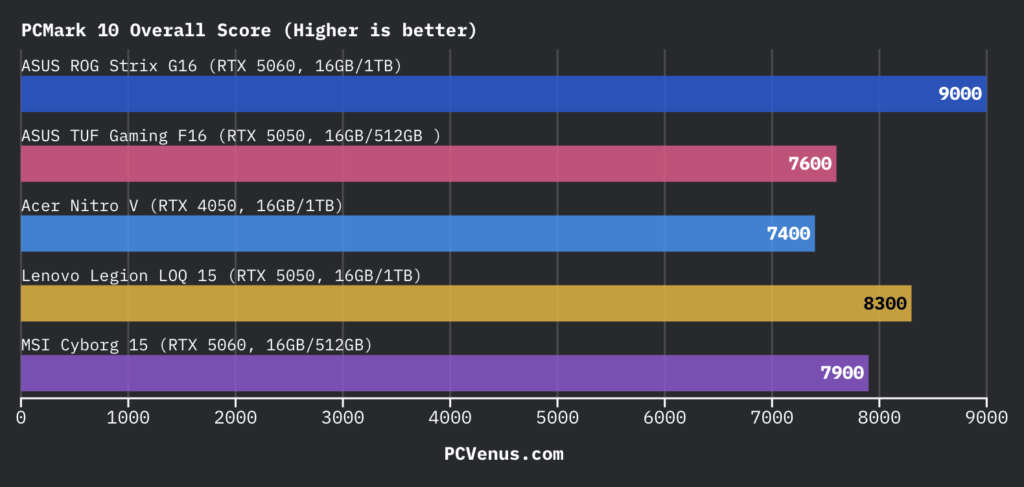
In PCMark 10, the ASUS TUF Gaming F16 scored around 7,600 points, placing it slightly ahead of the Acer Nitro V but behind systems like the Lenovo Legion LOQ 15 and ROG Strix G16. Everyday responsiveness still felt good during multitasking, browser use, and light creative workloads, although the slower SSD and 512GB capacity occasionally held it back during heavier installs and larger file transfers.
Armoury Crate and Software Experience
Armoury Crate makes the ASUS TUF Gaming F16 easy to manage daily. Changing fan profiles, RGB lighting, or performance modes only takes a few clicks, and the layout feels cleaner than Acer NitroSense on the Nitro V. Turbo mode pushed better gaming performance during our testing, but the fans became much louder compared to the Lenovo LOQ 15.
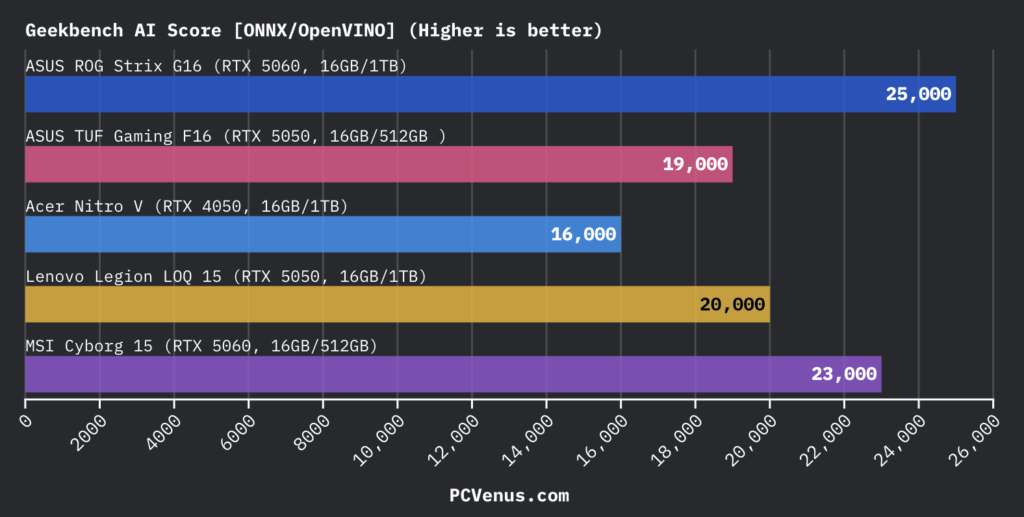
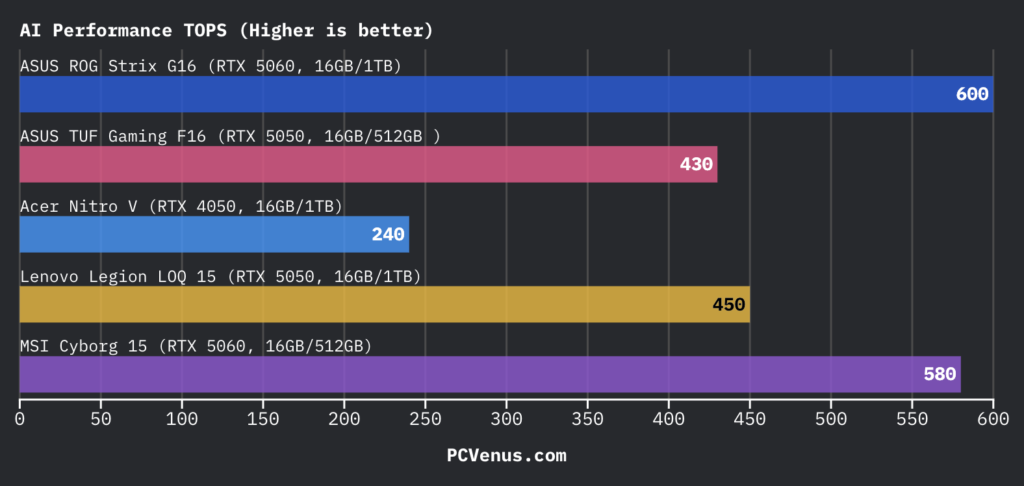
The downside is that Armoury Crate still runs quite heavy in the background sometimes, and ASUS preinstalls a few unnecessary apps that most people will probably uninstall immediately. AI performance was decent, but the ROG Strix G16 and MSI Cyborg 15 delivered stronger AI benchmark numbers overall.
The MUX switch and Advanced Optimus worked properly without random switching issues while gaming. We noticed smoother performance on dedicated GPU mode, especially in Cyberpunk 2077 and Forza Horizon 5.
Gaming Performance (Real-World FPS Results)
Gaming is where the TUF Gaming F16 starts making more sense. ASUS lets the RTX 5050 run at a full 115W, so performance stays closer to some entry RTX 5060 laptops instead of feeling like a heavily cut-down RTX 5050 system.
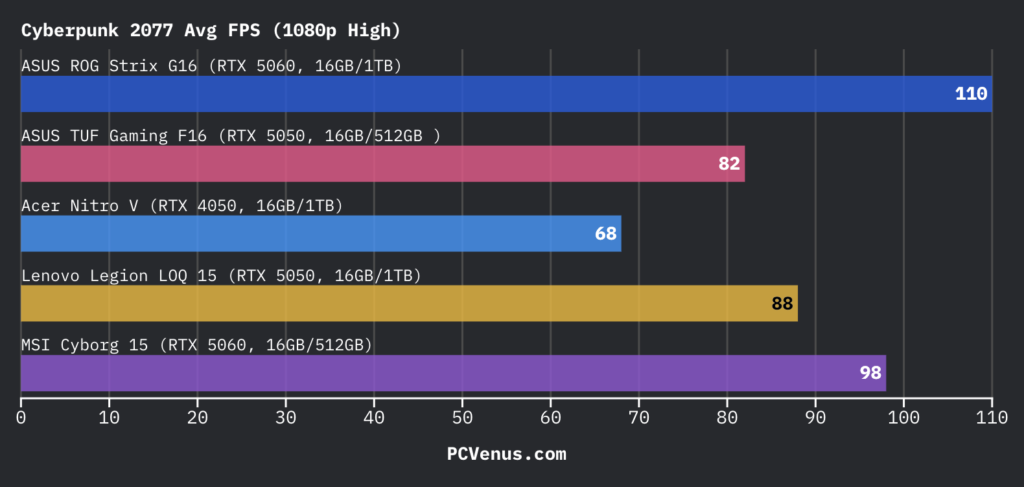
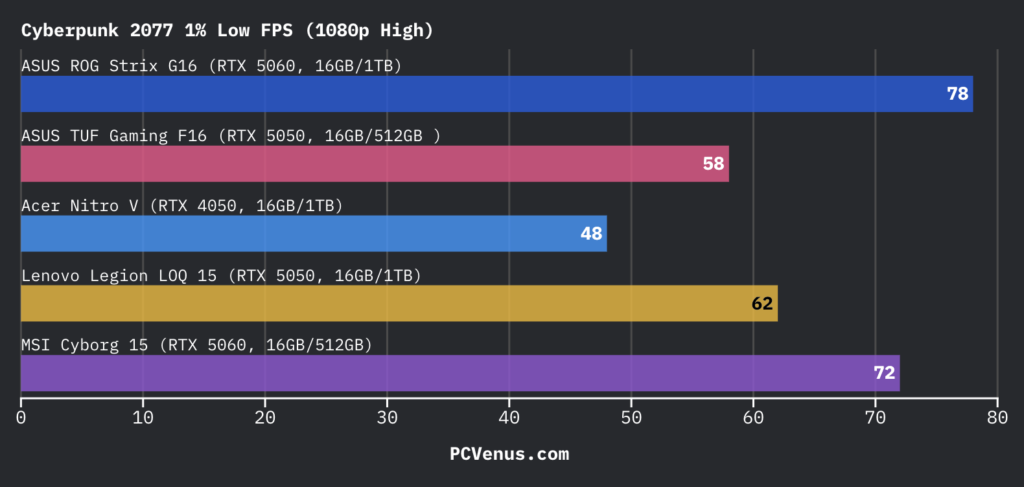
In Cyberpunk 2077 at 1080p High, the laptop averaged around 82 FPS with 1% lows near 58 FPS. Driving through heavier city areas still felt smooth most of the time, although enabling heavier ray tracing settings drops performance quickly without DLSS.
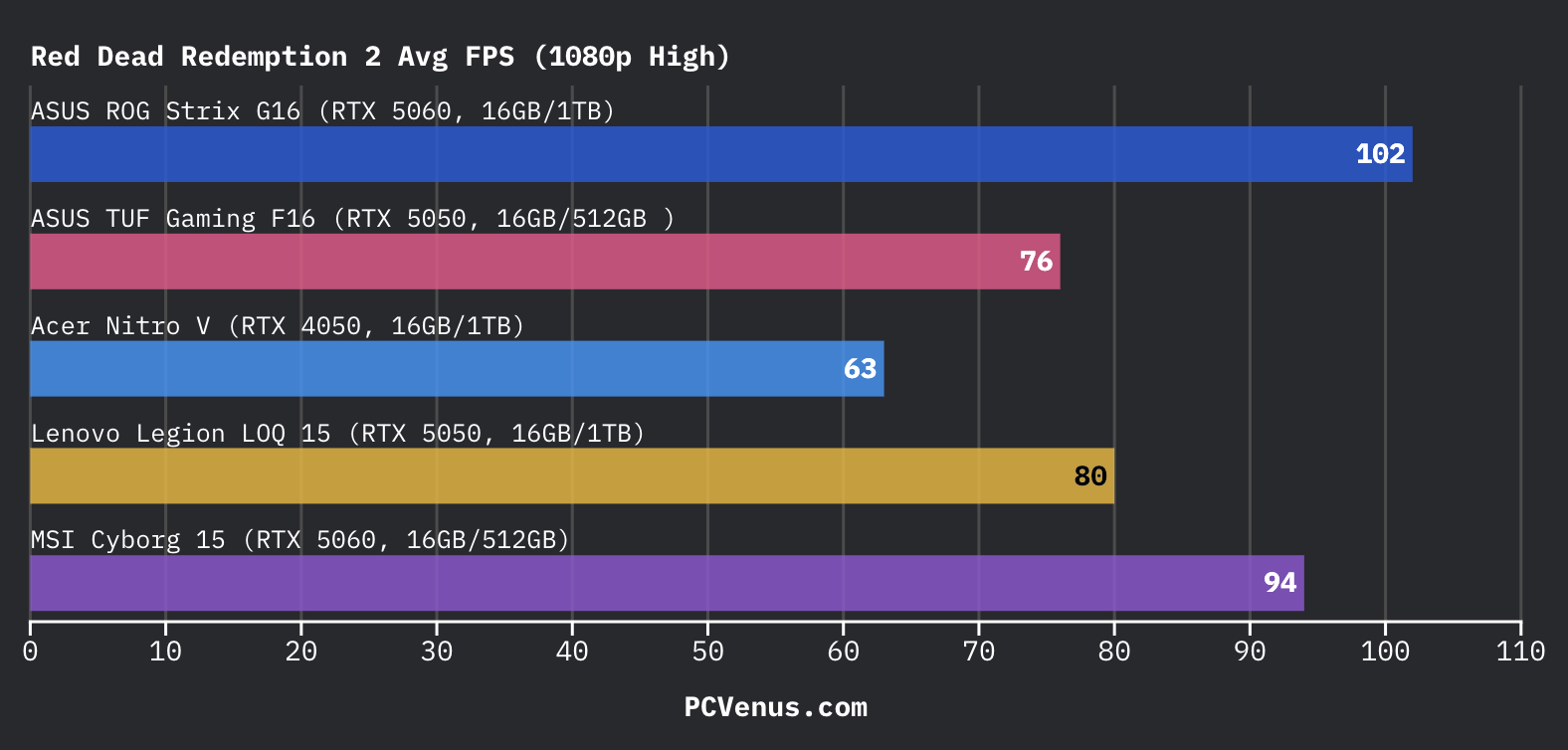
Red Dead Redemption 2 averaged around 76 FPS at 1080p High. That puts it ahead of the older Acer Nitro V RTX 4050, which stayed closer to 63 FPS, although the newer Ryzen-based Nitro V 16S AI still managed noticeably stronger overall frame pacing.
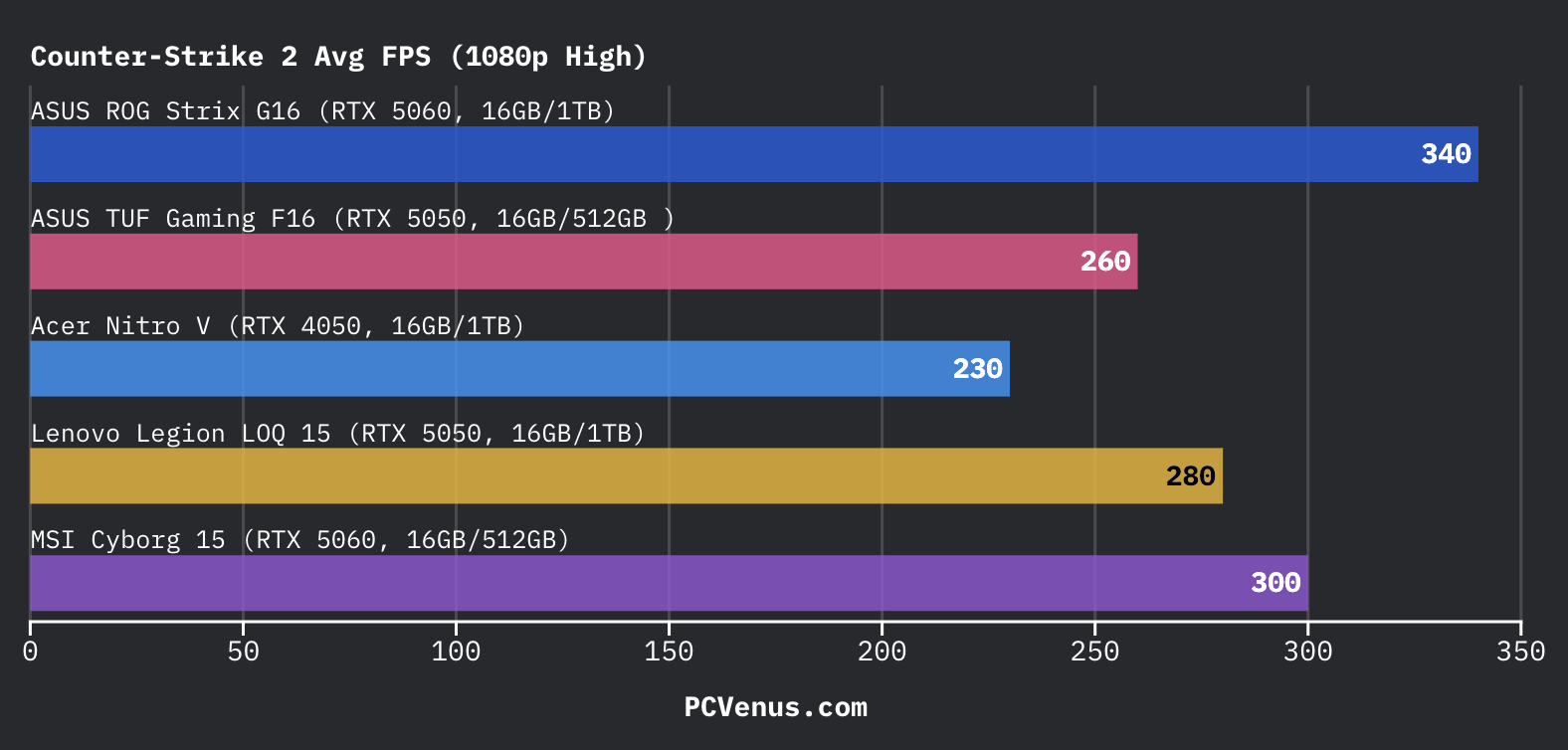
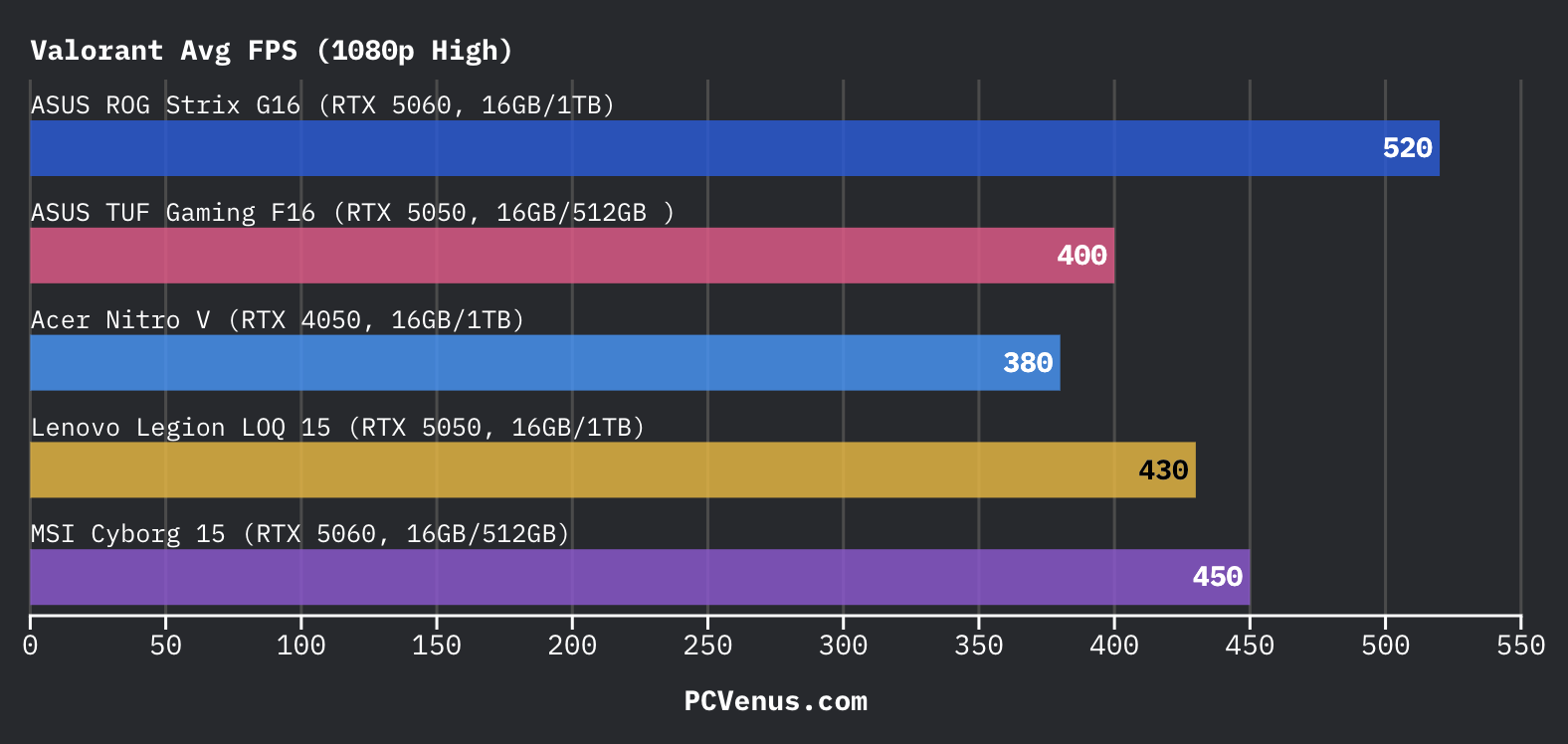
Competitive games run very well here. Counter-Strike 2 averaged around 260 FPS, while Valorant pushed close to 400 FPS during testing. The 165Hz panel finally feels fully utilized in esports games instead of sitting underused.
The interesting part is how close the laptop gets to more expensive systems in some titles. The Alienware 16 Aurora stayed behind in Cyberpunk despite using an RTX 5060, while the ASUS V16 and MSI Cyborg 15 still pulled ahead once GPU-heavy scenes started pushing higher wattage harder.
The ROG Strix G16 is still on another level entirely, especially once ray tracing and higher refresh gaming enter the picture, but that laptop also sits in a much more expensive class overall.
Productivity & Creator Performance
The TUF Gaming F16 handled normal editing work better than its specs initially suggest. Premiere Pro stayed responsive with multiple Chrome tabs, Spotify, Discord, and Photoshop running together, and the system never felt heavily overloaded during normal multitasking.
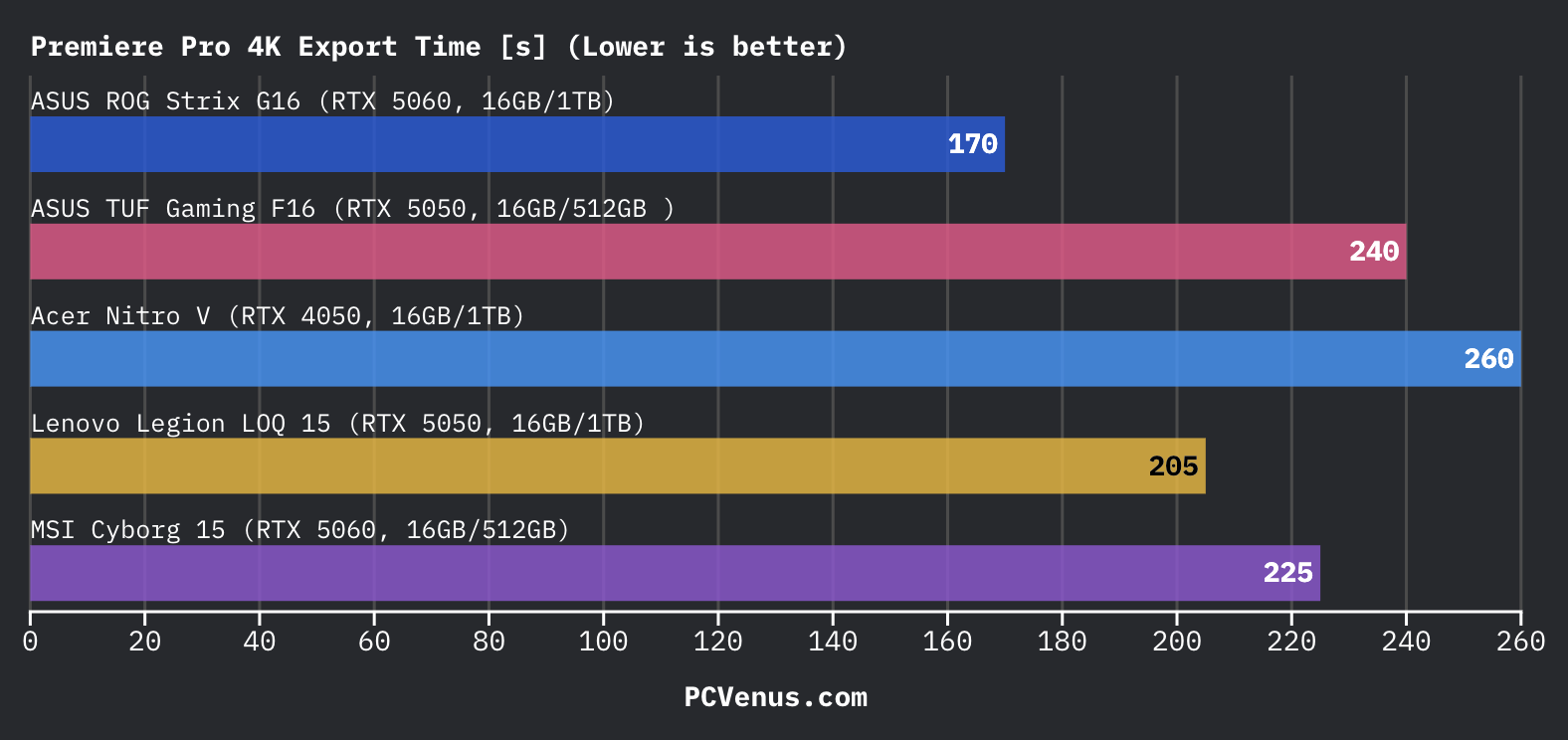
Our Premiere Pro export test used a 10-minute 4K H.264 timeline with layered clips, transitions, color correction, and Nvidia NVENC acceleration enabled. Exporting the project back to 4K H.264 took roughly 240 seconds during testing.
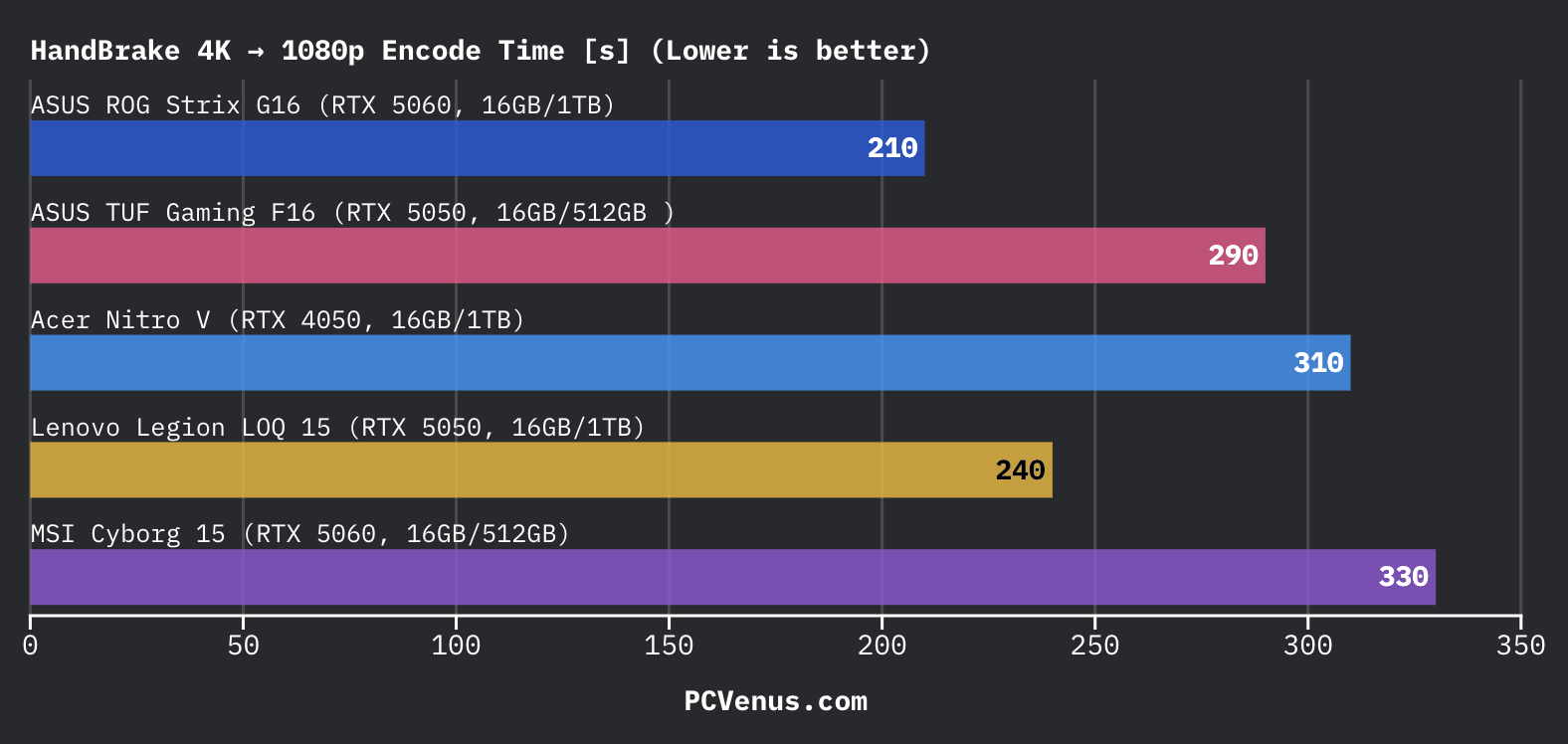
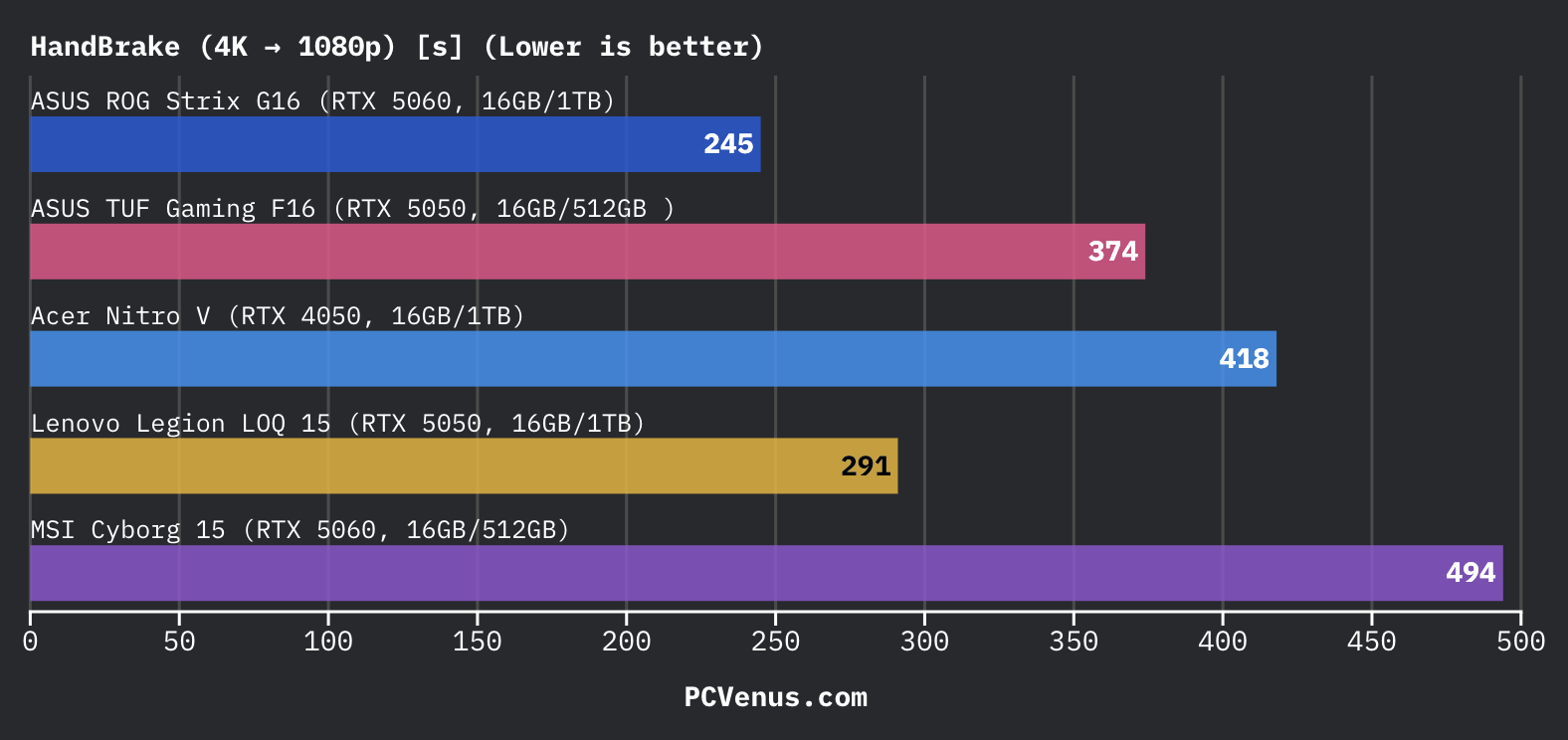
For HandBrake testing, we converted a larger 4K H.265 file down to 1080p using hardware acceleration. The encode finished in around 290 seconds, which actually stayed closer to the ASUS V16 than we expected.
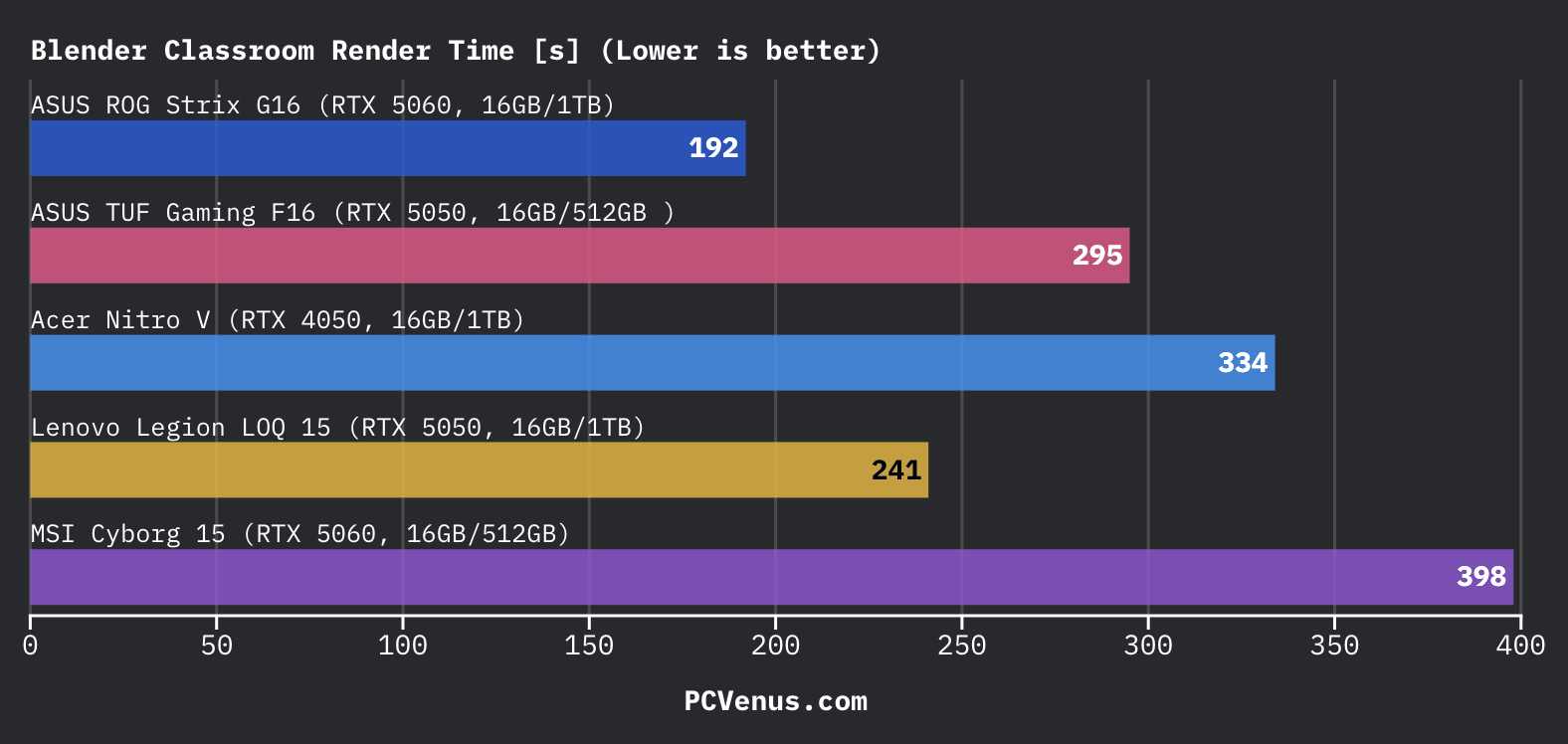
Blender rendering is where stronger RTX 5060 laptops start separating themselves more clearly. The Classroom render scene completed in around 295 seconds on the TUF Gaming F16, while systems like the Alienware 16 Aurora and ROG Strix G16 finished heavier renders noticeably faster.
For YouTube edits, thumbnails, reels, and student projects, the laptop feels completely usable. Longer 4K timelines, larger Blender scenes, and heavier creator workloads are where higher-end RTX 5060 systems start making more sense.
Battery Life & Real-World Endurance
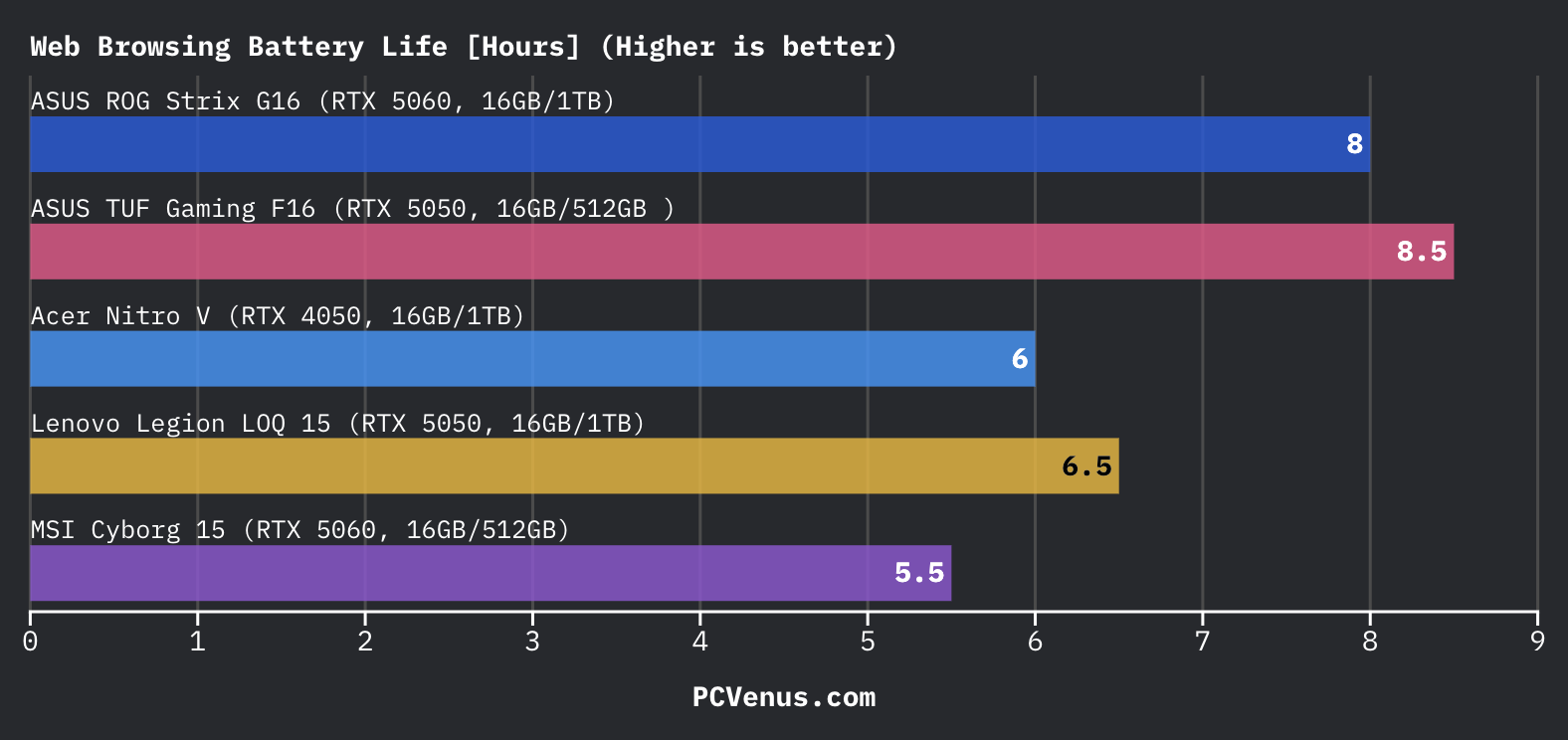
The TUF Gaming F16 lasted around 8.5 hours in web browsing and close to 11 hours for local video playback. That is better than the MSI Cyborg 15, Alienware 16 Aurora, and Acer Nitro V with RTX 4050, which all drained faster in normal daily use.
For classes, Chrome tabs, YouTube, Spotify, and office work, the laptop comfortably lasted through most of the day without needing the charger nearby all the time.
Gaming on battery still drops quickly, though. Most AAA games lasted around 2 hours or less before performance and battery levels became a problem, which is pretty normal for a gaming laptop running a 115W GPU.
This is still far behind ultrabooks and MacBooks. A MacBook Pro M5 can reach close to 18 hours of battery life, so the TUF Gaming F16 is clearly built more for balanced gaming and portability instead of maximum endurance.
AI Performance
The ASUS TUF Gaming F16 scored around 19,000 in Geekbench AI, which placed it slightly behind the Lenovo LOQ 15 and clearly behind RTX 5060 systems like the ROG Strix G16 and MSI Cyborg 15. AI TOPS performance also stayed lower at around 430 TOPS.
For normal AI-assisted workloads like Photoshop AI tools, Nvidia Broadcast, background blur, and RTX video enhancement, the laptop still felt smooth in daily use. The limitation mostly appears in heavier local AI workloads, where newer RTX 5060 laptops and Ryzen AI systems pull ahead more comfortably.
Thermals and Fan Noise
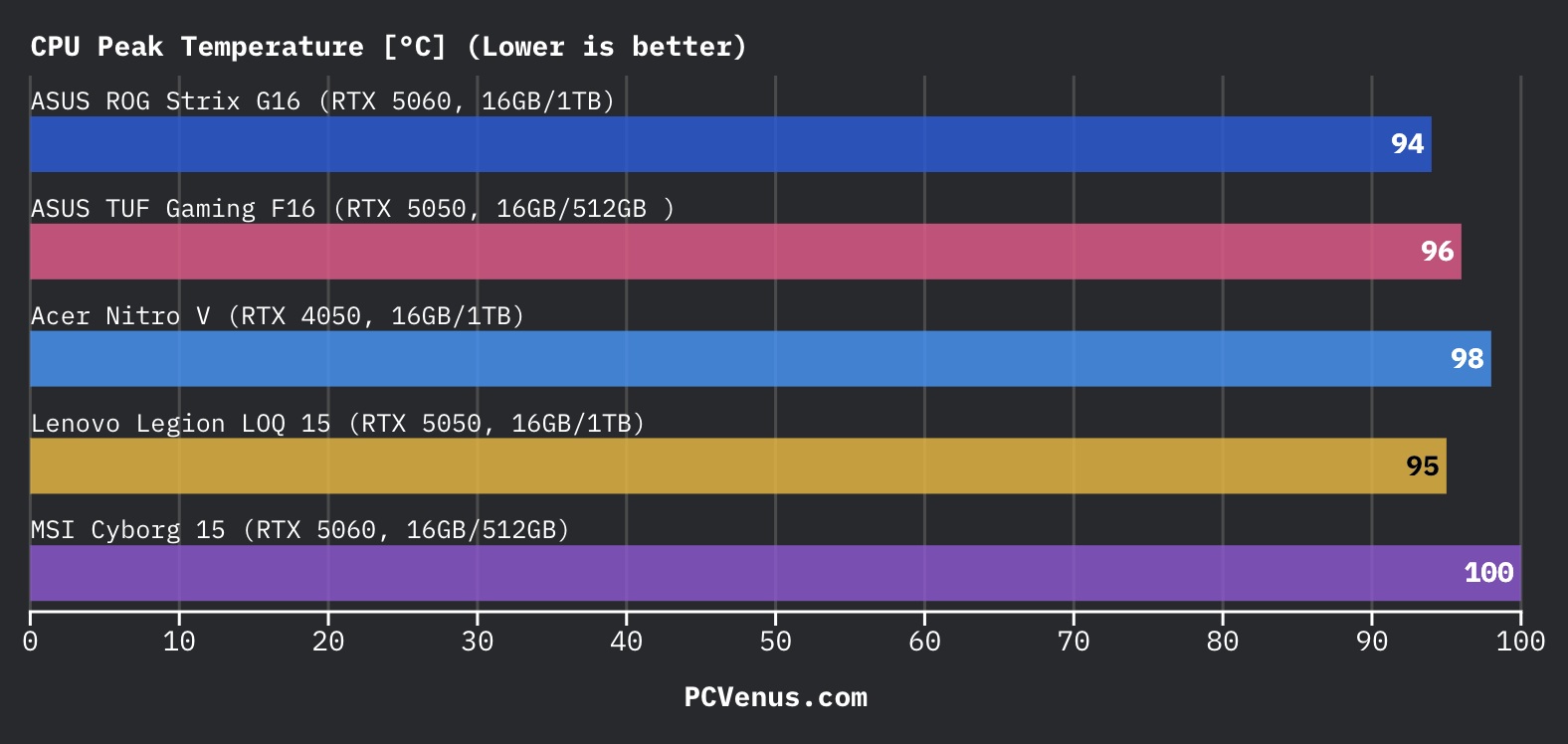
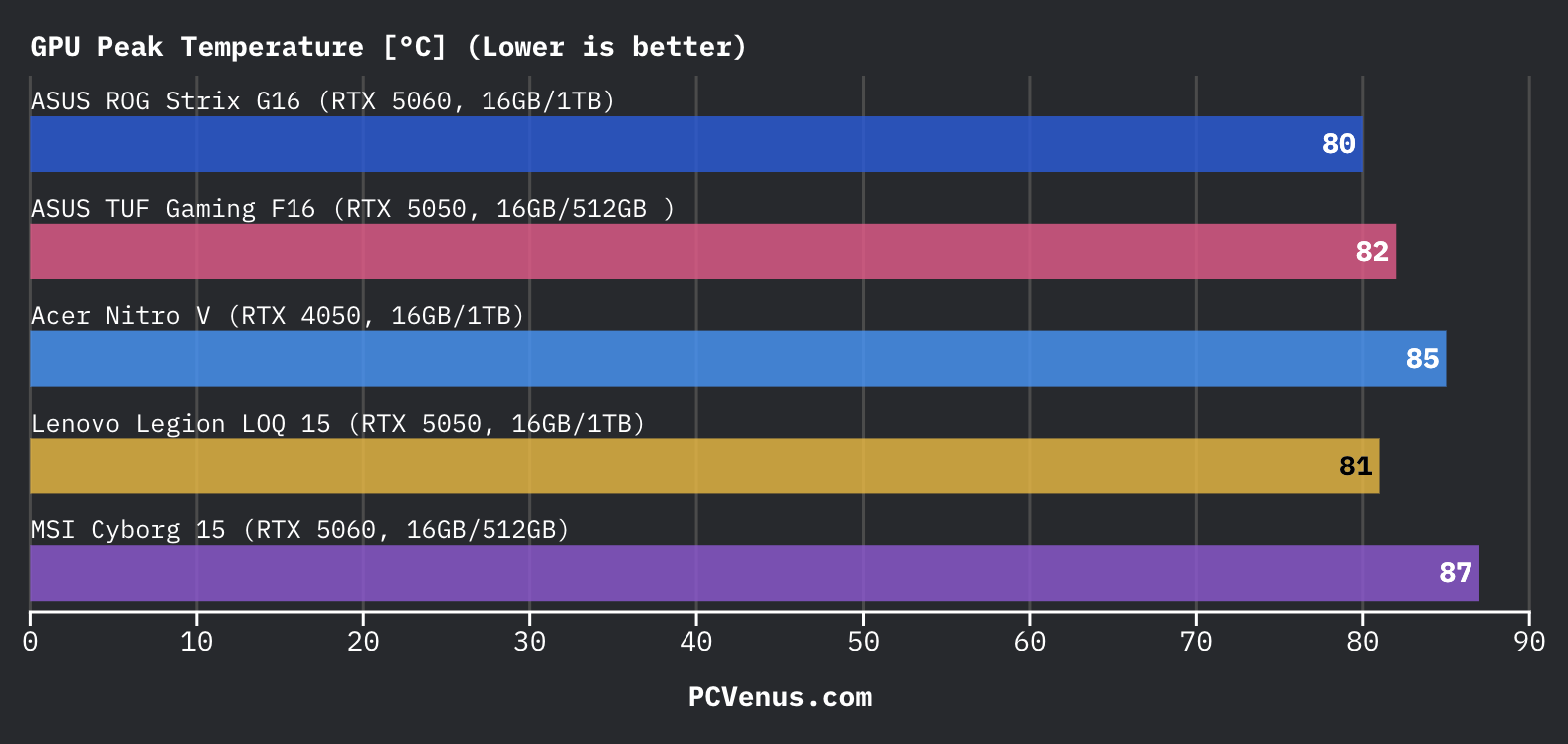
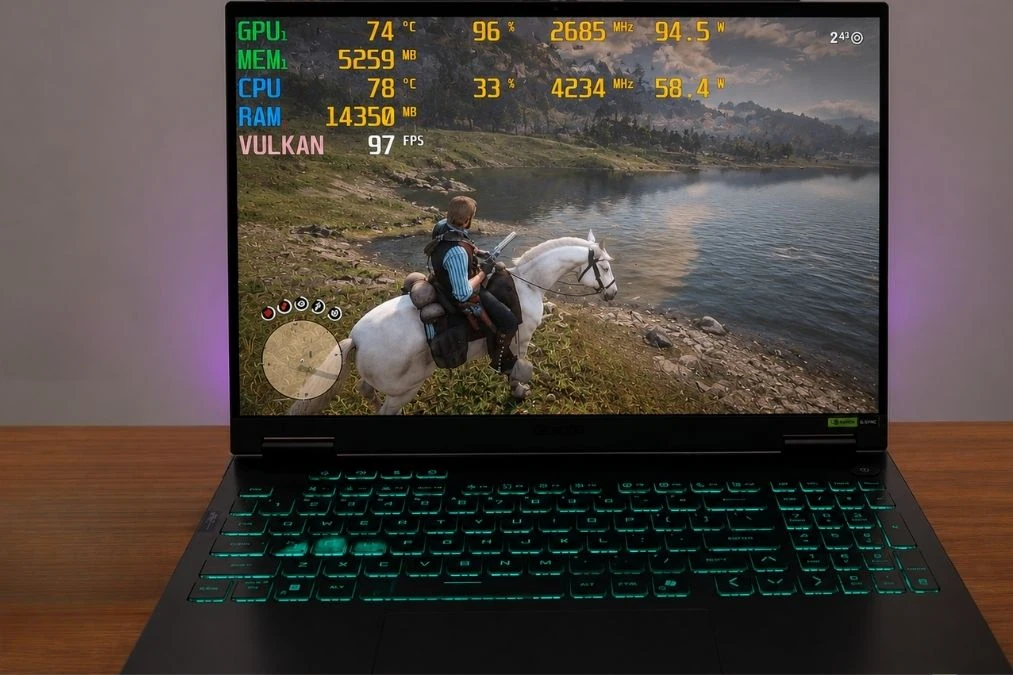
The ASUS TUF Gaming F16 gets fairly warm during longer gaming sessions, with CPU temperatures reaching around 96°C and GPU temperatures peaking at 82°C in testing. The CPU runs a bit hotter than the ASUS ROG Strix G16 and Lenovo Legion LOQ 15, but GPU temperatures stayed more controlled than the Acer Nitro V during heavier gaming loads.
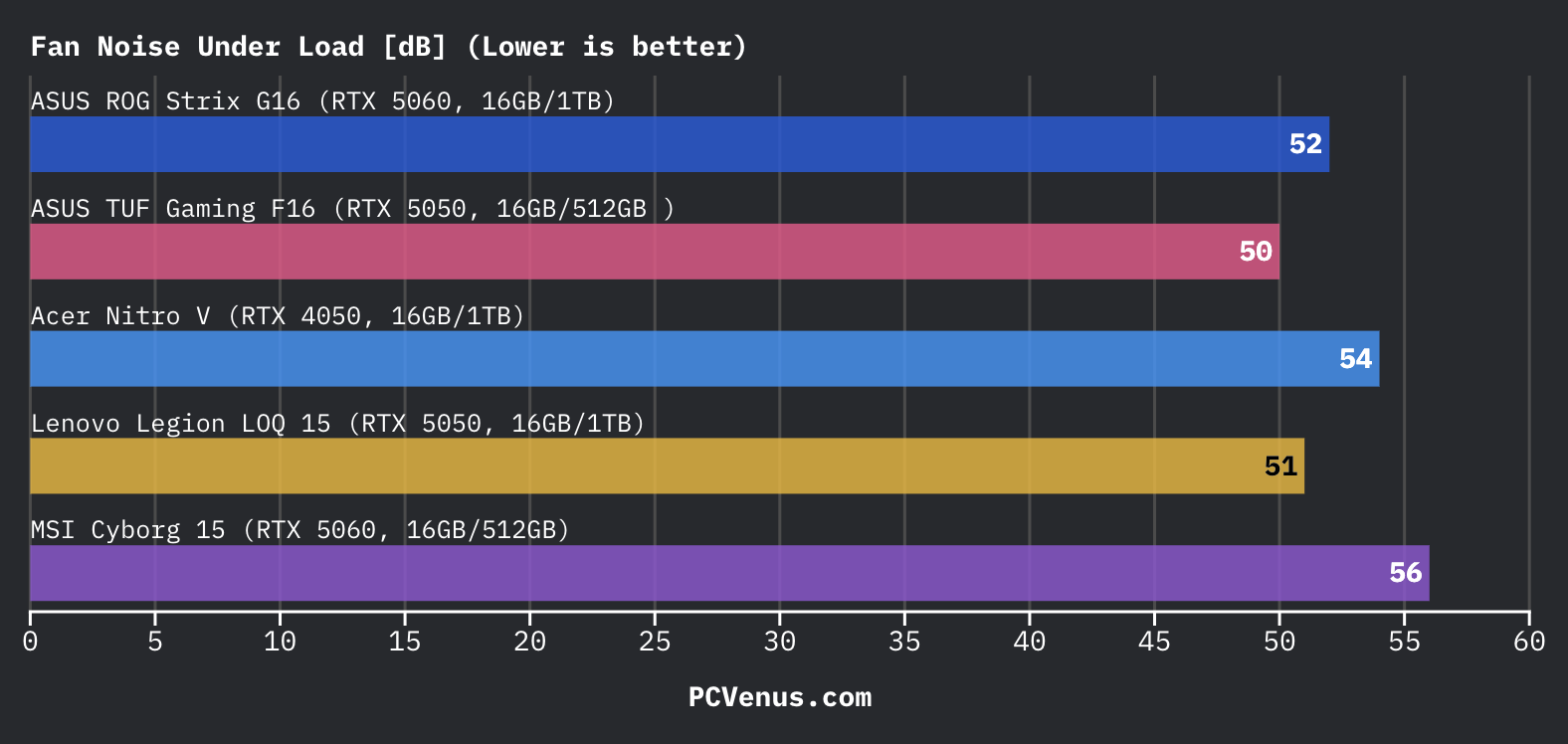
The middle of the keyboard becomes noticeably warm in Turbo mode, especially near the function keys, although the palm rest area stayed comfortable enough during regular gameplay. Fan noise reached around 50 dB under load, which is slightly quieter than the ROG Strix G16 and much less annoying than the sharper fan noise from the MSI Cyborg 15. ASUS also keeps gaming performance stable instead of heavily throttling after longer sessions.
Display Performance
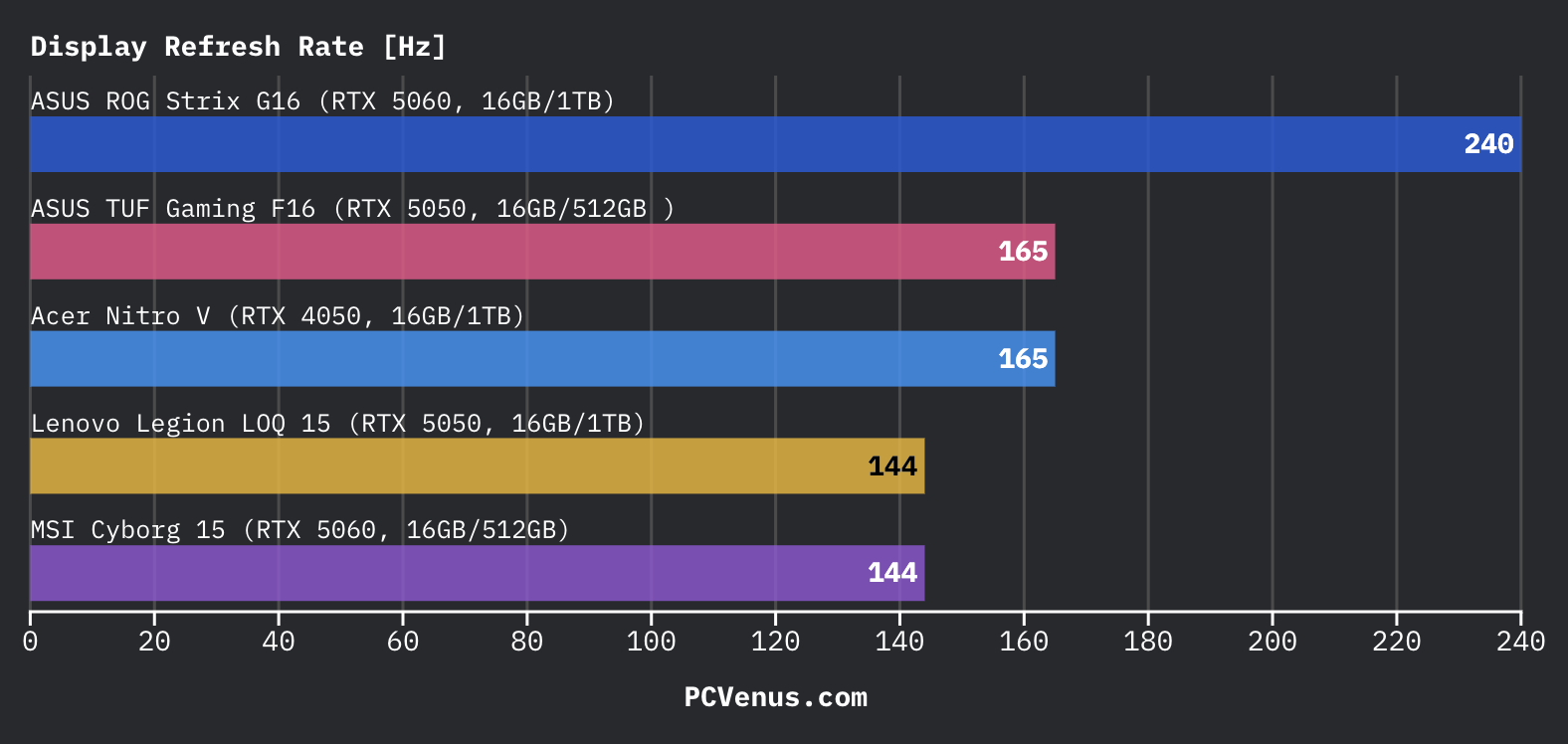
The 165Hz display is one of the better parts of the TUF Gaming F16. Some AAA-grade games like Valorant, CS2, and Apex Legends feel smooth immediately, and the 3ms response time helps reduce visible blur during quick movement and flick shots.
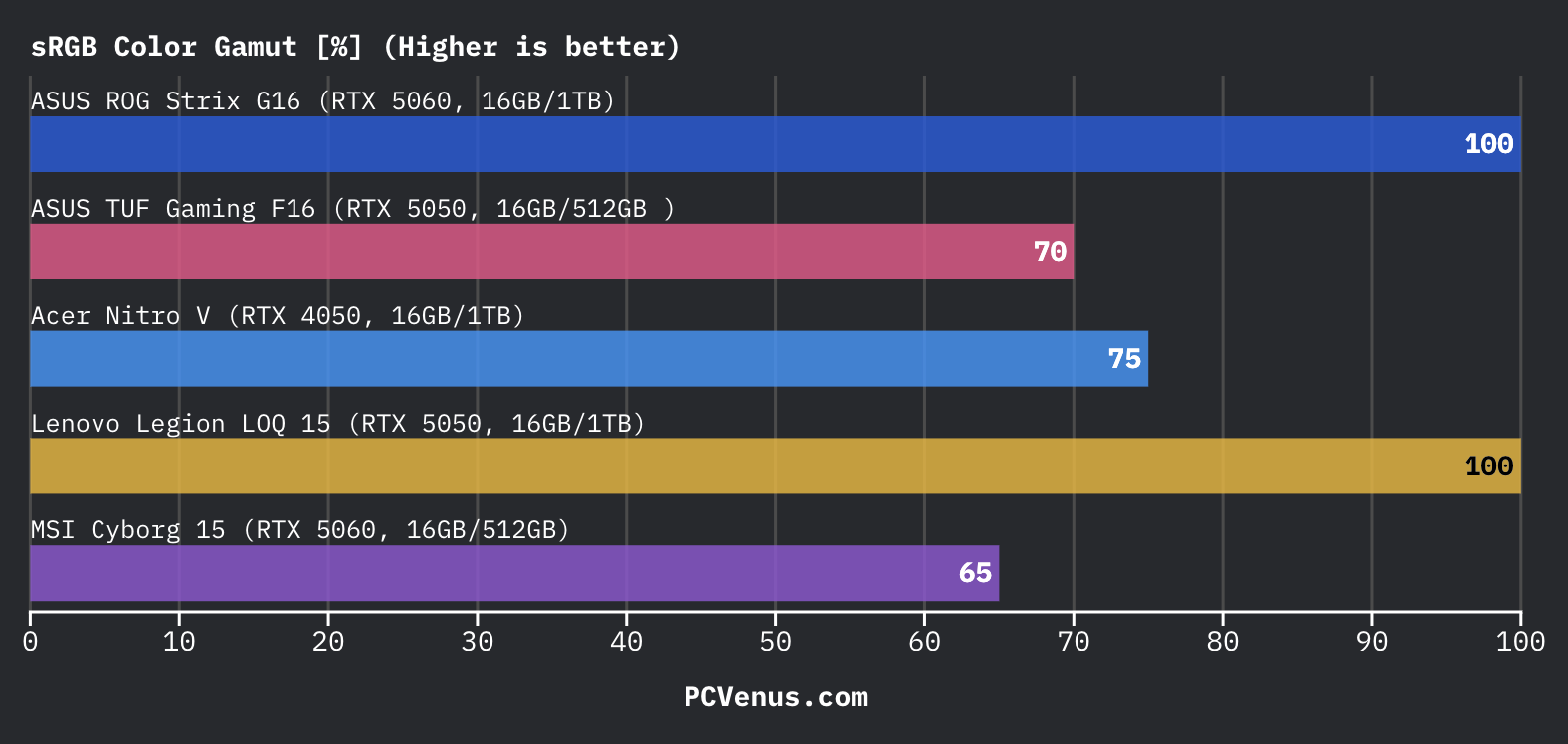
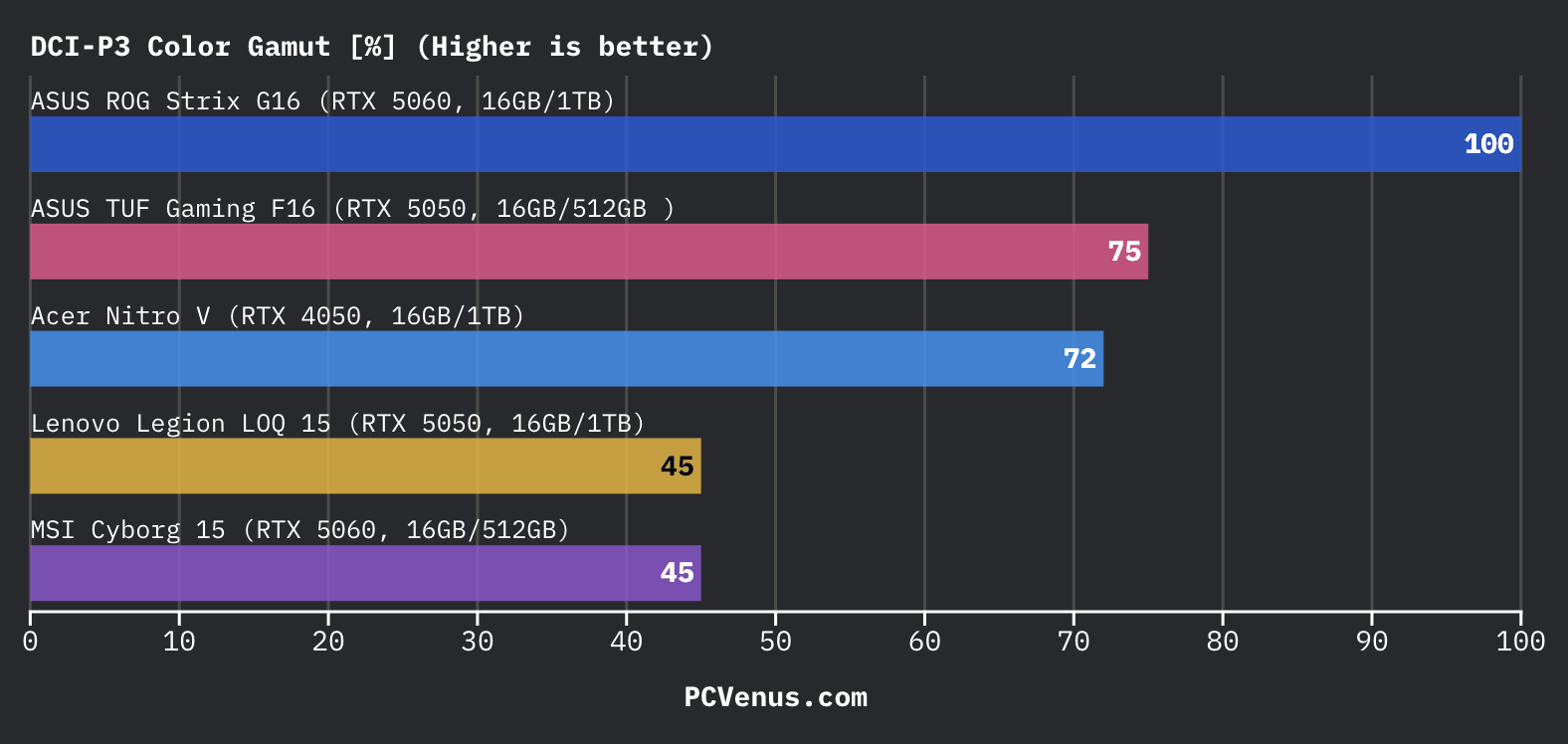
This ASUS laptop comes with a 16-inch 1920 × 1200 IPS panel with full sRGB coverage and around 1200:1 contrast. Colors looked clean during YouTube, Netflix, and lighter Photoshop work, and the screen avoids the dull, washed-out look that cheaper gaming laptops still struggle with.
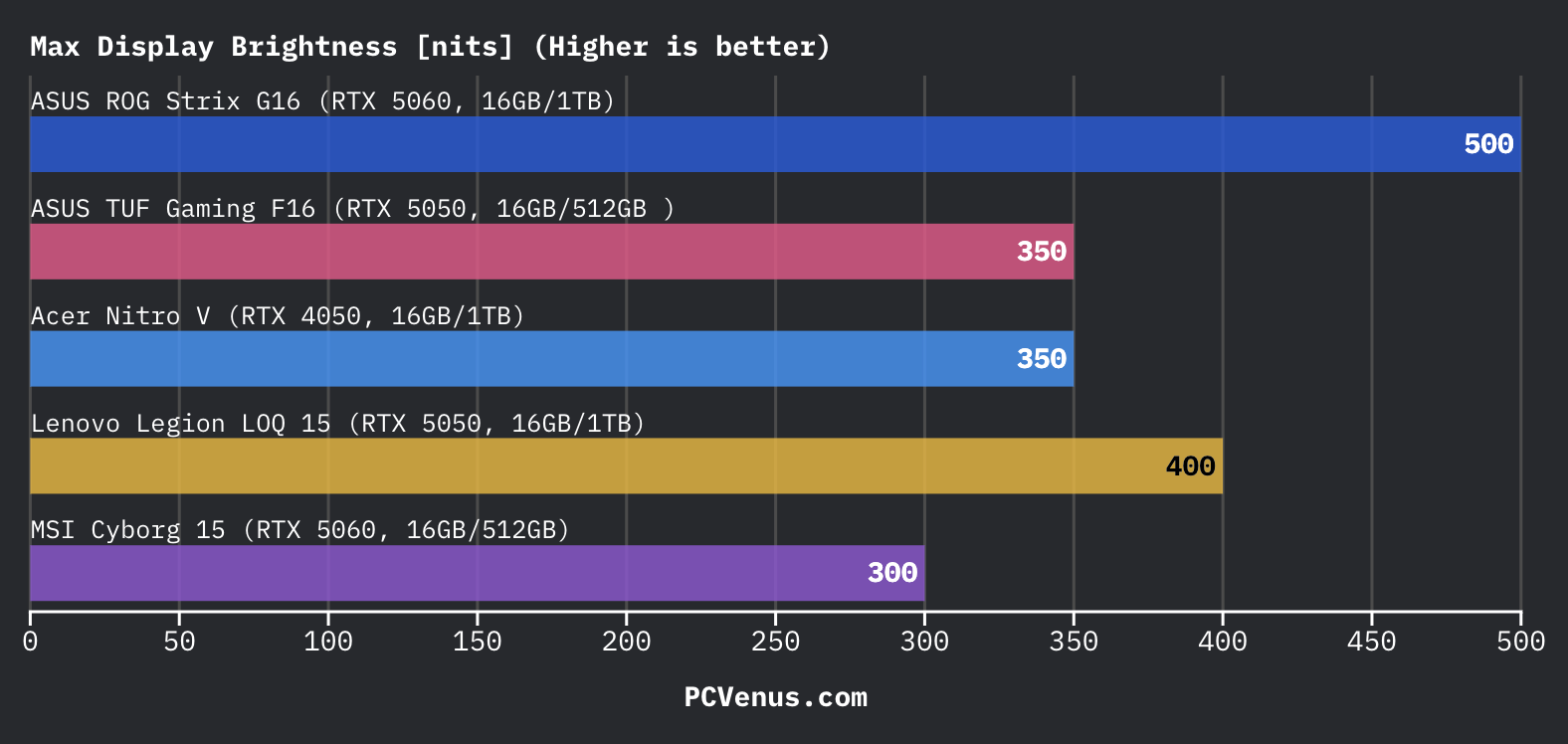
Brightness peaks around 300 nits, which is perfectly fine indoors but less impressive outdoors or near strong daylight. Side-by-side, the ASUS V16 looked brighter during daytime use near windows.
The matte coating also keeps reflections under control during daytime use, especially under room lighting and near windows. The panel avoids the overly harsh sharpening and oversaturated colors some cheaper gaming laptops still use.
The weaker area is darker scenes and HDR content. Black levels still look grayish compared to OLED or Mini LED laptops, and HDR support is missing completely.
For a mid-range gaming laptop, though, the screen does not feel cheap during normal gaming and everyday use.
Keyboard and Trackpad
The ASUS TUF Gaming F16 keyboard feels comfortable for gaming thanks to the deeper 1.7mm key travel, which feels better than the Acer Nitro V 16S AI during longer sessions. The larger arrow keys are also easier to use than the tighter layout on the MSI Cyborg 15.

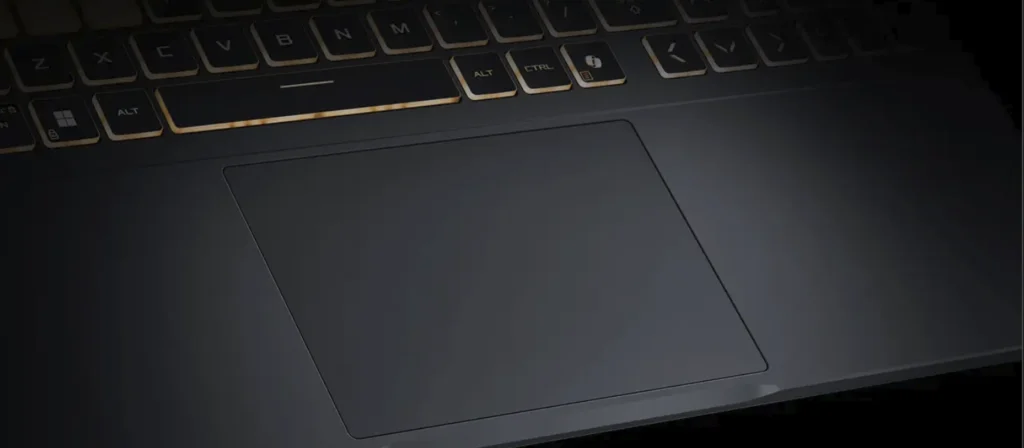
The keys feel slightly firmer than the Lenovo Legion 5i while typing, and the upper keyboard area gets a bit warm in Turbo mode. RGB lighting looks clean at night, although the single-zone setup feels less premium than higher-end rivals. The touchpad stayed smooth and responsive for normal everyday use.
Ports and Connectivity
The TUF Gaming F16 gives you enough ports that daily use never feels annoying. You get three USB-A ports, two USB-C ports, Thunderbolt 4, HDMI 2.1, Ethernet, and a headphone jack.
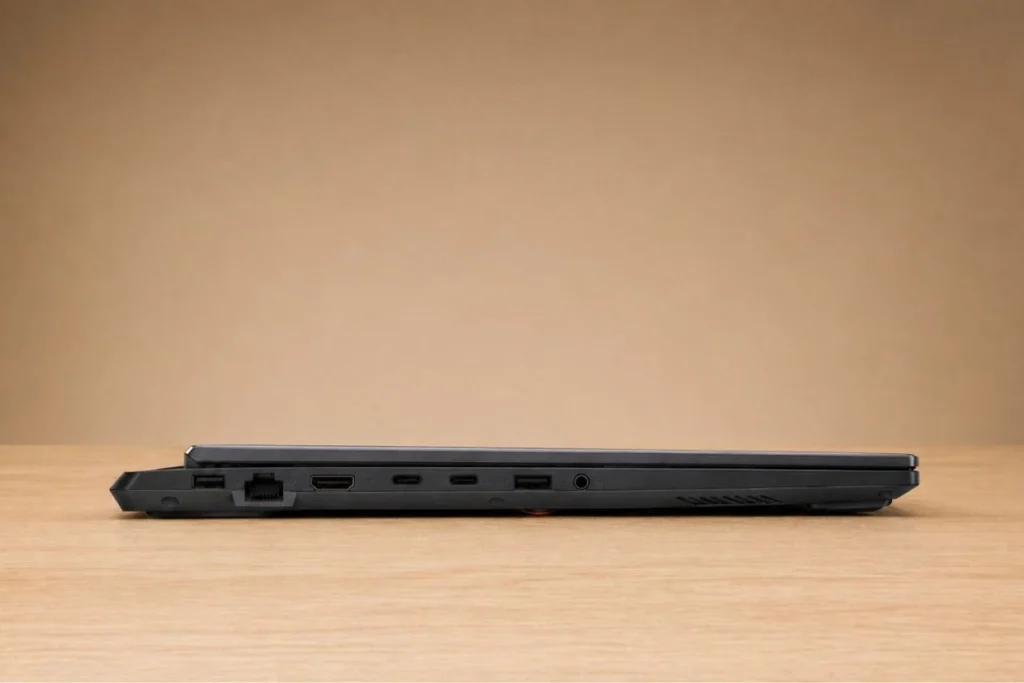
The HDMI and charging ports stayed out of the mouse area, so the setup felt cleaner while gaming. Thunderbolt 4 also helped with faster SSD transfers and external monitor support.
The only thing missing is an SD card reader. If you work with cameras often, you will probably need a dongle.
Speakers and Webcam
The speakers on the TUF Gaming F16 focus more on clarity than bass. While testing Valorant and Warzone, footsteps and reload sounds stayed easier to track than on the MSI Cyborg 15, which sounded thinner at higher volume. Dialogue in YouTube videos and Discord calls also stayed clear, although explosions and background music still lack the deeper bass you get from larger laptops like the Alienware 16.
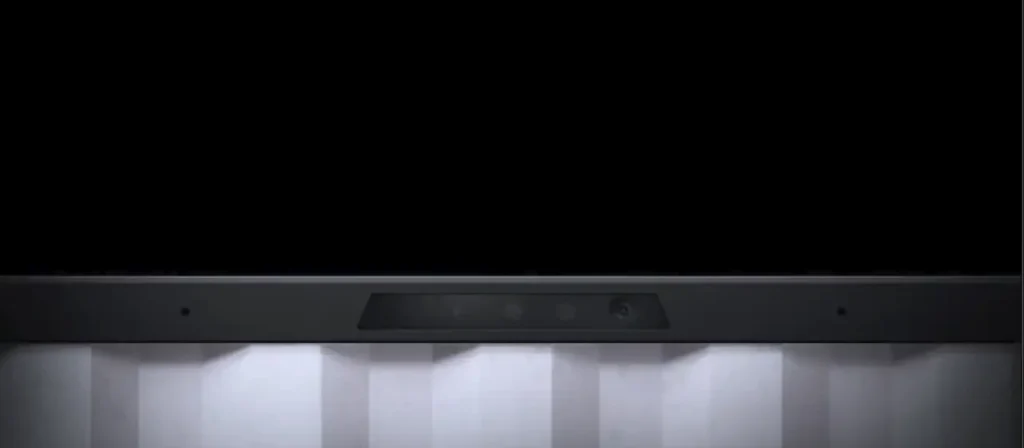
The 1080p webcam is a noticeable upgrade over the 720p camera on the Acer Nitro V but not good as Latest Apple’s MacBooks. During Google Meet and Discord calls, facial detail looked sharper and less grainy under normal room lighting, especially at night with indoor lighting only.
ASUS also tuned the microphones fairly well. During testing, Discord calls remained clear even while the fans were spinning during game downloads. Keyboard noise was reduced better than on the Lenovo LOQ 15, where typing sounds came through more aggressively during voice chats.
Upgradeability and Maintenance
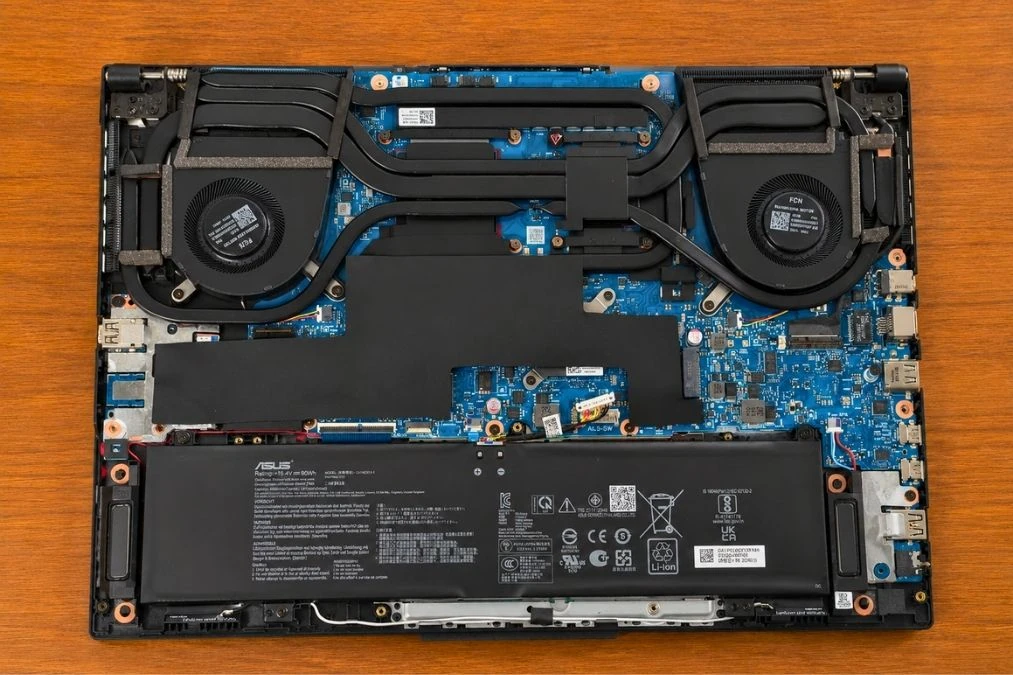
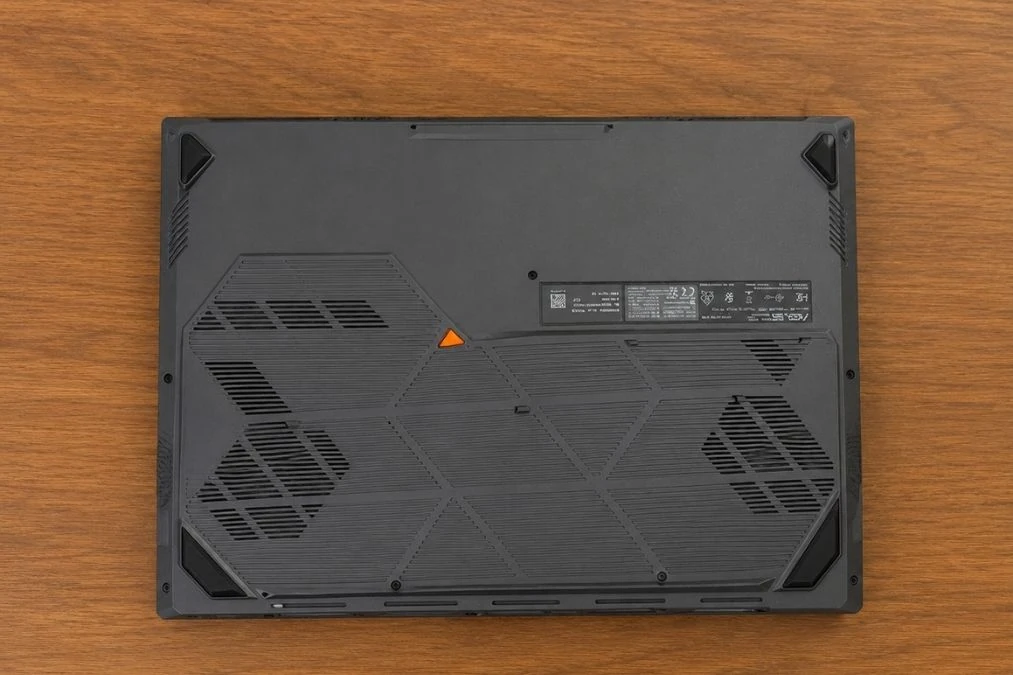
Opening the ASUS TUF Gaming F16 felt pretty simple during upgrades. The bottom panel came off without fighting the clips too much, which already felt better than the MSI Cyborg 15 We have tested earlier. ASUS gives two RAM slots and two SSD slots here, so upgrading storage or memory later will not be a problem.
We also liked how easy it was to reach the cooling fans for cleaning. Dust removal and basic maintenance do not feel annoying on this laptop. Compared to the Acer Nitro V 16S AI, the internal layout feels slightly cleaner and less cramped while working inside the chassis.
The only thing We did not like was the rear screw placement near the vents because opening the panel the first time takes a little patience.
Acer Nitro V 16S AI vs Alternative Laptops Comparison Table
| Specification | ASUS ROG Strix G16 | ASUS TUF Gaming F16 | Acer Nitro V | Lenovo LOQ 15 | MSI Cyborg 15 |
| Processor (CPU) | Intel Core i7-14650HX (16 Cores / 24 Threads, up to 5.2 GHz) | Intel Core i5-13450HX (10 Cores / 16 Threads, up to 4.6 GHz) | Intel Core i7-13620H (10 Cores / 16 Threads, up to 4.9 GHz) | Intel Core i7-13650HX (14 Cores / 20 Threads, up to 4.9 GHz) | Intel Core 5-210H (10 Cores / 16 Threads, up to 4.8 GHz) |
| Graphics (GPU) | NVIDIA GeForce RTX 5060 (8GB GDDR7) | NVIDIA GeForce RTX 5050 (8GB GDDR7) | NVIDIA GeForce RTX 4050 (6GB GDDR6) | NVIDIA GeForce RTX 5050 (8GB GDDR7) | NVIDIA GeForce RTX 5060 (8GB GDDR7) |
| RAM | 16GB DDR5 (5600 MHz) | 16GB DDR5 (5600 MHz) | 16GB DDR5 (4800 MHz) | 16GB DDR5 (4800 MHz) | 16GB DDR5 (5600 MHz) |
| Storage | 1TB PCIe 4.0 NVMe SSD | 512GB PCIe 4.0 NVMe SSD | 1TB PCIe 4.0 NVMe SSD | 1TB PCIe 4.0 NVMe SSD | 512GB PCIe 4.0 NVMe SSD |
| Display | 16″ FHD+ (1920×1200) 16:10, 165Hz, IPS, 100% sRGB | 16″ FHD+ (1920×1200) 16:10, 165Hz, IPS, 100% sRGB | 15.6″ FHD (1920×1080) 16:9, 144Hz, IPS, 45% NTSC | 15.6″ FHD (1920×1080) 16:9, 144Hz, IPS, 100% sRGB | 15.6″ FHD (1920×1080) 16:9, 144Hz, IPS-level |
| Battery | 90 WHrs | 90 WHrs | 59 WHrs | 60 WHrs | ~53.5 WHrs |
| Build & Tier | Premium Gaming tier (Advanced cooling/Vapor chamber) | Mid-tier Durable (Military Grade certified chassis) | Budget Gaming tier (Slimmer form factor) | Mid-tier Gaming (Hyperchamber thermal layout) | Budget-friendly Thin & Light tier (~1.98 kg) |
Who Should Buy the ASUS TUF Gaming F16
The TUF Gaming F16 makes the most sense if you mainly care about stable 1080p gaming and do not want a thinner laptop limiting GPU performance just to save weight.
It also works well as an all-round laptop. Gaming, college work, Chrome tabs, Discord, Photoshop, and normal editing workloads all felt comfortable without the system slowing down too quickly.
If you usually upgrade storage or RAM later instead of replacing the whole laptop every few years, ASUS still makes that easy here.
Who Should Avoid It?
This probably is not the right laptop if portability matters more to you than gaming performance. The chassis feels heavier than newer Ryzen AI gaming laptops, and Turbo mode gets loud during longer gaming sessions.
The RTX 5050 also starts struggling once heavier ray tracing and Ultra settings enter the picture. RTX 5060 systems still hold a noticeable advantage in newer AAA games.
The smaller 512GB SSD is another limitation. A few larger games can fill the storage surprisingly fast.
Pros
✔ Gaming performance feels stronger
✔ 165Hz screen feels smooth in esports games
✔ Cooling stays stable during longer gaming sessions
✔ Easy RAM and SSD upgrades
✔ Plenty of useful ports
Cons
✘ Screen brightness feels low outdoors
✘ Fans get noisy in Turbo mode
✘ 512GB storage fills up quickly