
Are you looking for a gaming laptop that costs less than $1,200?
If so, you have come to the right place.
In this post, we’ve compiled a list of the top gaming laptops that are both affordable and perform well.
Gaming laptops are available in price ranges ranging from $500 to $5,000, but finding a powerful machine in the middle of this range (i.e., $1200) is challenging.
Before purchasing a better gaming laptop, you must thoroughly research and understand all the components.
Isn’t it?
We wrote this article, which was completed after significant research, review, and practical use, to make this process easier.
All models on our list will let you play modern games like Call of Duty and easily perform demanding activities like Rendering, Video Editing, AutoCAD, and programming.
You will get better performance from a gaming laptop if you spend $1,000 on it. However, for an extra $200, bringing the total to $1,200, you can purchase future professional gaming laptops that will be easy to use in the next 3 to 4 years.
Always remember…
A laptop is a long-term investment, so get a powerful machine with a somewhat greater budget if possible.
Changing computers is a complicated process, similar to changing cell phones yearly because they contain many crucial large files.
What to look for in a 1200 Dollar Gaming Laptop?
Choosing the best gaming laptop under $1,200 is like choosing the perfect combat weapo, you need the perfect balance of power, speed, and endurance. For this price, you get an excellent machine that can handle modern games at high settings while also being future-proof for gaming for years to come.
Graphics Card (GPU) – The Core of Gaming
A dedicated GPU for gaming is non-negotiable. For prices under $1,200, you should consider buying an NVIDIA GeForce RTX 3050, RTX 4060, or AMD Radeon RX 7700S. These GPUs ensure smooth gameplay, high frame rates, and stunning visuals for demanding games like Cyberpunk 2077 and Call of Duty: Warzone.
Processor (CPU) – The brains behind performance
A powerful CPU ensures that your laptop can run games and other tasks efficiently. Choose the AMD Ryzen 5 5600H, Ryzen 7 7735HS, or Intel Core i5-12500H or more for extreme gaming performance and no lag.
RAM
For seamless gaming and multitasking, 16GB of DDR5 RAM is ideal. While some affordable models may come with 8GB, to future-proof your setup, it’s best to go for 16GB.
Storage Space – Faster loading times and more space
An SSD (Solid State Drive) is essential for faster game loading times. Choose at least a 512GB NVMe SSD. If you have a large game library, consider a laptop with an additional HDD slot to provide extra storage space.
Display – Smooth, stunning visuals
All the action happens on your screen. The 15.6-inch Full HD (1920×1080) IPS display with a refresh rate of 144Hz or higher ensures crisp visuals and smooth motion, making your gaming experience immersive and competitive.
Battery life and build quality
Gaming laptops aren’t known for their long battery life, but models with 70Wh batteries or higher can keep you playing for hours without having to plug in. Also, check for its solid construction quality and effective cooling system to ensure your laptop will function for a long time.
The Best Gaming Laptops under $1200: Our Top Pick
| Image | Product | Feature | Price |
|---|---|---|---|
TOP Pick
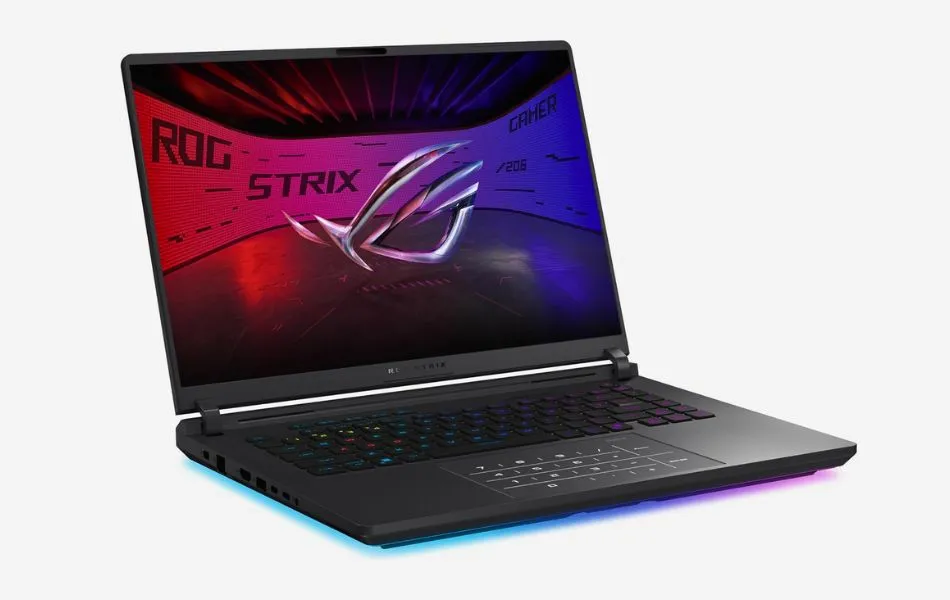 |
ASUS ROG Strix G16 |
| Check Price |
Best Overall
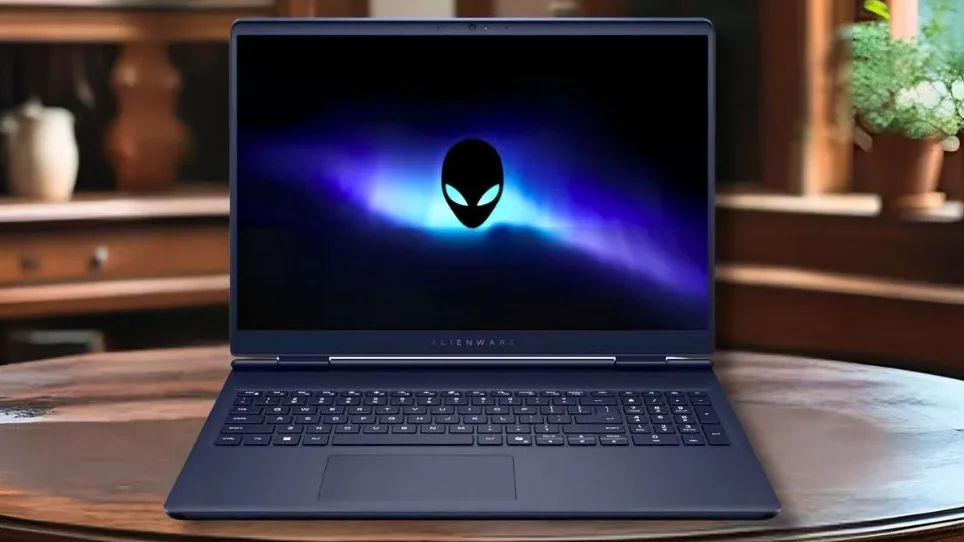 |
Alienware 16 Aurora |
| Check Price |
 |
Acer Nitro V 16S AI |
| Check Price |
 |
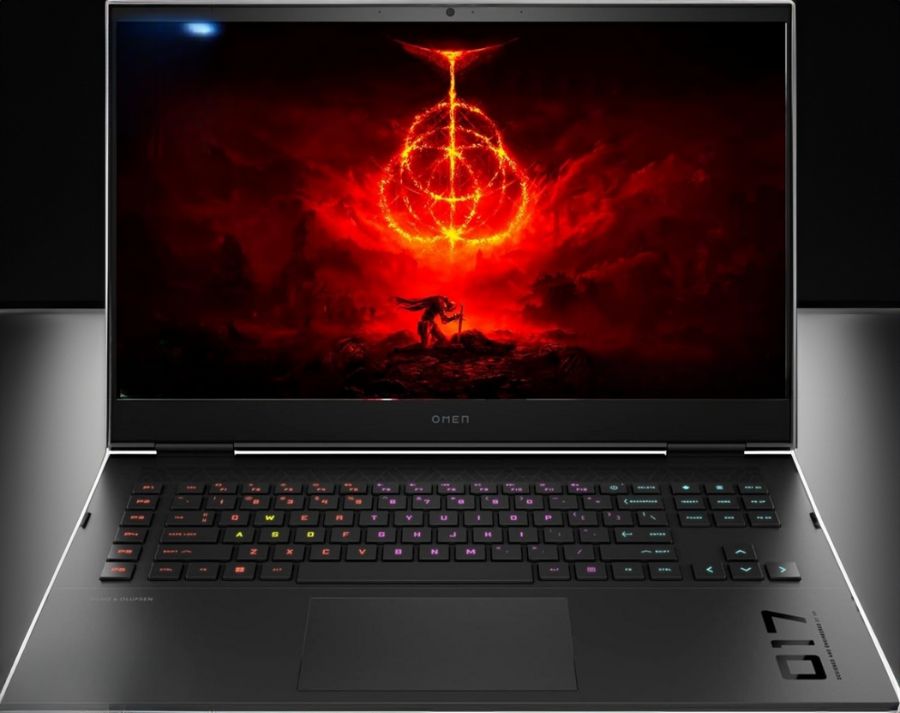
HP OMEN 16 |
| Check Price |
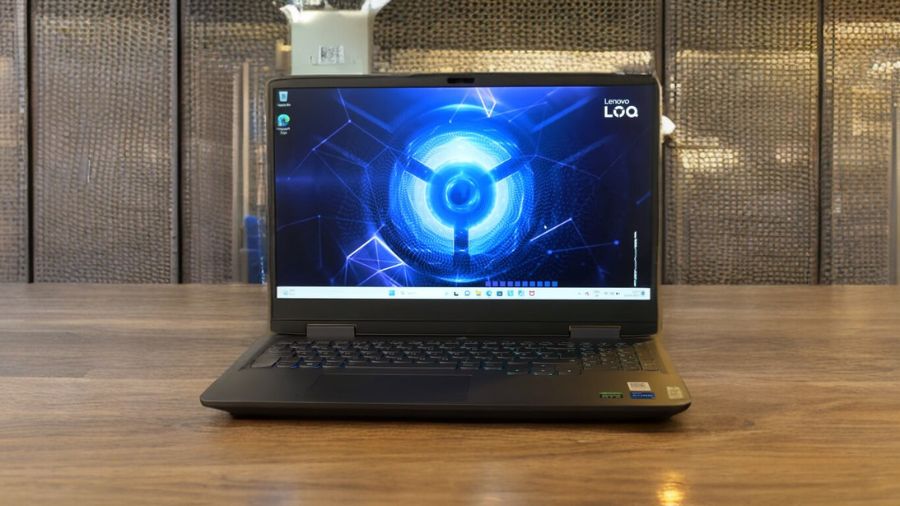 |
Lenovo Legion 5i |
| Check Price |
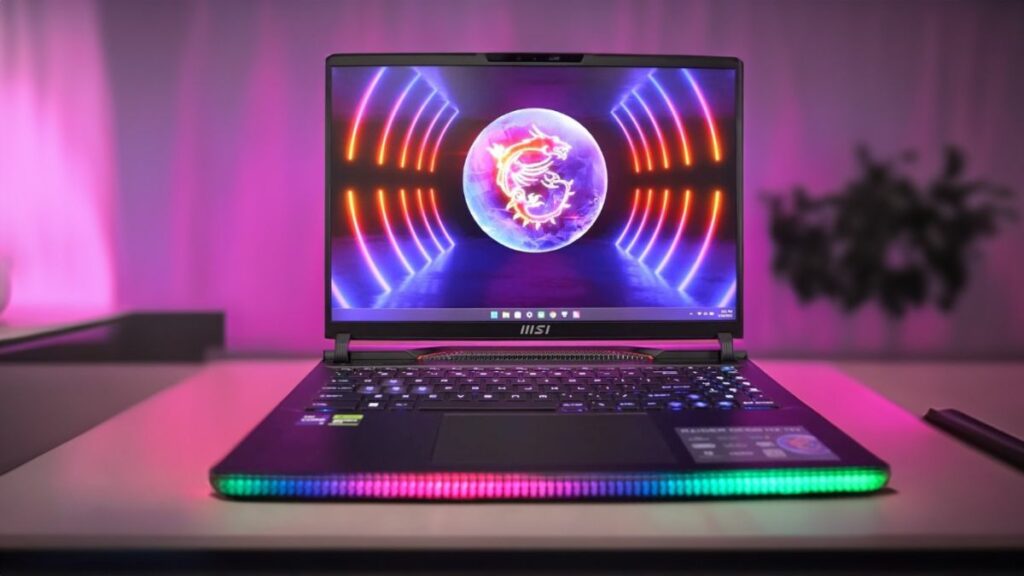 |
MSI Cyborg 17 |
| Check Price |
Best Overall Gaming Laptop Under $1200
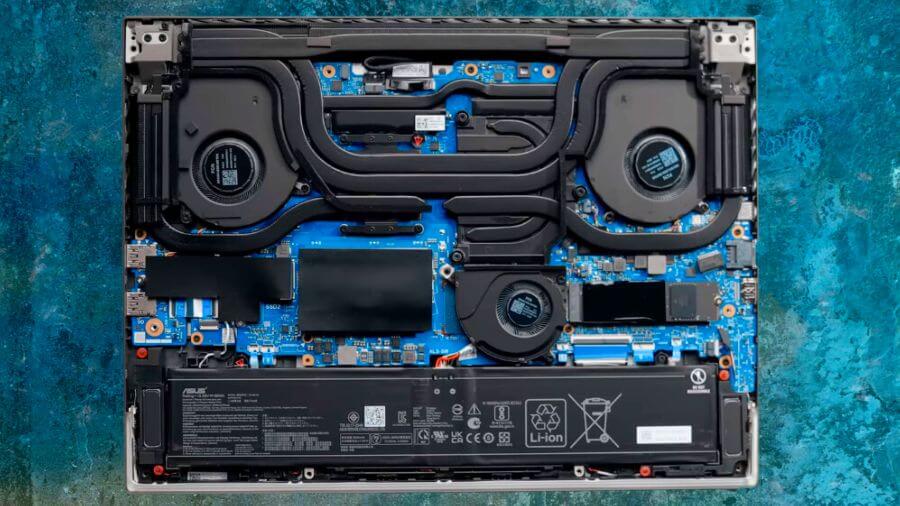
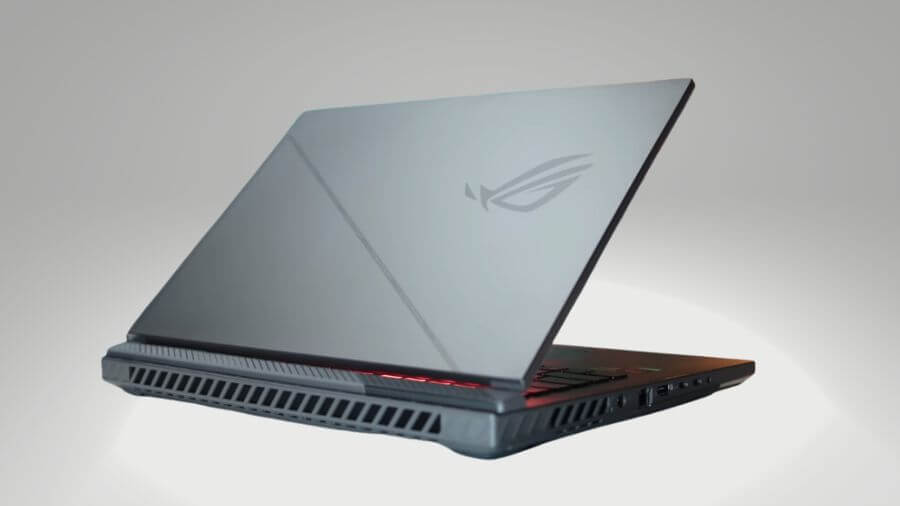
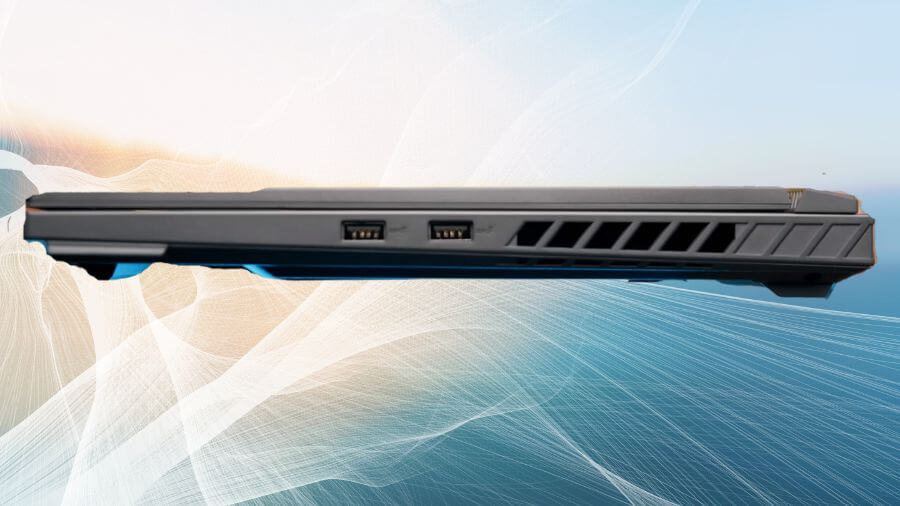


1. ASUS ROG Strix G16
Key Specs
| Processor | Intel Core i7-14650HX |
| Graphics | NVIDIA GeForce RTX 5060 |
| Memory | 16 GB GDDR5 |
| Storage | 1 TB SSD |
| Display | 16-inch, QHD+, 240Hz |
| Weight | 5.51 lbs (2.50 Kg) |
Check Current Pricing
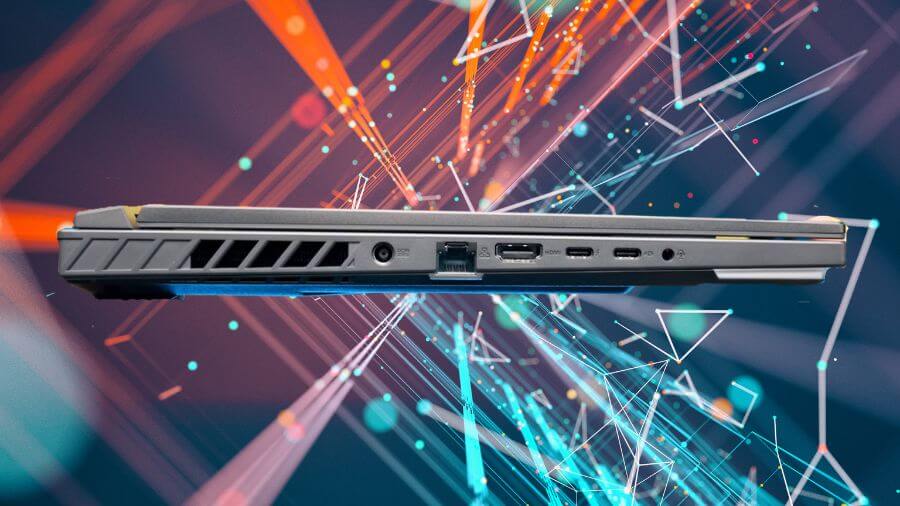
The ASUS ROG Strix G16 is one of the strongest choices if you want a laptop that balances gaming and productivity without going over the $1200 mark. Powered by Intel’s Core i7-14650HX and NVIDIA’s RTX 5060, it delivers the kind of performance that makes it suitable for both demanding AAA titles and daily work like programming or content creation.
In testing, Cyberpunk 2077 Phantom Liberty ran at around 90 FPS on 1080p Ultra settings and stayed smooth in the low 70s at 1440p High. Assassin’s Creed Mirage passed 100 FPS with ease, while Valorant consistently hit over 200 FPS, which really shows off the 165Hz refresh rate. For work and creative tasks, 16GB DDR5 memory and a 1TB SSD made multitasking quick and reliable, whether running IDEs, editing 4K video, or switching between heavy browser tabs.
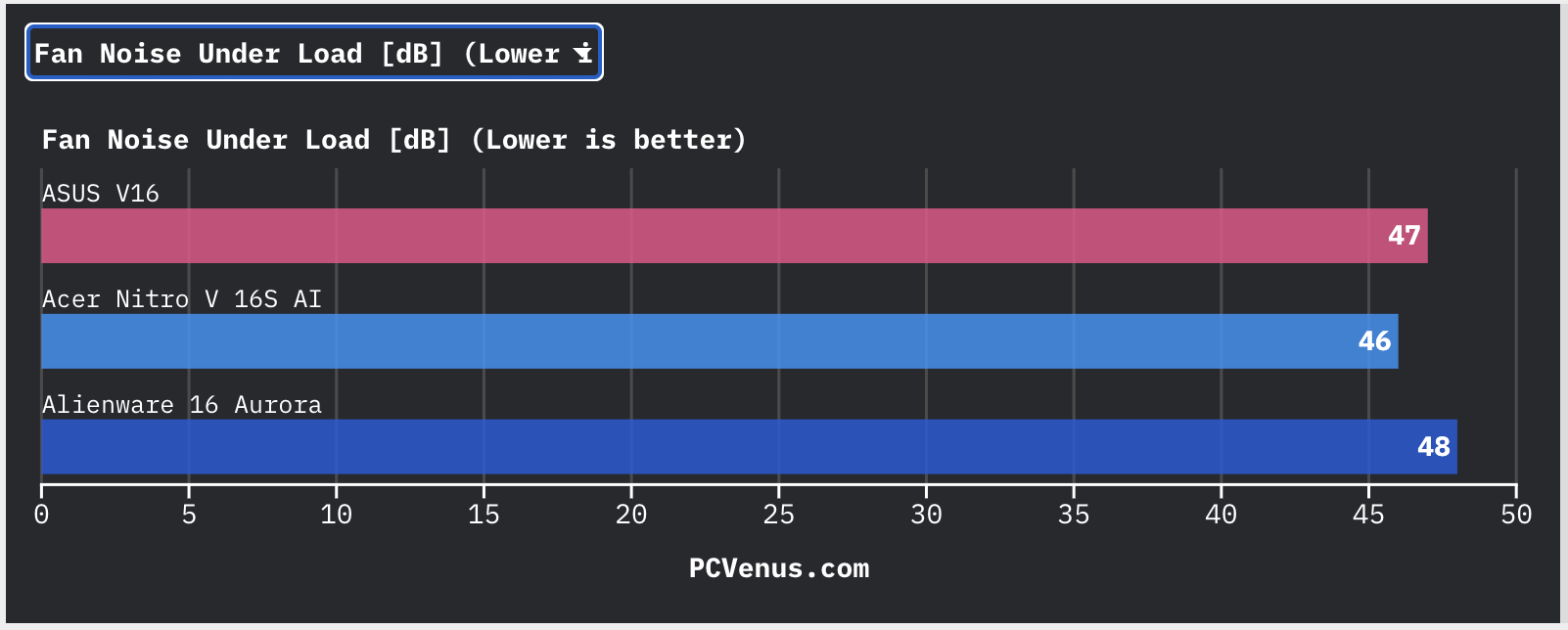
The 16 inch FHD+ screen is sharp and fluid with a 165Hz refresh rate, and the anti-glare coating helps keep it comfortable in bright rooms. Cooling is another area where ASUS did well. The tri-fan system with liquid metal kept temperatures between 72 and 82°C during long sessions, and while the fans are noticeable, they aren’t overly distracting.
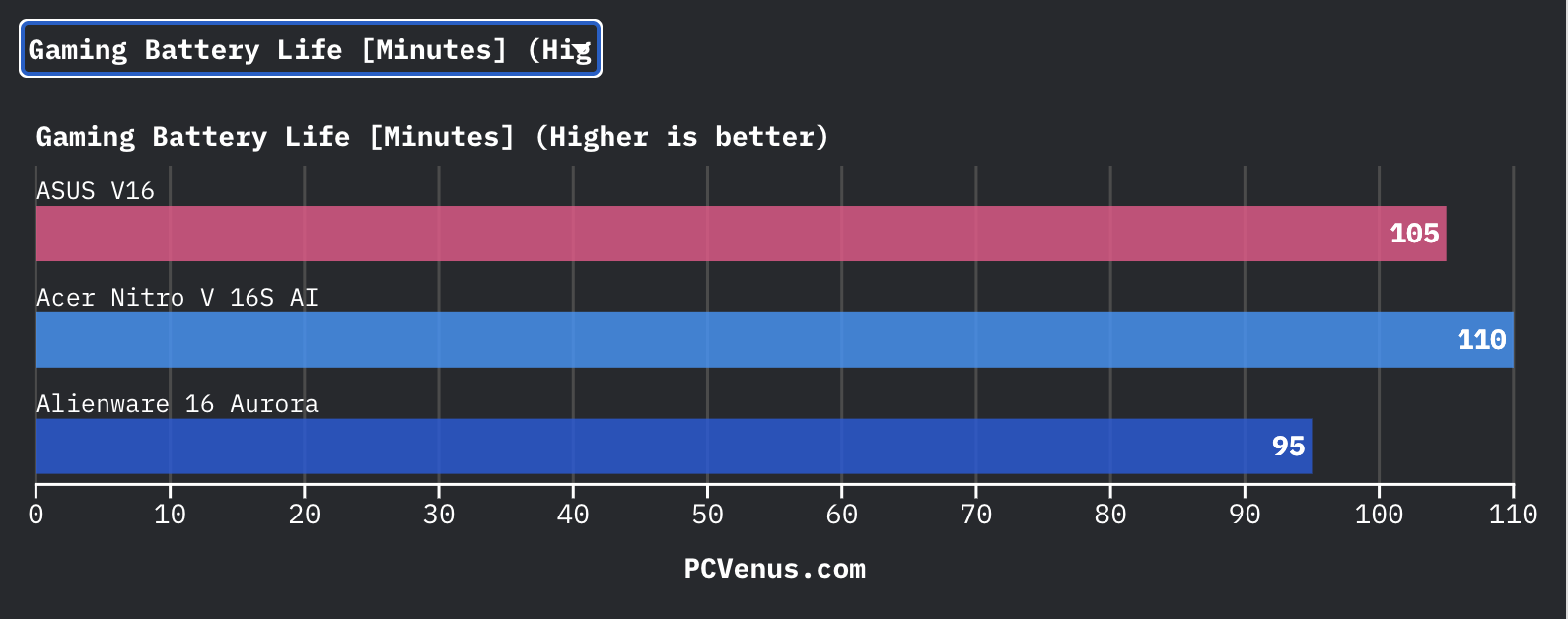
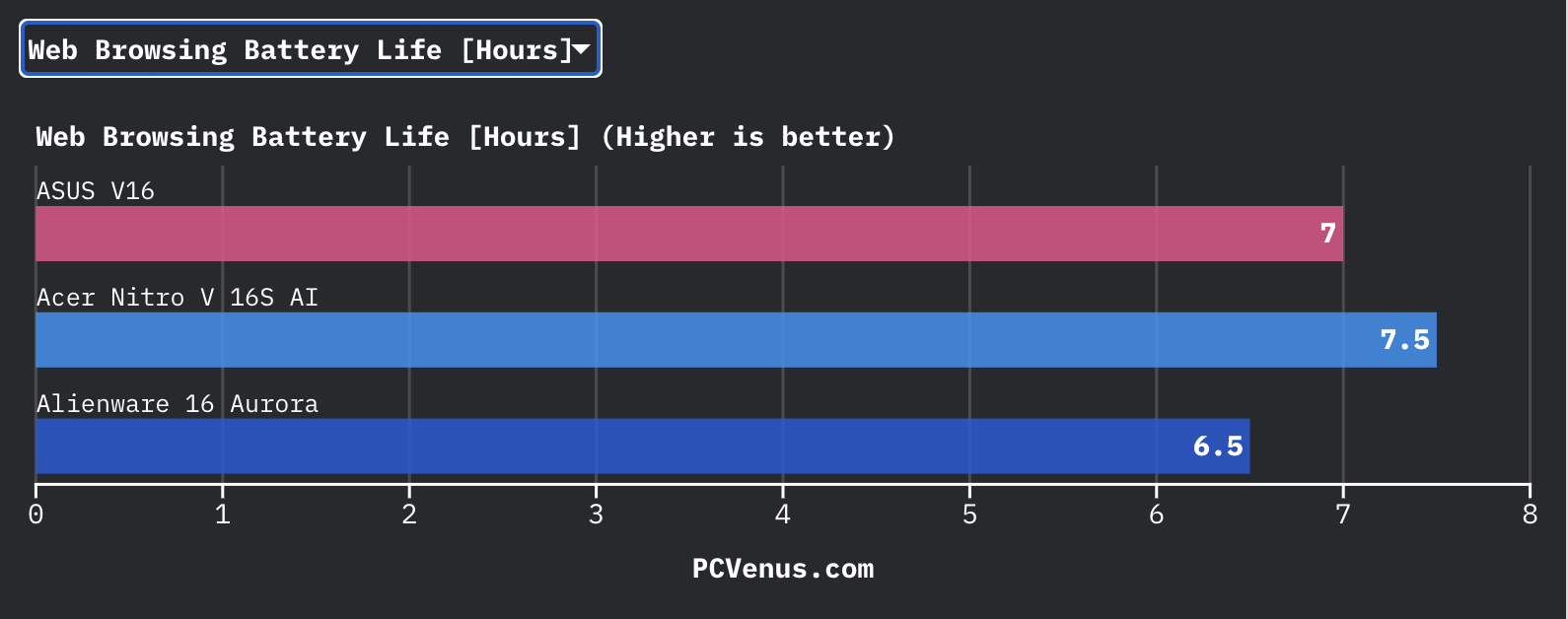
Battery life is average for this class of laptop. Expect around 1.5 to 2 hours when gaming unplugged and close to 6 hours for lighter use such as browsing or working on documents. It is not designed as an all-day travel laptop, but it holds up well for the performance it provides.
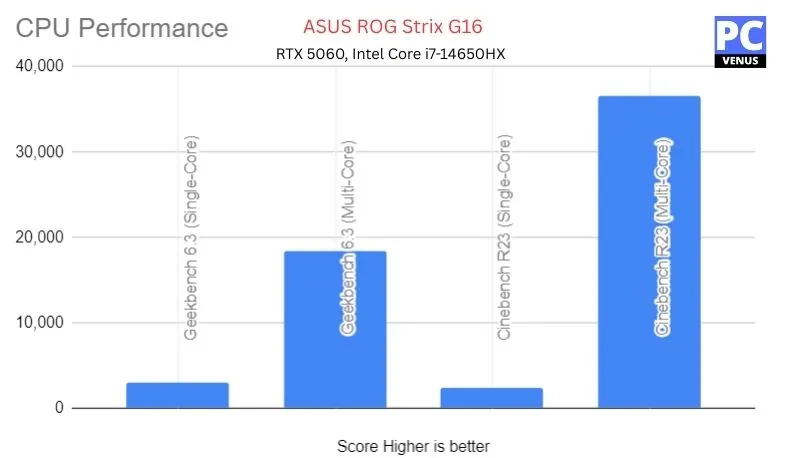
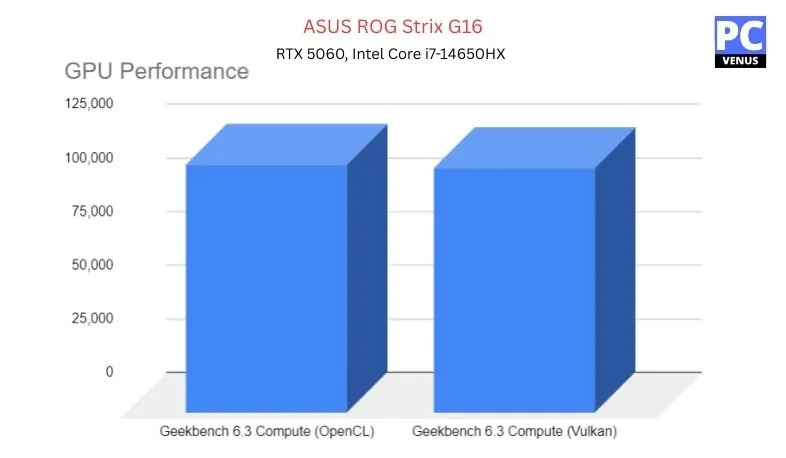
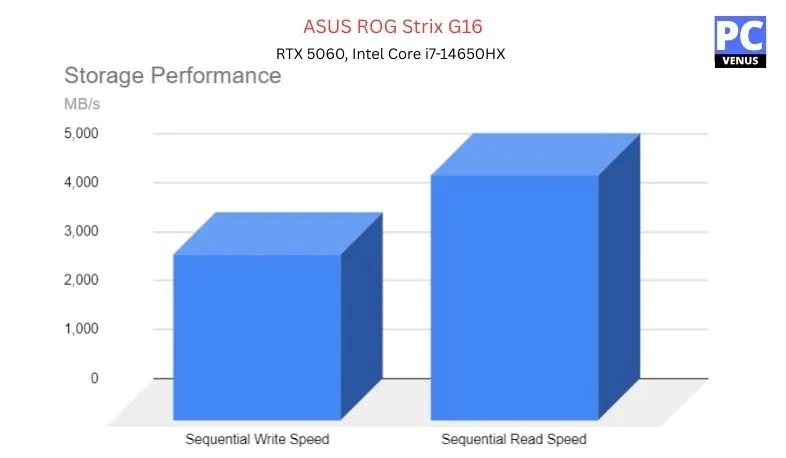
Benchmarks Test – ASUS ROG Strix G16
| Category | Test | Score/Result |
|---|---|---|
| CPU (Intel Core i7-14650HX) | Geekbench 6.3 Single-Core | 2,971 |
| Geekbench 6.3 Multi-Core | 18,470 | |
| Cinebench R23 Multi-Core | 36,577 | |
| GPU (NVIDIA RTX 5060) | Geekbench 6.3 Compute (Vulkan) | 114,377 |
| Overwatch 2 (1920×1200, Ultra) | 165 FPS | |
| Shadow of the Tomb Raider (1080p, Max) | 118 FPS | |
| Storage (1TB PCIe Gen 4 SSD) | Sequential Read | ~5,000 MB/s |
| Sequential Write | ~3,400 MB/s |
Pros
✔ Smooth 1080p Ultra and 1440p High gaming performance
✔ 165Hz anti-glare display looks sharp and fluid
✔ Advanced cooling system keeps temps stable
✔ 1TB SSD provides plenty of storage for games and projects
Cons
✘ Battery drains quickly when gaming unplugged
✘ Heavier than slim ultrabooks in this range
Also Read: ASUS ROG Strix G16 2025: Full Specifications and Benchmarks
Best affordable AI powered Gaming laptop
2. Alienware 16 Aurora
Key Specs
| Processor | Intel Core 7 Processor 240H |
| Graphics | NVIDIA GeForce RTX 5060 |
| Memory | 16 GB DDR5 |
| Storage | 1 TB SSD |
| Display | 16.0-inch, WQXGA (2560×1600) 120Hz |
| Weight | 5.5 lbs (2.5 kg) |
Check Current Pricing
The Alienware 16 Aurora is one of those laptops that instantly feels like a step up from the typical mid-range gaming laptop. Alienware’s long-standing reputation for bold designs and raw performance holds here, and it’s clear this model was built with gamers in mind.
Performance
This Alienware 16 Aurora gaming laptop is powered by Intel’s Core 7 processor and NVIDIA’s latest RTX 5060 GPU, and it handles modern AAA games with ease. Games like Cyberpunk 2077 and Red Dead Redemption 2 run smoothly at high settings, while esports games like Valorant and Counter-Strike 2 see frame rates soar into the triple digits.
The GPU also comes with AI-powered features like DLSS 4 and Reflex 2, which sharpen visuals and reduce input lag, making fast-paced competitive gaming feel much more responsive.
The redesigned cryo-chamber cooling system also deserves praise here, keeping the machine cool and quiet for longer, avoiding the thermal throttling that affects many thin laptops.
The only drawback is battery life; it drains quickly when gaming heavily, so this is a laptop you’ll mostly use plugged in.
Display & Design
The display is another area where the Aurora shines. Instead of a standard 1080p screen, you get a 16-inch WQXGA panel with a 16:10 aspect ratio and a 120Hz refresh rate.
Open-world games like Assassin’s Creed Valhalla feel more detailed and immersive, while the taller aspect ratio makes everyday multitasking even easier.
Whether you’re streaming from OBS Studio, editing in Adobe Premiere Pro, or programming in a high-end language, the extra resolution and vertical space make for a truly amazing experience. Although the 120Hz refresh rate is smooth, some rivals also offer faster 165Hz or 240Hz options, so competitive players may find these more appealing.
In terms of design, the Aurora looks and feels premium. Its aluminum chassis is sturdy, futuristic, and distinctly Alienware.
Weighing 5.5 pounds, it’s heavier than models like the ASUS TUF Dash or the MSI Stealth, but that extra weight comes with a sturdy build and excellent cooling. If portability is your priority, it might seem a bit bulky, but if you value reliability, it’s a reasonable choice.
Why Choose It Over Others?
Compared to its main competitors, the Aurora stands out for its balance of premium design and next-generation performance. The ASUS ROG Strix G16 also offers strong specifications, but its display doesn’t match the Aurora’s sharp WQXGA panel, and its cooling isn’t as efficient during long gaming sessions.
The Acer Nitro V is an affordable option, but its RTX 4060 GPU lags behind Alienware’s new RTX 5060, making the Aurora a more suitable choice for the future. The Lenovo LOQ 15, on the other hand, offers great performance with plenty of RAM and storage, but the Alienware pulls ahead with its robust build, advanced thermals, and sharp display.
Ideal for those who want a machine that looks premium, performs well, and lasts a long time, the Aurora is one of the best options under $1,200.
Pros
✔ Strong next-gen performance with RTX
✔ AI-powered features like DLSS 4 and Reflex 2
✔ Crisp WQXGA display with 16:10 aspect ratio
✔ Advanced Cryo-Chamber cooling system
✔ Premium Alienware build quality and design
✔ Future-ready connectivity (Wi-Fi 7, Bluetooth 5.4)
Cons
✘ Battery drains quickly during heavy gaming
✘ Slightly heavier than slimmer gaming laptops
Best AI-Powered Gaming Laptop


3. Acer Nitro V 16S AI
Key Specs
| Processor | AMD Ryzen 7 260 |
| Graphics | NVIDIA GeForce RTX 5060 |
| Memory | 32 GB DDR5 |
| Storage | 1 TB SSD |
| Display | 16-inch WUXGA, 180Hz |
| Weight | 4.63 lbs (2.1 kg) |
Check Current Pricing
Acer Nitro V 16 is a powerful laptop with high-end specs for under $1,200, making it an ideal choice for gamers, streamers, and content creators. It is powered by the latest Ryzen 7 260 processor and NVIDIA GeForce RTX 5060 graphics card, making it a great choice at this price point.
Performance
Thanks to AI-enhanced processing, its eight-core AMD Ryzen 7 CPU can easily handle gaming, 3D design, and editing. The RTX 5060 GPU ensures high frame rates and smooth ray-traced visuals for AAA games. Paired with 32GB DDR5 memory and a 1TB SSD, it provides fast speed and responsiveness, perfect for multitasking and gaming.
Display and Design
The 16-inch WUXGA display with a 180Hz refresh rate and 100% sRGB color gamut makes gaming and content creation more immersive. The powerful RTX 5060 GPU allows the graphics to drive the display efficiently, which improves performance. The chassis is durable but slightly thick, and it has a dual-fan cooling system to ensure thermal stability.
Other features
You get advanced features such as Wi-Fi 6, USB4 for faster transfer speeds, AI call noise reduction, and the NitroSense app for system control. The Copilot AI key also provides quick access to productivity tools in Windows 11.
Who Should Buy This & Why:
Perfect for gamers and creators looking for a future-ready, budget-friendly powerhouse around $1,200.
Reasons to Skip It:
If you need something lighter or don’t game often, the performance-focused hardware might be more than you need.
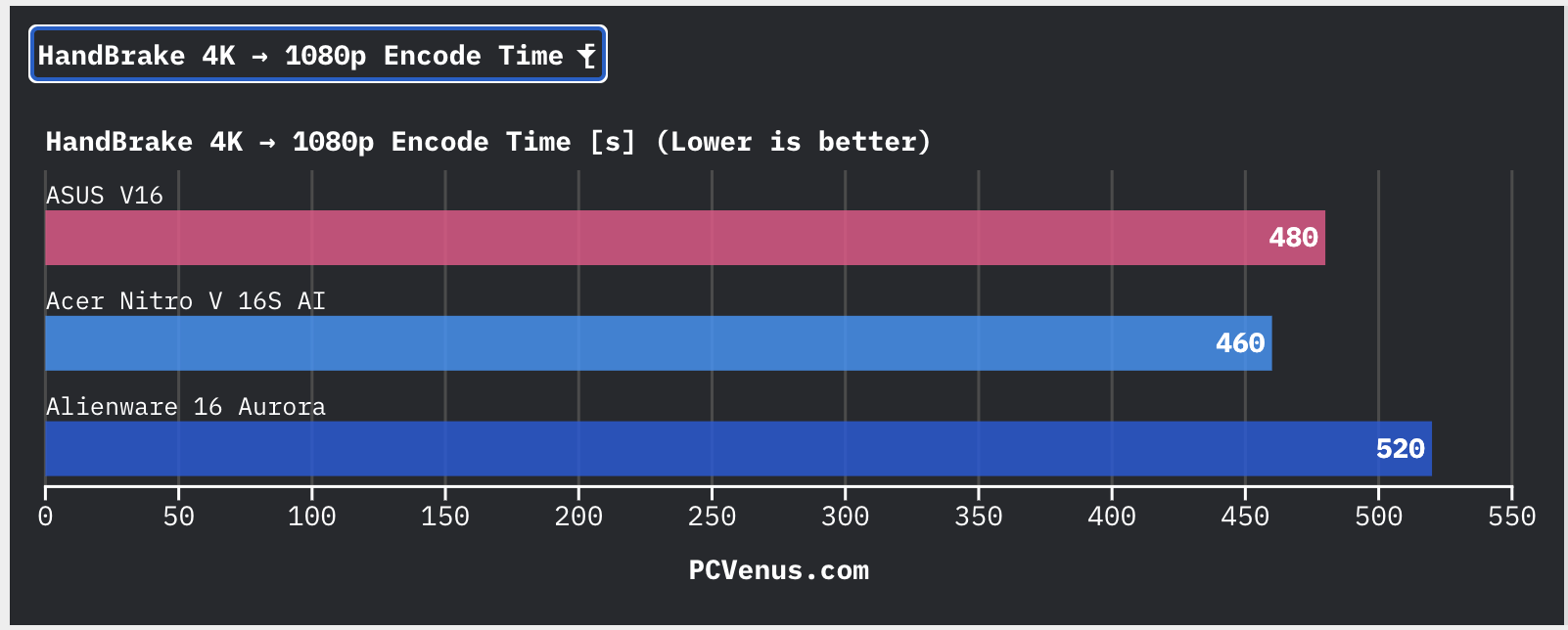
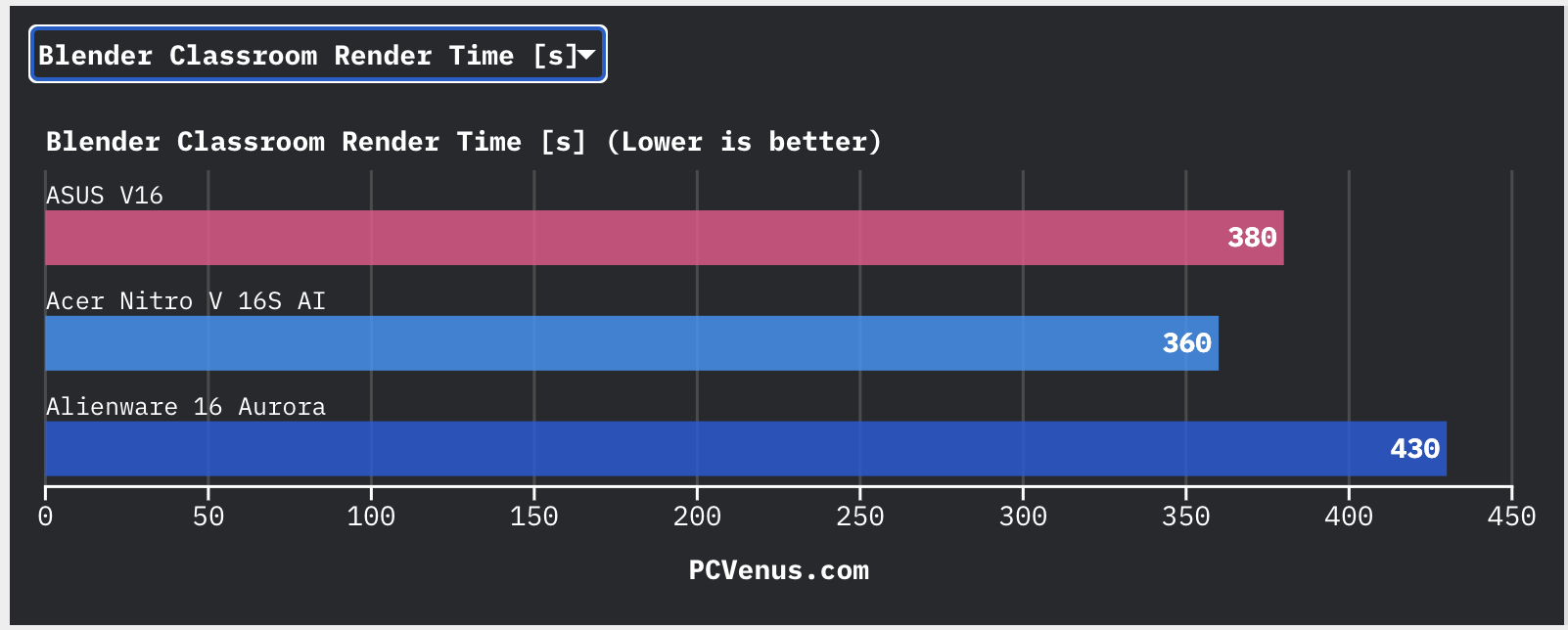
Read the Full Acer Nitro V 16S AI Review
Pros
✔ Powerful AMD Ryzen 7 260 Processor
✔ NVIDIA GeForce RTX 5060 with Ray Tracing & DLSS
✔ 16-inch WUXGA IPS Display with 180Hz Refresh Rate
✔ 100% sRGB Color Accuracy
✔ 32GB DDR5 RAM and 1TB Gen 4 SSD
Cons
✘ Slightly Heavy for Everyday Carry
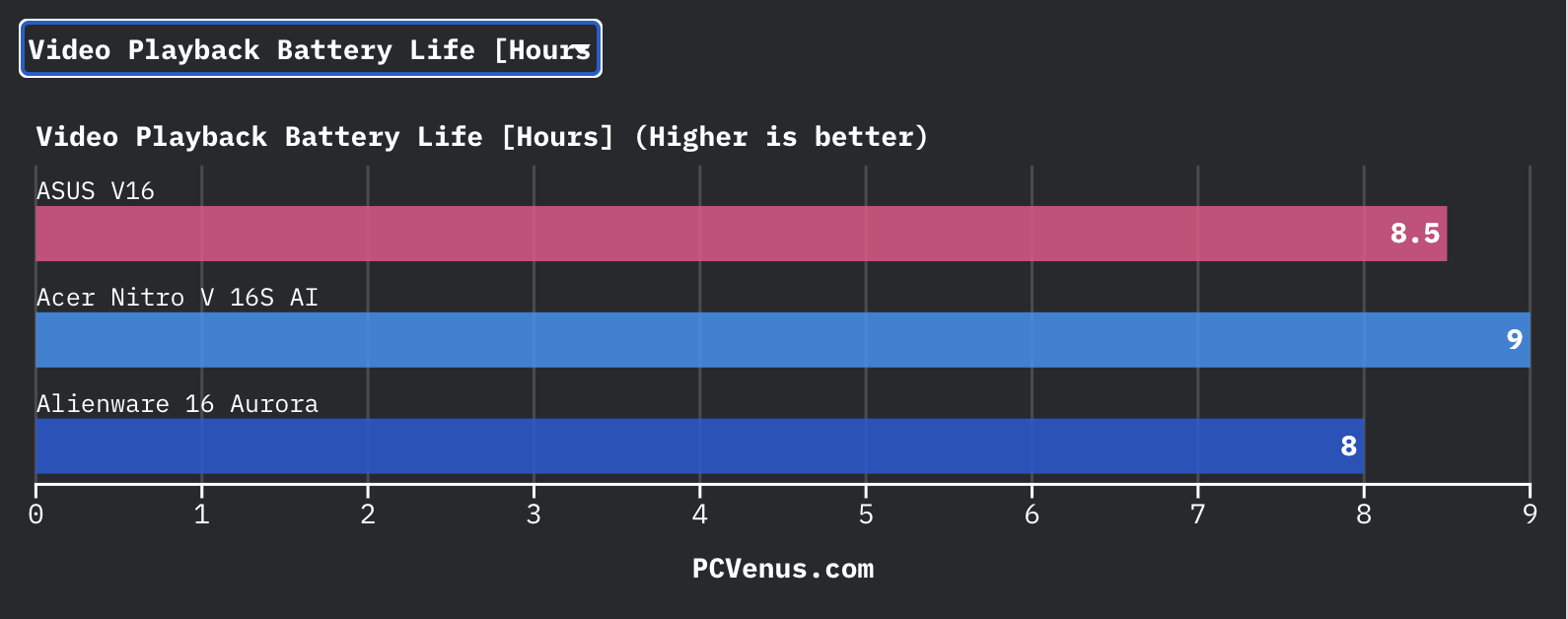
✘ Battery Life Could Be Better for Non-Gaming Use
✘ Bulky Chassis Compared to Ultrabooks
Best High-Performance Gaming Laptop
4. HP OMEN 16
Key Specs
| Processor | AMD Ryzen 9 8940HX |
| Graphics | NVIDIA GeForce RTX 5060 |
| Memory | 32 GB DDR5 |
| Storage | 1 TB PCIe SSD |
| Display | 16-inch 2K (1920 × 1200), 144 Hz |
| Weight | 5.42 lbs (2.46 kg) |
Check Current Pricing
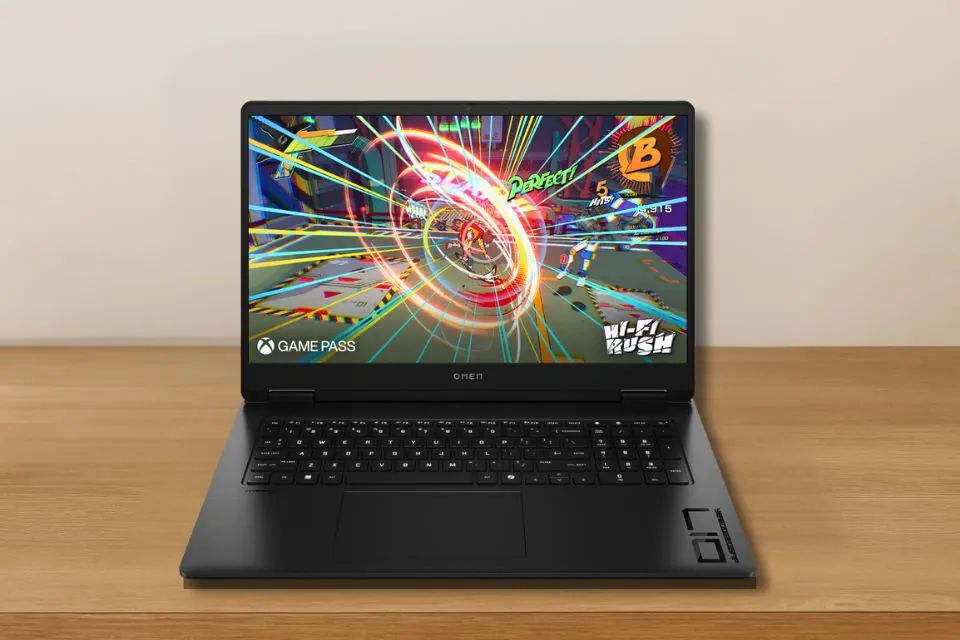
This HP OMEN 16 can provide a PC-like gaming experience and rapid performance. This excellent gaming laptop can easily handle even the most demanding modern games.
If you’re looking for a gaming laptop with desktop-like performance, go no further than the HP OMEN 16. Its 16-inch display will give you a fantastic wide-view experience.
Performance
This laptop will satisfy you when it comes to gaming performance. It is powered by an AMD Ryzen 9-8940HX processor. The processor has maximum clock boost technology, allowing it to reach up to 5.3 GHz for intensive activities.
Because it features a dedicated NVIDIA GeForce RTX 5060 graphics card, the GPU will have no problems. You can play games with a high refresh rate and maximum settings. As a result, it can smoothly run practically all modern AAA games at high-graphics settings.
It offers 1 TB PCIe NVMe SSD storage and 32 GB DDR5 memory, allowing smooth multi-tasking and providing quick game loading times. You can easily upgrade to higher storage or memory configurations if you need more memory or storage.
The HP OMEN 16 has a lithium-ion battery. Playing modern games or multitasking continuously can last for several hours once fully charged, depending on usage.
Design and Display
A 16-inch 2K display, IPS technology, and anti-glare support come standard on this gaming laptop. This 144Hz screen has a fast response time and a resolution of (1920 × 1200).
It can provide good brightness levels suitable for indoor and outdoor use. It offers vibrant colors and good image quality.
Other Features
TheThe keyboard offers distinct tactile keys, and the white backlit keyboard may be adjusted in different states. It includes two physical buttons and a huge sensitive touchpad.
In terms of ports and connectivity, It contains-
1 x USB Type-C port (10Gbps, USB Power Delivery, DisplayPort 1.4)
3 x USB Type-A ports
1 x HDMI 2.1 port
1 x RJ-45 jack
1 x Headphone/microphone combination jack
It has a substantial weight of 5.42 pounds (2.46 kg), and the design may seem a bit unique. Despite not being the most portable option, it is nevertheless durable and well-designed.
The laptop can stay cool with demanding hardware even after a long game session.
If you want to connect to the Internet wirelessly, the latest Bluetooth 5.3 and WiFi 6E technologies provide three times quicker rates than the previous version.
The HP OMEN is a powerful gaming laptop capable of handling the latest games and demanding work. Thanks to the 144Hz crystal clear screen and backlit keyboard, this is a terrific choice for professional gamers and designers.
Pros
✔ Powerful Ryzen 9-8940HX Performance
✔ Smooth NVIDIA GeForce RTX 5060 Graphics
✔ 16-inch 2K Display with Good Color & Refresh Rate
✔ Large 32 GB DDR5 RAM + 1 TB SSD Storage
✔ Solid Build with Effective Cooling
Cons
✘ Battery Life Could Be Better
✘ No RGB Per-Key Lighting (Backlight Only)
✘ Slightly Heavy Compared to Ultraportables
Best for Regular Gaming


5. Lenovo Legion 5i
Key Specs
| Processor | Intel Core i7-13650HX |
| Graphics | NVIDIA RTX 5050 |
| Memory | 16GB DDR5 |
| Storage | 512GB SSD |
| Display | 15.3-inch 2K WQXGA, 120Hz |
| Weight | 4.6 lbs (2.1 kg) |
Check Current Pricing
For a good reason, the Lenovo Legion 5i gaming laptop is the most recent addition to the popular gaming laptop series. It offers an excellent blend of size, build quality, and performance.
This laptop is ideal if you’re looking for Lenovo’s best gaming laptop under $1200. Its latest Intel Central processing unit will deliver excellent results.
Performance
The Lenovo Legion 5i is a powerful gaming laptop with the latest and most powerful hardware components for under $1,200. There is no better chipset in this price range than Intel’s Core i7-13650HX processor.
It features 14 high-performance cores, 20 threads, and a 24MB cache, enabling it to tackle any demanding tasks.
The most crucial feature is the dedicated NVIDIA GeForce RTX 5050 graphics card with additional dedicated GPU memory.
Some notable features, such as the visual fidelity of real-time ray tracing-RTX Gaming, have increased the game’s performance.
Furthermore, there is 16GB DDR5 memory, ensuring it works well during intense gaming situations.
It also features a 512GB M.2 PCIe SSD for storing important documents and game data, ensuring speedy loading times and rapid data access.
Display and Design
he Lenovo Legion 5i gaming laptop has a 15-inch 2K WUXGA (1920 × 1200) IPS display, enabling full-fidelity gaming with speed and color clarity.
The screen has a refresh rate of up to 165Hz, which allows the game to run smoothly and at high settings.
Undoubtedly, this is an outstanding gaming laptop with a 60Whr lithium battery that provides up to 70% capacity upon charging for under 30 minutes via USB Type-C fast charging, and delivers reliable battery performance for daily gaming and productivity tasks.
Other Features
The keyboard comes with a white backlight. As a result, RGB isn’t supported.
It has all the standard I/O ports and connection possibilities, including USB-C / Thunderbolt 4 ports that support high-speed data transfer and DisplayPort output, along with HDMI and an SDXC card slot. It connects to the Internet via wireless Wi-Fi 6 / Wi-Fi 6E and Bluetooth 5.3.
The laptop is perfect for gaming because it weighs 4.62 pounds (2.1 kg). The computer is equipped with the most recent Windows 11 Home operating system.
Pros
✔ Powerful Gaming Laptop
✔ Strong Intel Core i7-13650HX Processor
✔ Smooth NVIDIA GeForce RTX 5050 Graphics Performance
✔ 2K WUXGA IPS Display with High Refresh Rate
✔ Enough RAM and Fast SSD Storage
✔ Solid Build Quality
✔ Effective Cooling System
Cons
✘ Battery Life Could Be Better
✘ Slightly Heavy for a 15-inch Laptop
✘ No Fingerprint Reader
Read our Lenovo LOQ 15 Gaming Laptop Review
Best Large-Screen Gaming Laptop
6. MSI Cyborg 17
Key Specs
| Processor | Intel Core 7-240H |
| Graphics | NVIDIA Geforce RTX 5060 |
| Memory | 16GB DDR5 |
| Storage | 1TB SSD |
| Display | 17.3-inch FHD 144Hz |
| Weight | 5.29 lbs (2.4 kg) |
Check Current Pricing
MSI Cyborg 17 is a very thin and slim gaming laptop. It is light and portable and has also proven to be a cost-effective and efficient gaming machine.
A Taiwanese notebook manufacturer, MSI has been releasing high-quality, powerful gaming laptops at reasonable costs.
The MSI Cyborg 17 is one of the great devices, at around $1,200, and it is one of the best 17.3-inch gaming laptops on the market.
Performance
This is a gaming laptop with a powerful Intel Core 7-240H processor.
It also has a dedicated NVIDIA GeForce RTX 5060 graphics card with 8GB GDDR6 VRAM, which offers superb gaming performance.
The MSI Cyborg 17 gaming laptop has 16GB DDR5 5600 MHz memory and a 1TB NVMe M.2 SSD to manage the extra demand on the computer’s resources when playing games that support user-generated content.
The CPU will supply you with a maximum frequency of up to 4.9 GHz if you perform strenuous tasks, and it also features a high-capacity cache.
This gaming laptop is equipped with a lithium-polymer battery, and its battery life is impressive, like a typical gaming laptop. It can last up to several hours, even when handling intensive or multiple tasks.
Display and Design
It has a 17.3-inch FHD display with a 16:9 aspect ratio. The 1920 × 1080 screen resolution, thin bezel, and 144Hz refresh rate are ideal for gaming and can deliver a widescreen experience to consumers.
Users can see the keys in the dark thanks to the large touchpad and backlit keyboard.
The translucent black case and other exposed portions are pretty attractive. However, it remains among the best gaming laptops in its price range, with stunning screens and designs.
Other Features
It’s a portable machine weighing 5.29 pounds (2.4 kg) and has a slim and attractive design.
The Windows 11 Home operating system powers the laptop and features MSI Cooler Boost technology with shared heat-pipe cooling to cool down your device.
Even if you spend most of your time outside, you can take this laptop with you, which will easily fit in your backpack.
This laptop has a variety of ports and interfaces, including-
1 x HDMI
1 x USB Type-C
2 x USB-A ports
1 x RJ-45 cable connector
1 x audio combo jack
Pros
✔ Large 17.3-inch FHD 144Hz Display
✔ Powerful Intel Core 7-240H Processor
✔ NVIDIA GeForce RTX 5060 with 8GB GDDR6
✔ 16GB DDR5 RAM and 1TB NVMe SSD
✔ Slim and Lightweight for a 17-inch Laptop
✔ Unique Translucent Black Design
Cons
✘ Average Battery Life
✘ Limited USB-C Ports
✘ No Thunderbolt Support
Buying Guide: How To Choose a Good Laptop for Gaming?
Before purchasing a gaming laptop, you should be familiar with the laptop’s or PC’s components, such as the CPU, GPU, RAM, storage, portability, ports, and connectivity.
You will have a lot of trouble executing any activity if you need help understanding all of the components on your laptop.
Purchasing a laptop is a long-term investment, and picking a powerful laptop by gradually raising your budget is the best option.
As we all know, many individuals continue to replace their mobile phones or other electronic gadgets every one or two years, just as you can’t upgrade your laptop.
This is why it is essential to understand all of a laptop or PC components before deciding which one will provide you with the most power.
If your budget permits you to get a gaming laptop for less than $1200, machines with a strong CPU, smooth GPU, larger RAM, and storage are advised.
If you need help deciding on laptop components around $1200, we’ve included some minimal and recommended specs below; please look.
Minimum and Recommended System Requirement: Gaming Laptop Under 1200
| Specs | Minimum | Recommended |
|---|---|---|
| Screen | Full HD (1920 x 1080) | Full HD (1920 x 1080) or more |
| CPU | 10th Gen Intel Core i5 or equivalent AMD Ryzen 5 | 12th, 13th, or 14th Gen Intel Core i5 or equivalent AMD Ryzen 5,7 |
| GPU | Dedicated NVIDIA GeForce GTX 1600 Series | Dedicated NVIDIA GeForce RTX 3000 to 5000 Series |
| Memory | 8GB | 16GB or more |
| Storage | 128GB SSD | 512GB SSD or more |
| Battery | 2 Hour | 4 hours or more |
If you’re on a tight budget, a laptop with the exact minimum system requirements is an option. However, don’t always think of a cheaper option because you can obtain a full HD screen, 13th generation i5 or i7 CPUs, or AMD Ryzen 5, 7 processors in this price range.
In addition to the powerful processor, the $1,200 gaming laptop will come with a dedicated graphics card and 16GB of 512GB RAM.
If you want a dedicated gaming laptop, don’t worry about the battery life because gaming laptops consume more power.
Choose a Trusted Brand
From low-cost laptops to high-end gaming consoles, Asus has many products. The brand provides technical assistance as well as social media platforms.
ASUS business and gaming laptops are made of high-quality materials and are perfect for budget-conscious consumers. It’s a cost-effective computer with an excellent screen, long battery life, and solid performance. In 2026, it was also one of the world’s finest laptop brands.
Lenovo might be the solution if you seek a powerful, stylish, affordable laptop.
With a market share of nearly 25%, it is a genuine candidate for the finest laptop brand in the world. Lenovo provides excellent customer service and support worldwide, in addition to high-quality laptops.
Acer is recognized for its remarkable flexibility, offering anything from low-cost laptops for students to high-end gaming systems for professionals. Its low-cost variants make it a popular choice among people on a tight budget.
The benefit of MSI is that they offer a wide range of laptops. The MSI brand is known for its high-end graphics cards and gaming systems, but some budget-friendly models are available. MSI is someone other than the one to go if you’re searching for a low-cost gaming laptop.
Dell is an excellent brand when ordering a new laptop or computer. They provide high-quality machines with extraordinary battery life and performance. Although some of their models are more expensive than other companies, their dedicated following shows they are worth the investment.
The company sells a selection of laptops capable of handling even the most demanding jobs.
The HP isn’t for you if you’re looking for a cheap laptop. The brand is known for its expensive costs, and finding an excellent notebook for the under-budget category takes a lot of work.
HP had a good year in gaming with the Pavilion 15 and the more expensive Omen 15 and Omen 17. HP PCs are known for their dependability, but they may be costly.
Frequently Asked Questions (FAQs)
Why is a dedicated GPU Essential for Laming Laptops?
You must have a dedicated graphics card if you want to buy a gaming laptop for less than $1,200.
The integrated graphics card is only suitable for daily tasks such as browsing the Internet and watching movies.
If you perform graphics-related tasks, such as rendering, games, etc., you will quickly know how much your laptop needs to have a dedicated graphics card.
Some modern games, such as Call of Duty, Cyberpunk 2077, Fortnite, etc., use more and more graphics. So if you want to run on a laptop, you should have a dedicated one instead of one with less power4.
Dedicated graphics cards have some advantages or use more powerful components for rendering, so they take less time to complete the task than shared graphics cards.
Therefore, laptops should have dedicated GPUs to enjoy AAA-level games with high refresh rates and smooth settings.
In addition, you can get a laptop equipped with any NVIDIA GeForce RTX 2000 series and RTX 4000 series to complete all these heavy tasks.
How Much Should I Spend On a Gaming Laptop?
It is entirely dependent on your needs. You can effortlessly run modern games and do heavy tasks in stealth if you invest more money and see decent specifications.
However, if you have a limited budget, you will be limited to playing entry-level games or completing daily activities. You’ll have to pay more to acquire powerful components for robust gaming laptops.
If you spend around $500 on a gaming laptop, you can play entry-level games without difficulty.
You can get a gaming laptop with an NVIDIA GeForce GTX 1650 Ti entry-level dedicated graphics card for $600 to $700. On $800 to $900 computers, though, it can run AAA games and do heavy tasks.
Buy a gaming laptop for less than $1,000. You’ll be able to perform AutoCAD, video editing, and other tasks quickly, but if you spend $1200, you’ll be able to play modern games like League of Legends, Valorant, and Minecraft.
Do FPS Matter for Gaming?
FPS refers to the number of frames displayed per second. FPS matters because a higher FPS will ensure you can see more gaming details.
While many games are graphically demanding and require high frame rates, your average frame rate won’t make a difference. Higher frame rates mean smoother gameplay, less input lag, and less stuttering.
This is also important because high FPS allows you to see more enemies.
Final Words
You’ll quickly get a better gaming laptop for under $1,200, so you should keep the same when choosing components. You can expect a gaming laptop’s largest and most powerful processor, dedicated graphics, more RAM, and storage.
In this price range, you’ll get processors ranging from Intel Core I5 to 7, and in AMD, you’ll also get Ryzen 5 and Ryzen 7.
Gaming laptops aren’t just for gaming; they can efficiently run all the heavy lifting and content creation.
The ASUS ROG Strix G16 would be the best choice on this list because its processor and dedicated new graphics card are very powerful, and it has more and more RAM and storage space. The HP Omen is also a good choice if you want a portable one.
This article has cleared all your doubts about the best $1,200 gaming laptop.
If you still have questions and suggestions, please write us in the comment box, and we will reply as soon as possible.