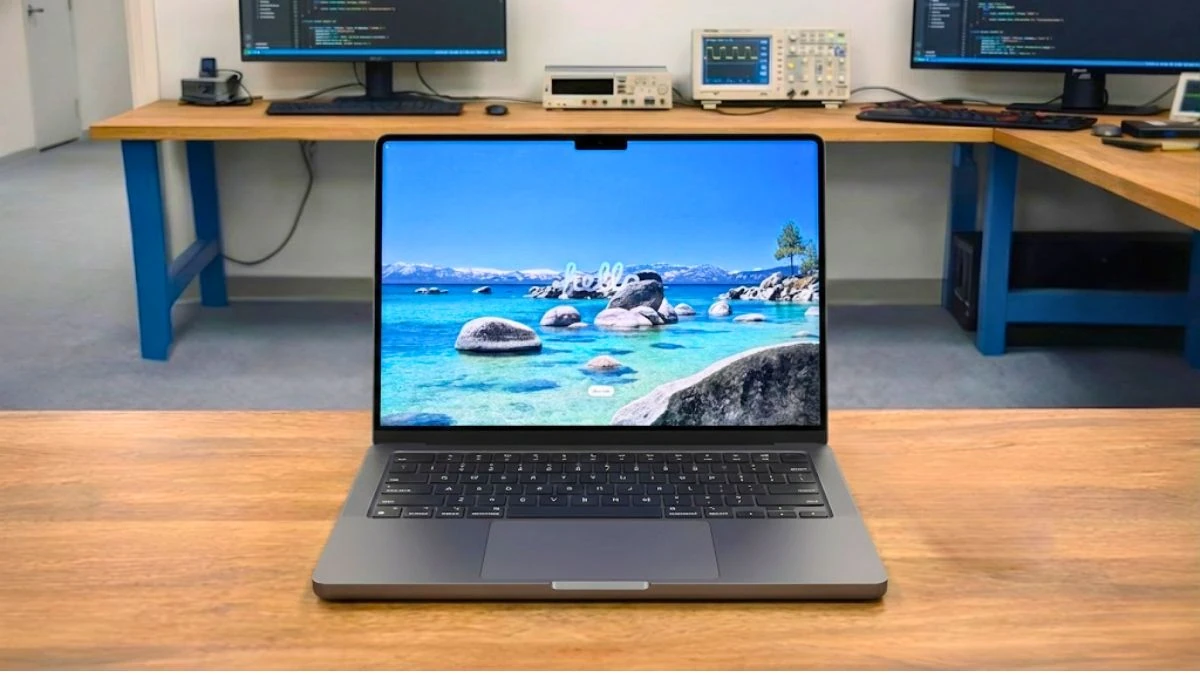
Apple’s MacBook Pro has always been designed for people who do serious work on their laptops. With the new MacBook Pro M5, Apple isn’t trying to reinvent the look of the laptop. Instead, the focus is on making it perform better during extended, real-world use.
We tested the MacBook Pro M5 not just as a benchmark device, but as a daily work machine. For several days, we used it for coding, photo editing, video editing, web browsing, and long writing sessions.
The goal was simple: to see how the laptop performs when used as a professional tool rather than just subjected to quick tests.
The MacBook Pro M5 is clearly not for the average user. It’s designed for developers, content creators, and power users who need consistent performance throughout the day.
What’s New in the MacBook Pro M5?
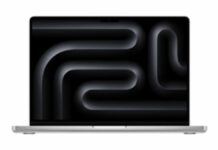
In our initial impressions, the MacBook Pro M5 looks identical to the previous M4 series model. Apple hasn’t made any changes to the design, display size, or port layout, so those expecting visual changes will find it a familiar machine.
The main update is the new Apple M5 chip, built on an improved 3-nanometer process. In everyday use, this translates to smoother performance during demanding tasks and improved power efficiency. When working with large files or running demanding applications for extended periods, the system remained responsive without any noticeable slowdowns.
The M5 utilizes a mix of performance and efficiency cores. During light tasks such as browsing, writing, and email, the laptop remained cool and quiet. When switching to heavier tasks like code compilation or video export, the performance scaled smoothly without sudden fan noise or throttling.
Apple is also placing a greater emphasis on on-device AI. The updated Neural Engine is designed to handle machine learning tasks locally. While many macOS AI features are still rolling out, the hardware appears ready for future updates, even if the changes in everyday use seem subtle today.
Recent Updates
December 31, 2025: Full review published following extended hands-on testing of the MacBook Pro M5, including real world performance, battery life, thermals, AI behavior, and comparisons with Apple MacBook M4 series, and high-end Windows alternatives.
Apple MacBook Pro M5 Configuration of this Review
- Release Date: October 2025
- Model Number: MDE04LL/A
- Laptop Type: Professional / Creative / Productivity
- Series: MacBook Pro
- CPU: Apple M5 (10-Core)
- GPU: Apple M5 (10-Core)
- RAM: 16GB
- Storage: 512GB SSD
- Display: 14.2 inch, 3024 × 1964 pixels
Check Current Price
Click Here to See Full Specifications
Full Specifications
Processor (CPU)
| Processor Model Name | Apple M5 (10-Core) |
| Processor Speed | Up to 4.61 GHz |
| Cores | 10 (4P + 6E) |
| Threads | 10 |
| L3 cache | 16 MB |
| Fabrication process | 3 nm |
Video Card
| Graphics Processor | Apple M5 GPU (10-core) |
| Graphics Memory Capacity | System Shared |
| Graphic Type | Integrated |
| Memory Type | LPDDR5X |
| GPU Frequency | Base: 500 MHz Boost Clock: 2240 MHz |
| Fabrication process | 3 nm |
RAM
| Memory Capacity | 16 GB |
| Channels | 2×8 GB |
| Memory Type | LPDDR5X |
| Frequency | 9600 MHz |
| Memory Slots | Soldered |
| Upgradable | No |
| Maximum RAM size | 32 GB |
Storage
| Storage Capacity | 512 GB SSD |
| Storage Type | SSD (M2) |
| Drive Interface | PCIe Gen 4.0 x4 |
| Channels | 2×256 GB |
| Total Slots | 2 |
| Upgradable | No |
Display
| Screen Size | 14.2 inches |
| Screen Resolution | 3024 × 1964 pixels |
| Refresh Rate | 120 Hz |
| Display Screen Type | Liquid Retina XDR |
| Display Screen Technology | True Tone technology |
| HDR Support | Yes, HDR10 |
| PPI | 254 ppi |
| Pantone Validated | P3 Wide Color |
| Response Time | 48 ms |
| Touch Input | No |
| Coating | Glossy (Antireflective) |
| Maximum Brightness | Up to 1000 nits |
| Contrast | 1000000:1 |
| sRGB Color Gamut | 100% |
| Sync Technology | No |
Battery
| Capacity | 72.4 Wh |
| Full Charge Time | 1:30 Hr |
| Battery Type | Li-pro |
| Removable | No |
| Fast Charging | Yes |
| USB Power Delivery | Yes, 100 W |
| Charging Connector Location | Left, Right |
| Charging Power | 70 / 96 W |
| Output | 20V/4.8A |
| Charger Weight | 232 / 367 Grams |
Frame
| Weight | 1.55 kg (3.42 lbs) |
| Dimensions | 312.6 x 221.2 x 15.5 mm 12.31 x 8.71 x 0.61 inches |
| Area | 691 cm2 (107.2 inches2) |
| Screen-to-Body Ratio | ~84.6% |
| Side Frames | 3.4 mm |
| Material | Aluminum |
| Colors | Black, Silver |
| Transformer | No |
| Screen Opening Angle | 135° |
Thermal Management
| Cooling Type | Active |
| Liquid Metal | No |
| Evaporation Chamber | No |
| Number of Coolers | 2 |
| Noise Level | 48 dB |
Sound
| Audio Chip | Apple-designed Six-Speaker System |
| Audio Format | Dolby Atmos, Spatial Audio |
| Speaker Power | 4.2 (4 tweeters and 2 woofers) |
| Dolby Atmos | Yes |
| Max. Volume | 84.8 dB |
| Microphones | 3 |
| Noise-Canceling Technology | Yes |
| Audio Recording | Standard |
Communications
| Wi-Fi version | 6E (802.11ax)8 |
| Bluetooth | v5.3 |
| Fingerprint Scanner | Yes |
| Drive | No |
| Webcam | Above the display |
| Webcam Resolution | 1920 x 1080 |
IO and Ports
| USB-A | No |
| USB Type-C | 3x USB 4.0 |
| Thunderbolt | Thunderbolt 4 |
| HDMI | 1x HDMI 2.1 |
| Display Port | No |
| VGA | No |
| Audio Port (3.5mm) | Yes |
| Ethernet (RJ45) | No |
| SD Card Reader | Yes |
| Separate Charging Port | Yes |
Keyboard and Touchpad
| Key Type | Island |
| Numeric Block | No |
| Backlight | Yes |
| Key Travel | 1 mm |
| Keyboard Type | Magic, Force Touch Glass Trackpad |
| Keyboard Layout | macOS QWERTY |
| Size | 13.2 × 8.1 cm |
| Surface | Glass |
| Windows Precision | No |
Apple MacBook Pro M5: Full Review and Test
Design and Build Quality (Hands-on Experience)
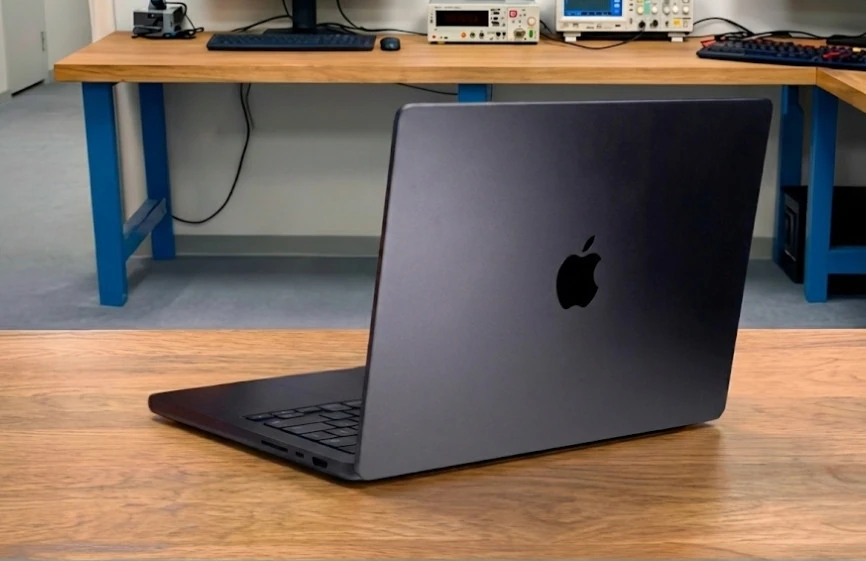
As soon as we picked up the MacBook Pro M5, it felt solid and well-built. The aluminum body is sturdy, with no noticeable flex even when held with one hand, giving the impression that this laptop is designed not just for portability but for long-term use.
We carried the laptop in a backpack and used it on desks and sofas during our daily work. It weighs approximately 3.4 pounds (1.55 kg). This is heavier than thinner ultrabooks, but the weight feels evenly distributed and helps keep the laptop stable during use. The slightly thicker design also helps the system manage heat more comfortably during sustained workloads.
The hinge feels smooth and durable. We were able to open the lid with one hand, and the screen remained firmly in place while typing. These little things make a big difference when the laptop is used for hours every day.
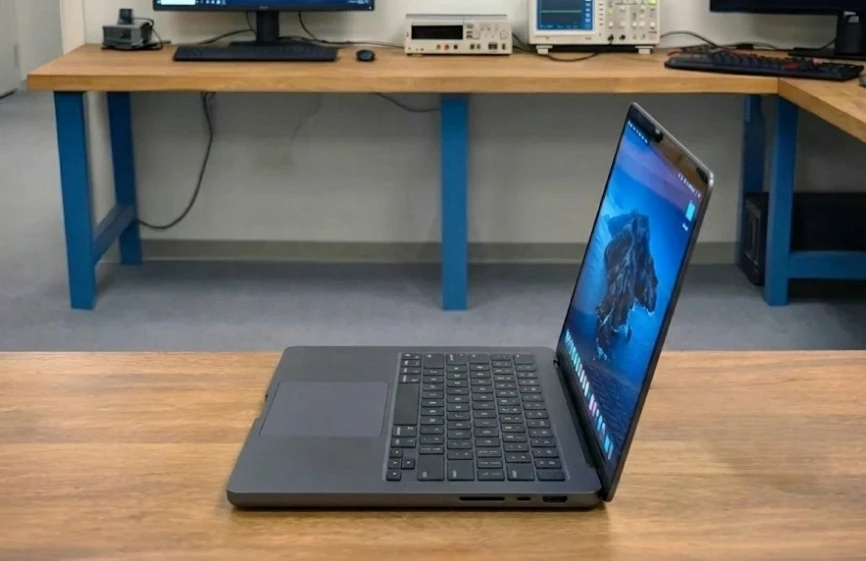
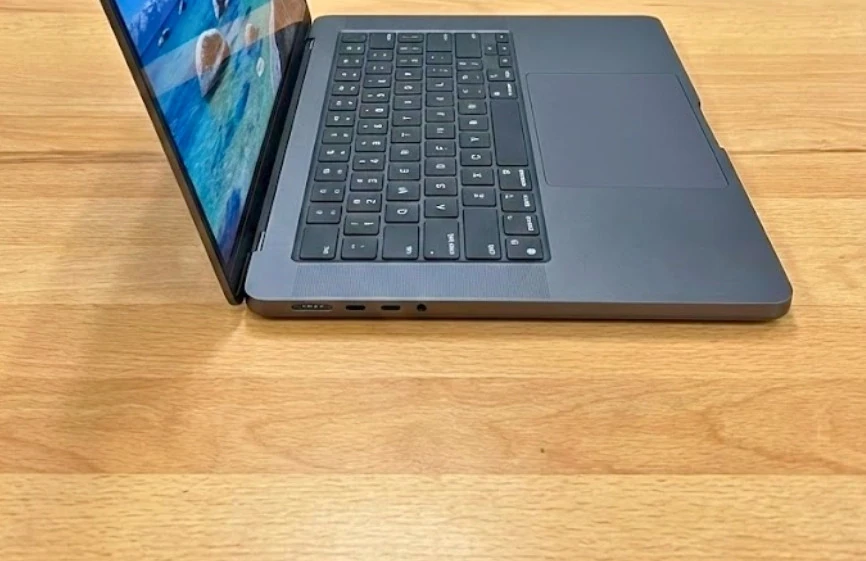
The port selection is practical. During testing, the built-in HDMI port and SD card reader were genuinely useful for connecting external displays and transferring files without adapters. That said, the overall design has remained largely unchanged for several generations, so users looking for features like a touchscreen or Face ID won’t find them here.
Display Analysis – How the Screen Performs in Real-World Use
We used the MacBook Pro M5 display for extended sessions of writing, coding, photo editing, and video editing and playback. The screen was tested in various lighting conditions, including near windows and under indoor lighting.
The 14.2-inch Liquid Retina XDR display with a 3024 × 1964 resolution looks sharp and clear. Text remains easy to read even during long work sessions, resulting in less eye strain compared to standard laptop displays in this size range. However, it might feel small if you’re used to a 16-inch laptop.
The display supports ProMotion up to 120Hz, making scrolling and animations appear smooth. While this doesn’t improve raw performance, it significantly enhances comfort during everyday tasks such as reading long documents, browsing, and working on timelines. Some competing laptops at this price point still use fixed 60Hz panels, where this difference is easily noticeable.
Brightness was excellent in real-world use. The display remained clearly visible even in brightly lit rooms, matching Apple’s claim of up to 1,000 nits of sustained brightness. This is an area where the MacBook Pro M5 performs particularly well compared to OLED laptops, which often compromise peak brightness for higher contrast.
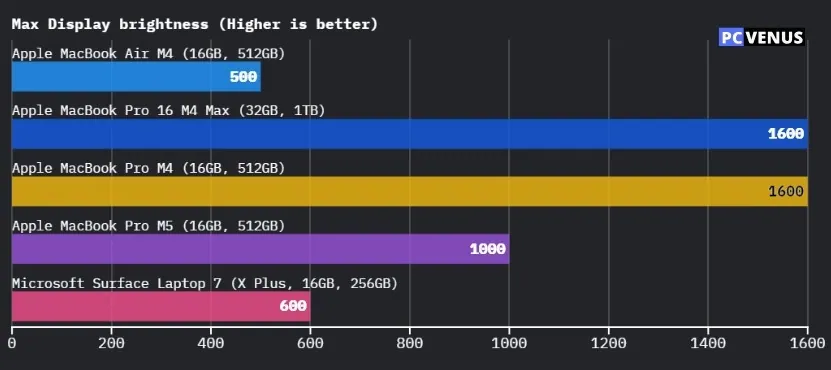
Color accuracy was reliable, with photos and videos appearing natural and consistent across applications. This display is well-suited for creative work where color consistency matters more than visual punch.
It’s still a mini-LED display rather than OLED, meaning that deep blacks aren’t quite as perfect as some competing OLED laptops, and some blooming may be visible in extreme HDR scenes. A glossy finish can also reflect light in certain environments, which is something to consider for users who frequently work near brightly lit windows.
Keyboard, Trackpad, Webcam, and Audio
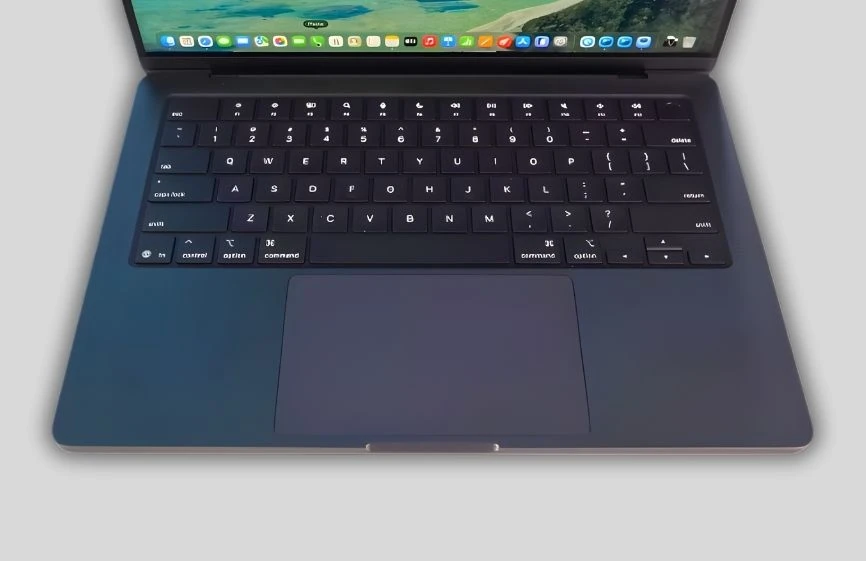
We spent a several days, attending video calls, and listening to audio on the MacBook Pro M5. These aspects matter because they impact comfort more than raw performance in everyday use.
The keyboard feels comfortable and familiar. The key travel is well-balanced, and typing remained effortless even after several hours, making it suitable for writers, developers, and students who type frequently. However, Apple hasn’t made any changes to the keyboard this year, and compared to other premium laptops in this price range, it lacks any new features or customization options. Users expecting a noticeable improvement over the previous generation may find the experience largely the same.
The trackpad remains one of the best trackpads on any laptop. It’s large, smooth, and very precise, with gestures working consistently during everyday use. While many high-end Windows laptops have improved their trackpads, Apple still maintains an edge in accuracy and reliability here, especially for multi-gesture workflows.
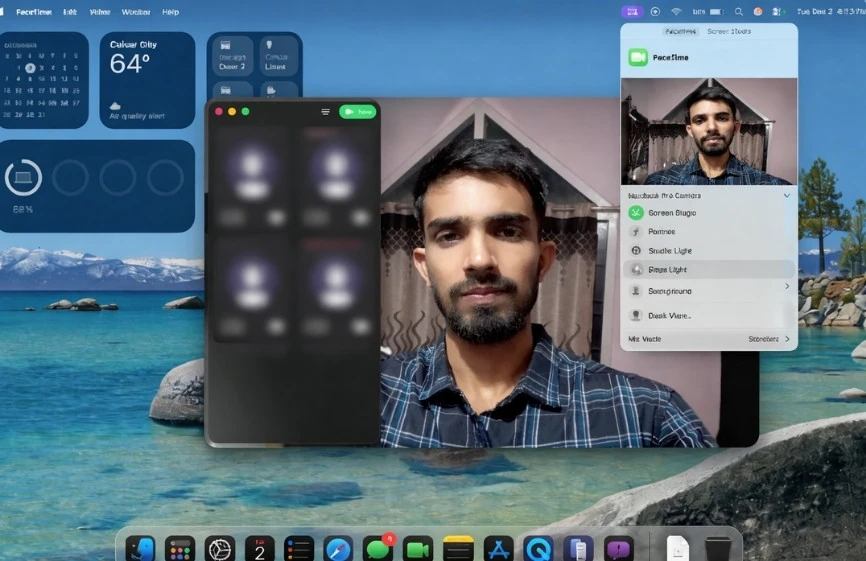
The 1080p webcam delivered clear video quality during calls, with natural skin tones and stable exposure in varying lighting conditions. However, some competing laptops now offer higher-resolution webcams or additional features like facial recognition hardware. At this price point, the lack of Face ID still feels like a missed opportunity.
The speaker quality is good for a laptop of this size. Voices were clear, and music sounded balanced at normal listening levels. For meetings and media playback, the speakers perform well, although users doing serious audio work will still prefer external speakers or headphones, as is common with most laptops in this category.
How We Tested the MacBook Pro M5
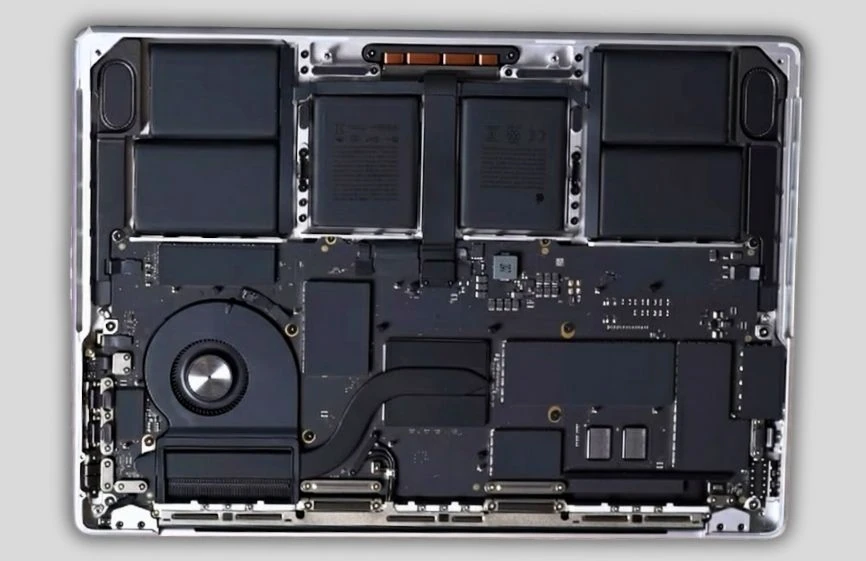
We tested the MacBook Pro M5 for 14 days as a daily work laptop, not just as a short-term benchmark device. The system was used continuously over multiple workdays to understand how it performs during real-world professional use, rather than just for quick performance tests.
During testing, the MacBook Pro M5 was used on battery power and plugged in, under typical indoor conditions without any external cooling or performance tuning. We focused on how the laptop performs during extended sessions, where heat, noise, and consistency matter more than peak speeds.
Daily use included writing, web browsing with multiple tabs, email, and long coding sessions. For more demanding tasks, we worked with large photo libraries, edited and exported video projects, rendered test scenes, and handled large files to evaluate sustained performance.
Standard benchmarks such as Geekbench, Cinebench, and graphics tests were used to measure CPU and GPU performance. These results were used to confirm what we observed during real-world use, rather than being treated as isolated scores.
Battery life was tested using a mixed workload at a comfortable screen brightness, with Wi-Fi enabled and background apps running normally. We also monitored fan noise, surface temperatures, and system responsiveness throughout the day.
This approach allowed us to evaluate how the MacBook Pro M5 performs as a true professional tool, not just how it scores on charts.
CPU Performance – How Much Faster the M5 Really Is
While using the MacBook Pro M5 every day, the laptop felt fast and steady, especially during long work sessions. Apps opened quickly, multitasking stayed smooth, and performance did not slow down even after hours of heavy use. The benchmark scores help explain why this happens.
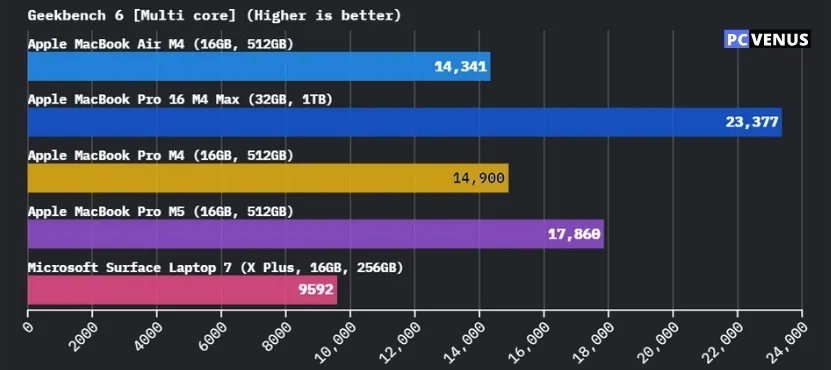
In Geekbench, the MacBook Pro M5 scored 4,263 in single-core and 17,860 in multi-core performance. Single-core speed affects everyday tasks like opening apps, browsing the web, and typing documents. The benchmarks is significantly higher sustained performance than the fanless M4 Air, which mainly shows up as smoother and quicker responses in daily use.
Multi-core performance matters more for heavy work such as video exporting, code compiling, and running many apps at the same time. Here, the M5 shows a larger gain. Its multi-core score is roughly 15–20% higher than the previous M4 models, which explains why demanding tasks feel more stable when they run for a long time.
The difference becomes clearer in Cinebench R23, which tests how the CPU performs under continuous load. The MacBook Pro M5 scored 22,400 in multi-core, compared to about 19,800 on the M4 Pro and much lower results on the M4 Air. This means the M5 delivers around a 13–15% boost over the M4 Pro and nearly double the performance of the M4 Air in long, CPU-heavy workloads.
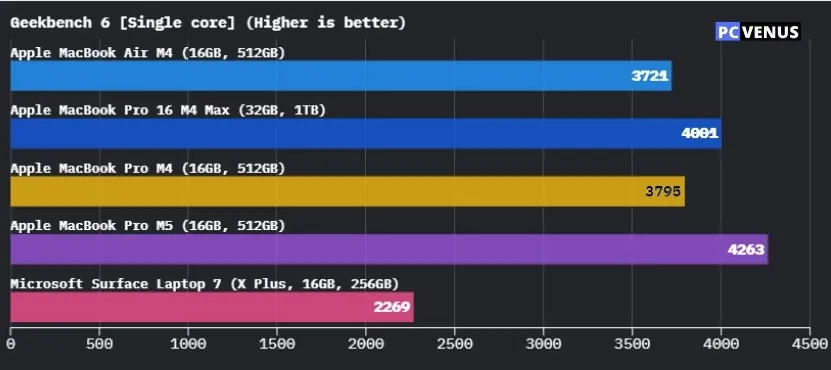
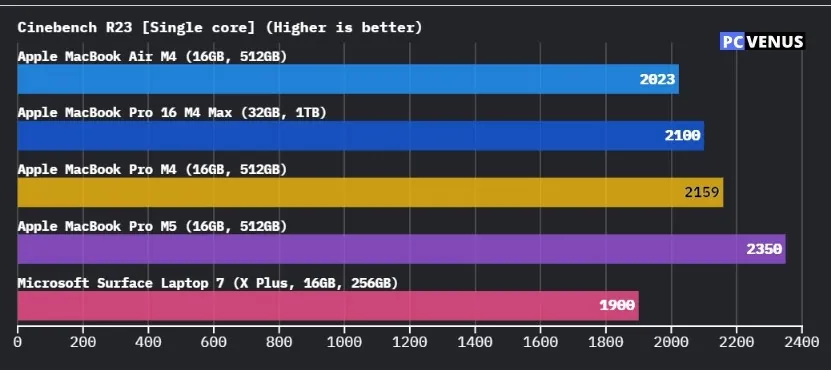
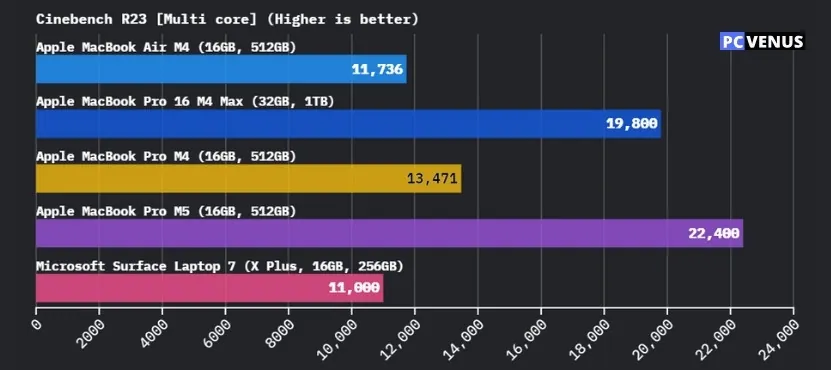
In real use, this does not mean everything suddenly feels twice as fast. Instead, it means the MacBook Pro M5 keeps its speed longer. Tasks like long video exports or large file processing finish more reliably, without the system slowing down midway.
For users upgrading from an M4 Air, the performance jump is easy to notice. For those coming from an M4 Pro, the improvement is more about better consistency during long tasks rather than everyday speed.
GPU Performance – Real-World Use for Editing and Light Gaming
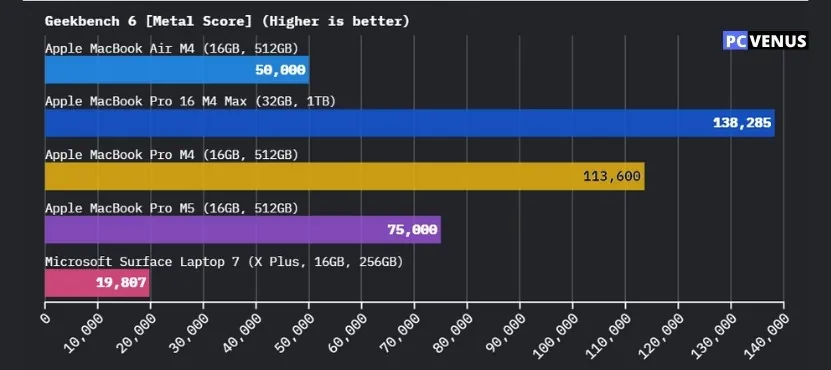

We tested the MacBook Pro M5 GPU using real-world creative tasks such as video editing, photo work, 3D previews, and some light gaming. Our goal was to see how it performs during everyday creative workflows, not just on benchmarks.
In Geekbench Metal, the MacBook Pro M5 scored approximately 75,000. For comparison, the MacBook Air M4 typically scores between 45,000–50,000, while the Apple MacBook Pro M4 scores around 58,200. This puts the M5 approximately 30–35% ahead of the M4 Pro and significantly ahead of the M4 Air. In real-world use, this translated to smoother video timelines and faster effect previews.
We also ran 3DMark Wild Life Extreme, where the M5 scored approximately 12,000. This is higher than both the M4 Air (9,000–10,500) and the M4 Pro (approximately 9,850). This indicates that the M5 handles graphically intensive tasks more easily and maintains stable performance during longer sessions.
In GFXBench Aztec Ruins (High, Offscreen) testing, the M5 reached approximately 230 fps, compared to around 180 fps on the M4 Pro, and significantly lower results on the M4 Air. This confirms that the M5 GPU handles complex scenes more efficiently, benefiting animation, previews, and visual effects.
What this means in everyday use
For creative work, the MacBook Pro M5 feels smooth and reliable. Video timelines remain fluid, previews load quickly, and effects apply without stuttering, especially on larger, longer projects.
For gaming, expectations should be realistic. The M5 handles casual and optimized games well, but it’s not designed for modern AAA gaming at high settings. Users who prioritize gaming will still need a laptop with a dedicated GPU.
Memory and Storage – How it Feels in Everyday Use
Memory and storage play a huge role in how fast a laptop feels, especially when you’re multitasking or working with large files. In everyday use, the MacBook Pro M5 handled multitasking with ease, without any noticeable slowdowns.
Unified Memory in Real-World Use
The MacBook Pro M5 comes with 16GB of unified memory, which is shared between the CPU and GPU. In simple terms, this allows apps to communicate with each other more quickly. While working, we had multiple apps open simultaneously, including a browser with many tabs, a code editor, and photo editing software. App switching was fast, and the system didn’t lag.
For most professional work, 16GB is sufficient. However, users who work on very large video projects or heavy 3D work should consider a higher memory option when purchasing, as the memory cannot be upgraded later.
Storage Speed and File Handling
The internal SSD in the MacBook Pro M5 is very fast. In testing, it delivered read speeds of approximately 7,500–8,000 MB/s and write speeds of approximately 6,700–7,200 MB/s. This is similar to what we see in higher-end MacBook Pro models like the M4 Pro Max, which offers 6,800–7,200 MB/s read and 5,800–6,400 MB/s write speeds, and is significantly faster than the SSDs used in MacBook Air systems, which typically hover around the 3,000 MB/s range.
In real-world use, this translated to fast boot times, quick app launches, and large files opening almost instantly. Copying large video files and working with large photo libraries felt smooth and seamless. What this means for users:
For everyday tasks and professional work, the MacBook Pro M5 feels fast and reliable. Apps load quickly, large projects open without significant delays, and multitasking is seamless.
The main thing to consider is the configuration. Since memory and storage are fixed at the time of purchase, choosing the right setup is more important than focusing solely on raw speed, which is already impressive.
Real-World Performance – What We Actually Worked On
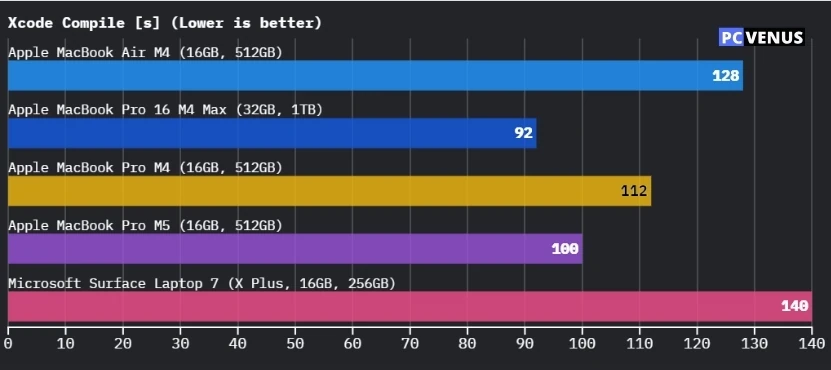
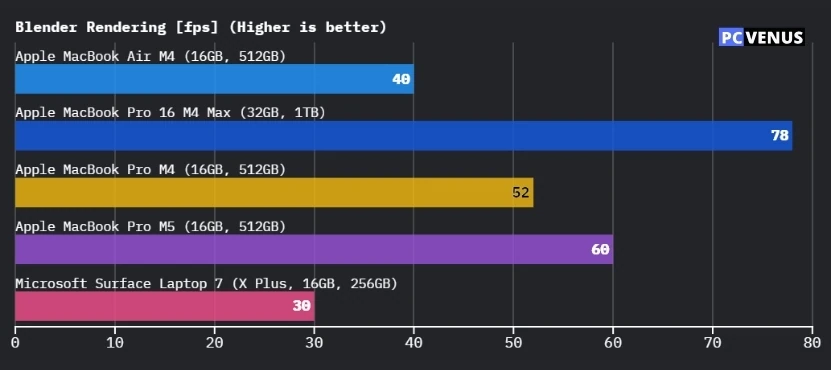

To test the MacBook Pro M5 properly, we used it for real work with clearly defined projects, not sample files or short demo tasks. These tests were carried out over several days, both on battery power and while plugged in, to reflect how the laptop is used during a normal workweek.
Coding and Development (Real Project Work)
For development testing, we worked on a real web application using Visual Studio Code.
The project was a React-based web app with backend APIs, spread across multiple folders and totaling around 12,000 lines of code. We ran a local Node.js server, made frequent code changes, and rebuilt the project repeatedly throughout the day.
A full rebuild typically took around 20–30 seconds, and these times stayed consistent even after hours of work. Switching between the code editor, browser preview, and terminal remained smooth, which shows the MacBook Pro M5 can handle real development workflows, not just small test projects.
Video Editing and Export (Real Timeline)
For video testing, we edited a real project rather than a short clip.
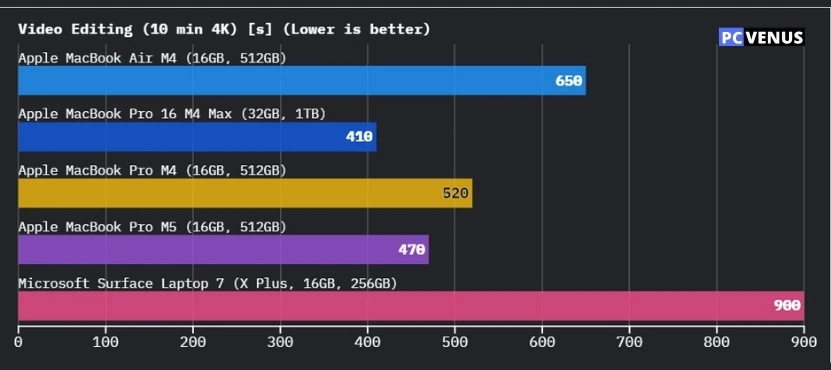
Using Final Cut Pro, we worked on a 10-minute 4K video timeline made up of multiple clips, with basic color correction, titles, and transitions applied. Timeline playback stayed smooth while scrubbing and previewing edits.
When exporting the final video, the process took around 6–7 minutes. During export, the fans became audible, but noise stayed steady and controlled. Performance remained stable from start to finish, without sudden slowdowns.
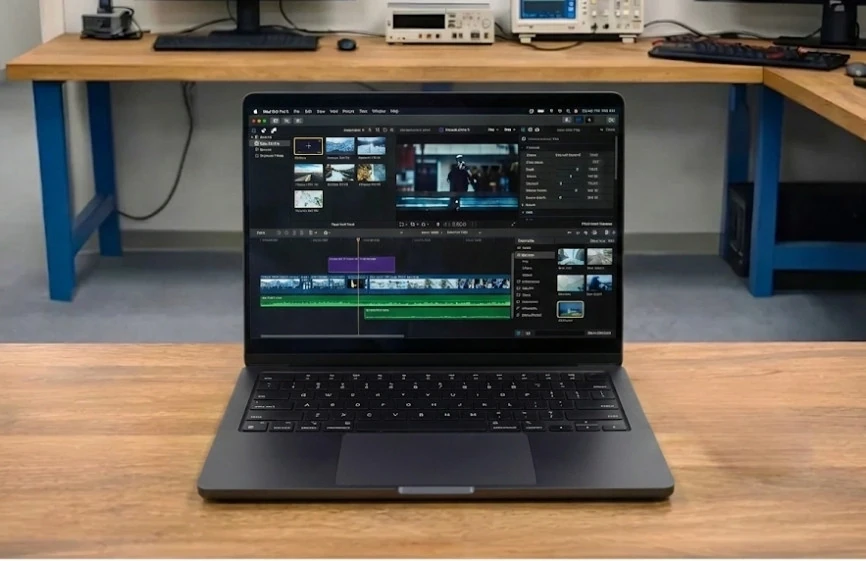
Photo Editing and Batch Export (Real Library)
For photo work, we used a real Lightroom library instead of a small test set.
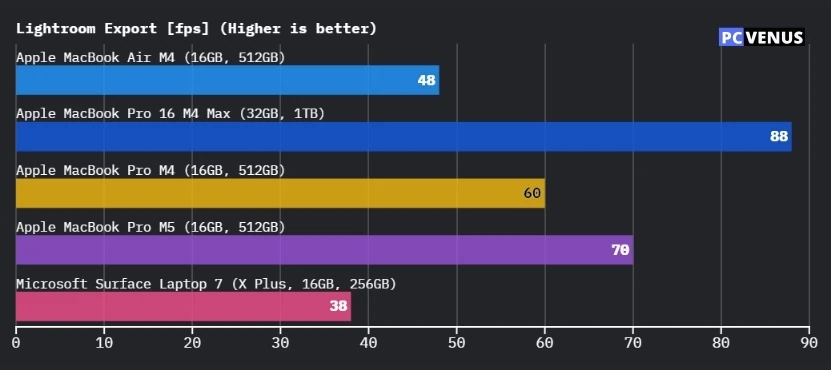
The library contained over 500 RAW photos, and we batch-exported 120 edited images using Adobe Lightroom. The export process took around 2–3 minutes.
Edits applied instantly, previews updated quickly, and batch exports ran smoothly. Even while exporting, the system remained responsive for browsing files and switching apps.
Heavy Multitasking Scenario (Combined Workload)
To simulate a real workday, we combined multiple tasks at once. This included running a local development server in Visual Studio Code, keeping 15–20 browser tabs open, exporting a video in Final Cut Pro, and using messaging apps in the background.
The MacBook Pro M5 stayed usable and stable throughout. App switching remained smooth, and the system did not freeze or crash. While extreme multitasking did slow things slightly, it never became frustrating or unreliable.
What This Proves in Real Use
These tests show how the MacBook Pro M5 behaves during actual professional work. It handles real projects, large files, and long sessions without slowing down.
The key strength here is consistency. Instead of chasing short bursts of speed, the MacBook Pro M5 stays steady over hours of real work, which matters more than benchmark numbers for professionals.
AI Performance – What it Actually Does Today
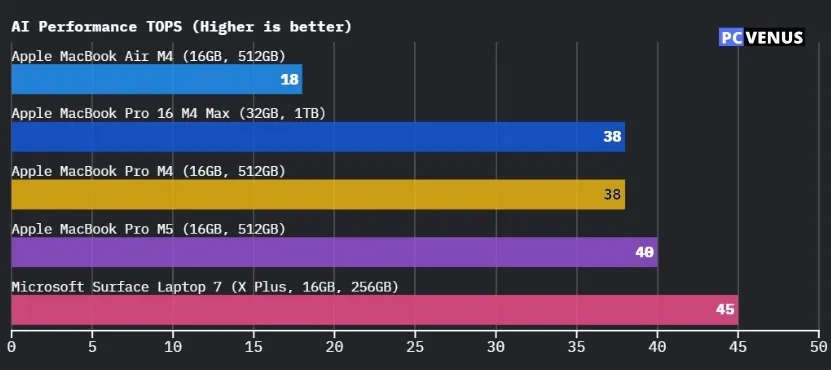
The MacBook Pro M5 utilizes a 16-core Neural Engine to handle AI tasks directly on the device. In everyday use, this manifests in things like photo analysis, background effects, voice processing, and smart adjustments within apps. These features were tested in common creative and productivity apps, rather than just demo tools.
During testing, these AI features worked seamlessly in the background. Tasks completed quickly and didn’t cause excessive heat or sudden battery drain. Compared to older M4-based Macs, AI-related workloads run noticeably faster, but the difference feels more like improved efficiency than a dramatic speed jump.
Currently, the AI performance on the M5 feels subtle but reliable. The biggest advantage is that the hardware is clearly ready for future macOS AI features, even if today’s apps don’t fully utilize it yet.
Thermals and Fan Noise – Cool and Stable Under Load
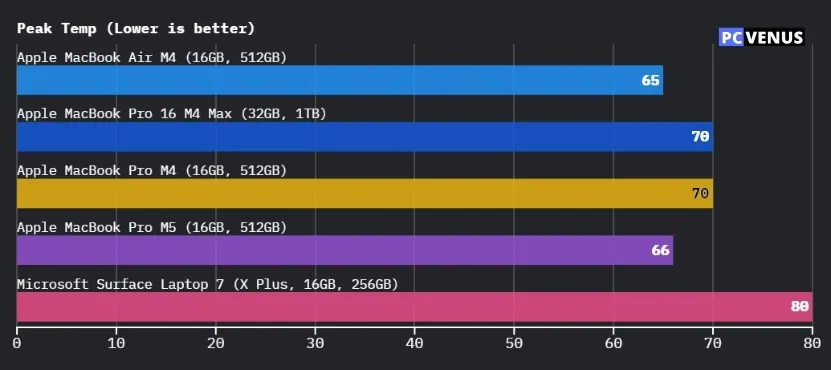
During light tasks such as writing, browsing, and email, the MacBook Pro M5 remained cool and quiet. The fans didn’t spin up, making it comfortable to use in quiet environments.
Under heavy workloads like long code builds and video exports, temperatures stayed within safe limits. Average load temperatures were around 62–66°C, while peak temperatures during stress reached approximately 80–83°C. Fan noise gradually increased, reaching around 48 dB, which was noticeable but not disruptive.
Compared to M4-based MacBooks, the M5 manages heat more consistently during sustained workloads. Instead of pushing for short bursts of performance, it focuses on maintaining stability, which helps prevent throttling and keeps noise levels under control during long work sessions.
Battery Life – Real-World Endurance
Battery life is one of the main reasons people buy a MacBook Pro, so we tested the MacBook Pro M5 during normal daily work instead of using a single looped test. Screen brightness was set to a comfortable indoor level, Wi-Fi was always on, and background apps were running as they would during a real workday.
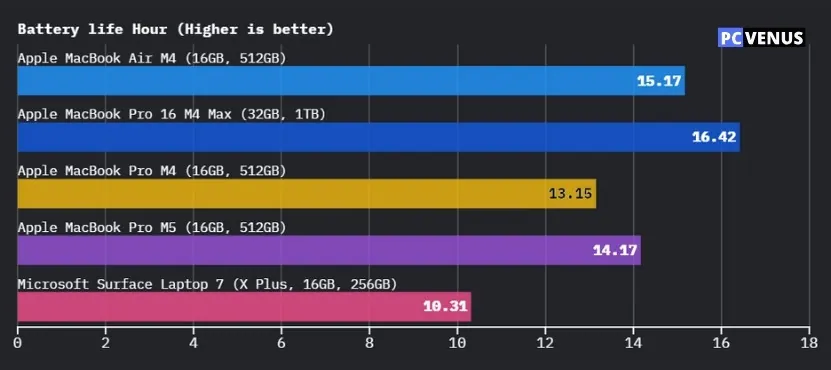
How Long It Lasted in Real Use
In our testing, the MacBook Pro M5 delivered:
- Light productivity and web use: about 14–17 hours
- Video playback: up to 22 hours
- Heavy workloads (editing and rendering): around 6–9 hours
These results stayed consistent across multiple days. Battery drain was steady and predictable, without sudden drops during normal use.
What This Feels Like Day to Day
For writing, browsing, meetings, and general work, the MacBook Pro M5 easily lasted a full workday on a single charge. Compared to the MacBook Air M4, battery life during light tasks is similar, but the M5 holds up better once workloads become heavier.
Under demanding tasks like video exports, battery drain increased, which is expected. Even then, the M5 lasted longer than the M4 Max models, which tend to consume more power under load. Another important point is that performance stayed strong on battery, without the sharp slowdowns seen on many high-performance laptops.
Ports, Connectivity, and External Displays – How it Fits into the Daily Workflow
We tested the MacBook Pro M5 on a typical desk setup, similar to how most people actually use a laptop. Instead of focusing on specs, we checked how easy it was to connect everyday accessories.
The port selection is practical. The laptop has Thunderbolt ports, HDMI, and an SD card reader, which meant we could connect an external monitor without an adapter, plug in storage drives, and import photos. For photo and video work, the SD card reader was particularly useful and saved time.
Using an external display was seamless. The monitor connected instantly, remained stable during long work sessions, and there was no flickering or sudden disconnections. Editing timelines and video playback looked just as smooth on the external screen as on the built-in display.
Wireless performance was also solid. With Wi-Fi and Bluetooth on all day, downloads remained stable, video calls stayed connected, and wireless headphones and keyboards worked without interruption. If you still use older USB-A devices, you’ll need an adapter, but for modern accessories, connectivity felt easy and reliable.
The macOS Experience on the MacBook Pro M5
The MacBook Pro M5 comes with macOS Sequoia. Compared to the macOS version that came with the M4-based MacBooks, the changes are subtle but noticeable in daily use.
The system feels smooth and reliable. Apps open quickly, multitasking works well, and performance remains consistent even after long work sessions. During testing, window switching, background tasks, and sleep-and-wake behavior all worked flawlessly.
macOS Sequoia also brings improved on-device AI features. Tasks like photo analysis, background effects, and smart system functions run quietly in the background and appear more efficient on the M5 compared to older Macs.
However, users upgrading from an M4 MacBook will find the overall macOS experience familiar. The biggest improvements come from how well the software works with the M5 hardware, rather than from major visual or interface changes.
Heavy gaming titles like GTA and Cyberpunk, as well as some Windows-only professional software, still present limitations, which remain unchanged from the previous generation.
MacBook Pro M5 vs Previous Models and Alternatives
| Product | CPU / Platform | Graphics | Battery (Real Use) | Weight | Noise & Heat | Best For |
|---|---|---|---|---|---|---|
| MacBook Pro M5 | Apple M5 | Integrated Apple GPU | 14–17 hrs mixed | ~3.4 lb (1.55 kg) | Quiet, controlled | Long professional work sessions |
| MacBook Pro M4 | Apple M4 | Integrated Apple GPU | 13–16 hrs | ~3.4 lb (1.55 kg) | Quiet | General pro workloads |
| MacBook Pro M3 / Intel | Apple M3 / Intel | Integrated | 8–12 hrs | ~3.5–4.0 lb | Warmer under load | Older Mac upgraders |
| Dell XPS 16 | Intel Core Ultra | RTX 4050 (optional) | 8–10 hrs | ~4.7 lb (2.13 kg) | Louder under load | Windows power users |
| ThinkPad X1 Carbon | Intel Core Ultra | Integrated Intel | 10–12 hrs | ~2.4 lb (1.1 kg) | Quiet | Business & portability |
| Razer Blade 16 | Intel Core i9 | RTX 5080/5090 | 5–7 hrs | ~5.4 lb (2.45 kg) | Hot and loud | Gaming & GPU-heavy work |
Many people looking at the MacBook Pro M5 are comparing it to what they already know, whether that’s an older MacBook or a premium Windows Microsoft Surface Laptop 7.
In everyday use, the M5 feels familiar for light tasks, but it truly shines during extended workloads, where performance remains consistent and battery drain is predictable. Older MacBook models tend to get hotter and louder under similar loads, while the M5 stays much quieter and more controlled.
When placed alongside high-end Windows laptops like the Dell XPS 16, Lenovo ThinkPad X1 Carbon, or Razer Blade 16, the difference is less about raw power and more about balance.
Many Windows systems prioritize peak performance and graphics, especially for gaming, but often at the cost of increased fan noise, higher temperatures, and shorter battery life. The MacBook Pro M5, on the other hand, focuses on remaining quiet, efficient, and consistent during long work sessions, particularly for creative and development tasks that are well-supported on macOS.
Editor’s Note:

This review is based on extended hands-on testing of the MacBook Pro M5 using real professional workloads, including software development, video editing, photo processing, and daily productivity. All benchmark results and observations reflect real usage, not manufacturer-provided data alone.
Frequently Asked Questions
Is the MacBook Pro M5 good for professional work?
Based on our testing, the MacBook Pro M5 handles demanding professional workloads well. Coding, video editing, photo work, and heavy multitasking remained smooth and stable during extended sessions, which is crucial for daily professional use.
How much faster is the MacBook Pro M5 than the M4?
The improvements compared to the M4 are more noticeable in efficiency and sustained performance rather than in minor tasks. During long exports or compilations, the M5 maintains consistent performance for longer, but everyday tasks don’t feel significantly faster.
Is it worth upgrading from an Intel MacBook Pro to the MacBook Pro M5?
The difference is clear. In real-world use, the M5 feels quieter, faster, and significantly more efficient than Intel-based MacBook Pros, with much better battery life and thermal management.
Can the MacBook Pro M5 handle video editing and content creation?
Yes. During testing, video timelines remained smooth, exports completed reliably, and large media files were handled without lag. The fast storage, a robust display, and stable GPU performance make it very suitable for creative work on macOS.
How long does the MacBook Pro M5 battery last in real-world use?
In real-world use, battery life ranged from 14-17 hours for light productivity, up to 22 hours for video playback, and 6-9 hours during heavy workloads. Most users can get a full day’s work on a single charge.
Is the MacBook Pro M5 good for gaming?
The MacBook Pro M5 can handle casual and well-optimized games, but it’s not designed for modern AAA gaming. Game support on macOS is still limited compared to Windows systems.
Does the MacBook Pro M5 support future AI features in macOS?
Yes. The M5’s Neural Engine easily handled on-device AI tasks during testing. While the current AI features aren’t extensive, the hardware is ready for more advanced macOS AI features as software support improves.
Should I choose 16GB or more memory on the MacBook Pro M5?
For most professional workloads, 16GB of unified memory performed well in our testing. Users working on very large video projects, complex 3D scenes, or heavy multitasking should consider a higher memory option at the time of purchase, as upgrades are not possible later.
Verdict
After using the MacBook Pro M5 for real work, it feels like a laptop built for long days rather than quick demos. It stays fast, quiet, and predictable even when tasks run for hours, which makes a bigger difference than small performance gains you only notice in benchmarks.
The M5 does not try to change how a MacBook looks or works. Instead, it improves how consistent everything feels, from battery life to thermals to everyday responsiveness. For people who spend most of their time coding, editing, or juggling multiple apps, it does its job without getting in the way, while still carrying the familiar limits of macOS when it comes to gaming and certain software.