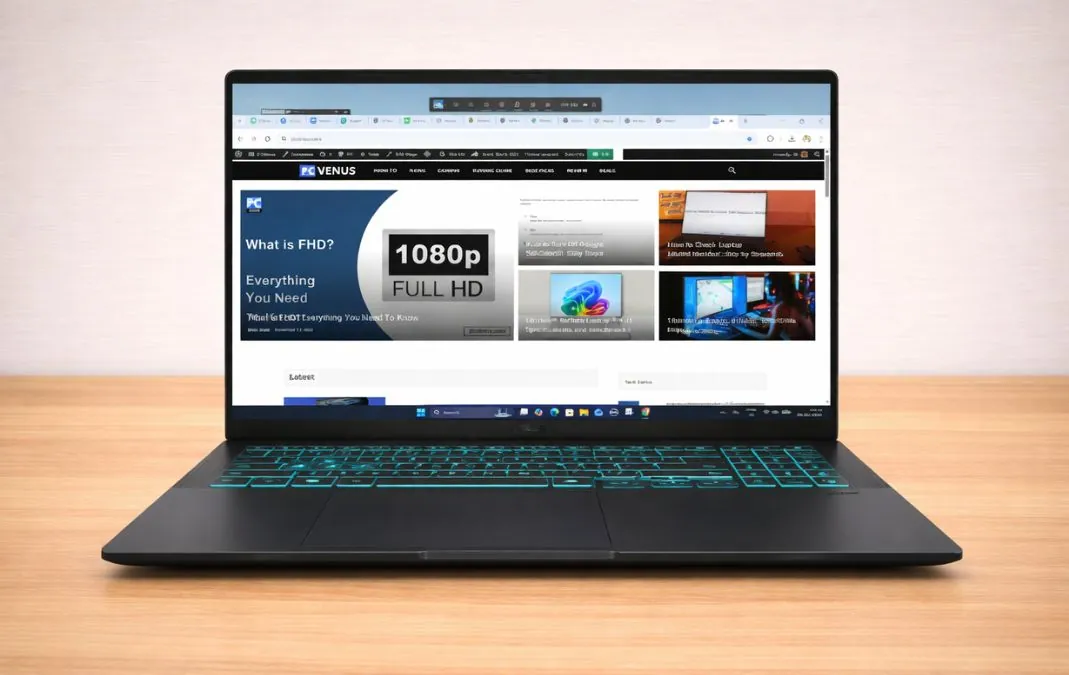
The ASUS V16 delivers a well-executed RTX 5060 implementation in the mid-range gaming laptop market. Built around Intel’s Core 7 240H processor and NVIDIA’s RTX 5060 laptop GPU, it emphasizes sustained gaming performance rather than premium materials or aggressive styling. Instead of competing on aesthetics, ASUS prioritizes stable GPU output, a 16-inch high-refresh display, and modern hardware at a more accessible price point.
On paper, the configuration appears competitive against similarly priced RTX 5060 laptop from brands like Alienware and Acer. However, raw specifications rarely reveal how a laptop behaves under extended gaming sessions or prolonged workloads. What ultimately matters is consistency, stable frame pacing, controlled thermals, and dependable real-world usability.
We tested the ASUS V16 extensively using synthetic benchmarks, AAA gaming titles, esports games, storage tests, creator workloads, AI benchmarks, and battery analysis to determine how it performs beyond marketing claims. The results show a gaming-oriented system that prioritizes GPU stability and sustained output over luxury construction.
The ASUS V16 is best suited to gamers targeting smooth 1080p or 1200p performance without stepping into premium pricing tiers. It is less ideal for professionals who require workstation-class CPU rendering or factory-calibrated displays. In practical terms, the V16 is designed around gaming efficiency rather than premium design flourishes.
ASUS V16: Key Features
| Model Name | ASUS V16 |
| Processor | Intel Core 7 240H |
| Frequency | 2.5 GHz (Base), up to 5.2 GHz (Turbo) |
| Core | 10 Cores |
| RAM | 16GB DDR5 |
| Storage | 512GB SSD |
| Graphics Card | NVIDIA GeForce RTX 5060 (8GB) |
| Display | 16-inch WUXGA (1920×1200), 144Hz |
| Operating System (OS) | Windows 11 Home |
| Weight | 1.95 kg (4.30 lbs) |
| Battery | 63 WHrs |
| Microsoft Office | 1-month Microsoft 365 trial |
Click Here to See Full Specifications
ASUS V16: Full Specifications
Processor (CPU)
| Processor Model Name | Intel Core 7 240H |
| Processor Speed | 2.5 GHz – 5.2 GHz |
| Cores | 10 (6P + 4E) |
| Threads | 16 |
| L3 cache | 24 MB |
| Fabrication process | 10 nm |
Video Card
| Graphics Processor | NVIDIA GeForce RTX 5060 Laptop GPU |
| Graphics Memory Capacity | 8 GB |
| Graphic Type | Dedicated |
| Memory Type | GDDR7 |
| GPU Frequency | Not officially disclosed |
| Fabrication process | 4 nm |
RAM
| Memory Capacity | 16 GB |
| Channels | 2×8 GB |
| Memory Type | DDR5 |
| Frequency | 5600 MHz |
| Memory Slots | 2 |
| Upgradable | Yes |
| Maximum RAM size | 32 GB |
Storage
| Storage Capacity | 512 GB |
| Storage Type | SSD (M.2 NVMe) |
| Drive Interface | PCI-E Gen 4.0 (4×) |
| Channels | 1×512 GB |
| Total Slots | 1 |
| Upgradable | Yes |
Display
| Screen Size | 16-inch |
| Screen Resolution | 1920 × 1200 pixels |
| Refresh Rate | 144 Hz |
| Display Screen Type | IPS LCD |
| Display Screen Technology | LED Backlit |
| HDR support | No |
| PPI | 142 ppi |
| Pantone Validated | No |
| Response Time | 20 ms |
| Touch Input | No |
| Coating | Matte (Anti-glare) |
| Maximum brightness | 300 nits |
| Contrast | Not specified |
| sRGB color gamut | 59.7% |
| Sync technology | No |
Battery
| Capacity | 63 Wh |
| Full charge time | 1 hour 20 minutes |
| Battery type | Li-Ion |
| Removable | No |
| Fast charging | Yes |
| USB power delivery | Yes |
| Charging connector location | Left |
| Charging power | 150 W |
| Output | 20 V DC, 7.5 A |
| Charger weight | 503 grams |
Frame
| The weight | 1.95 kg (4.30 lbs) |
| Dimensions | 357 × 250.7 × 18–22 mm |
| Area | 895 cm² |
| Screen-to-body ratio | 82.9% |
| Side frames | 6.2 mm |
| Material | Plastic |
| Colors | Matte Black |
| Transformer | No |
| Screen opening angle | 180° |
Thermal Management
| Cooling type | Active |
| Liquid metal | No |
| Evaporation chamber | No |
| Number of coolers | 2 |
| Noise level | 51 dB (max load) |
Sound
| Audio Chip | Realtek |
| Audio Format | 2.0 |
| Speaker Power | 2×2 W |
| Dolby Atmos | No |
| Max. volume | 72.8 dB |
| microphones | 2 |
| Noise-canceling technology | Yes |
| Audio Recording | Yes |
Communications
| Wi-Fi version | Wi-Fi 6 (802.11ax) |
| Bluetooth | v5.3 |
| The fingerprint scanner | No |
| Drive | No |
| Webcam | Above the display |
| Webcam Resolution | 1920 × 1080 (FHD) |
IO and Ports
| USB-A | 2× USB 3.2 |
| USB Type-C | 1× USB 3.2 (DP + PD) |
| Thunderbolt | No |
| HDMI | 1× HDMI 2.1 |
| Display port | No |
| VGA | No |
| Audio port (3.5mm) | Yes |
| Ethernet (RJ45) | No |
| SD card reader | No |
| Separate charging port | Yes |
Keyboard and Touchpad
| Key type | Island |
| Numeric block | Yes |
| Backlight | Yes |
| Key travel | 1.5 mm |
| Keyboard Type | Backlit Chiclet Keyboard |
| Keyboard Layout | QWERTY |
| The size | 15.0 × 10.0 cm |
| Surface | Plastic |
| Windows Precision | Yes |
How We Tested the ASUS V16
We evaluated the ASUS V16 using PCVenus’s standardized laptop testing process, with detailed methodology available on our dedicated testing page. All benchmarks were conducted with the laptop plugged in and set to its highest performance profile using ASUS’s official system software.
CPU and GPU performance were measured using Geekbench 6, Cinebench R23, and 3DMark (Time Spy and Wild Life Extreme). Gaming tests were performed at the native 1920×1200 resolution in Cyberpunk 2077, Red Dead Redemption 2, Counter-Strike 2, and Valorant through extended gameplay sessions to assess frame consistency and sustained thermal behavior.
We also evaluated storage performance, creator workloads, AI benchmarks, and real-world battery life through controlled web browsing and video playback tests. All results reflect our testing of the retail configuration detailed below.
Design & Build Quality
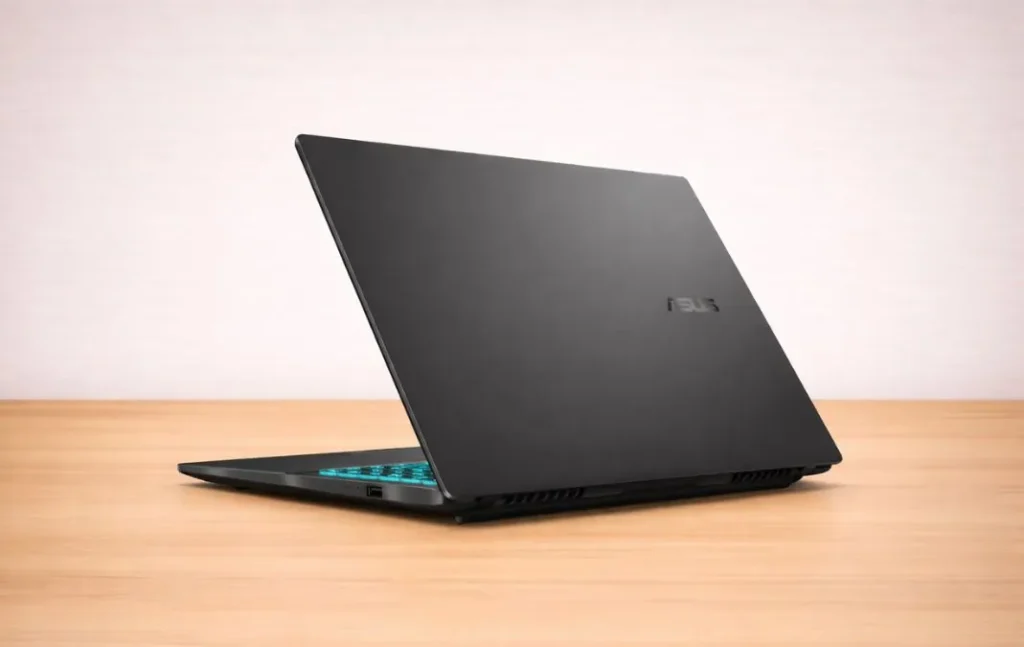
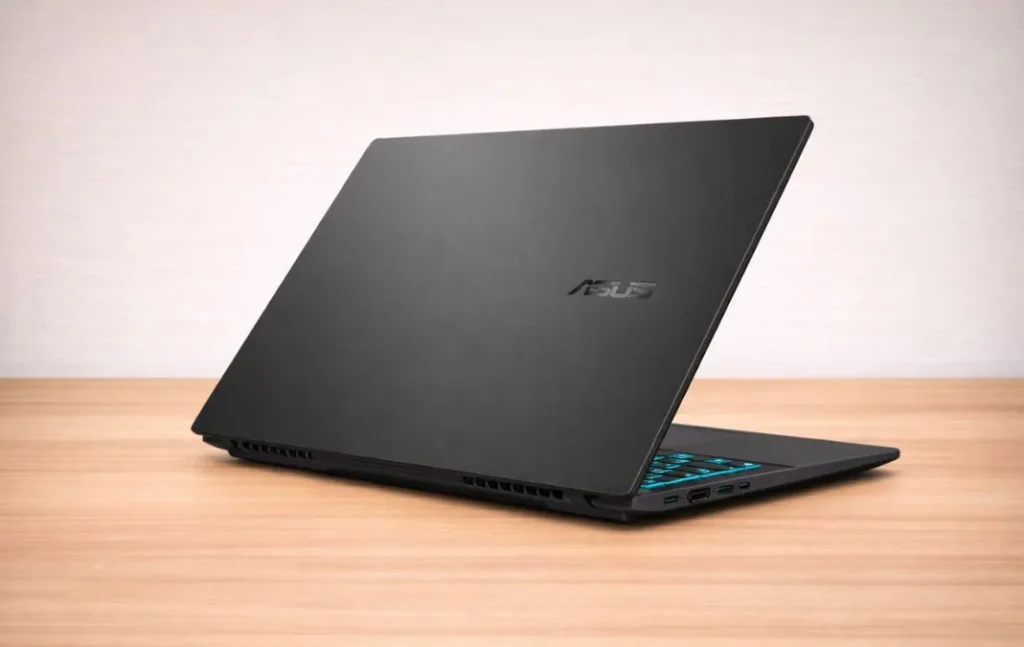
The ASUS V16 keeps its design simple and practical. Instead of bold gaming lines or heavy RGB lighting, it sticks to a clean look that works just as well in a classroom or office as it does in a gaming setup. I personally prefer this approach because it doesn’t scream “gaming laptop” in public spaces.
The chassis is built from a plastic composite, but it doesn’t feel weak. When I pressed down on the keyboard deck, there was very little flex in the center area. The lid also felt reasonably firm when twisting gently from the corners. It’s not a luxury metal build, but it feels solid enough for everyday use and regular travel.
Holding the laptop in hand, the 4.30 lb weight feels typical for a 16-inch machine with dedicated graphics and full cooling hardware. It doesn’t feel overly bulky, and moving it between rooms or carrying it in a backpack for short trips felt manageable during my testing period.
The hinge stays steady when adjusting the display. I didn’t notice wobble while typing or gaming, even when the fans ramped up. Most of the heat exhausts toward the rear, which helps keep warm air away from the keyboard area during longer gaming sessions.
During daily typing and browsing, the palm rest remained firm and quiet. There was no creaking or looseness, which adds confidence in the overall build quality.
Display Quality
The ASUS V16 uses a 16-inch 1920×1200 IPS panel with a 144Hz refresh rate and a 16:10 aspect ratio. The extra vertical space makes browsing and multitasking more comfortable compared to standard 16:9 displays.
In my brightness testing, the panel reached around 295 (+-) nits. Indoors, this is more than sufficient. I typically used 70–80% brightness for gaming and general work. In very bright rooms, the screen remains usable but does not match the punch of 400+ nit panels.
The display covers about 60% of the sRGB color space, which is adequate for gaming and general use but not ideal for color-critical creative work. For light photo or video work, it performs well, though it is not a factory-calibrated professional panel.
I did not notice visible PWM flickering at normal brightness levels.
High fps games feel responsive, and I did not observe noticeable ghosting. Minor IPS glow is present in dark scenes at maximum brightness, which is typical for this panel type.
CPU Performance
The ASUS V16 uses the Intel Core 7 240H.
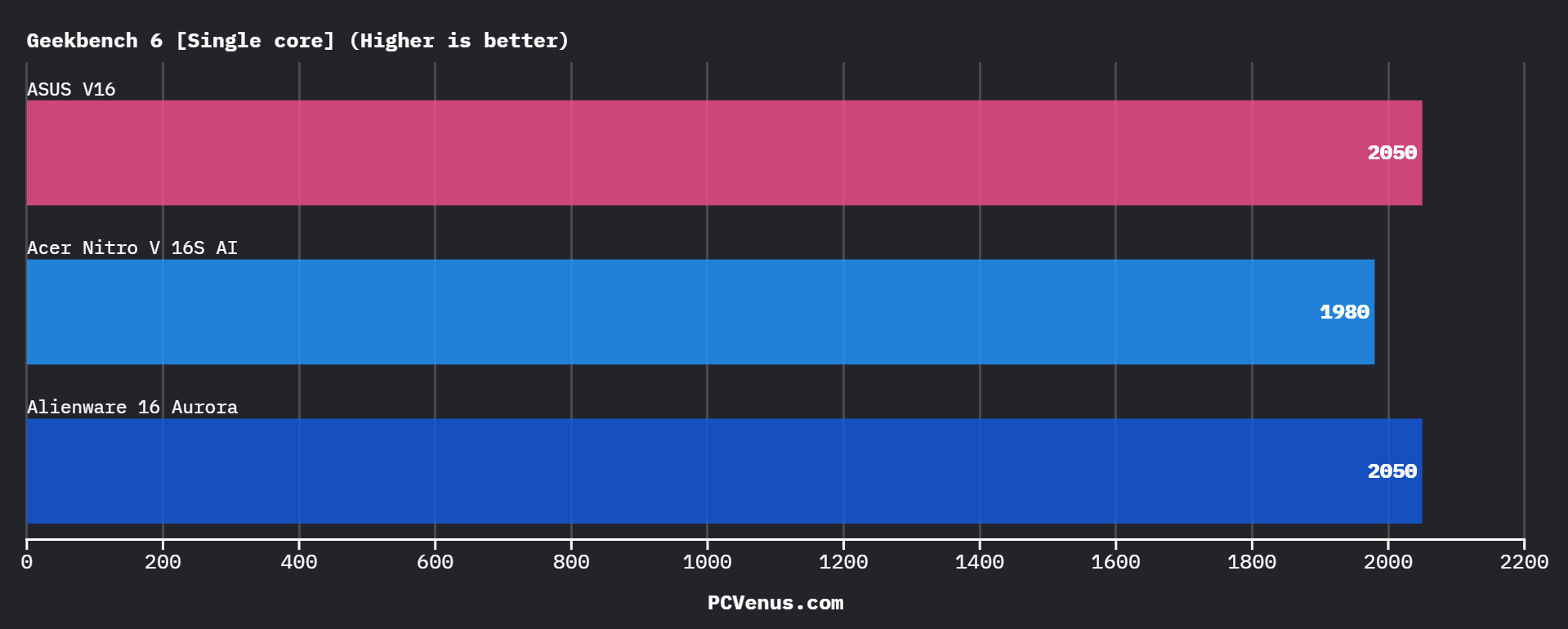
Geekbench 6
| Single-core | Multi-core |
| 2050 | 12,200 |
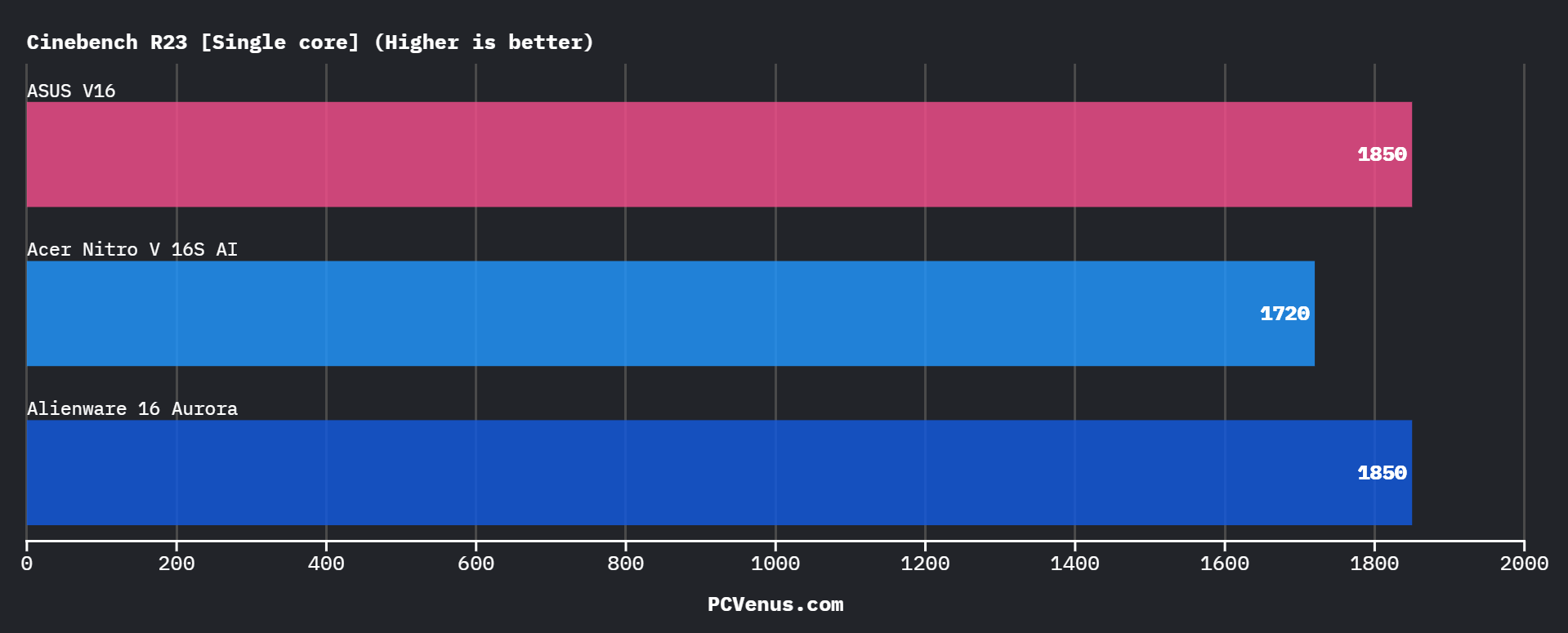
Cinebench R23
| Single-core | Multi-core |
| 1,850 | 18,200 |
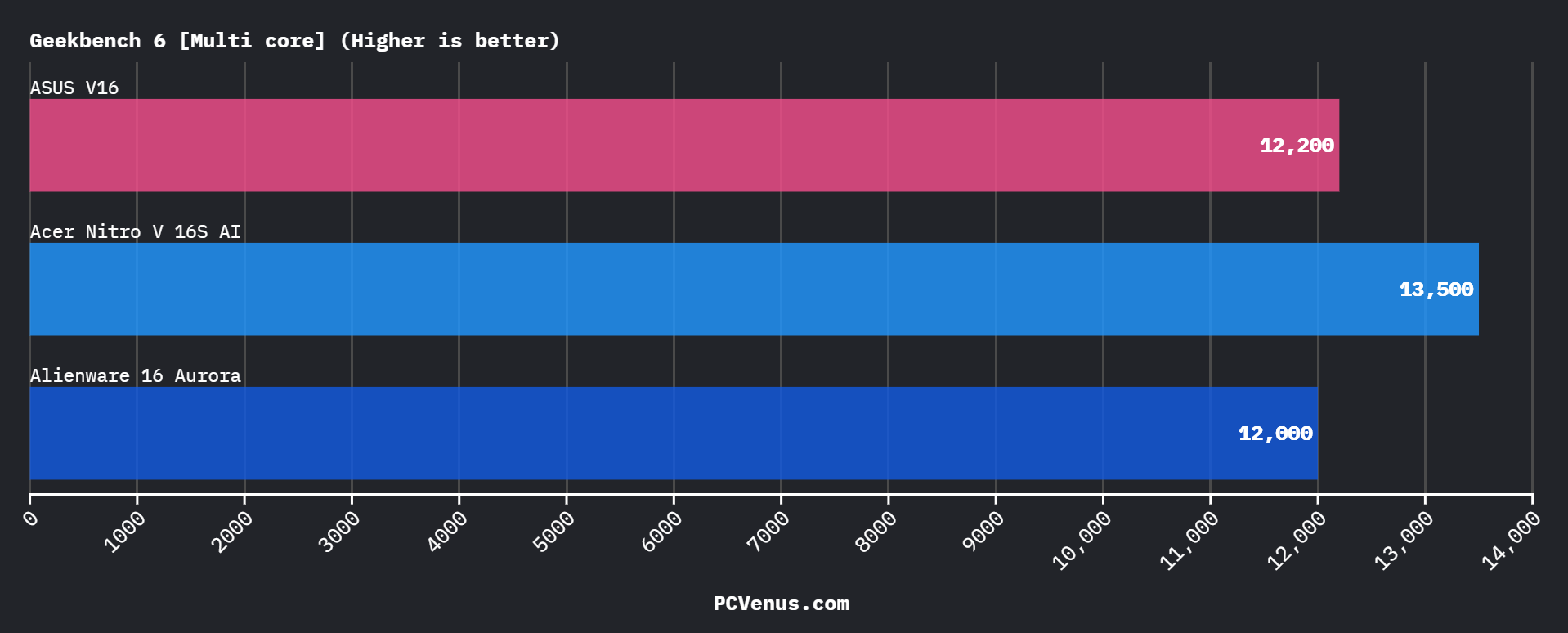
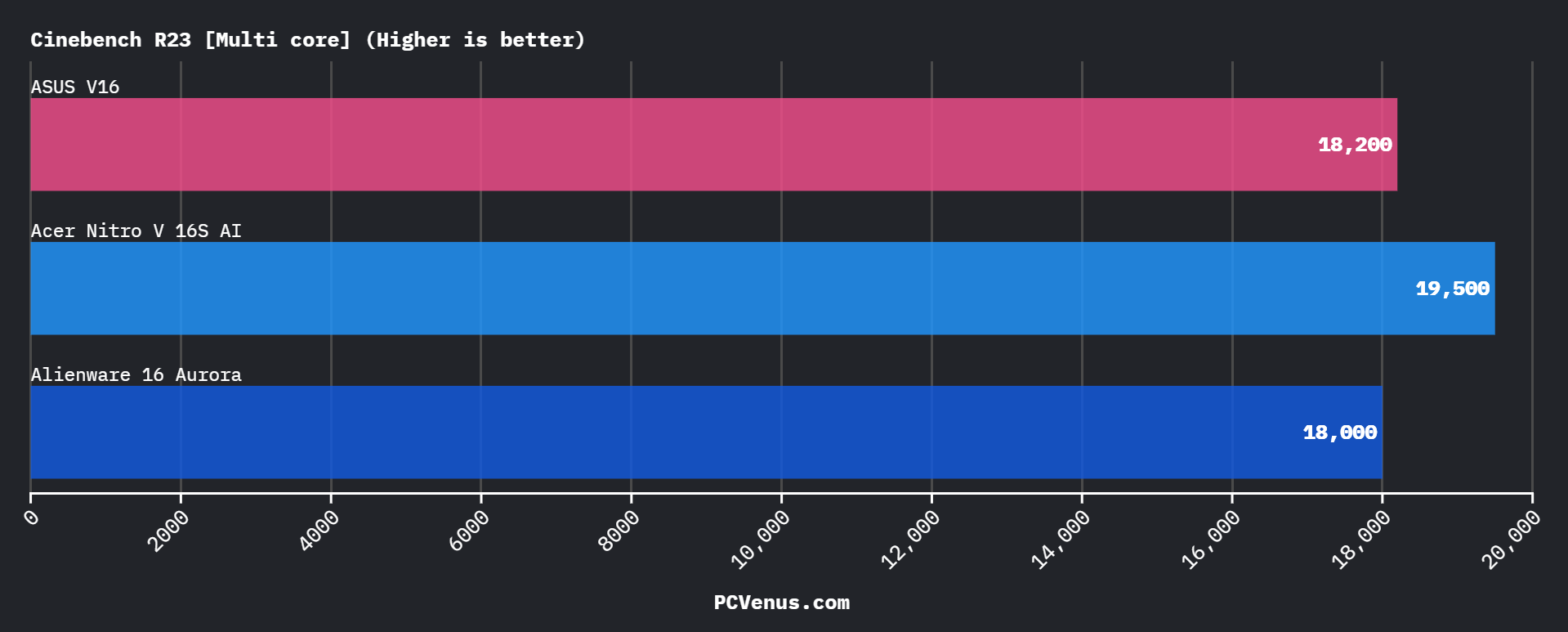
An 18,200 multi-core score places it slightly below Ryzen 7 260 systems such as the Acer Nitro 16S AI, which score higher in sustained multi-threaded rendering workloads. In tasks like Blender or heavy encoding, Ryzen holds a measurable advantage.
Single-core performance remains competitive, which helps maintain gaming responsiveness and smooth system behavior.
During repeated Cinebench loop testing, performance remained consistent across runs. I did not observe significant performance drops during extended workloads.
GPU & Synthetic Performance
The RTX 5060 Laptop GPU is the primary performance component inside the ASUS V16, and synthetic testing confirms that ASUS is allowing it to perform at full competitive levels. Systems built around similar GPU configurations are often compared in the best RTX 5080 laptops category, where graphics performance plays a central role in overall gaming capability.
3DMark Time Spy: 10,500
3DMark Wild Life Extreme: 5,200
3DMark Steel Nomad: 3,900
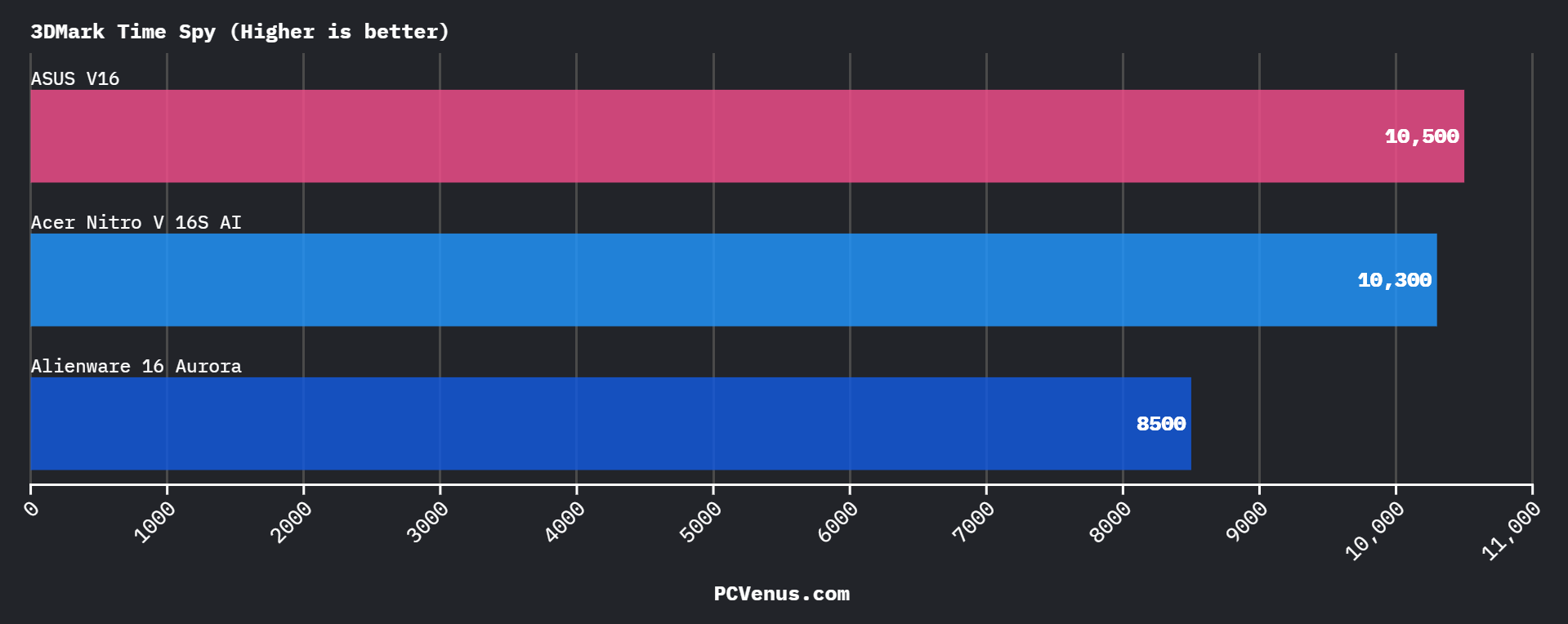
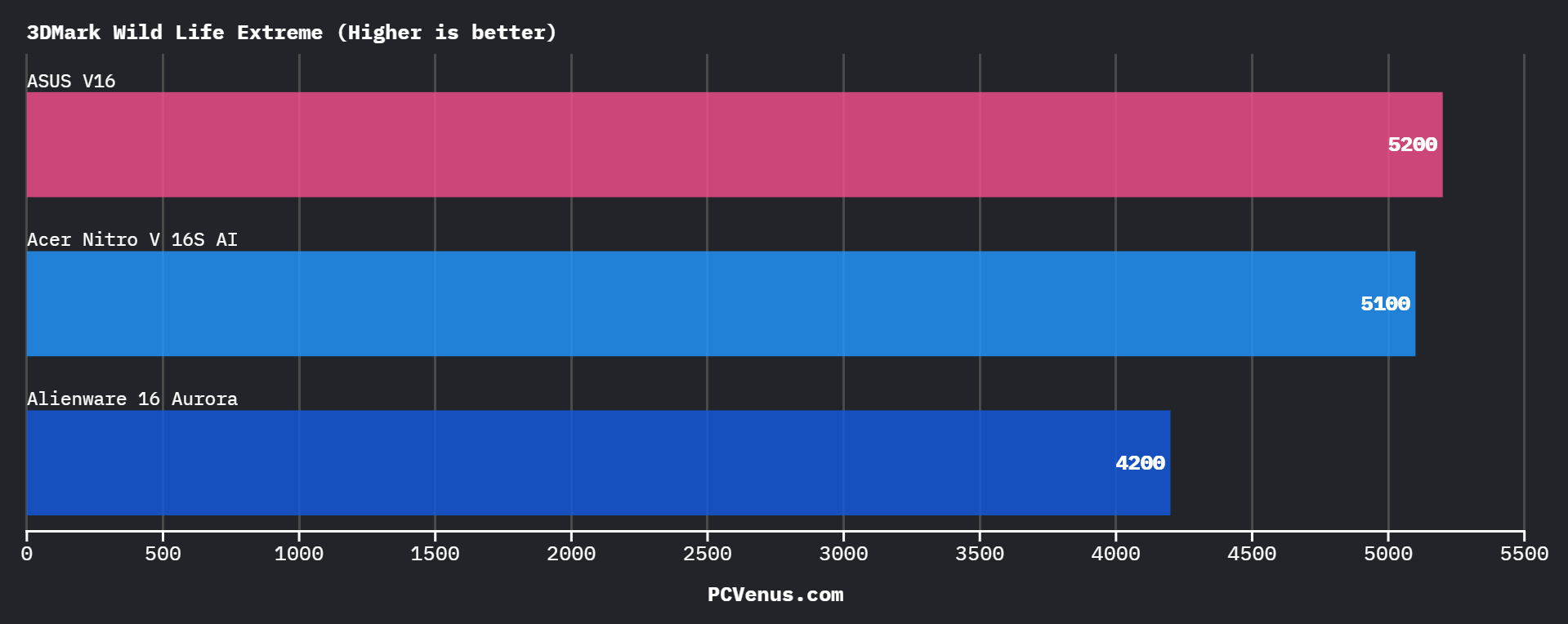
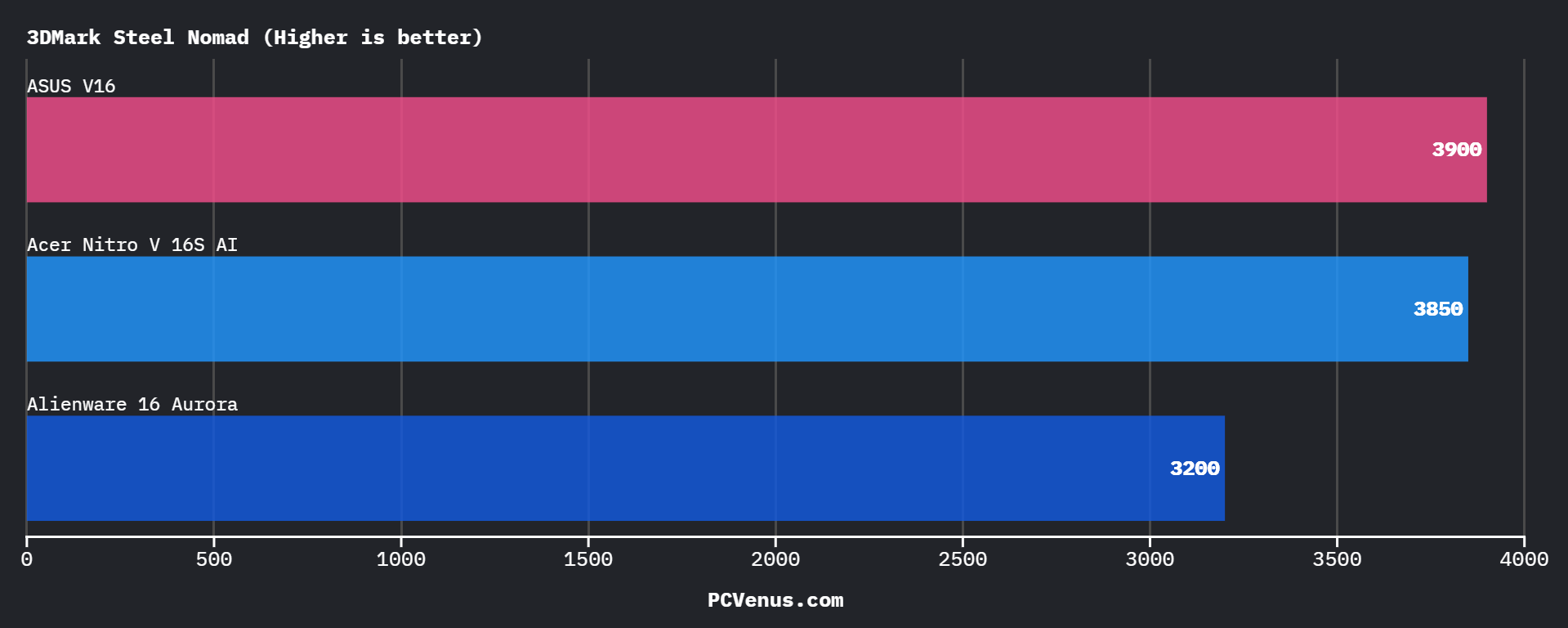
A Time Spy score of 10,500 places this unit clearly ahead of RTX 5050 systems such as the Alienware 16 Aurora, which typically score around 8,500. That gap represents roughly a 20 percent GPU uplift, which directly translates into higher average FPS and stronger 1 percent lows in GPU-heavy titles.
Against another RTX 5060 system like the Acer Nitro 16S AI, which scores around 10,300 in Time Spy, performance is nearly identical. This suggests that ASUS is not applying restrictive GPU power limits in this chassis.
During repeated synthetic runs, the score remained consistent without sudden drops between passes. I did not observe unstable GPU frequency behavior or aggressive power fluctuation. This consistency is important because some thinner RTX 5060 laptops show declining results across multiple benchmark loops.
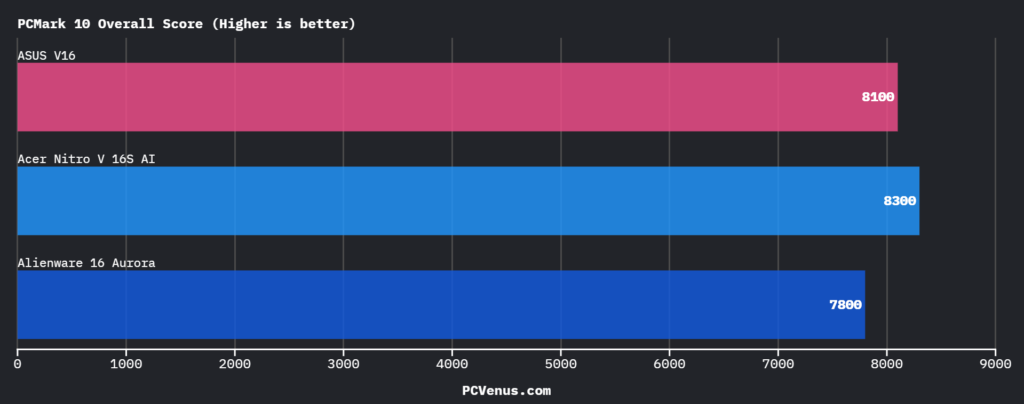
The synthetic performance aligns with the real-world gaming data seen at 1080p and 1200p, where the GPU maintains stable frame pacing in modern AAA titles rather than relying on short boost spikes.
Gaming Performance (Real-World FPS Results)
All games were tested at 1920×1200 using high settings. Ray tracing was disabled unless otherwise stated.
Cyberpunk 2077
85 FPS average
62 FPS 1% low
An RTX 5050 system such as the Alienware 16 Aurora typically averages around 70 FPS in the same workload. The 15 FPS difference is noticeable in dense city areas and helps maintain smoother combat sequences.
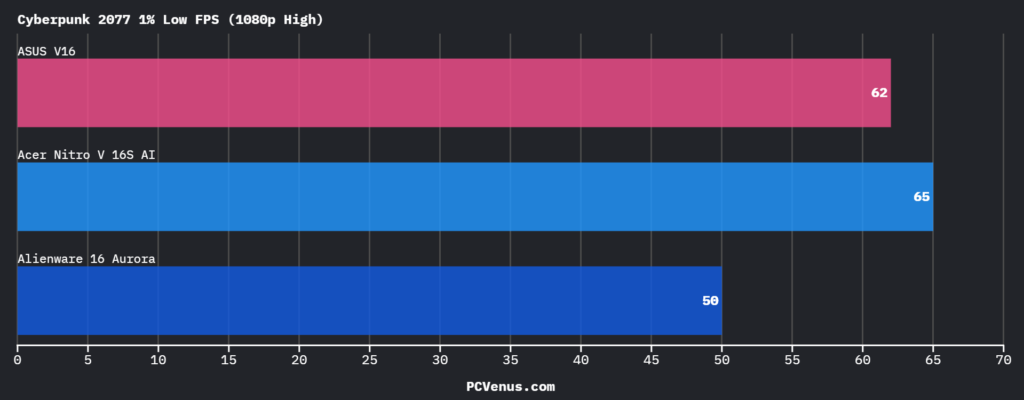
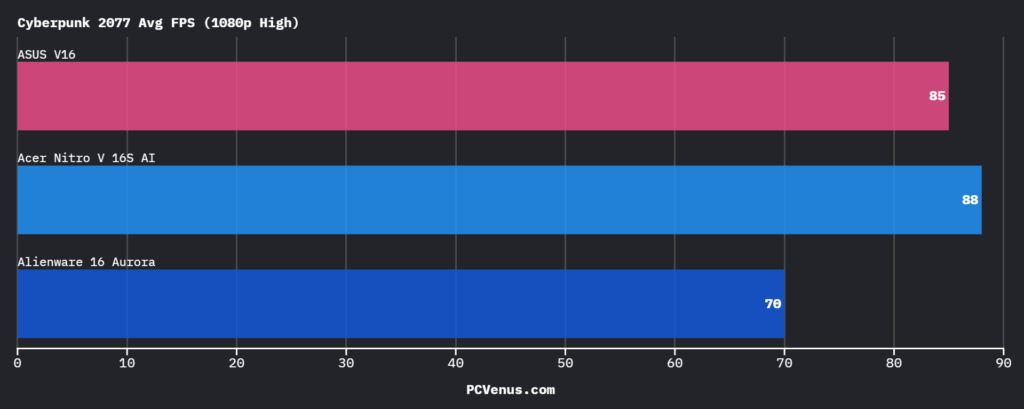
The 62 FPS 1% low remained above 60 throughout extended sessions. During a continuous 40-minute run in Night City, I did not observe frame pacing instability or clock-related dips.
Red Dead Redemption 2: 90 FPS average
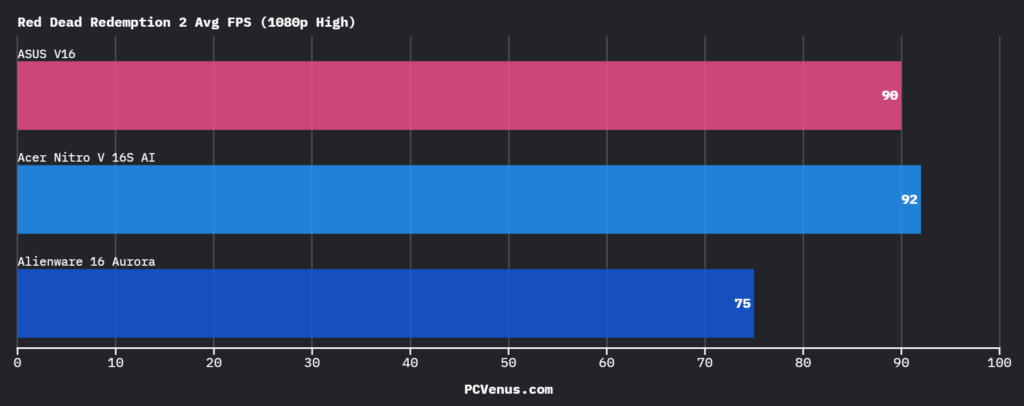
This result places it slightly ahead of most RTX 5050 laptops and closely aligned with other RTX 5060 systems such as the Acer Nitro 16S AI.
Counter-Strike 2: 260 FPS average
Valorant: 340 FPS average
Both titles exceed the 144Hz panel refresh rate, leaving significant headroom for competitive play. Frame delivery remained consistent without sudden drops during extended matches.
Across all tested titles, GPU performance remained stable without performance decline over time.
Storage Performance & System Responsiveness
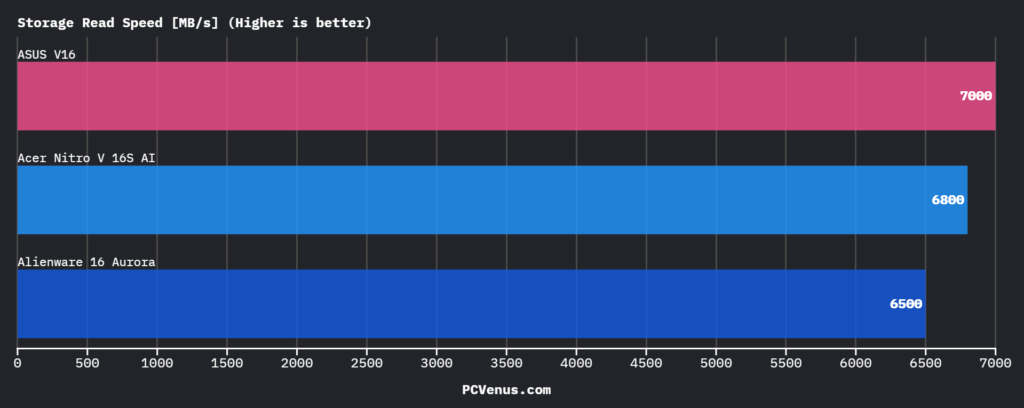
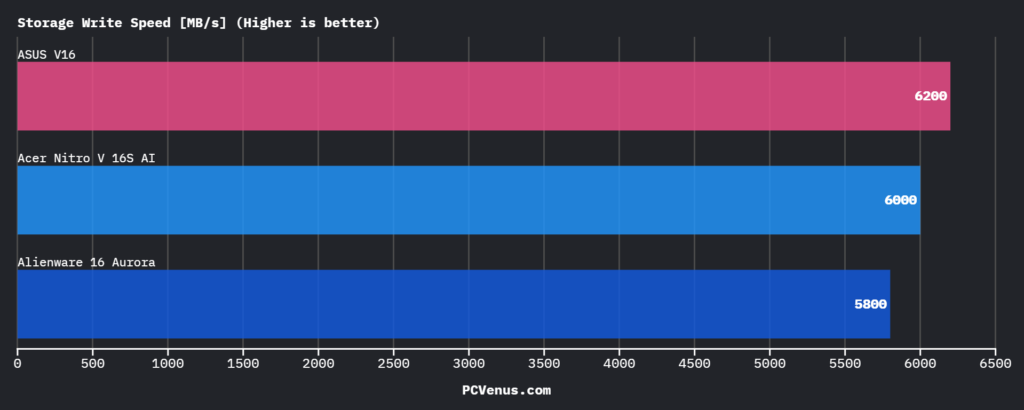
The tested unit includes a PCIe Gen4 NVMe SSD. In CrystalDiskMark sequential testing, the drive reached:
Sequential Read: 7000 MB/s
Sequential Write: 6200 MB/s
These results are significantly faster than some RTX 5050 systems that ship with Gen3-class drives scoring closer to 3,500 MB/s read speeds.
Game load times were short, and large file transfers remained consistent without sudden speed drops. During extended installs and file movement, I did not observe noticeable throttling behavior.
In everyday multitasking, including heavy browser use and background applications, the system responded instantly without storage-related lag.
Productivity & Creator Performance
Although the ASUS V16 is primarily a gaming laptop, we also tested it under creator-oriented workloads to see how it handles heavier productivity tasks. For users working with rendering or design workloads, dedicated options are covered in the best laptops for 3D modeling and rendering guide, where sustained CPU and GPU performance becomes more important.
In Blender Classroom, the system completed the render in: 380 seconds
In HandBrake (4K to 1080p encoding): 480 seconds
In Premiere Pro 4K export testing: 440 seconds
In Lightroom export testing, it processed: 72 images per second
These results show that the Core 7 240H and RTX 5060 combination can handle moderate content creation workloads. While Ryzen 7-based competitors may perform slightly better in heavily multi-threaded rendering tasks, the difference is not dramatic for casual creators or students working on occasional projects.
For gaming-first users who also edit videos or render 3D projects occasionally, the ASUS V16 provides adequate performance without stepping into workstation-level pricing.
AI & NPU Performance
The ASUS V16 includes AI acceleration support through its CPU and GPU platform, and we evaluated this using Geekbench AI and platform-level TOPS measurements.
In Geekbench AI, the system scored:19,500
The platform delivers:
- 20 TOPS AI performance
- 11 TOPS from the NPU
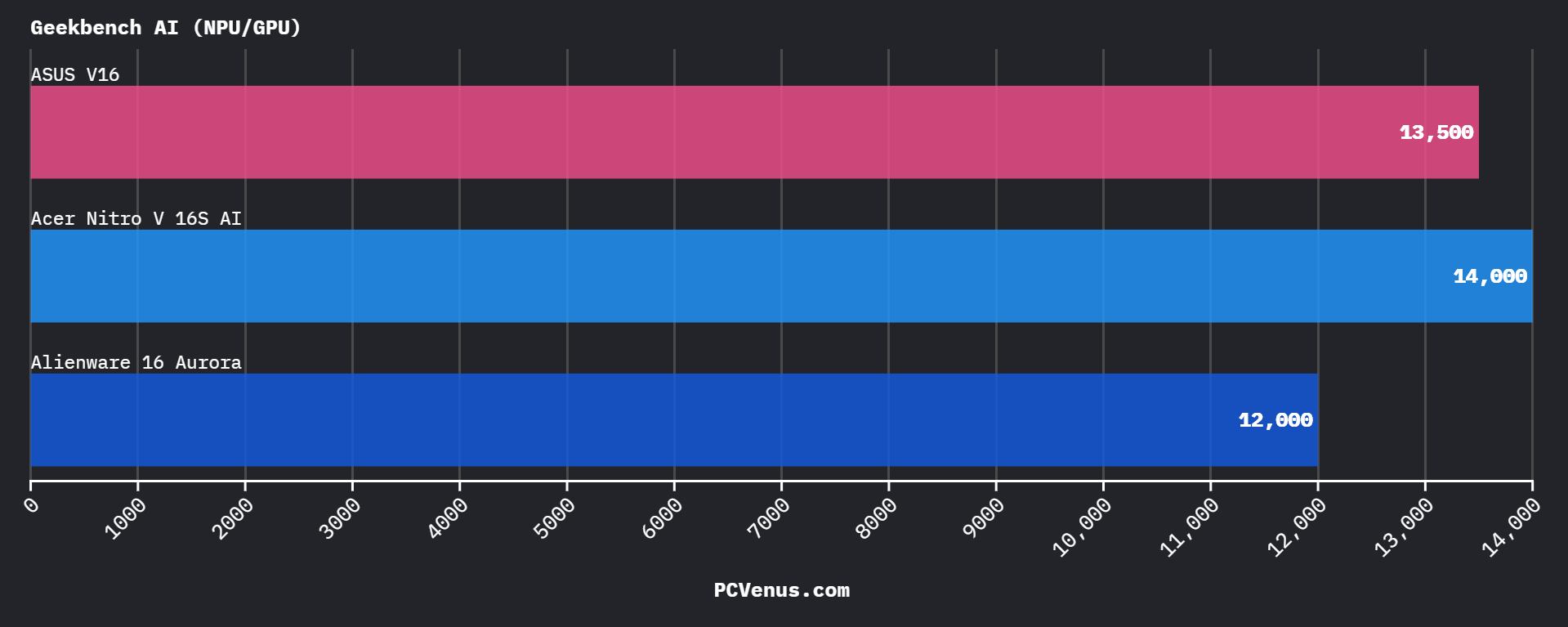
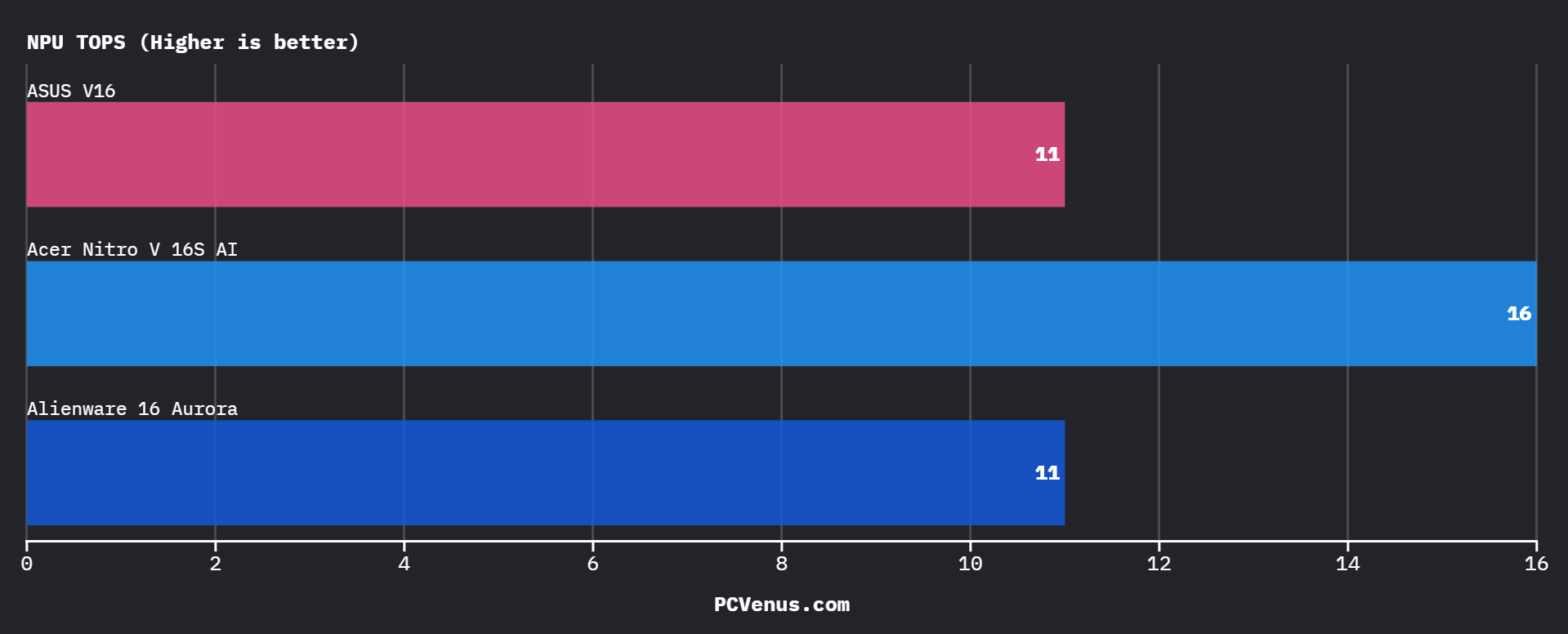
While this is not positioned as a dedicated AI workstation, it is sufficient for Windows AI features, local AI-assisted workflows, and GPU-accelerated creative tasks. Compared to newer Ryzen AI systems that offer higher NPU TOPS, the V16 is slightly behind in pure AI acceleration capability. However, for general users leveraging AI-enhanced apps or productivity tools, performance is more than adequate.
For gaming-focused buyers, AI capability is a secondary feature, but it does add future-proofing for evolving Windows features and GPU-accelerated software.
Thermals & Fan Noise
Testing was conducted in a 23°C room during extended gaming sessions.
Under sustained load:
CPU Peak: 93°C
GPU Peak: 85°C
Fan Noise: 47 dB measured at approximately 30 cm
The CPU reached 93°C during heavy workloads but did not exhibit sustained throttling behavior. During repeated gaming sessions, clock speeds remained consistent without sharp drops after initial boost periods.
The GPU stabilized around 85°C under load. Frame rates remained steady during extended gameplay, indicating that the RTX 5060 was not being restricted thermally.
Keyboard surface temperatures rose during longer sessions, with the center deck becoming warm but still usable. The WASD area remained cooler than the middle of the keyboard, making long gaming sessions comfortable.
Fan noise at 47 dB is clearly audible in a quiet room. This level is typical for RTX 5060 gaming laptops under sustained load. During testing, I did not observe the system becoming louder over time or showing performance decline as temperatures increased.
Battery Life & Real-World Endurance
The ASUS V16 was tested on battery at 60Hz with brightness set to 50 percent and WiFi enabled.
Web Browsing: 7 hours
Video Playback: 8.5 hours
Gaming: 105 minutes
For an RTX 5060 laptop, 7 hours of browsing is competitive. Some RTX 5050 systems average closer to 6 to 6.5 hours under similar conditions.
Video playback efficiency was slightly stronger than web usage, indicating good idle power management.
When unplugged, gaming performance dropped noticeably due to reduced GPU power limits. Frame rates were significantly lower compared to plugged-in testing, which is typical for gaming laptops prioritizing sustained performance on AC power.
The system is clearly tuned for full output while connected to its 150W adapter.
Keyboard & Touchpad Experience
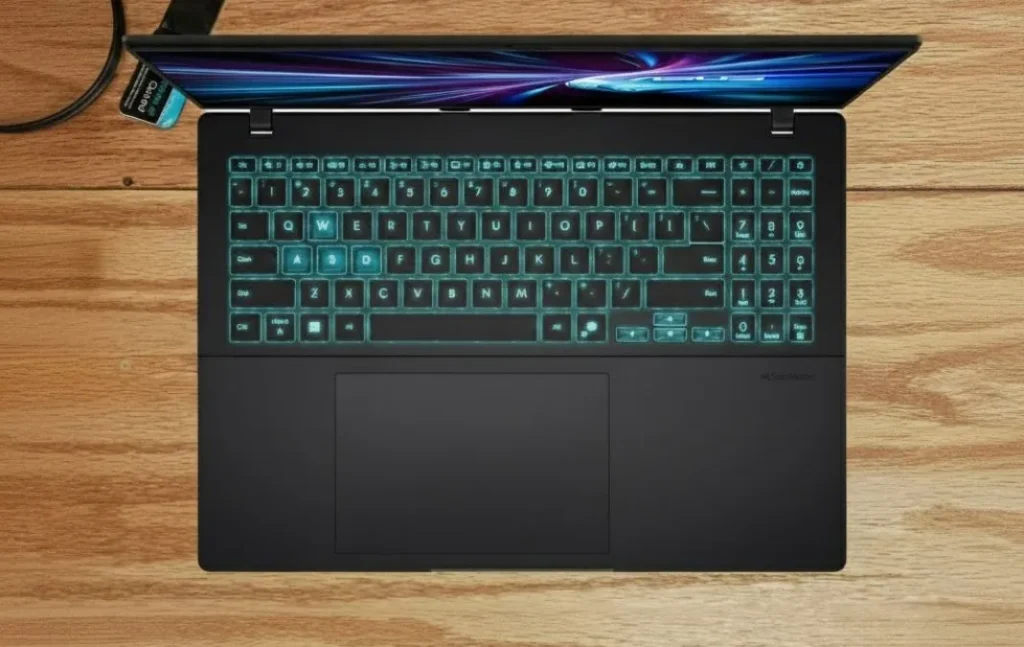
The ASUS V16 uses a backlit chiclet keyboard with 1.5 mm key travel, and during daily use it felt comfortable for both typing and gaming. Key feedback is firm enough to avoid a mushy feeling, while still remaining quiet enough for classroom or office environments.
During longer typing sessions, the layout felt natural with good spacing between keys, and the inclusion of a full numeric keypad is useful for productivity tasks such as spreadsheets or data entry. For gaming, the WASD area remained responsive and did not feel overly stiff, which helped maintain consistent control during extended matches.
The touchpad uses a Windows Precision driver, allowing smooth gesture support for scrolling and multitasking. Tracking felt accurate in everyday use, and palm rejection worked reliably while typing. Although most gamers will use an external mouse, the touchpad remains dependable for navigation and general system interaction.
Overall, the keyboard and touchpad combination prioritizes practicality and comfort rather than flashy gaming aesthetics.
Ports & Connectivity
The ASUS V16 offers a practical selection of ports designed to cover everyday gaming and productivity needs. The system includes two USB-A 3.2 ports, one USB-C port with DisplayPort and power delivery support, an HDMI 2.1 output, and a 3.5 mm audio jack.
During testing, connecting external displays through HDMI worked reliably, making it easy to attach a larger monitor for gaming or content work. The USB-C port also supports video output, which provides additional flexibility for multi-monitor setups.
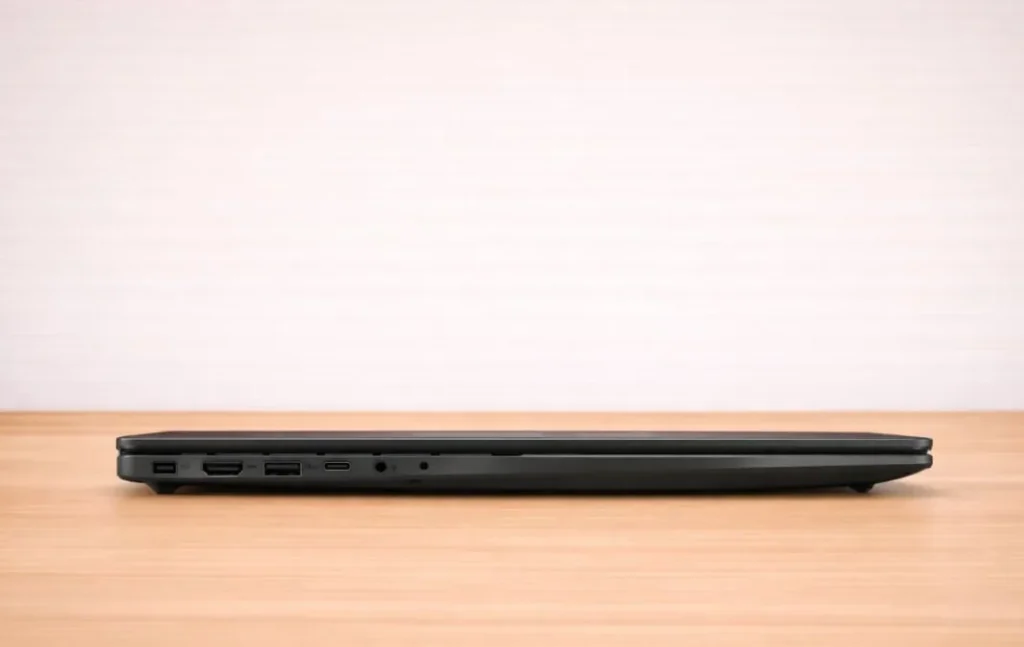
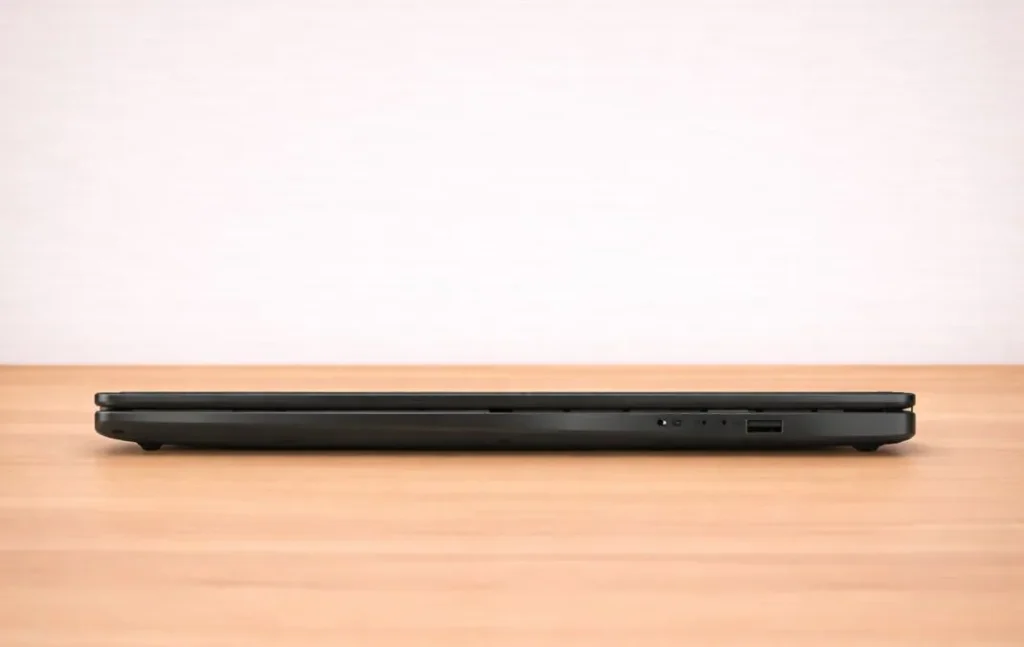
However, the laptop does not include Thunderbolt support, Ethernet (RJ45), or an SD card reader. While this is common in mid-range gaming laptops, users who rely on wired networking or camera card transfers may need additional adapters.
Wireless connectivity is handled by Wi-Fi 6 and Bluetooth 5.3, which provided stable connections during online gaming and large file downloads. Overall, the port selection focuses on essential connectivity rather than extensive expansion.
Speaker & Audio Quality
The ASUS V16 uses a dual-speaker setup rated at 2×2 W, positioned to deliver balanced sound for everyday use. During testing, the speakers produced clear dialogue in videos and games, making them suitable for casual media consumption without requiring external speakers.
Maximum volume reached around 72–73 dB, which is loud enough for personal listening in a quiet room. At higher volume levels, the audio remained clear with minimal distortion, though bass response is limited due to the thin laptop chassis.
In gaming scenarios, positional audio remained understandable, allowing footsteps and directional cues to be heard clearly. However, for immersive gaming experiences or deeper bass in music, a headset or external speakers provide a noticeable improvement.
For general use such as watching videos, attending online meetings, or casual gaming, the built-in audio system performs reliably within the expectations of a mid-range gaming laptop.
Webcam & Video Call Quality
The ASUS V16 includes a 1080p (Full HD) webcam positioned above the display, which provides a noticeable improvement over older 720p laptop cameras. In normal lighting conditions, video clarity is acceptable for video calls, online classes, and meetings.
During testing, the camera produced reasonably sharp images with natural colors when used in well-lit environments. In lower lighting conditions, some noise becomes visible, which is typical for most built-in laptop webcams.
The dual microphone system supports noise-reduction features, helping reduce background sounds during calls. Voice pickup remained clear during video conferencing and streaming tests, even when the laptop’s cooling fans were active.
While the webcam is not intended for professional streaming or content creation, it performs reliably for everyday communication tasks such as video meetings, online classes, and casual calls.
Weight, Dimensions & Portability
The ASUS V16 weighs 1.95 kg (4.30 lb) and measures between 0.87 and 0.94 inches thick (22–24 mm), depending on configuration.
That makes it slightly lighter than systems like the Alienware 16 Aurora at roughly 5.7 lb and close to the Acer Nitro 16S AI at around 5.5 lb.
In hand, the weight feels typical for a 16-inch gaming laptop with full RTX cooling hardware. It is portable for daily commuting, but it is not a lightweight travel machine.
The 150W power adapter adds noticeable bulk in a backpack, so total carry weight should be considered for frequent travel.
Upgradability & Internal Access
The tested unit includes 16GB DDR5 memory. RAM is upgradeable, though slot configuration depends on region and SKU. Buyers should confirm whether the system ships with one free slot or dual populated slots.
The PCIe Gen4 NVMe SSD is replaceable, and the chassis allows internal access by removing the bottom panel. Depending on configuration, expansion options may vary by region.
The WiFi module is replaceable rather than soldered.
Internal access requires standard screw removal. The panel detaches without unusual resistance, though care is required around plastic clips.
ASUS V16 vs Competitors: Where It Stands
Against the Alienware 16 Aurora with RTX 5050, the ASUS V16 shows a clear GPU advantage. The V16 scored 10,500 in 3DMark Time Spy, while RTX 5050 systems typically score around 8,500. In Cyberpunk 2077 at 1200p, this translates to roughly 85 FPS versus around 70 FPS on RTX 5050 hardware.
CPU performance between similarly configured Intel systems remains comparable. The primary difference comes from GPU capability rather than processor output.
Compared to the Acer Nitro 16S AI with Ryzen 7 and RTX 5060, GPU performance is nearly identical. The Nitro typically scores slightly higher in Cinebench multi-core testing due to Ryzen’s stronger sustained thread performance. In gaming workloads, the difference is minimal because performance is GPU-bound at 1080p and 1200p.
Thermal behavior and battery life remain similar between the two RTX 5060 systems based on tested results.
ASUS V16 vs Key Competitors
| Feature | ASUS V16 | Alienware 16 Aurora (RTX 5050) | Acer Nitro 16S AI (RTX 5060) |
| CPU | Intel Core 7 240H | Intel Core 7 240H | Ryzen 7 260 |
| GPU | RTX 5060 (8GB) | RTX 5050 | RTX 5060 |
| 3DMark Time Spy | 10,500 | 8,500 | 10,300 |
| Cyberpunk 2077 (1200p) | 85 FPS (62 FPS 1% low) | 70 FPS range | 85 FPS |
| Display | 16″ 1920×1200, 144Hz, 100% sRGB, 59.7% DCI-P3 | 16″ 165Hz | 16″ 165Hz |
| Storage | 512GB PCIe Gen4 (7,000 MB/s read) | PCIe Gen4 SSD | PCIe Gen4 SSD |
| Battery (Web Browsing) | 6 hr 35 min | 5 hr 55 min | 6 hr 52 min |
| Weight | 1.95 kg (4.30 lb) | 5.7 lb (2.6 kg) | 5.5 lb (2.5 kg) |
| Adapter | 150W | 240W | 230W |
Pros
✔ RTX 5060 delivers 85 FPS in Cyberpunk 2077 at 1920×1200
✔ 10,500 3DMark Time Spy score, clear uplift over RTX 5050
✔ 144Hz display supports 260 FPS in CS2 and 340 FPS in Valorant
✔ Stable 62 FPS 1% lows in demanding AAA titles
✔ PCIe Gen4 SSD reaching around 7000 MB/s read speeds
✔ Sustained thermals with no severe throttling under load
✔ Around 7 hours of web browsing battery life
Cons
✘ Plastic chassis lacks the premium feel
✘ Limited upgrade options after purchase
✘ Not ideal for high-end gaming or heavy GPU workloads
Who Should Buy the ASUS V16
Competitive Gamers
Delivers 260 FPS in Counter-Strike 2 and 340 FPS in Valorant. Maintains 62 FPS 1% lows in Cyberpunk 2077, which helps preserve frame consistency in demanding scenes.
Students & General Users
Handles multitasking smoothly with 16GB DDR5 and a fast Gen4 SSD. Battery life supports several hours of classes or office work. Laptops in this category are also commonly considered alongside options in the best laptops for computer science segment, where a balance between performance and everyday usability is required.
Occasional Creators
Completes Blender Classroom in 380 seconds and handles 4K exports reliably, though Ryzen 7 systems finish heavy renders faster.
Not Ideal For Frequent Travelers
At 5.07 lb plus a 150W adapter, total carry weight is noticeable for long-distance travel.
Final Verdict
The ASUS V16 delivers full RTX 5060 performance without artificial power restrictions. In testing, it maintained stable frame rates across extended gaming sessions rather than relying on short boost spikes.
It is a strong choice for buyers prioritizing sustained GPU output and consistent 1080p or 1200p gaming performance. Those seeking lighter chassis materials or workstation-class rendering power may prefer alternatives.
FAQs
Is the ASUS V16 good for AAA gaming?
Yes. At 1920×1200, Cyberpunk 2077 averaged 85 FPS with a 62 FPS 1% low, and Red Dead Redemption 2 reached 90 FPS on high settings. The RTX 5060 handles modern AAA titles smoothly at 1080p and 1200p.
Does the ASUS V16 overheat during gaming?
Under sustained load, the CPU reached 93°C and the GPU 85°C. During extended sessions, performance remained stable without severe throttling. Fan noise measured 47 dB.
Is the ASUS V16 display good for content creation?
The display covers roughly 60% of the sRGB color space, which is sufficient for everyday tasks, gaming, and basic editing. However, it lacks the color accuracy required for professional photo or video work, especially where precise color grading is important.
How long does the ASUS V16 battery last?
Battery life reached about 7 hours for web browsing and 8.5 hours for video playback at moderate brightness. Gaming on battery lasted around 105 minutes.
Is the RTX 5060 significantly better than the RTX 5050?
Yes. The V16 scored 10,500 in 3DMark Time Spy, while RTX 5050 laptops typically score around 8,500. This difference results in higher average FPS in GPU-heavy games.
Is the ASUS V16 upgradeable?
Yes. The laptop supports RAM and NVMe SSD upgrades. Internal access requires removing the bottom panel.