
Test Environment & Lab Standards
All laptops reviewed at PCVenus are tested under a controlled, repeatable lab environment. Consistency is critical when comparing devices across different brands, price segments, and form factors. Every result we publish is produced using strict standards to ensure fairness and reliability.
Standardized Software Environment
To ensure a level playing field, each laptop is tested using:
A clean OS state: Either a fresh installation or a factory-reset system.
Latest stable updates: The most current OS build available at the time of testing.
Official drivers only: We use the latest manufacturer-provided firmware and drivers.
Version-locked benchmarks: We use identical software versions across all devices to prevent scoring drift.
Note: We never use beta software or unofficial drivers. This prevents artificial performance inflation and ensures our results reflect what you can realistically expect out of the box.
Power & Performance Settings
To avoid misleading results, we test devices at their peak potential:
Performance Profiles: Windows/macOS power plans are set to “Best Performance.”
OEM Utilities: Manufacturer control centers (e.g., Armoury Crate, Synapse) are set to their default “Performance” or “Turbo” preset.
No Manual Tuning: We do not overclock or undervolt unless specifically testing an “enthusiast” feature.
Battery Standards: Endurance tests are conducted at a fixed brightness (typically 150 or 200 nits) using a “Balanced” power profile.
Environmental Conditions
Thermal physics matter. All testing is conducted in a climate-controlled room:
Ambient Temperature: Maintained at a stable 22°C – 24°C (72°F – 75°F).
Surface Consistency: Laptops are tested on a flat, hard wooden surface (our standardized lab bench) to ensure consistent airflow intake/exhaust.
Stabilization: Thermal and noise measurements are taken only after the system has reached a “steady state,” preventing short boost durations from skewing the data.
The PCVenus Lab Bench
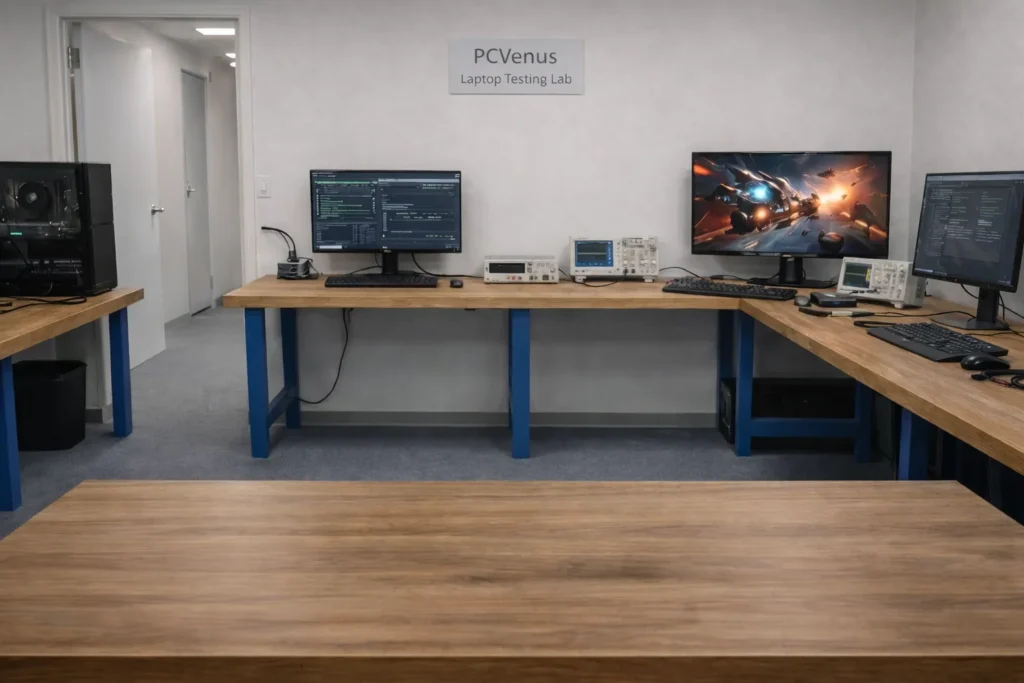
Every laptop reviewed is photographed and tested on our standardized PCVenus Lab Table. This is not just for aesthetics—it serves a functional purpose:
Visual Proof: It guarantees that every device was physically present in our lab.
Scale Comparison: Using the same surface allows readers to visually compare size and footprint accurately.
Lighting Consistency: Controlled lighting ensures screen brightness and color accuracy are captured faithfully.
Why This Matters
When a laptop is retested under the same conditions, results fall within a predictable variance range, confirming repeatability.
Laptop performance can vary wildly based on room temperature or a single driver update. By strictly standardizing our environment, PCVenus ensures that:
Benchmark comparisons are scientific, not anecdotal.
Thermal and battery data is reproducible.
Differences in scores reflect actual engineering, not testing bias.
Design, Build & Human Interface Evaluation
At PCVenus, design and build quality are evaluated as functional characteristics, not aesthetic preferences. A laptop is a tool that is opened, carried, typed on, and transported daily, and these physical factors directly influence reliability and comfort over time.
Chassis Construction & Structural Integrity
The chassis is examined for material quality, panel alignment, and overall rigidity to understand how well the laptop holds up under regular use. Controlled pressure is applied to the lid and keyboard deck to check for flex, creaking, or deformation. Torsional rigidity is also assessed by gently handling the device from the corners to observe resistance to twisting.
Any excessive flex, uneven panel gaps, or structural inconsistencies are documented, as these issues can affect durability and internal component protection during long-term use.
Hinge Design & Stability

Hinges are evaluated through repeated opening and closing cycles under typical daily handling conditions. Hinge tension is assessed using a one-finger open test, while screen stability is observed during typing and when the desk surface is lightly disturbed.
A properly tuned hinge should maintain display position without feeling loose or requiring excessive force.
Keyboard Experience & Typing Consistency

Keyboards are tested during extended typing sessions rather than brief demonstrations to reflect real-world usage. Evaluation focuses on key travel, actuation consistency, and overall layout efficiency, including key spacing and modifier placement.
Heat transfer to the keyboard and palm rest areas is also observed during sustained workloads, as elevated surface temperatures can reduce typing comfort during long sessions.
You can check our review: Best Thunderbolt 5 Laptops
Trackpad Precision & Gesture Reliability

The trackpad is tested for surface quality, glide smoothness, and click uniformity across its entire surface. Multi-touch gestures, palm rejection, and cursor stability are evaluated during slow and precise movements to identify tracking or driver inconsistencies.
Uneven clicks, tracking instability, or unreliable gesture recognition are documented, as these issues can affect daily navigation efficiency.
Port Selection, Placement & Usability

Ports are assessed based on real-world practicality rather than quantity alone. Evaluation includes the variety of available ports, their spacing, and placement to determine how easily peripherals can be connected without obstruction.
High-speed ports such as USB-C or Thunderbolt are validated for expected performance where supported, and charging behavior across compatible ports is observed.
Weight Distribution & Ergonomic Handling
Beyond total weight, overall handling is evaluated during everyday use scenarios. Balance is assessed when the laptop is carried or used on a lap, while edge design and palm rest comfort are examined during prolonged typing.
Poor weight distribution or sharp contact points are noted, as these can reduce comfort despite an otherwise lightweight design.
Overall Build Assessment
The final build evaluation reflects structural integrity, input reliability, and day-to-day comfort. Laptops that combine solid construction with consistent input performance are rated higher than devices that prioritize raw performance at the expense of long-term usability.
CPU Performance Testing
CPU performance testing at PCVenus focuses on both peak capability and sustained behavior. While benchmark scores are useful, we place equal importance on how consistently a processor performs over time, especially under prolonged workloads that resemble real usage.
We test CPUs in a controlled lab environment using repeatable methods so results remain comparable across different laptop categories and generations.
Synthetic CPU Benchmarks
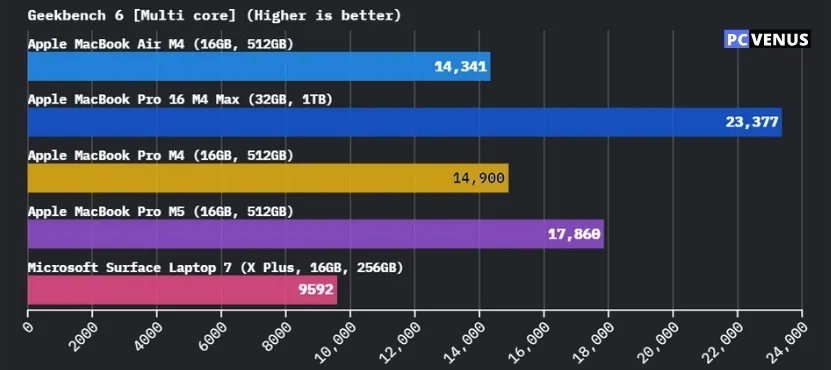
We begin with industry-standard benchmarks to measure raw processing power:
- Geekbench 6 Single-Core: Used to evaluate responsiveness in everyday tasks such as browsing, office work, and light applications.
- Geekbench 6 Multi-Core: Measures how well the processor handles parallel workloads like multitasking and background-heavy usage.
- Cinebench R23 Single-Core: Helps assess short-burst performance and instruction efficiency.
- Cinebench R23 Multi-Core: Used to test sustained rendering workloads and full-core utilization.
All benchmarks are run multiple times. We record stable results rather than peak outliers to avoid inflated scores caused by short boost behavior.
Also Read: What Is Geekbench 6
Sustained Performance & Throttling Analysis
Short benchmarks do not reveal how a CPU behaves during long workloads. To address this, we run extended stress tests and back-to-back benchmark loops.
During these tests, we monitor:
- Clock speed stability over time
- Performance drop-off after initial boost periods
- Thermal throttling under continuous load
- Power limit enforcement by the system
If performance declines significantly after a few minutes, we document the extent and duration of the drop, as this directly affects tasks like compiling code, rendering, or long exports.
Real-World CPU Workload Validation
Beyond synthetic tests, we validate CPU performance using real workloads:
- Application launch and responsiveness under load
- Multitasking with background processes running
- CPU-heavy productivity tasks such as compilation and media processing
We pay close attention to how the system feels during these tasks. A CPU that benchmarks well but feels sluggish under real use is scored accordingly.
Power Efficiency & Thermal Behavior
CPU performance is closely tied to power consumption and heat output. During testing, we observe:
- How aggressively the CPU boosts and how long it sustains those clocks
- Temperature trends during extended workloads
- Fan behavior triggered by CPU load
Efficient CPUs that maintain stable performance without excessive heat or noise are rated higher than processors that rely on short-lived boosts.
How We Interpret CPU Results
When comparing laptops, we do not rely on a single benchmark score. Instead, CPU performance is evaluated based on:
- Consistency across multiple tests
- Stability during long workloads
- Balance between performance, thermals, and efficiency
This approach helps us distinguish between laptops that perform well only in charts and those that deliver reliable performance during daily use.
GPU & Graphics Performance Testing
Graphics performance testing at PCVenus is designed to measure both raw rendering power and sustained real-world behavior. We test integrated and dedicated GPUs with methods that reflect gaming, creative workloads, and long-duration usage rather than short benchmark bursts.
We focus on how the GPU performs over time, how it interacts with the cooling system, and how consistently it delivers frames or compute output under load.
Synthetic Graphics Benchmarks
We start with standardized GPU benchmarks to establish a comparable baseline:
- Geekbench 6 GPU Compute Score (Metal where applicable): Used to evaluate GPU compute performance, especially for creative and graphics-accelerated tasks.
- 3DMark Wild Life Extreme: Used to measure graphics performance under heavy, modern workloads that stress both the GPU and memory subsystem.
Each benchmark is run multiple times. We log stabilized scores rather than peak results to avoid boost-driven spikes that do not reflect sustained performance.
Integrated vs Dedicated GPU Evaluation
Integrated and dedicated GPUs are assessed based on their intended use cases:
- Integrated GPUs are evaluated for everyday graphics tasks, light gaming, and accelerated productivity workloads.
- Dedicated GPUs are tested for gaming, rendering, and GPU-accelerated creative applications.
We do not directly compare integrated and dedicated GPUs in isolation. Performance is interpreted within the context of the laptop’s category, power limits, and cooling design.
Real-World Gaming Performance

Synthetic benchmarks alone do not reflect gaming behavior. We validate GPU performance using real gameplay scenarios where applicable.
During gaming tests, we observe:
- Average and sustained frame rates
- Frame time consistency and stutter
- Performance stability during extended play sessions
- Thermal behavior under continuous GPU load
If performance degrades noticeably after prolonged gaming, we document the scale and cause of the drop.
Sustained Load & Thermal Interaction
To understand long-term behavior, we run extended GPU stress tests and looped workloads. During these sessions, we monitor:
- GPU clock stability
- Power limit enforcement
- Thermal throttling behavior
- Fan response and noise escalation
We pay close attention to how the GPU and CPU share thermal headroom, as combined loads often reveal cooling limitations not visible in isolated tests.
GPU Power Efficiency & System Balance
Raw performance is only one part of the equation. We also evaluate how efficiently the GPU delivers that performance:
- Performance per watt trends
- Heat output relative to workload
- Noise levels triggered by sustained GPU usage
GPUs that maintain stable output without excessive heat or noise are rated higher than those that rely on aggressive boosting and rapid throttling.
Interpreting GPU Results
When we compare laptops, GPU performance is interpreted using:
Sustained benchmark behavior
Real-world gaming and creative workloads
Thermal and acoustic impact on usability
This approach helps us identify systems that deliver reliable graphics performance in daily use, not just impressive scores in short benchmark runs.
More coming…