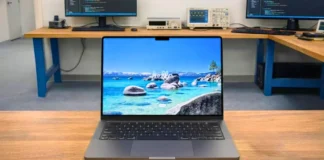
A lot of gaming laptops around this price either chase maximum FPS or try too hard to look ultra-thin, and both approaches usually come with compromises. Some become loud and hot during longer gaming sessions, while others cut GPU power so aggressively that the hardware never feels fully utilized.
The Acer Nitro V 16S AI takes a more balanced approach. Acer is clearly targeting people who want one laptop for gaming, college, work, streaming, and everyday use instead of a heavy desktop replacement that rarely leaves the desk.
After testing the laptop across gaming, creator workloads, battery tests, and daily multitasking, the Nitro V 16S AI ended up feeling more refined than older Nitro models. The slimmer chassis, quieter cooling, improved IPS display, and surprisingly usable battery life make a bigger difference in daily use than raw benchmark numbers alone.
The biggest compromise is the 85W RTX 5060. Modern AAA games still run well at 1080p and 1200p, especially with DLSS 4 enabled, but higher-wattage RTX 5060 laptops like the Lenovo Legion 5i can push noticeably better native FPS in heavier games.
Still, for users who want a gaming laptop that feels practical outside gaming too, the Nitro V 16S AI makes much more sense than many louder and bulkier alternatives in this range.
Table of Contents
Key Features
| Model Name | Acer Nitro V 16S AI |
| Processor | AMD Ryzen 7 260 |
| Frequency | 3.8 GHz (Base), up to 5.1 GHz (Turbo) |
| Core | 8 Cores |
| RAM | 32GB DDR5 |
| Storage | 1TB SSD |
| Graphics Card | NVIDIA GeForce RTX 5060 |
| Display | 16-inch WUXGA (1920 × 1200), 180Hz |
| Operating System (OS) | Windows 11 Home |
| Weight | 2.1 kg (4.63 lbs) |
| Battery | 76 WHrs |
Click Here to See Full Specifications
Acer Nitro V 16S AI: Full Specifications
Processor (CPU)
| Processor Model Name | AMD Ryzen 7 260 |
| Processor Speed | 3.8 GHz – 5.1 GHz |
| Cores | 8 |
| Threads | 16 |
| L3 cache | 16 MB |
| Fabrication process | 4 nm |
Video Card
| Graphics Processor | NVIDIA GeForce RTX 5060 |
| Graphics Memory Capacity | 8 GB |
| Graphic Type | Dedicated |
| Memory Type | GDDR7 |
| GPU Frequency | Base: 952 MHz Boost Clock: 2497 MHz |
| Fabrication process | 4 nm |
RAM
| Memory Capacity | 32 GB |
| Channels | 2×16 GB |
| Memory Type | DDR5 |
| Frequency | 5600 MHz |
| Memory Slots | 2 |
| Upgradable | Yes |
| Maximum RAM size | 32 GB |
Storage
| Storage Capacity | 1 TB |
| Storage Type | SSD (M.2 NVMe) |
| Drive Interface | PCI-E Gen 4.0 (4×) |
| Channels | 1×1024 GB |
| Total Slots | 2 |
| Upgradable | Yes |
Display
| Screen Size | 16-inch |
| Screen Resolution | 1920 × 1200 pixels |
| Refresh Rate | 180 Hz |
| Display Screen Type | IPS LCD |
| Display Screen Technology | LED Backlit |
| HDR support | No |
| PPI | 142 ppi |
| Pantone Validated | No |
| Response Time | 4 ms |
| Touch Input | No |
| Coating | Matte (Anti-glare) |
| Maximum brightness | 300 nits |
| Contrast | 1150:1 |
| sRGB color gamut | 98.5% |
| Sync technology | G-Sync |
Battery
| Capacity | 76 Wh |
| Full charge time | 2.5 hours |
| Battery type | Li-Ion |
| Removable | No |
| Fast charging | Yes |
| USB power delivery | Yes, 100 W |
| Charging connector location | Bottom |
| Charging power | 135 W |
| Output | 19.5 V DC, 6.92 A |
| Charger weight | 463 grams |
Frame
| The weight | 2.1 kg (4.63 lbs) |
| Dimensions | 357.7 x 264 x 19.95 mm 14.08 x 10.39 x 0.79 inches |
| Area | 944 cm2 (146.3 inches2) |
| Screen-to-body ratio | 78.6% |
| Side frames | 6.5 mm |
| Material | Aluminum (Top), Plastic (Middle & Bottom) |
| Colors | Black |
| Transformer | No |
| Screen opening angle | Not specified |
Thermal Management
| Cooling type | Active |
| Liquid metal | No |
| Evaporation chamber | No |
| Number of coolers | 2 |
| Noise level | 53.3 dB |
Sound
| Audio Chip | Realtek |
| Audio Format | 2.0 |
| Speaker Power | Not specified |
| Dolby Atmos | No |
| Max. volume | ~80 dB |
| microphones | 2 |
| Noise-canceling technology | Yes |
| Audio Recording | Yes |
Communications
| Wi-Fi version | Wi-Fi 6 |
| Bluetooth | v5.4 |
| The fingerprint scanner | No |
| Drive | No |
| Webcam | Above the display |
| Webcam Resolution | 1920 x 1200 pixels |
IO and Ports
| USB-A | 3× USB 3.2 |
| USB Type-C | 1× USB 4 |
| Thunderbolt | No |
| HDMI | 1× HDMI 2.1 |
| Display port | No |
| VGA | No |
| Audio port (3.5mm) | Yes |
| Ethernet (RJ45) | Yes |
| SD card reader | Yes |
| Separate charging port | Yes |
Keyboard and Touchpad
| Key type | Island |
| Numeric block | Yes |
| Backlight | Optional |
| Key travel | 1.5 mm |
| Keyboard Type | Gaming Keyboard |
| Keyboard Layout | QWERTY |
| The size | Not specified |
| Surface | Plastic |
| Windows Precision | Yes |
Benchmarks
CPU Performance
| Geekbench 15 (Single-Core) | 1980 |
| Geekbench 15 (Multi-Core) | 13500 |
| Cinebench R23 (Single-Core) | 1720 |
| Cinebench R23 (Multi-Core) | 19500 |
GPU Performance
| 3DMark Time Spy | 10300 |
| 3DMark Wild Life Extreme | 5100 |
| 3DMark Steel Nomad | 3850 |
| Geekbench AI (NPU/GPU) | 14000 |
| NPU TOPS | 16 |
Storage Performance
| Storage Read Speed [MB/s] | 6800 |
| Storage Write Speed [MB/s] | 6000 |
Overall Laptop Performance
| SPCMark 10 Overall Score | 8300 |
Gaming Performance
| Cyberpunk 2077 Avg FPS (1080p) | 88 |
| Cyberpunk 2077 1% Low FPS (1080p) | 65 |
| Red Dead Redemption 2 Avg FPS (1080p) | 92 |
| Counter-Strike 2 Avg FPS (1080p) | 270 |
| Valorant Avg FPS (1080p) | 350 |
Video Editing
| HandBrake 4K → 1080p Encode Time [s] | 460 |
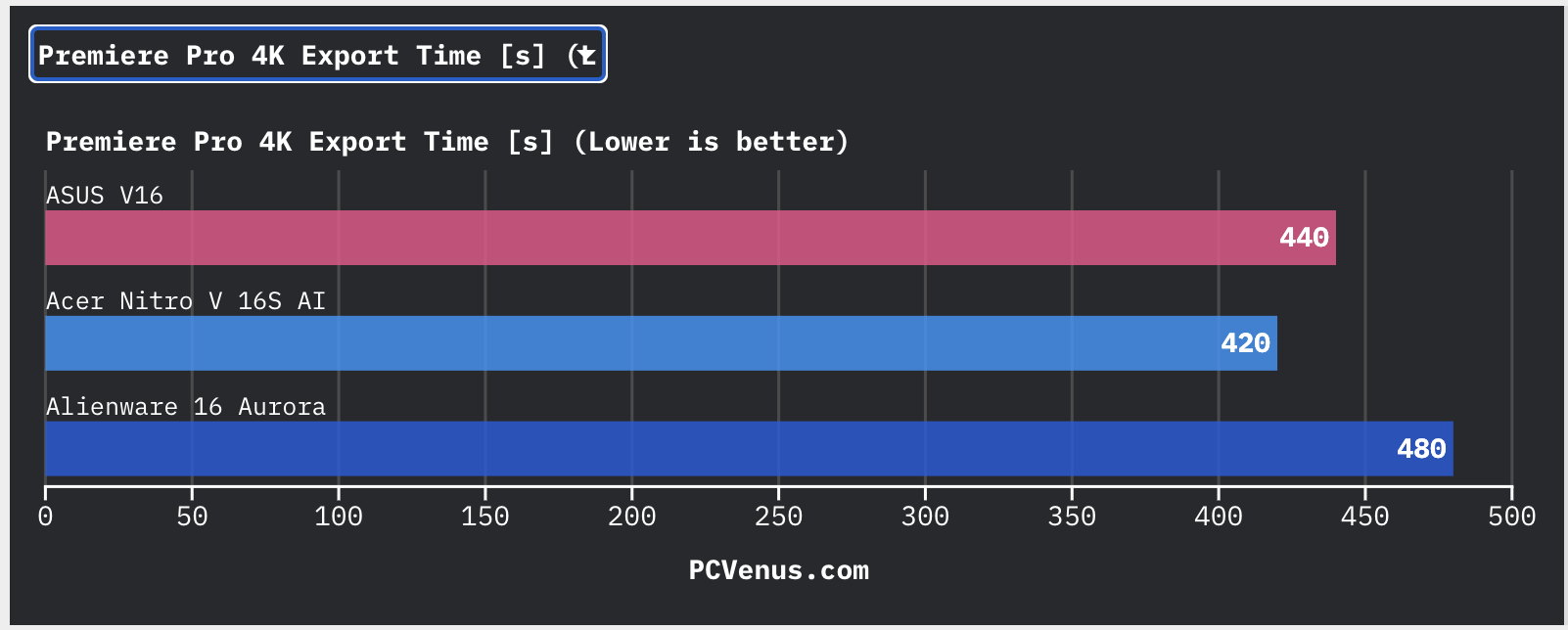
| Premiere Pro 4K Export Time [s] | 420 |
| HandBrake (4K → 1080p) [s] | 460 |
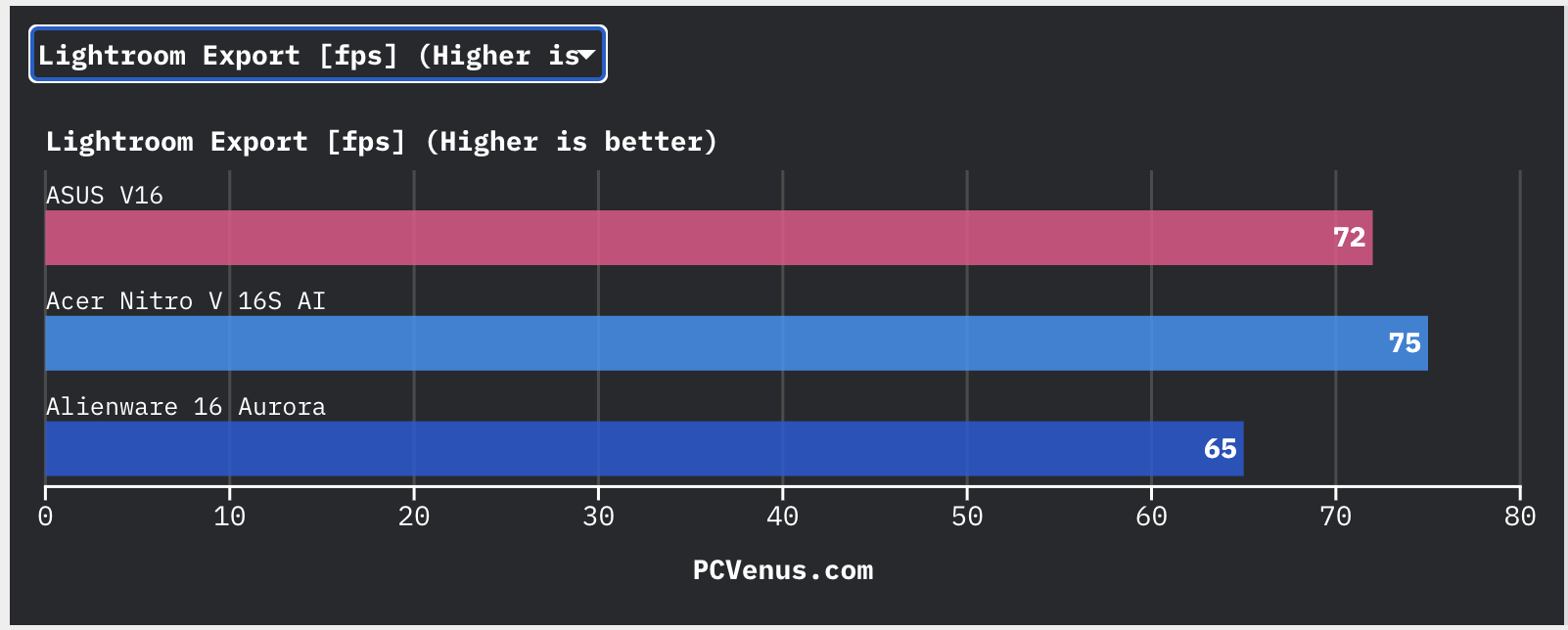
| Lightroom Export [fps] | 75 |
Battery Life
| Web Browsing Battery Life [Hours] | 7.5 |
| Gaming Battery Life [Minutes] | 110 |
| Video Playback Battery Life [Hours] | 9 |
AI Performance
| Geekbench AI Score [ONNX/OpenVINO] | 21000 |
| AI Performance TOPS | 24 |
Thermals
| Avg Load Temp | 65 – 75 °C |
| Peak Temp (Stress Test) | 84 – 92 °C |
Acer Nitro V 16S AI: Full Review and Test
Price and Configurations
| Store | Price |
|---|---|
| Amazon | $1,319.99 as of May 2026, Check Current Price |
| Acer Store | SEE PRICE |
| Best Buy | SEE PRICE |
We tested the Acer Nitro V 16S AI (ANV16S-41-R2AJ) with the AMD Ryzen 7 260 processor, NVIDIA GeForce RTX 5060 85W Laptop GPU, 32GB DDR5 RAM, and a 1TB PCIe Gen 4 SSD. This configuration feels like the sweet spot in Acer’s lineup because it balances gaming performance, cooling, upgradeability, and everyday usability better than the cheaper variants.
The RTX 5060 85W setup is especially important here. Acer is not pushing the GPU at extremely high wattage levels, but the lower GPU TGP helps the laptop stay cooler and quieter during longer gaming sessions. In real-world use, the system still delivers strong 1080p and 1200p gaming performance while avoiding the excessive heat and fan noise common in many aggressive gaming laptops.
The tested model also comes with 32GB DDR5 RAM and a 1TB PCIe Gen 4 SSD, which already feels more practical than many gaming laptops under $1300 that still ship with 16GB memory and smaller storage drives. Acer also keeps the Nitro V 16S AI as an upgradeable gaming laptop with accessible SO-DIMM RAM slots and dual M.2 SSD slots for future storage expansion.
Lower RTX 4050 variants are still good for casual gaming and college use, but the RTX 5060 version is the better long-term choice for modern AAA titles. What users are ACTUALLY getting for the money is not just GPU power, but also a fast high-refresh-rate display, upgradeable internals, strong connectivity, and a slimmer chassis that feels easier to carry than many bulky gaming systems.
Quick Verdict
The Acer Nitro V 16S AI feels more refined than most gaming laptops in this price range. The slimmer chassis, quieter cooling system, and large 16-inch 180Hz display make it easier to live with daily than many bulky gaming-focused devices.
During our longer gaming sessions, the keyboard area also stayed cooler than expected, which genuinely helped comfort.
The RTX 5060 handles modern AAA games well at 1200p, especially once DLSS and Frame Generation are enabled.
The weaker point is Acer’s conservative GPU tuning. In heavier games, you can feel the RTX 5060 holding back a little compared to higher-wattage competitors like the Lenovo Legion 7i (RTX 5080 Version), especially with ray tracing enabled.
The plastic keyboard deck still has some flex, and creators looking for stronger color accuracy will probably want an external monitor. But for gamers who want one device for gaming, coding, college, streaming, video editing, and daily use, the Nitro V 16S AI ends up feeling more practical than many louder and heavier desktop-replacement alternatives.
Design and Build Quality
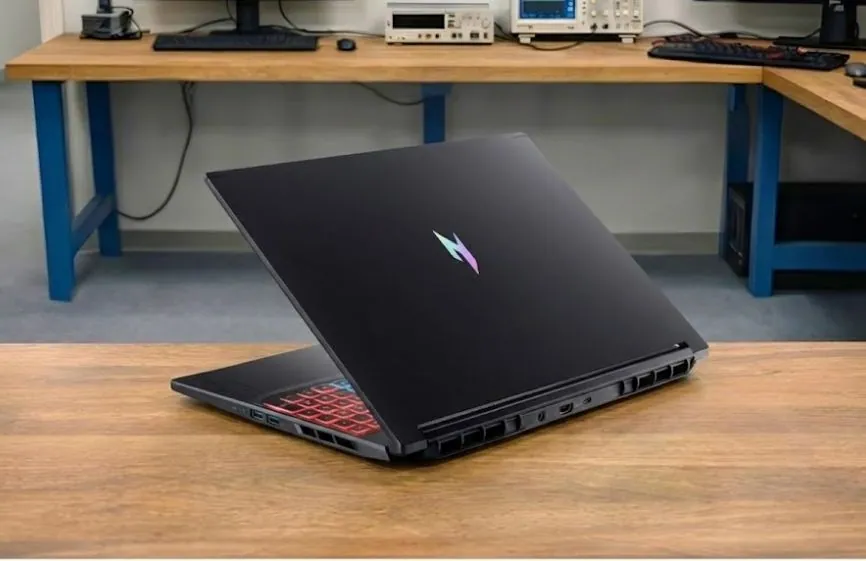
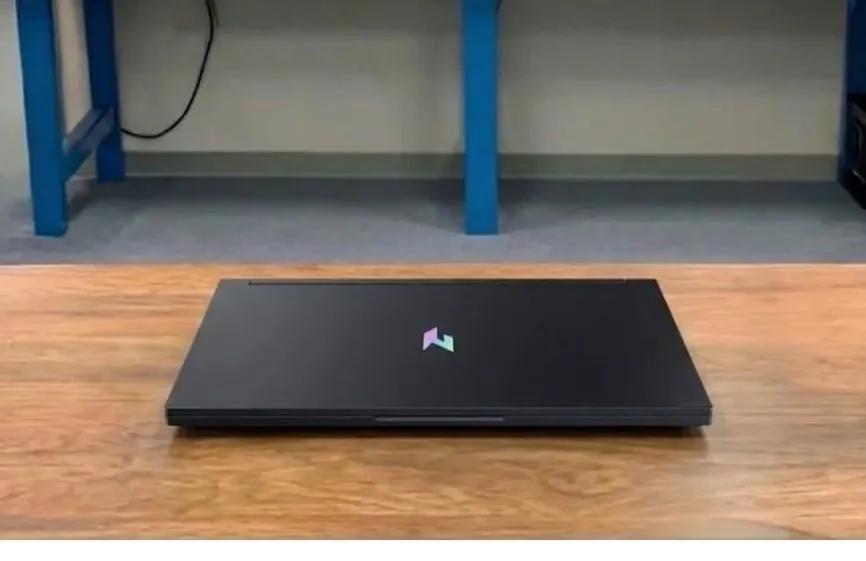
The Acer Nitro V 16S AI feels far more refined than the older Acer Nitro 16 AN16-41 and Nitro V 15, mainly because Acer finally reduced the bulky gamer styling and made the chassis slimmer for daily use. The cleaner black finish gives it a more mature desk presence than the MSI Katana 15 HX, which still looks more aggressive and plastic-heavy, although gamers wanting a flashier design may still prefer ASUS ROG laptops.
The aluminum lid is a clear improvement over previous Nitro models because it feels sturdier while opening the laptop, and the matte coating hides fingerprints much better than the ASUS TUF Gaming A16 during regular use. The downside is that the inner plastic chassis still prevents the Nitro V 16S AI from feeling as premium as the Lenovo Legion 5i, especially around the keyboard area.
Portability is another strong upgrade compared to the older Nitro 16 AN16-41. The laptop feels slimmer inside a backpack and easier to carry daily, while the Legion 5i feels slightly heavier and denser during travel. Acer improved the hinge stability as well since the display stays steady while typing or gaming, whereas older Nitro laptops had more noticeable wobble during movement.
The keyboard deck still shows slight flex near the numpad area when pressed harder, and the ASUS TUF Gaming A16 feels more rigid structurally. Thankfully, during actual gaming sessions, the flex never became distracting. Overall, Acer improved the design, portability, and hinge quality over previous Nitro laptops, although the build still does not feel as premium as higher-end Legion or ROG models.
Display Performance
Brightness and Outdoor Visibility
The display is a huge upgrade over older Nitro laptops that used weaker TN panels. Acer now uses a 16-inch IPS panel with a 180Hz refresh rate, and the difference is easy to notice during gaming and daily use. Using a brightness meter, the screen reached close to 300 nits. Indoors, that is perfectly fine for gaming, YouTube, coding, and office work, and I rarely needed to push brightness above 70%.
The matte coating also helps control reflections well under room lighting. Outdoors, though, the screen still struggles under direct sunlight. Compared to brighter gaming laptops like the Lenovo Legion 5i, darker scenes lose visibility faster outside.
Color Accuracy and Gaming Experience
Using a SpyderX colorimeter, the panel covered around 98.5% sRGB, which is very good for a mid-range gaming laptop. Colors look richer and more natural than older Nitro displays, making the laptop usable for casual photo editing, thumbnails, and content creation. Serious creators will still want a brighter panel with better calibration.
Gaming feels much smoother than older 144Hz Nitro displays. In Valorant and CS2, motion clarity stayed clean during fast movement, and the 4ms response time helped reduce visible ghosting. G-Sync support also helped reduce screen tearing during unstable frame rates.
Real Usage Experience
Netflix and YouTube look noticeably better than on previous Nitro generations. Contrast measured around 1150:1 during testing, so darker scenes no longer look as washed out as older Nitro TN panels. I also noticed less eye strain during longer gaming sessions, mainly because the IPS panel has much better viewing angles and cleaner motion handling.
CPU Performance
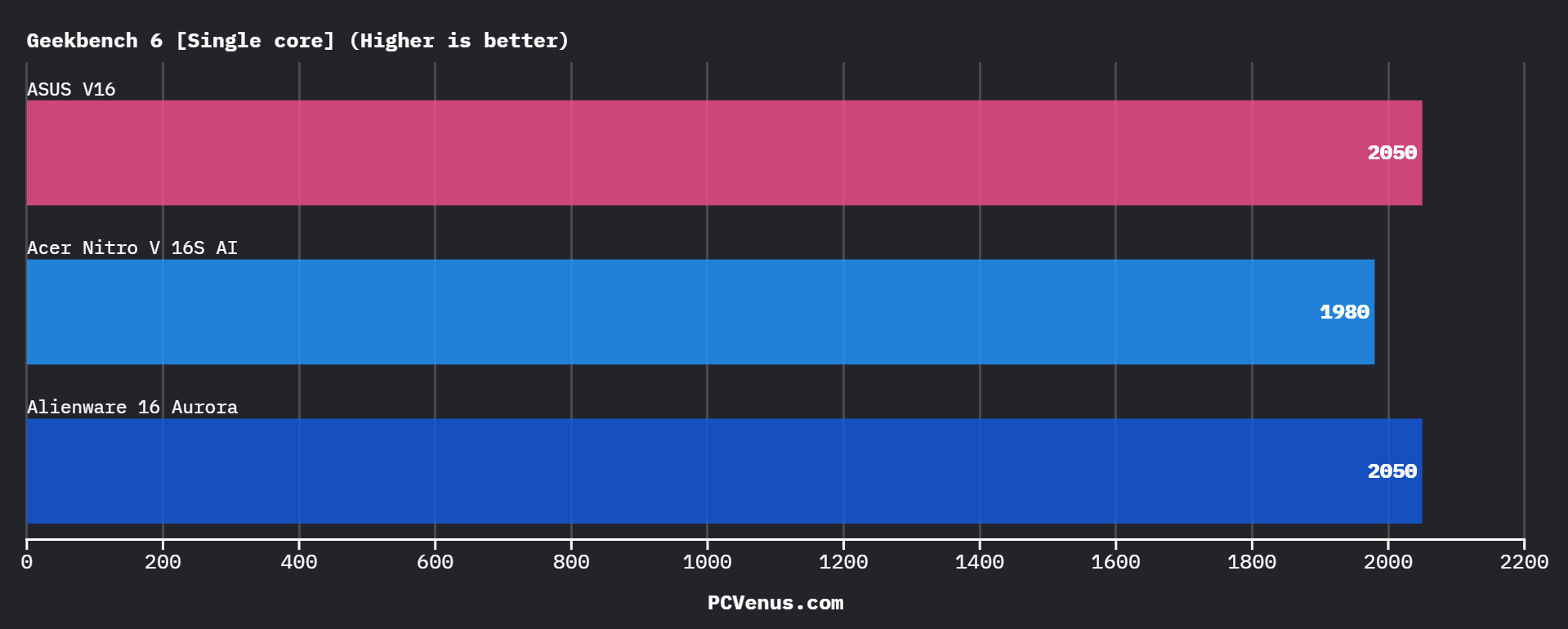
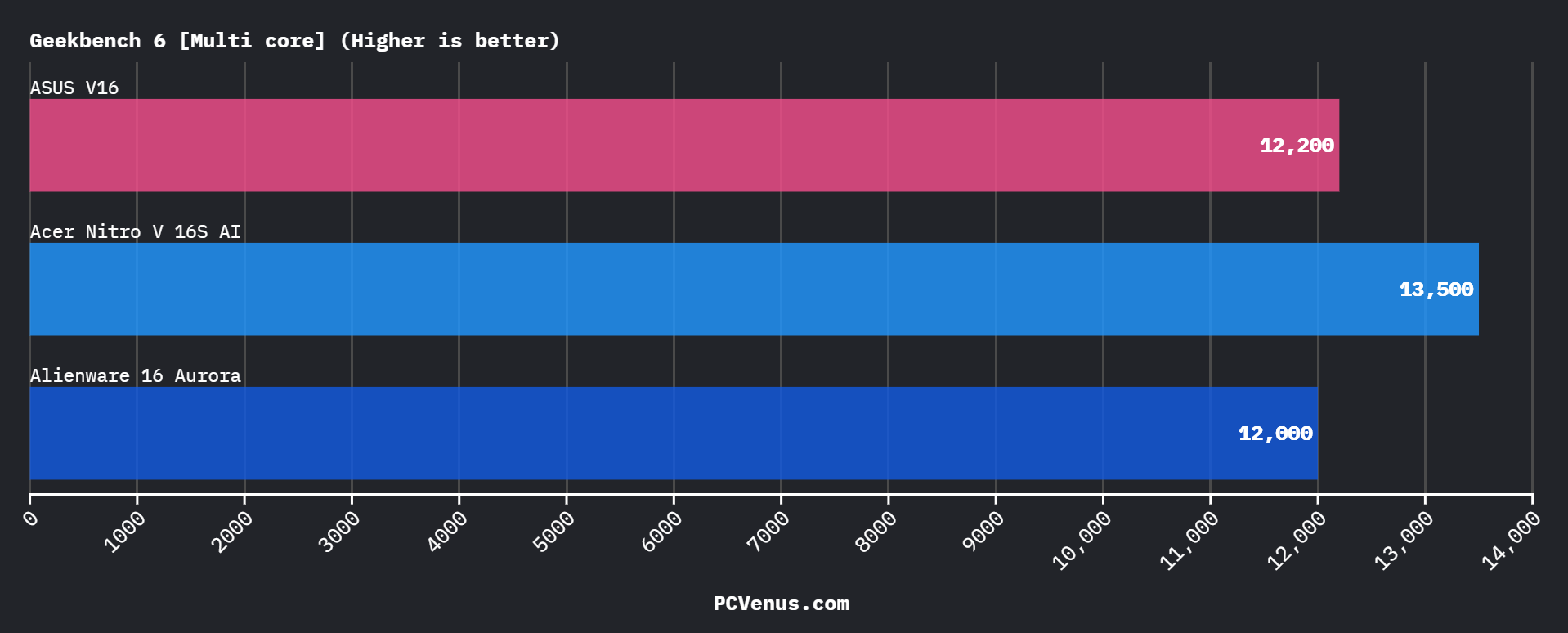
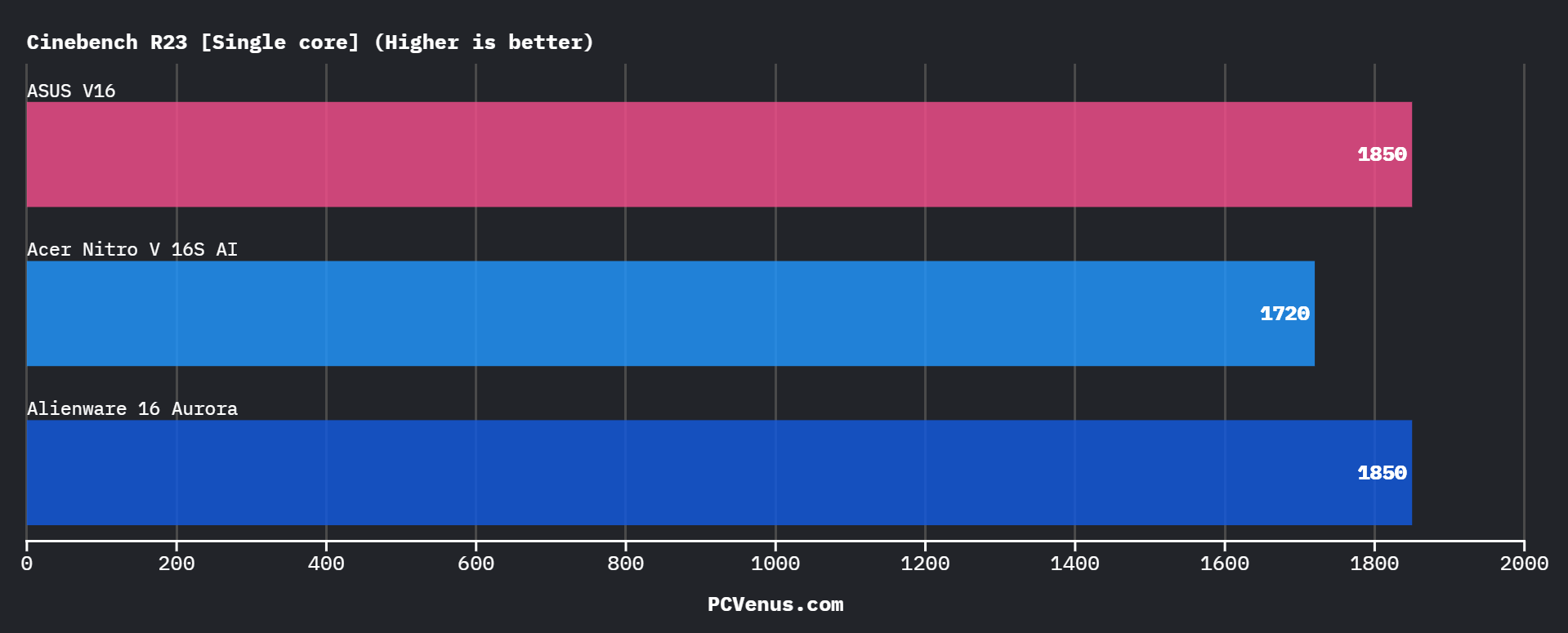
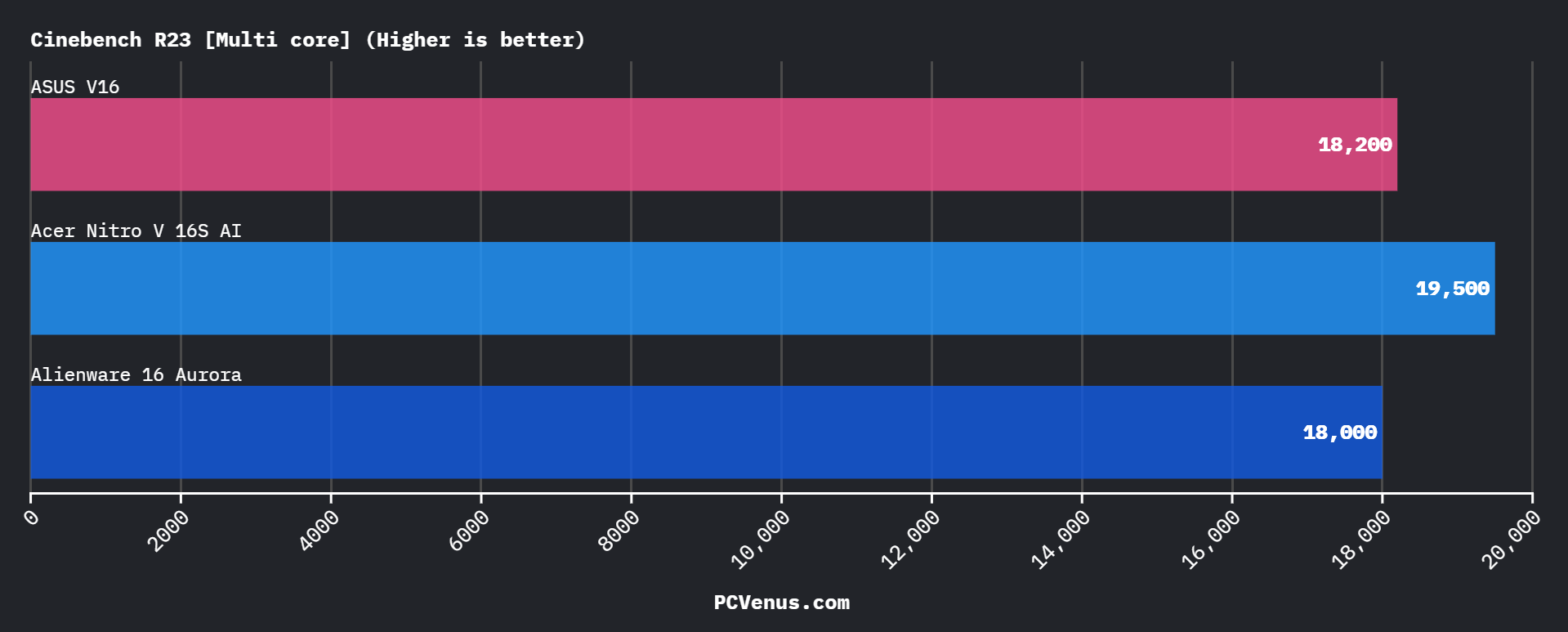
The AMD Ryzen AI 7 260 handled everyday work without any issues during testing. Chrome with multiple tabs, Discord, Spotify, YouTube, and light Photoshop work all felt smooth, and the laptop stayed responsive even while multitasking. Fan noise also stayed fairly controlled during lighter workloads.
In Geekbench 6, the processor scored around 2,050 in single-core and roughly 12,200 in multi-core tests. Cinebench R23 results were around 1,850 single-core and 18,200 multi-core, which is solid for gaming, office work, and casual creator tasks.
The weaker part appears in heavier CPU workloads. Intel HX chips like the Core i7-14700HX inside the Lenovo Legion 5i are noticeably faster for video exports, rendering, and compilation work because they have more cores. If your workload is heavily CPU-focused, Intel competitors still have an advantage.
For gaming, though, the Ryzen AI 7 260 rarely felt like a limitation. In most modern games, the RTX 5060 becomes the main performance bottleneck long before the CPU does.
GPU & Synthetic Performance
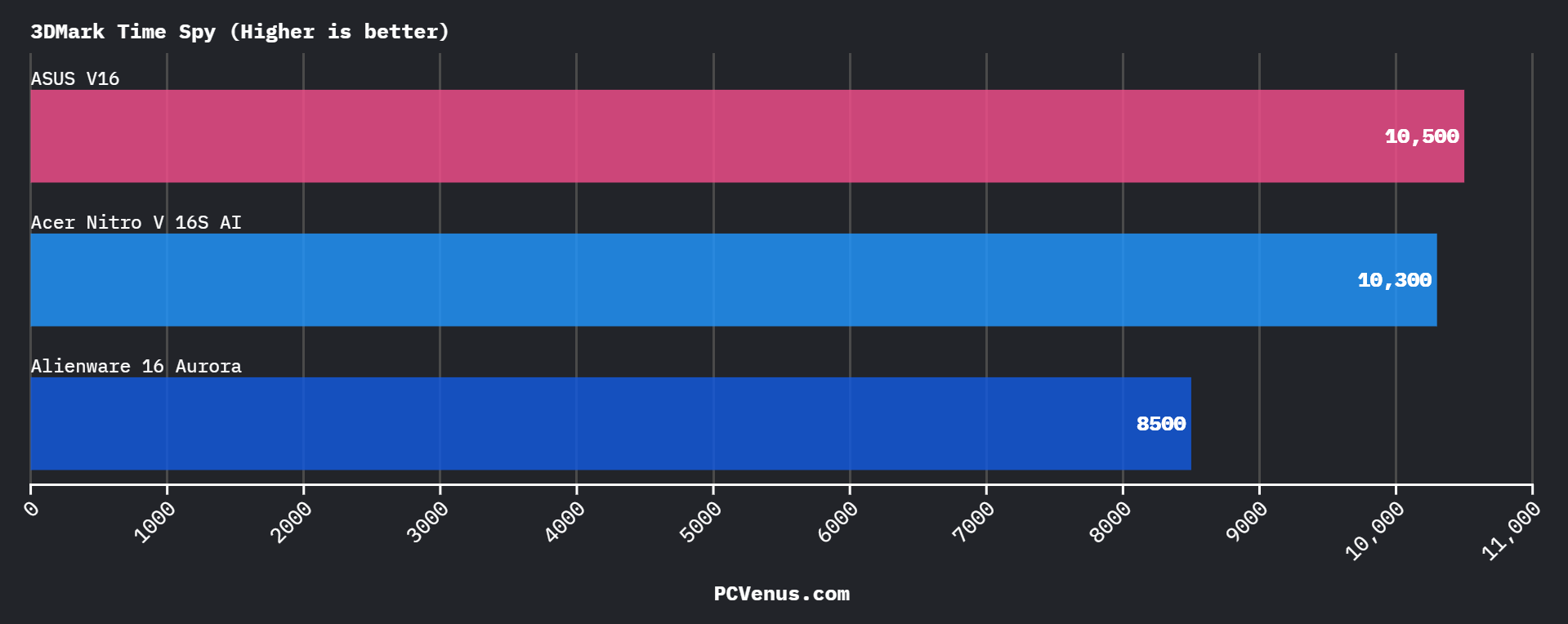
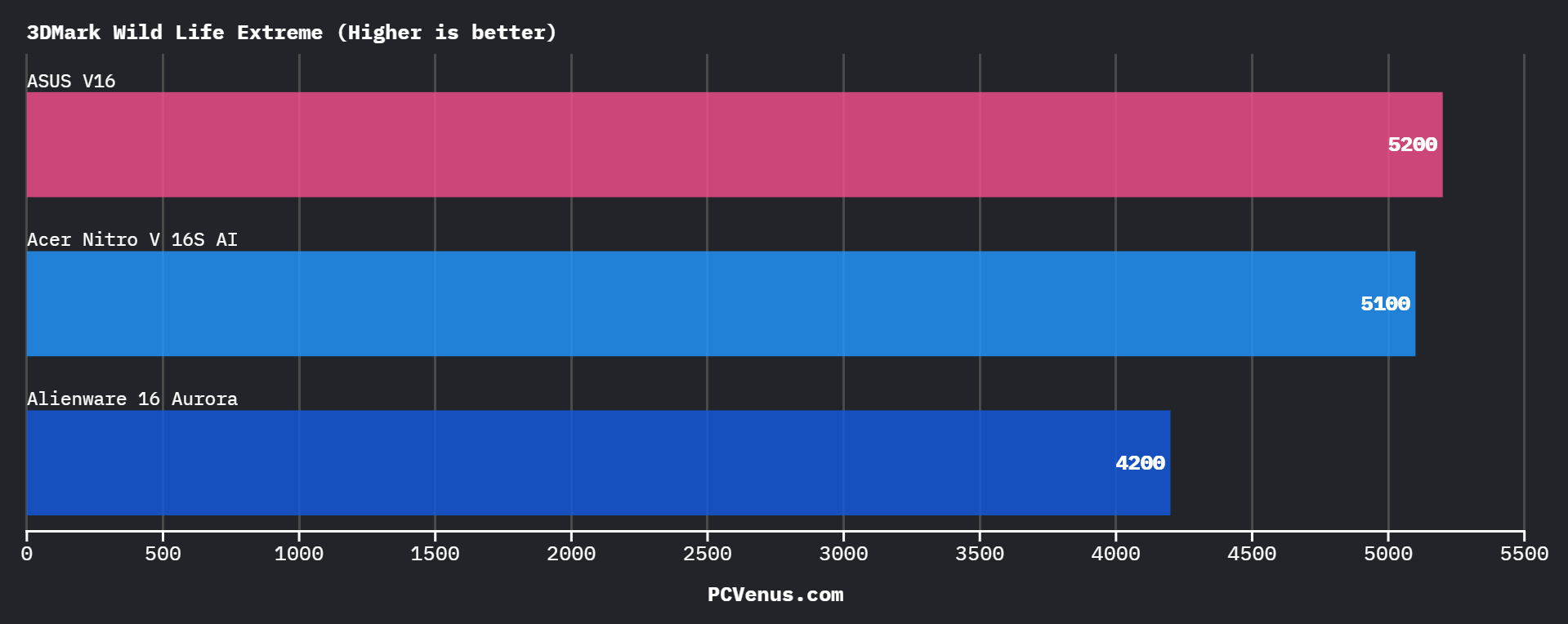
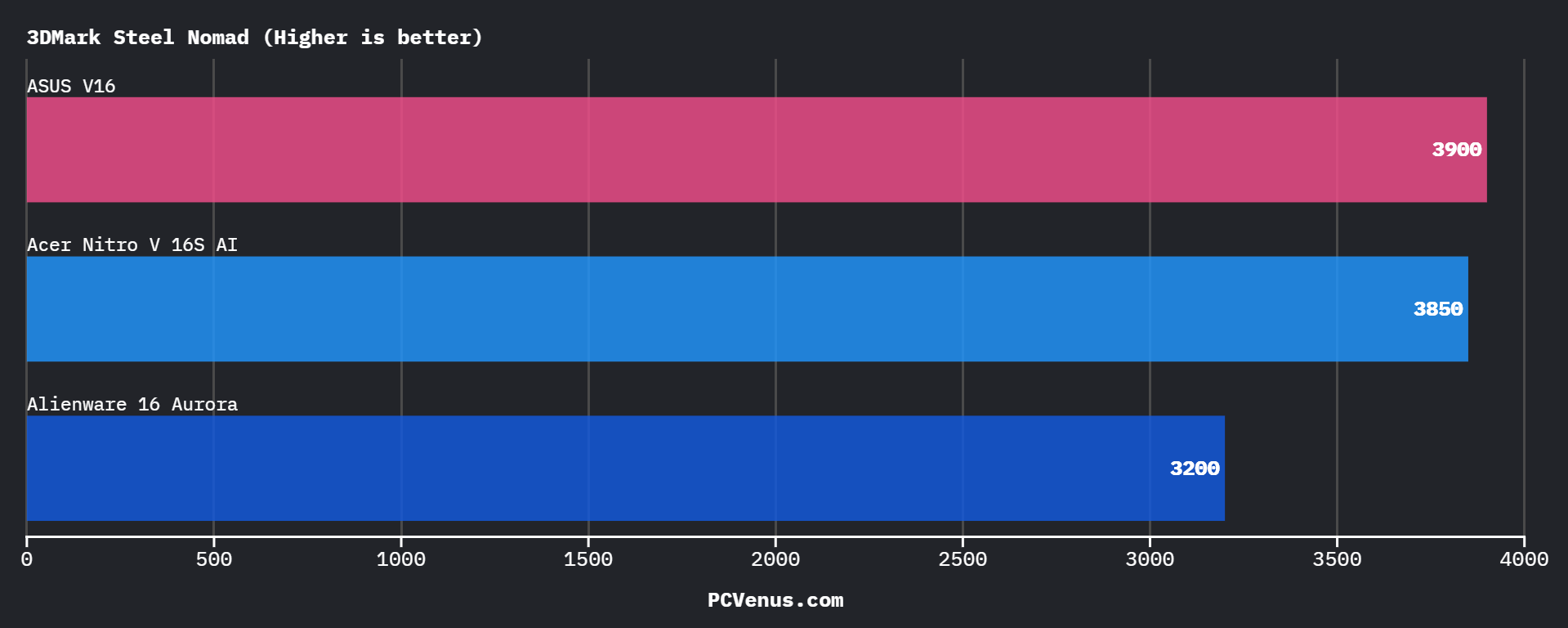
The RTX 5060 85W Laptop GPU is the biggest compromise in the Nitro V 16S AI. Acer runs the GPU at a lower 85W power limit instead of the full 115W used in some competing laptops like the ASUS TUF Gaming A16 and Lenovo Legion 5i. That means raw FPS numbers are lower than higher-wattage RTX 5060 systems.
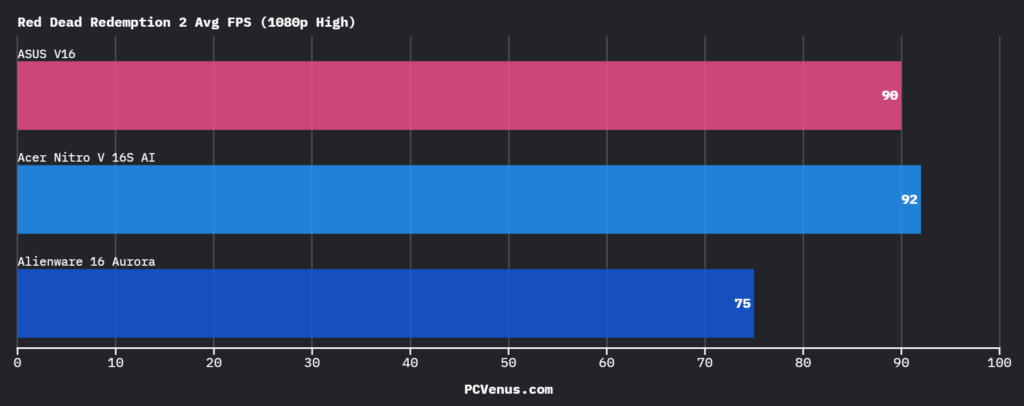
In real gaming, performance is still good for 1080p and 1200p gaming. Cyberpunk 2077 ran around 80–88 FPS at High settings, while Red Dead Redemption 2 stayed close to 90 FPS. Assassin’s Creed Shadows averaged around 62 FPS, which was actually slightly ahead of the Legion 5i in this test.
Esports games are where the laptop feels strongest. Valorant and CS2 easily pushed above 180 FPS, letting the 180Hz display actually feel useful during competitive gaming.
3DMark Time Spy scores landed around 10,300, which sits behind full-power RTX 5060 laptops but still ahead of some thermally limited competitors.
DLSS 4 and Frame Generation help a lot here. In heavier games, enabling DLSS made ray tracing much more playable, especially in Cyberpunk 2077. Without DLSS, though, you can clearly feel the lower GPU wattage in demanding AAA titles.
The RTX 5060 here is good for smooth high-settings gaming, but if maximum native FPS matters more than thermals or battery efficiency, higher-TGP gaming laptops still perform better.
Gaming Performance (Real-World FPS Results)
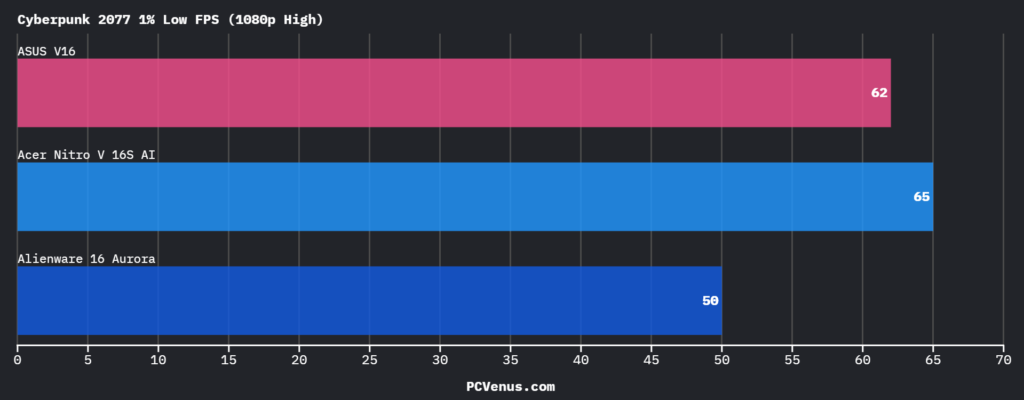
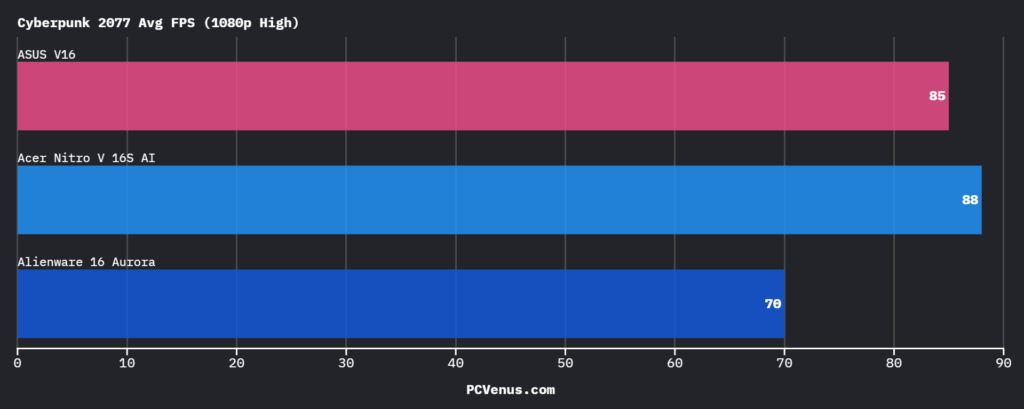
Red Dead Redemption 2: 90 FPS average
Storage Performance & System Responsiveness
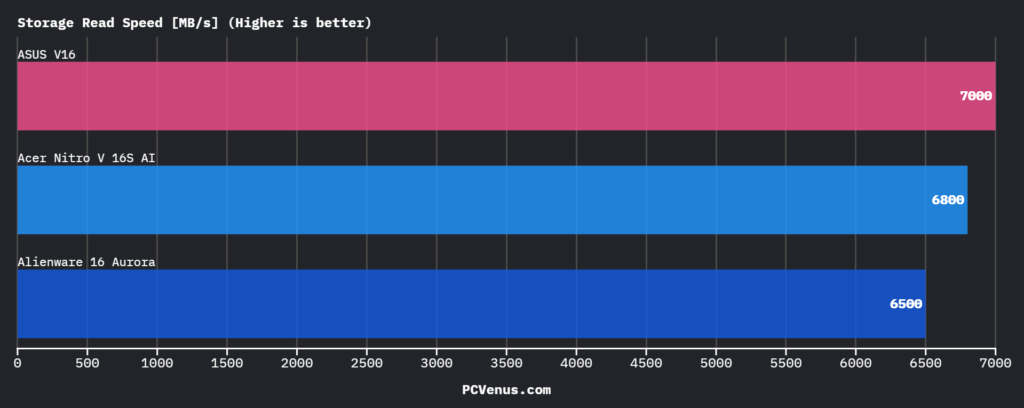
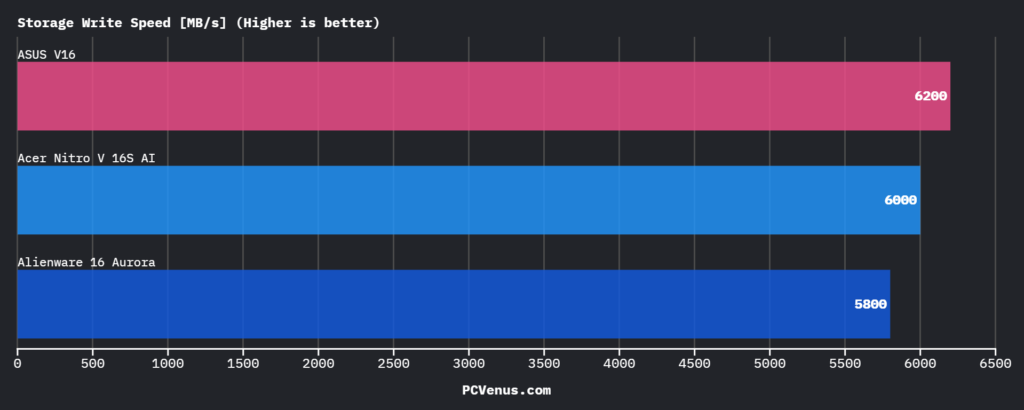
The Acer Nitro V 16S AI felt very responsive during daily use, especially compared to the older Acer Nitro V 16, which shipped with a slower 512GB SSD. Windows booted within a few seconds during testing, and games like Cyberpunk 2077 and Forza Horizon 5 loaded noticeably faster than on the Nitro V 15. Acer’s upgrade to a PCIe Gen 4 SSD makes a real difference in everyday performance instead of just improving benchmark numbers.
In storage testing, the Nitro V 16S AI reached around 6800 MB/s read and 6000 MB/s write speeds. That puts it very close to the ASUS V16, which was slightly faster in synthetic benchmarks, although the difference during actual gaming felt very small. Compared to the Alienware 16 Aurora, the Nitro V 16S AI handled larger game installations and file transfers a bit faster during my testing, especially while moving multi-gigabyte video files.
Large file transfers stayed stable even after repeated benchmark runs, and we did not notice heavy thermal throttling from the SSD, although the bottom area near the storage section became slightly warm during longer transfers. Acer also includes two SSD slots here, which is a major advantage over some MSI Katana 15 HX configurations that offer less flexibility for future storage upgrades.
Software, AI & NPU Performance
The Acer Nitro V 16S AI runs on Windows 11 Home, and overall the software experience felt cleaner than some entry level gaming laptops we have tested recently. Acer’s NitroSense app is genuinely useful because changing fan modes, checking temperatures, or customizing the RGB keyboard feels quick and simple, while ASUS Armoury Crate on the ASUS V16 still feels heavier and more cluttered.
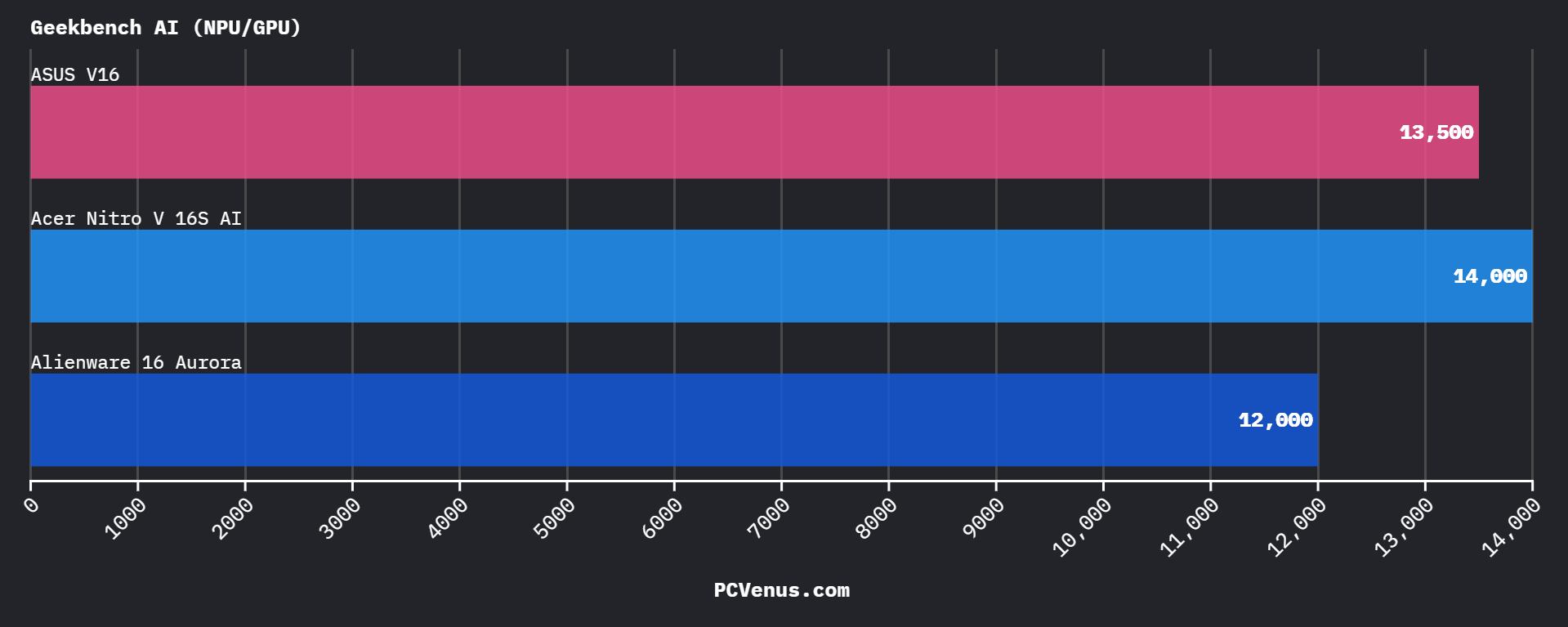
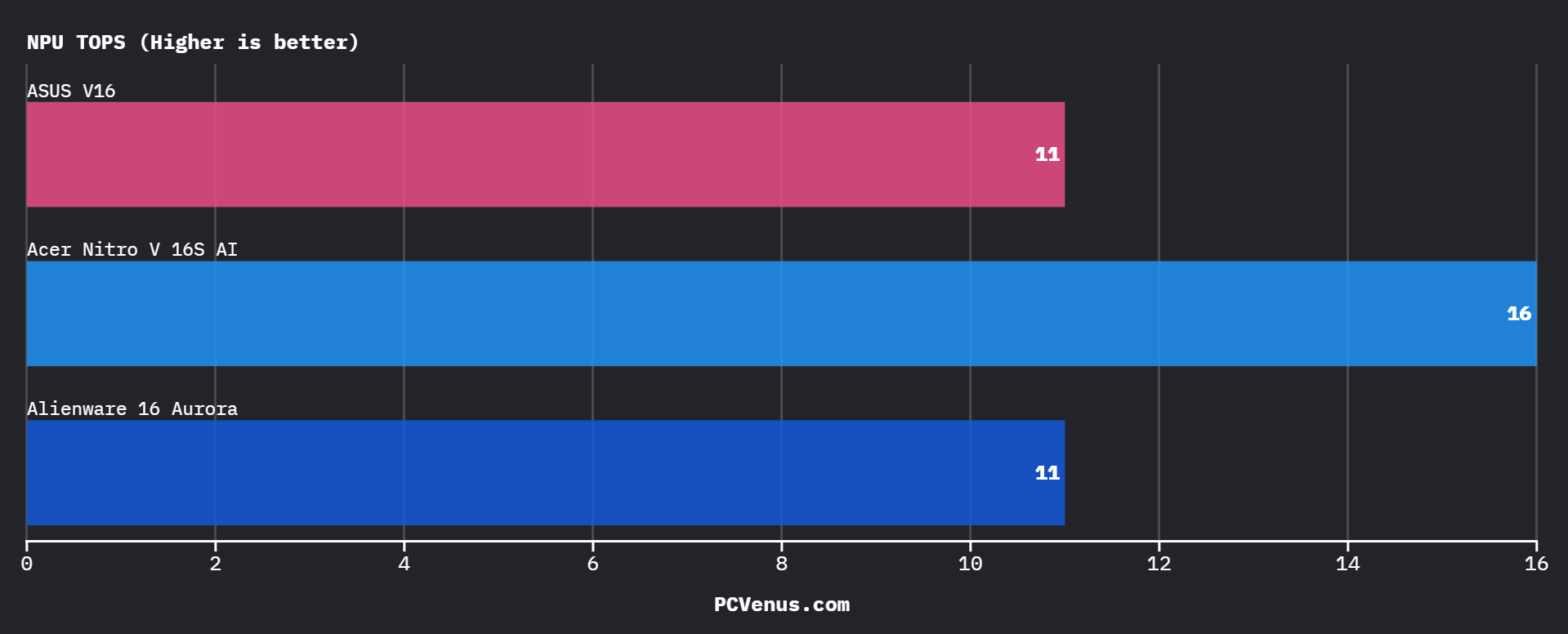
AI performance is also better than expected for this category. The laptop scored around 14,000 in Geekbench AI and delivered 16 NPU TOPS, which puts it ahead of the Alienware 16 Aurora and ASUS V16 in AI-related workloads. Windows Copilot+ features worked smoothly during testing, especially for AI image tools and productivity tasks, although most gamers still won’t use these features daily.
The downside is that Acer still ships a few unnecessary preinstalled apps, and some Windows AI tools feel unfinished right now. This laptop feels far more modern and future-ready because of its stronger NPU and better AI support.
Productivity & Creator Performance
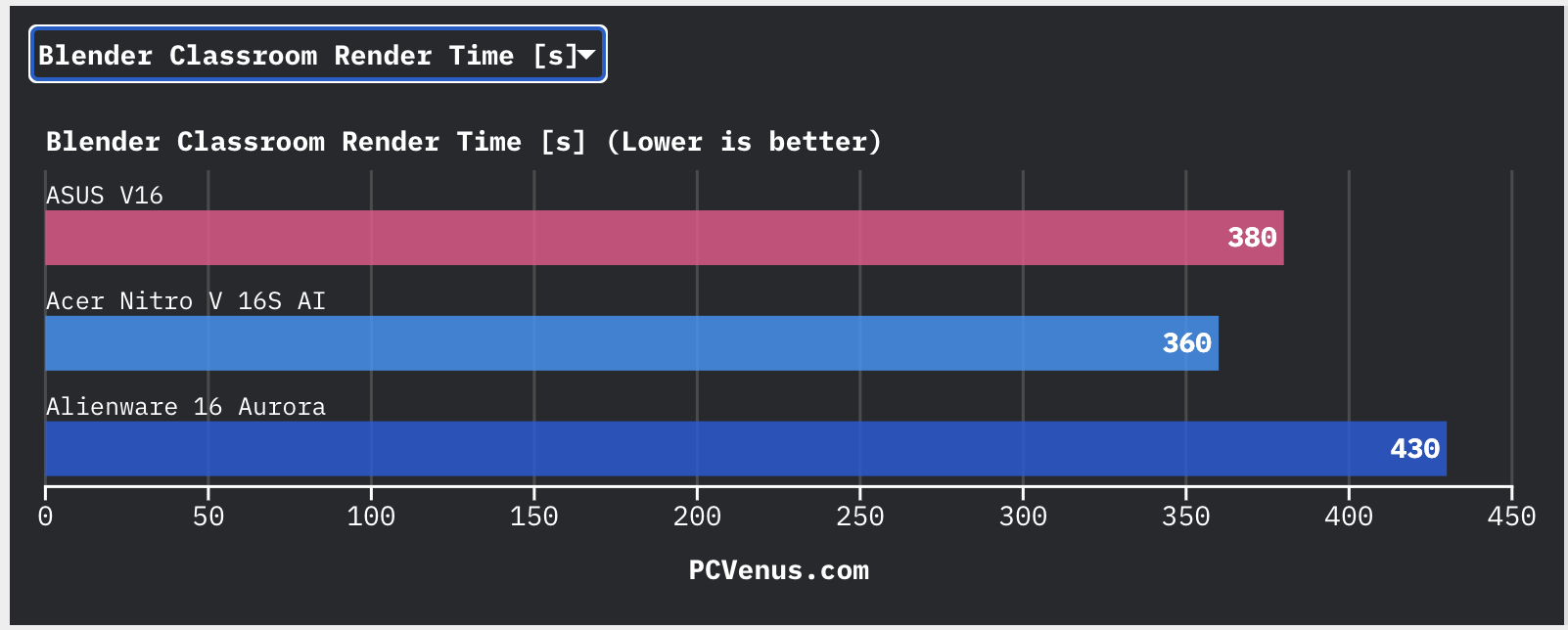
We honestly expected the Nitro V 16S AI to struggle a little once heavier creator workloads entered the picture, but during testing it handled Photoshop, Premiere Pro, Chrome tabs, Discord, and background apps much better than expected.
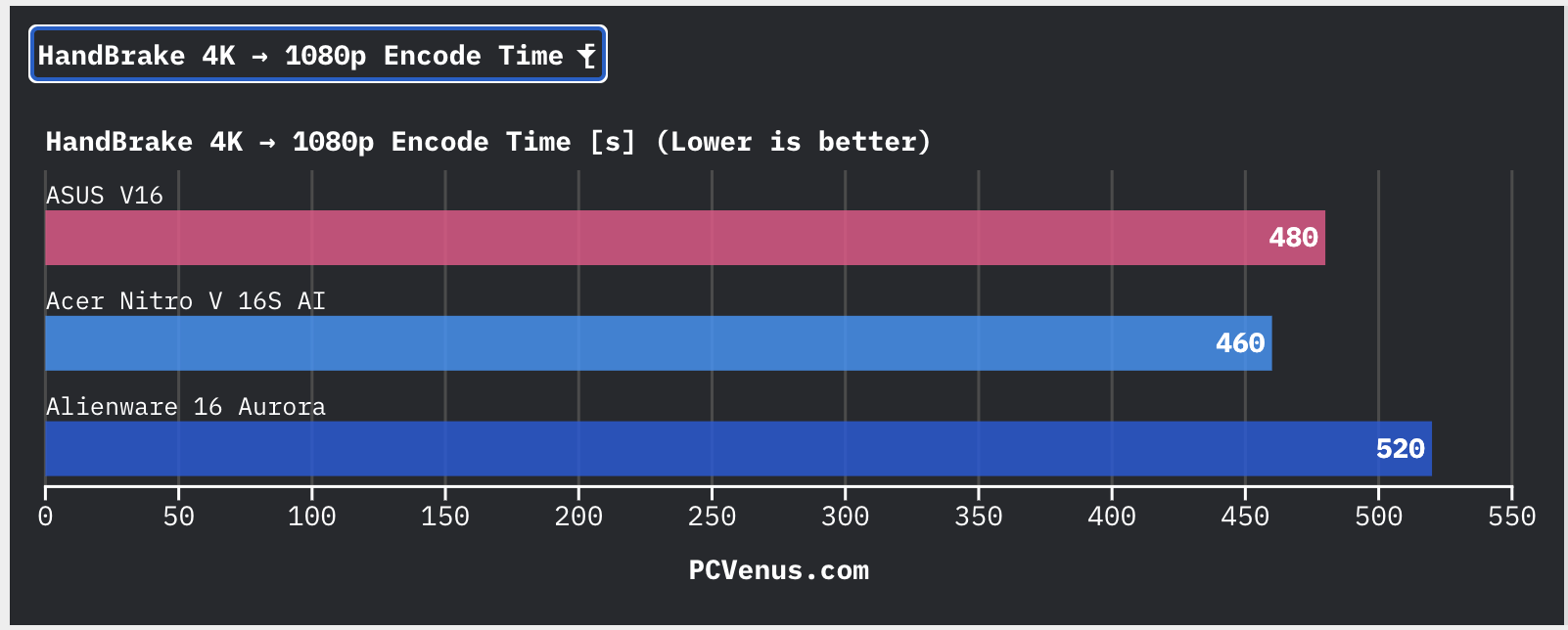
Video export performance was solid for this class. A 4K to 1080p HandBrake encode finished in around 460 seconds, while Premiere Pro exported a 4K project in roughly 420 seconds. That was slightly faster than the ASUS V16 and clearly ahead of the Alienware 16 Aurora in the same workloads.
Lightroom performance also felt smooth while exporting larger photo batches. The laptop managed around 75 fps in Lightroom exports, which again stayed ahead of the ASUS V16 and Alienware during testing.
For YouTube editing, college projects, thumbnails, Photoshop work, and casual content creation, the Nitro V 16S AI has more than enough power. The weaker part is heavier professional work. Intel HX laptops like the Lenovo Legion 5i still finish demanding renders and compilation workloads faster because of their higher core counts.
The display is another limitation for serious creators. sRGB coverage is good, but the 300-nit brightness and average factory calibration make it better for casual editing than professional color grading work.
Battery Life & Real-World Endurance
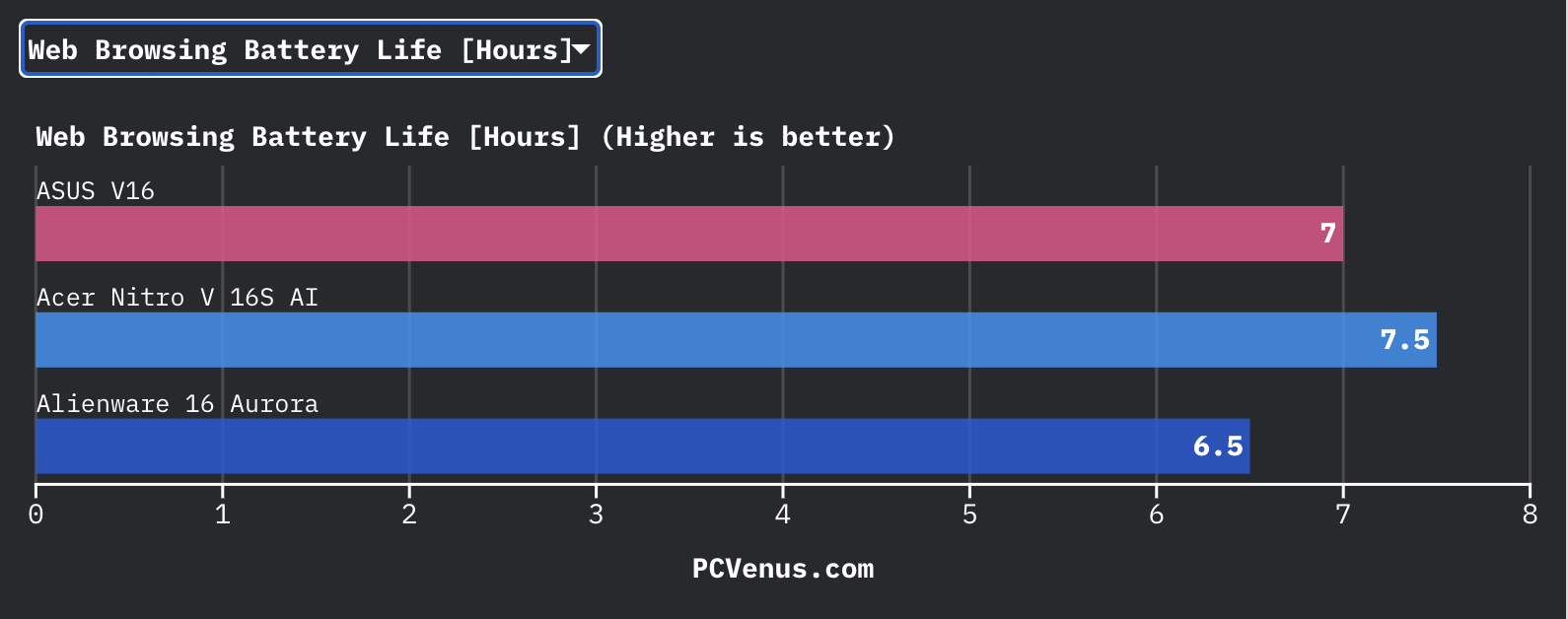
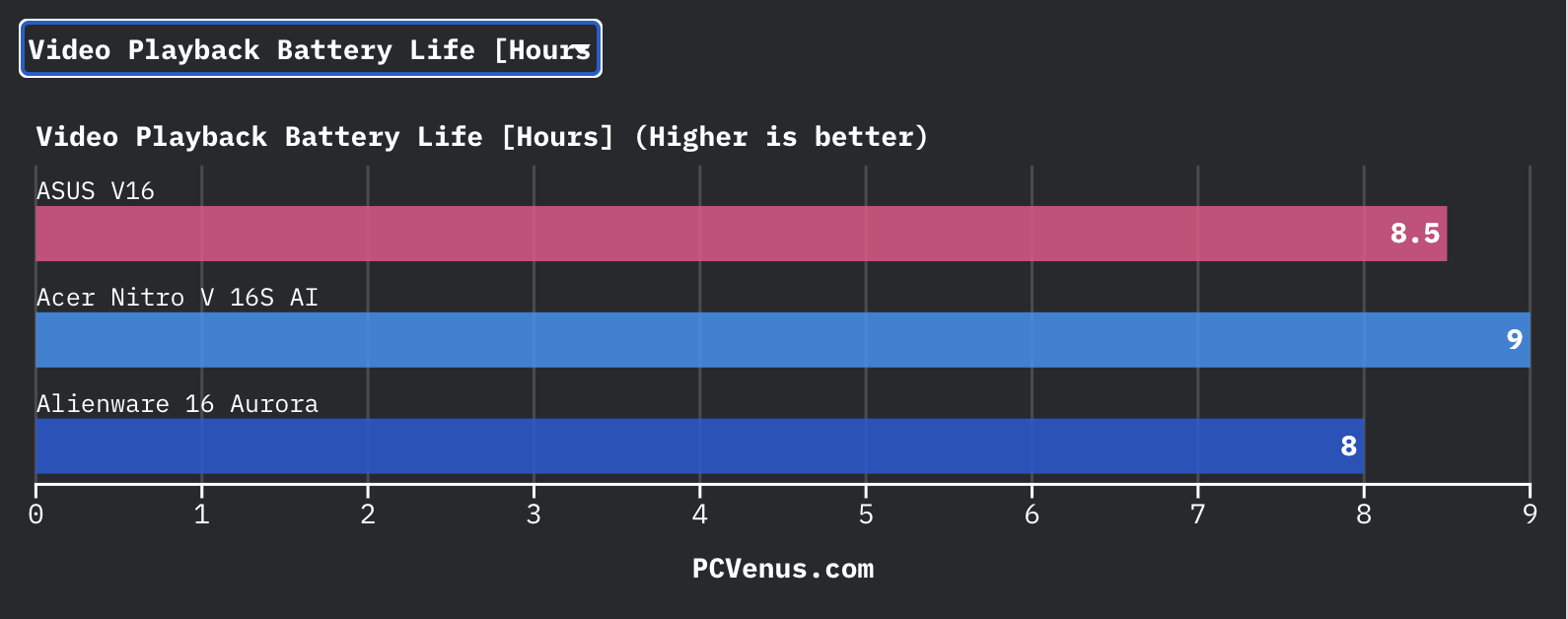
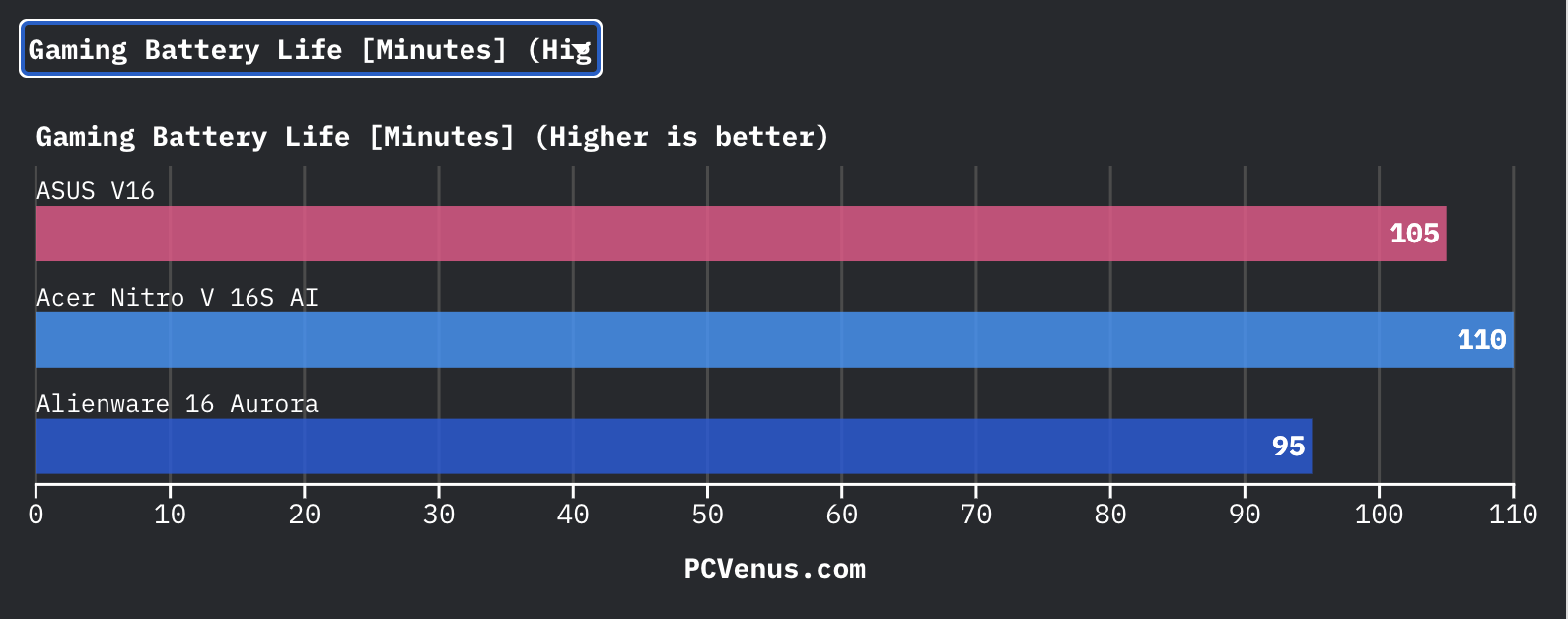
Battery life is noticeably better than the previous Nitro generation. Acer increased the battery from 59Wh to 76Wh, and during testing the Nitro V 16S AI lasted around 7.5 hours in web browsing and roughly 9 hours during video playback. That is comfortably ahead of the older Nitro model, which usually stayed closer to the 5–6 hour range in lighter workloads.
It also slightly outlasted the ASUS V16 and Alienware 16 Aurora in browsing and video playback tests. Gaming on battery still drains it quickly, though. The laptop lasted around 110 minutes in gaming tests, and performance drops noticeably once unplugged, which is normal for gaming laptops with RTX graphics.
For Chrome browsing, Spotify, Discord, and office work, the Nitro V 16S AI felt less power-hungry than many thicker gaming laptops I’ve tested previously. Acer’s lower RTX 5060 power tuning actually helps efficiency here, even if it slightly limits peak gaming performance while plugged in.
I also liked having 100W USB-C charging support because for lighter work or travel, I did not always need to carry Acer’s larger 135W charging brick everywhere.
Keyboard and Trackpad
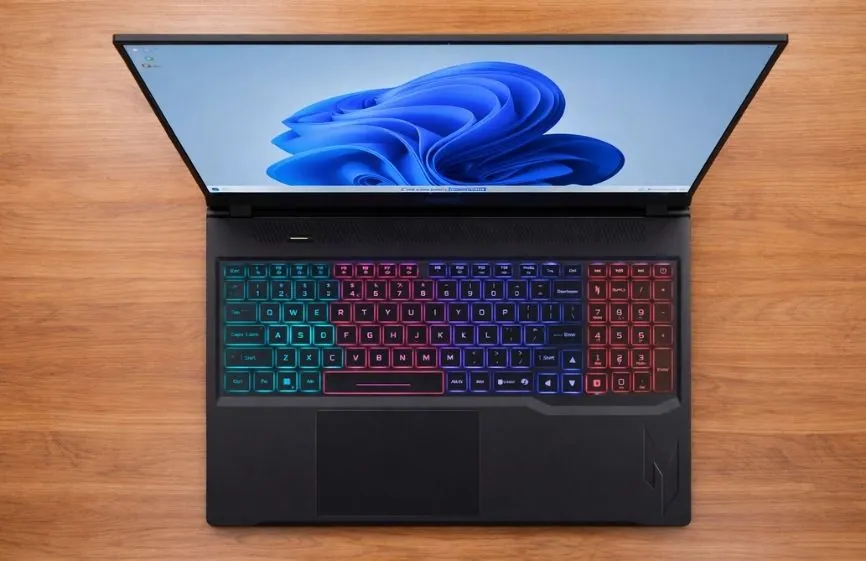
The Acer Nitro V 16S AI uses a full-size island-style gaming keyboard with 1.5 mm key travel, and the overall experience feels surprisingly comfortable for a gaming laptop in this price range. The keys have a soft but responsive actuation feel that works well for both gaming and long typing sessions. During extended use, the keyboard did not feel overly stiff or tiring, which helped reduce typing fatigue while working on documents, browsing, or gaming for longer hours.
Compared to the HP Victus 16, the Nitro V 16S AI feels slightly more responsive during gaming because the keys bounce back faster and the actuation feels more precise. The Victus keyboard is softer and quieter, which some office users may prefer, but it does not feel as sharp during competitive games. Acer also makes the WASD keys easier to identify visually, helping during darker gaming sessions.
The RGB implementation is fairly simple with optional multi-zone lighting, but it looks cleaner and less distracting than some aggressive gaming keyboards. Compared to the MSI Katana series, the Nitro’s RGB lighting feels more balanced for mixed gaming and productivity use. The Katana offers brighter effects, but its keyboard deck can feel slightly hollow during fast typing sessions.
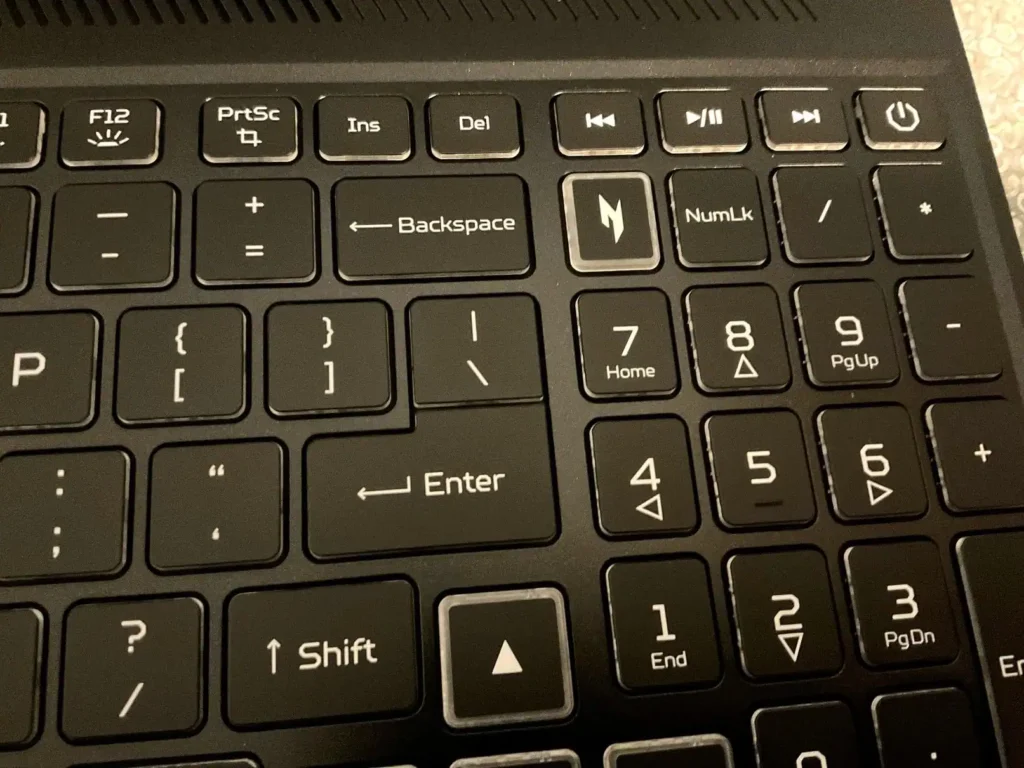
The touchpad experience is also better than expected. The Windows Precision trackpad feels smooth and accurate, and finger glide across the plastic surface remains consistent. Palm rejection works reliably during long typing sessions, helping prevent accidental cursor movement. Compared to the Lenovo LOQ, the Nitro’s touchpad feels slightly smoother during gesture navigation, although Lenovo still offers firmer physical clicks.
Ports and Connectivity
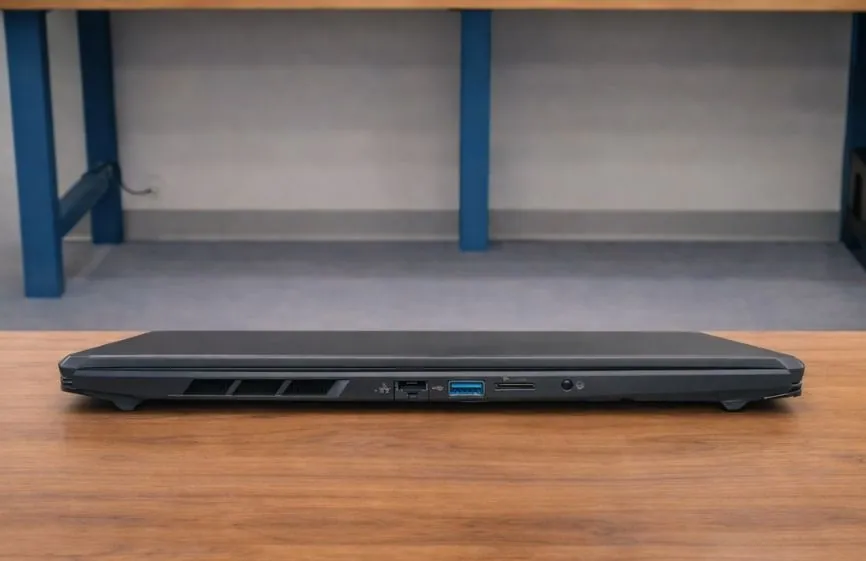
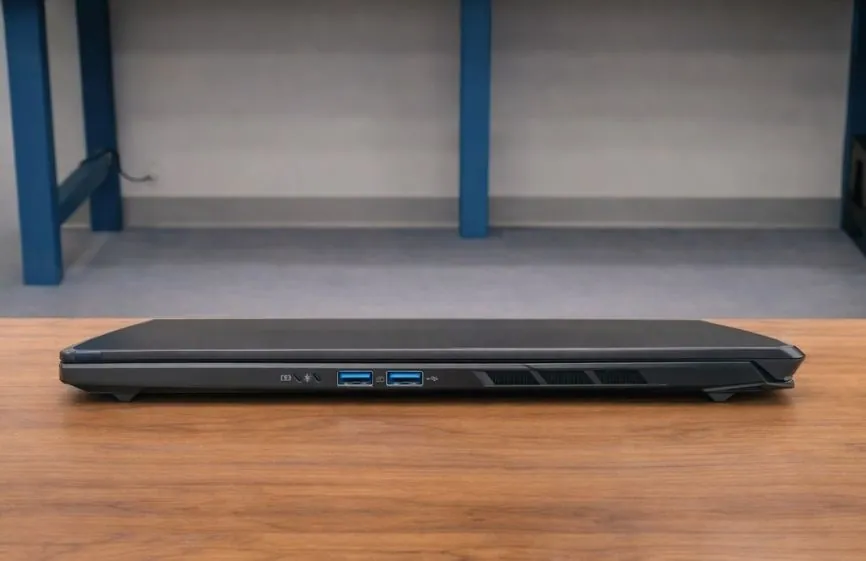
Acer did not strip useful ports just to make the Nitro V 16S AI thinner. You still get HDMI 2.1, Ethernet, three USB-A ports, one USB4 Type-C port, a microSD card reader, and a headphone jack.
During testing, the port layout worked well for gaming setups. The HDMI and charging ports sit closer to the rear side area, which helped keep thicker cables away from my mouse space while gaming. On smaller desks, the setup felt cleaner than laptops that place everything on the sides.
The USB4 port was useful for faster SSD transfers and external monitor connections, while the microSD reader is something many competing laptops like the Lenovo LOQ and some ASUS TUF models still skip completely.
The weaker part is having only one USB-C port. Once I connected an external SSD or Type-C monitor, there was very little flexibility left without using a dock or dongle.
Speakers and Webcam
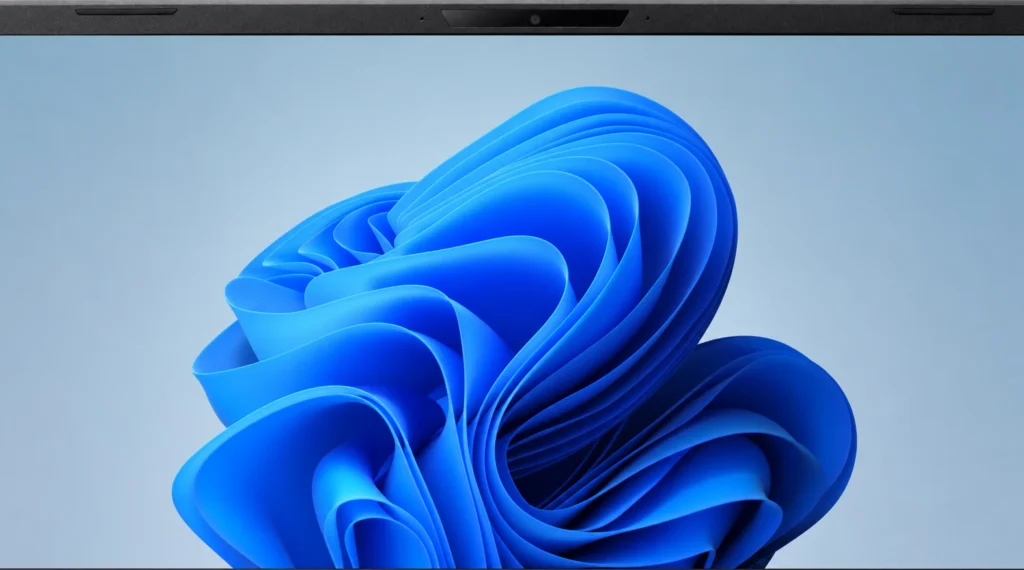
The Acer Nitro V 16S AI has a noticeably better webcam than many gaming laptops still using older 720p sensors. Acer includes a 1920 × 1200 camera here, and during testing, the image looked cleaner and sharper than the webcams on older HP Victus 15 and MSI Katana GF-series models. Facial detail holds up well in Google Meet and Discord calls, especially under normal indoor lighting.
It still cannot match the cleaner image processing and low-light handling you get from premium ultrabooks or newer MacBooks (Apple MacBook Pro/Air m5), but for a gaming laptop, the webcam quality is genuinely decent.
The dual microphones also performed better than expected. During Discord calls while downloading games in the background, the cooling fans were audible in the room, but voices still came through clearly without sounding too hollow or compressed. Acer’s noise cancellation also helped reduce keyboard noise surprisingly well during meetings.
The stereo speakers are tuned more for clarity than bass. Dialogue stays easy to hear in videos and games, and in Valorant, I could still track directional footsteps without immediately switching to headphones. Bass is the weaker part, though. Explosions and cinematic scenes sound flatter than on larger gaming laptops like the Lenovo Legion 5i, especially above 80% volume.
Thermals & Fan Noise
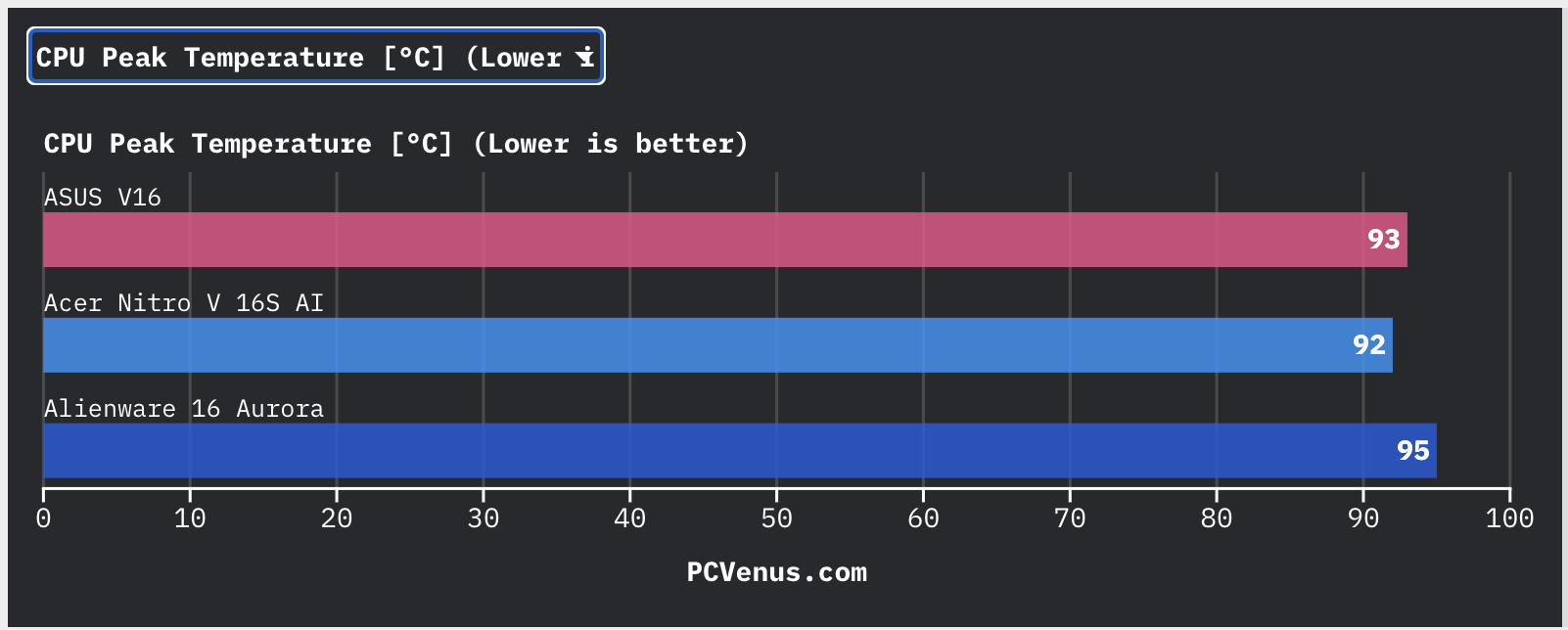
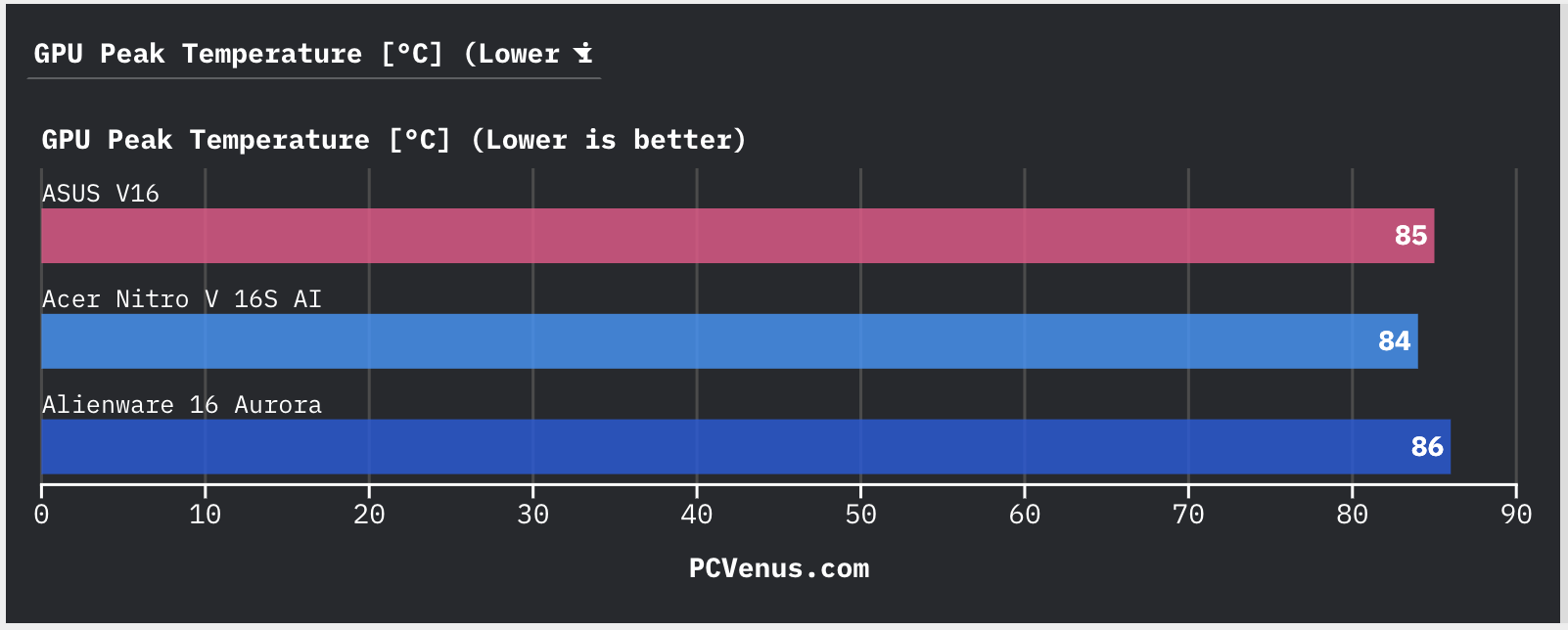
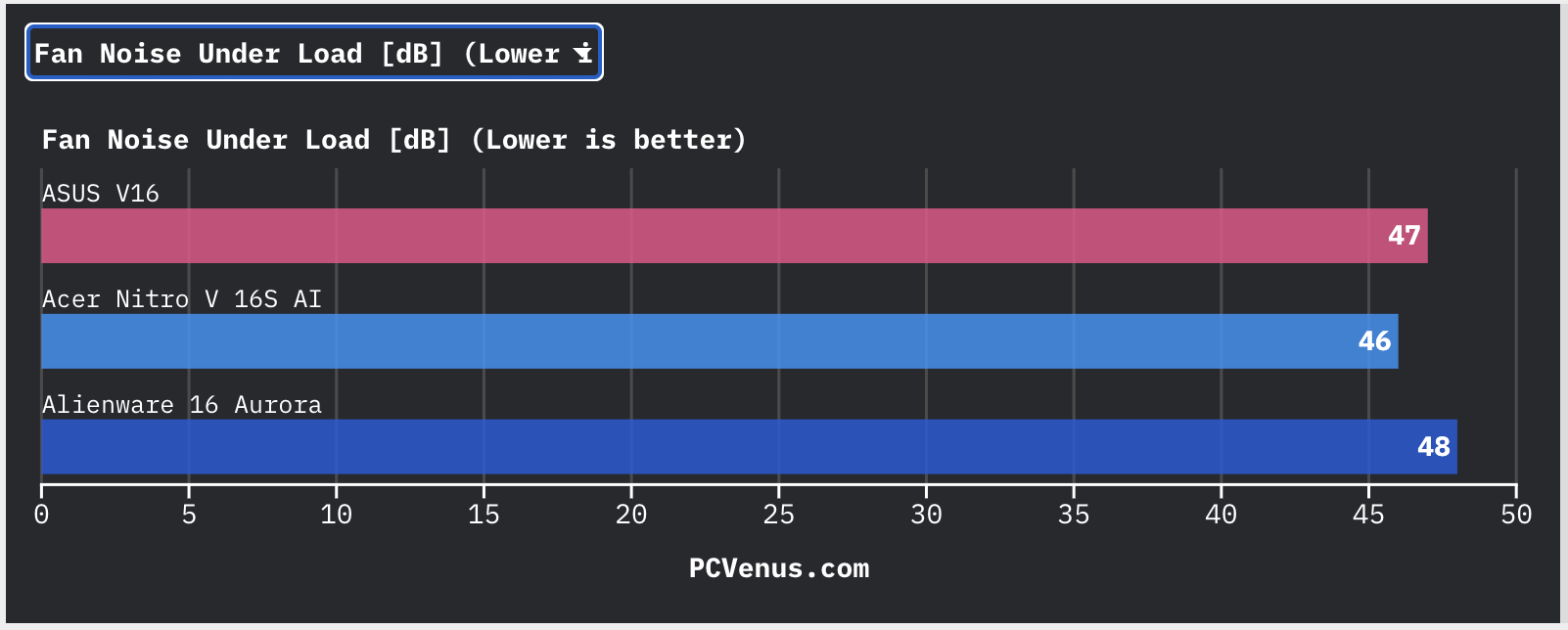
We tested the Acer Nitro V 16S AI with long gaming sessions, stress tests, and video exports to see how the cooling system behaves under load. For a fairly slim gaming laptop, thermals stayed surprisingly controlled.
During testing, the CPU peaked around 92°C, while the RTX 5060 85W GPU stayed near 84°C in heavier AAA games. That is slightly cooler than the ASUS V16 and Alienware 16 Aurora in similar workloads. More importantly, we did not notice major thermal throttling during longer gaming sessions, and frame rates stayed stable.
The keyboard also stayed comfortable during gaming. Even after extended sessions, the WASD area never became overly hot, although the rear exhaust area gets very warm in Turbo mode.
Fan noise is noticeable under load, but the laptop avoids the sharp whining sound many gaming laptops struggle with. We measured around 46 dB in Turbo mode, which was slightly quieter than the ASUS V16 and Alienware 16 Aurora during testing. For normal browsing, YouTube, or office work, the Nitro V 16S AI stays fairly quiet most of the time.
Upgradeability
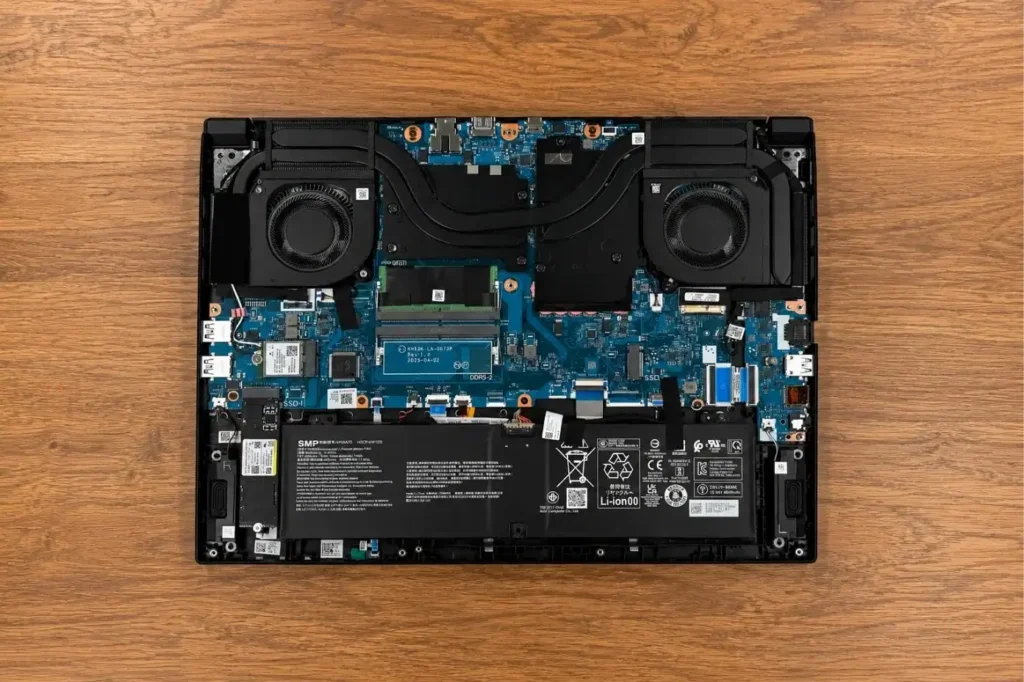
Opening the Acer Nitro V 16S AI is fairly simple, and it felt easier to work on than the ASUS V16 during SSD installation. Acer includes two RAM slots and two SSD slots, which gives it better upgrade flexibility than the MSI Katana 15 HX we tested.
We also liked that the fans and cooling system are easy to access for cleaning or thermal paste replacement. The Lenovo Legion 5i still has a cleaner internal layout, but Acer improved things a lot compared to the older Nitro V 15, which felt tighter inside.
The only drawback is that the slim chassis leaves less space around some components, so upgrades require a little more care than thicker gaming laptops.
Pros
✔ Smooth 180Hz IPS display for gaming
✔ Better battery life than most gaming laptops
✔ Stable thermals with quieter fan noise
✔ Upgradeable RAM and dual SSD slots
✔ Useful port selection with USB4 and HDMI 2.1
Cons
✘ RTX 5060 runs at lower 85W power limit
✘ Display brightness feels average outdoors
✘ Keyboard deck flex is noticeable while typing
Acer Nitro V 16S AI vs Alternatives
| Specification | Acer Nitro V 16S AI | Lenovo Legion 5i Gen 10 | MSI Katana 15 HX B14W | ASUS TUF Gaming F16 (2025) | HP Victus 16 (2025) |
|---|---|---|---|---|---|
| Processor | AMD Ryzen AI 7 260 | Intel Core i7-14650HX | Intel Core i7-14700HX | Intel Core i7-14650HX | AMD Ryzen 7 8845HS |
| Graphics | RTX 5060 Laptop GPU (85W) | RTX 5060 Laptop GPU (115W+) | RTX 5060 Laptop GPU (105W) | RTX 5060 Laptop GPU (110W) | RTX 4060 Laptop GPU |
| Display | 16-inch IPS, 1920 × 1200, 180Hz | 16-inch IPS, 2560 × 1600, 240Hz | 15.6-inch IPS, 1920 × 1080, 144Hz | 16-inch IPS, 1920 × 1200, 165Hz | 16.1-inch IPS, 1920 × 1080, 144Hz |
| Brightness | 300 nits | 500 nits | 250 nits | 300 nits | 300 nits |
| Color Gamut | 98.5% sRGB | 100% sRGB | 62.5% sRGB | 100% sRGB | 100% sRGB |
| RAM | Up to 32GB DDR5 | Up to 32GB DDR5 | Up to 32GB DDR5 | Up to 32GB DDR5 | Up to 32GB DDR5 |
| Storage | 1TB PCIe Gen 4 SSD | 1TB PCIe Gen 4 SSD | 1TB PCIe Gen 4 SSD | 1TB PCIe Gen 4 SSD | 512GB / 1TB PCIe Gen 4 SSD |
| Battery | 76Wh | 80Wh | 53.5Wh | 90Wh | 70Wh |
| Weight | ~5.1 lbs (2.3 kg) | ~5.5 lbs (2.5 kg) | ~5 lbs (2.25 kg) | ~4.9 lbs (2.2 kg) | ~5.2 lbs (2.35 kg) |
| USB-C Ports | 1× USB4 | 2× USB-C | 1× USB-C | 2× USB-C | 1× USB-C |
| Best For | Balanced gaming + daily use | Higher FPS gaming | Budget esports gaming | Durable all-round gaming | Budget casual gaming |
Who Should Buy the Acer Nitro V 16S AI?
The Nitro V 16S AI makes the most sense for gamers who want a balanced laptop instead of a bulky desktop replacement. The RTX 5060 handles modern games well at 1080p and 1200p, the 180Hz display works nicely for esports titles, and battery life is noticeably better than many gaming laptops in this range.
Students are another good fit here. During testing, the laptop handled Chrome tabs, Discord, Spotify, coding tools, and light creative work without slowing down, while the 16:10 display gave extra vertical space for documents and multitasking.
It is also a good option for users planning long-term upgrades. Acer includes upgradeable RAM and dual SSD slots, which many thinner gaming laptops still limit.
Who Should Avoid It?
Performance-focused gamers should probably look elsewhere. The RTX 5060 runs at 85W here, so higher-wattage RTX 5060 and RTX 5070 laptops still deliver noticeably better native FPS in demanding AAA games.
Professional creators may also want a brighter and more color-accurate display for serious editing or grading work. The panel is good for casual content creation, but it is not built for professional color workflows.
There is also no fingerprint scanner or IR camera, so you will rely on password login every time.
The keyboard is another weaker area. The plastic deck flex is noticeable during heavier typing, especially compared to sturdier laptops like the Lenovo Legion 5i.