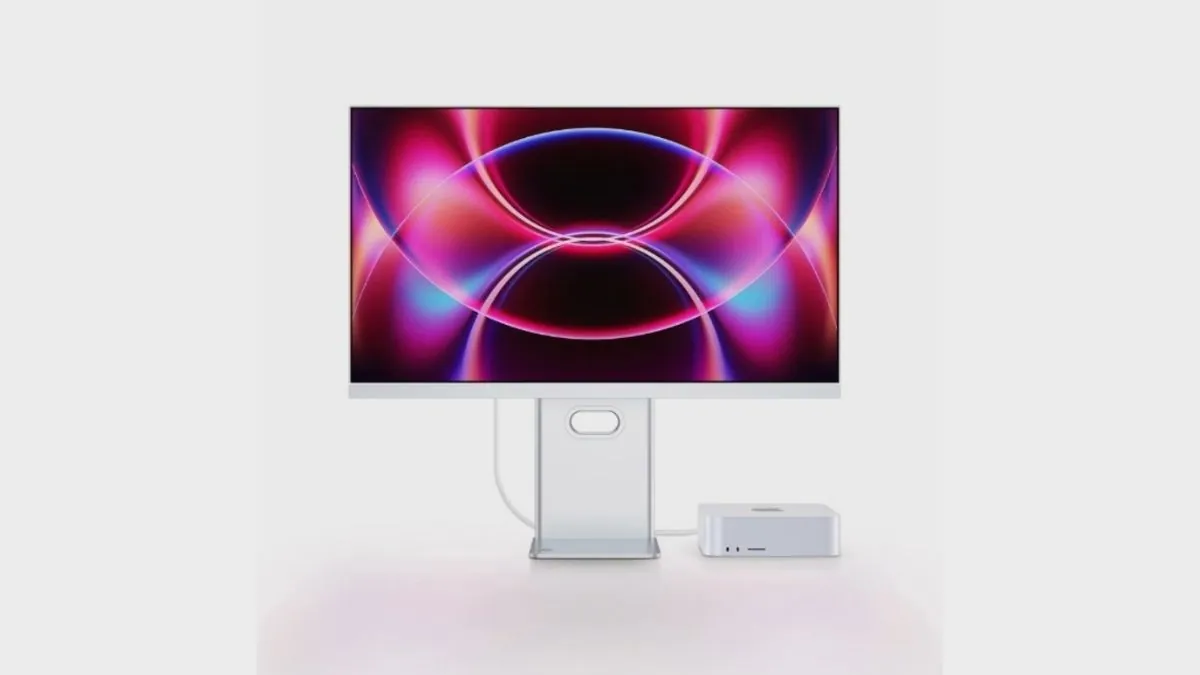
Future Vision has introduced a new 27 inch monitor called RV200 Turbo. The product is now listed on JD.com based on official listing details and was reported on May 4, 2026. It supports 4K resolution at 120Hz and also offers a 1080p mode at 240Hz. The price is 1683 yuan, which is roughly about 230 US dollars, and in some regions it drops to around 1599 yuan, which is about 220 US dollars after subsidies.
The display is built to serve users who need both high resolution clarity and high refresh performance in one setup. Instead of choosing between a productivity monitor and a gaming monitor, this model combines both roles in a single screen. This approach reflects how many users now work, create, and play on the same desk without switching devices.
It uses a 27 inch IPS panel with a native resolution of 3840 by 2160. The screen can switch to 1920 by 1080 when running at 240Hz. The company has not explained how this dual mode works, but it is likely handled through internal scaling, although this is not officially confirmed. Because the panel is natively 4K, the 1080p mode does not use full pixel mapping. As a result, image sharpness is lower in this mode, especially on a 27 inch screen. This trade off favors motion smoothness over fine detail, making it more suitable for fast paced tasks than for reading or design work.
The connectivity setup is one of the key parts of this monitor as includes a USB-C port that delivers up to 90W of power, allowing a laptop to connect with a single cable for display output, charging, and data transfer. The monitor also supports a built in KVM function. This allows two systems to be connected at the same time, and users can switch control between them using input selection while sharing the same keyboard and mouse. This is useful for setups where a laptop and a desktop are used together.
The port layout includes two HDMI 2.1 ports, one DisplayPort 1.4 port, one USB-C port with 90W charging, two USB-A 3.0 ports, and an audio jack. The HDMI 2.1 specification is listed, but the bandwidth mode is not specified. Full chroma support at 4K 120Hz, such as 4:4:4 output, is not confirmed. This means performance may vary depending on the connected device, especially for consoles. The DisplayPort 1.4 connection normally requires DSC compression to deliver 4K at 120Hz, which is standard behavior for this interface.
The panel covers 98 percent of the DCI P3 color space and has a Delta E value of 1.5 or lower, which suggests good factory calibration. The display supports 10 bit color using 8 bit plus FRC, which means it is not a true native 10 bit panel but can simulate a wider color range. Brightness reaches up to 400 nits and the monitor carries a DisplayHDR 400 certification. This level of HDR does not include local dimming, so the visual difference in HDR content is limited. The contrast ratio is 1500 to 1, which is typical for IPS panels.
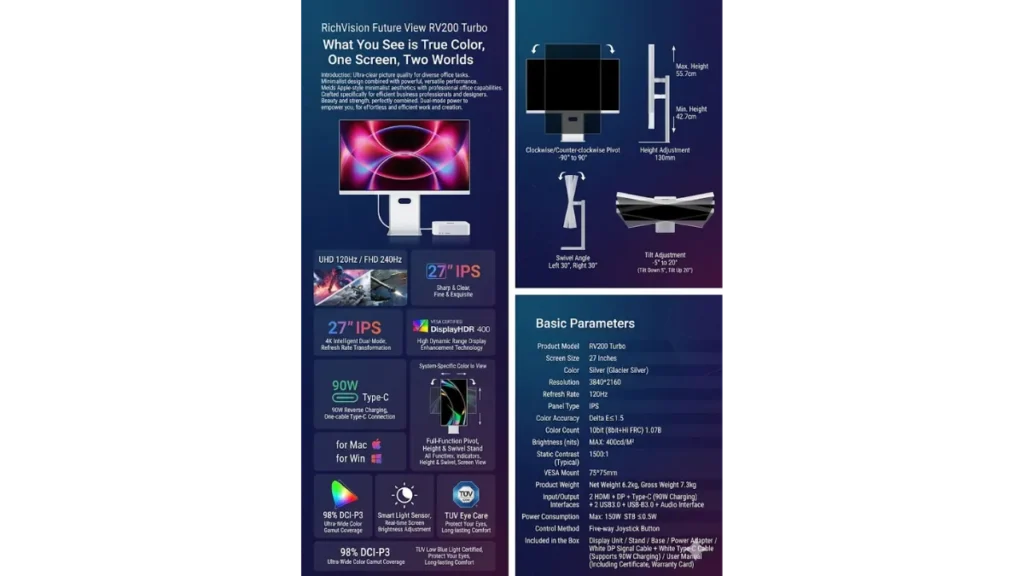
Additional features include an ambient light sensor that adjusts brightness based on the surrounding environment. This helps reduce eye strain during long usage and can improve viewing comfort. The monitor also includes TÜV low blue light certification and supports color tuning for both Mac and Windows systems, which is useful for maintaining consistent color output across platforms.
The stand supports full ergonomic adjustment. It offers a height adjustment range of 130 mm, with the screen height ranging from 42.7 cm to 55.7 cm. It can tilt from minus 5 degrees to plus 20 degrees, swivel 30 degrees left and right, and rotate 90 degrees in both directions for vertical use. The monitor also supports VESA 75 by 75 mm mounting. Navigation is handled through a five way joystick control.
The unit weighs 6.2 kg without packaging and 7.3 kg with packaging. The box includes the monitor, stand, base, power adapter, a DisplayPort cable, and a USB-C cable that supports up to 90W charging. Standby power consumption is rated at 0.5W or lower, while maximum power usage can reach up to 150W.
Also Read: Best Laptops for Data Science: Real Workflow Tested
In real use, this setup fits users who rely on a laptop for daily work and also use a desktop for higher performance tasks. It also suits creators who need accurate colors at 4K and smoother motion for occasional high refresh use. For competitive gaming, the 240Hz mode offers smoother motion, but the lower resolution means it is not focused on image sharpness. For users deciding between buying two monitors or one flexible display, this model is positioned as a single screen alternative.
The manufacturer has not shared details about response time, input lag, or variable refresh rate support. Full HDMI bandwidth capability is also not confirmed. These factors will affect real world performance, especially for gaming and console use.
| Specification | Details |
|---|---|
| Model | Future Vision RV200 Turbo |
| Display Size | 27 inch |
| Panel Type | IPS |
| Resolution | 3840 × 2160 and 1920 × 1080 dual mode |
| Refresh Rate | 120Hz at 4K and 240Hz at FHD |
| Color Depth | 10 bit (8 bit + FRC) |
| Color Gamut | 98 percent DCI P3 |
| Color Accuracy | Delta E ≤ 1.5 |
| Brightness | 400 nits |
| Contrast Ratio | 1500 to 1 (typical for IPS) |
| HDR | VESA DisplayHDR 400 |
| Ports | 2 HDMI 2.1, 1 DisplayPort 1.4, 1 USB-C (90W), 2 USB-A 3.0, audio jack |
| KVM | Yes, via USB hub |
| Mounting | VESA 75 × 75 mm |
| Stand Adjustment | Height, tilt, swivel, pivot |
| Height Range | 42.7 cm to 55.7 cm (130 mm lift) |
| Tilt | -5° to +20° |
| Swivel | ±30° |
| Pivot | ±90° |
| Light Sensor | Yes |
| Eye Care | TÜV low blue light |
| Color Modes | Mac and Windows tuning supported |
| Control | 5 way joystick |
| Weight | 6.2 kg (net), 7.3 kg (gross) |
| Accessories | DisplayPort cable, USB-C cable, power adapter |
| Standby Power | ≤ 0.5W |
| Power Consumption | Up to 150W |
| Price | 1683 yuan (~230 USD), ~1599 yuan (~220 USD with subsidy) |
The RV200 Turbo focuses on combining features that are usually separated across different monitor types. It does not aim to replace high end HDR or OLED displays, but instead provides a balanced solution for users who need both clarity and speed in one setup. Its real value will depend on how well these features perform in everyday use, especially the dual mode behavior and connection stability, which are not fully detailed yet.
Source: IThome