
The engineering field is demanding, filled with intricate calculations, complex designs, and cutting-edge software. To navigate this demanding field effectively, engineering students need a powerful and reliable tool that can handle the computational intensity of their work – a laptop.
Nowadays, the competition has increased so much that finding the ideal laptop can be a challenging yet crucial task for engineering students.
Don’t worry! In this guide, we’ll look at and understand the technical requirements and check out the best cheap laptops for engineering students.
Whether you’re a budding mechanical engineer, an aspiring civil engineer, or a future software engineer, this guide will help you choose the right laptop to assist you throughout your engineering journey.
We’ll explore the essential factors, from processor power and RAM capacity to graphics capabilities and storage space. We’ll also recommend laptops catering to different engineering disciplines, ensuring you find the perfect match for your specific needs.
What to Look for in a Budget Laptop for Engineering Students?
Engineering students require powerful laptops to effectively handle demanding tasks such as 3D modeling, AutoCAD, and complex programming. These activities cannot be easily accomplished on an inexpensive laptop.
It’s crucial to consider specific factors when choosing the best laptop for engineering students at an affordable price.
The cost of a laptop is crucial for students, as it can be challenging to afford an expensive one. If you have a higher budget, getting a powerful new-generation laptop is easier. However, finding a suitable option becomes more challenging with a limited budget. For engineering students, it’s advisable to consider laptops in the $400 to $2000 range for better performance and features.
Choosing any laptop with a powerful processor to perform competitive engineering tasks. The latest generation Intel Core i5 and AMD Ryzen 5 chips are the minimum requirements for engineering students.
Buy a laptop with a more powerful processor, such as the latest generation Intel Core i7, i9, or AMD Ryzen 7, Ryzen 9, and It won’t have any issues for years.
Laptop Requirements for Engineering Students on a Budget
| Specs | Minimum | Recommended |
|---|---|---|
| Screen | Full HD (1920 x 1080) | Full HD+ (1920 x 1200) or more |
| CPU | 12th Gen Core i3 or equivalent AMD Ryzen 3 | 12th, 13th Gen Core i5, i7 or equivalent AMD Ryzen 5,7 |
| GPU | Intel UHD or equivalent AMD Radeon Vega graphics | Intel Iris Xe, NVIDIA GeForce RTX |
| Memory | 4GB | 8GB or more |
| Storage | 128GB SSD | 256GB SSD or more |
| Battery | 2 Hour | 6 hours or more |
| Operating system (OS) | Windows 10 | Windows 11, macOS, or Linux |
Top 10 Laptops for Engineering Students on a Budget: Best Picks
| Image | Product | Feature | Price |
|---|---|---|---|
TOP Pick
 |
Apple MacBook Air M4 |
| Check Price | Best Overall
 |
Acer Nitro V |
| Check Price | 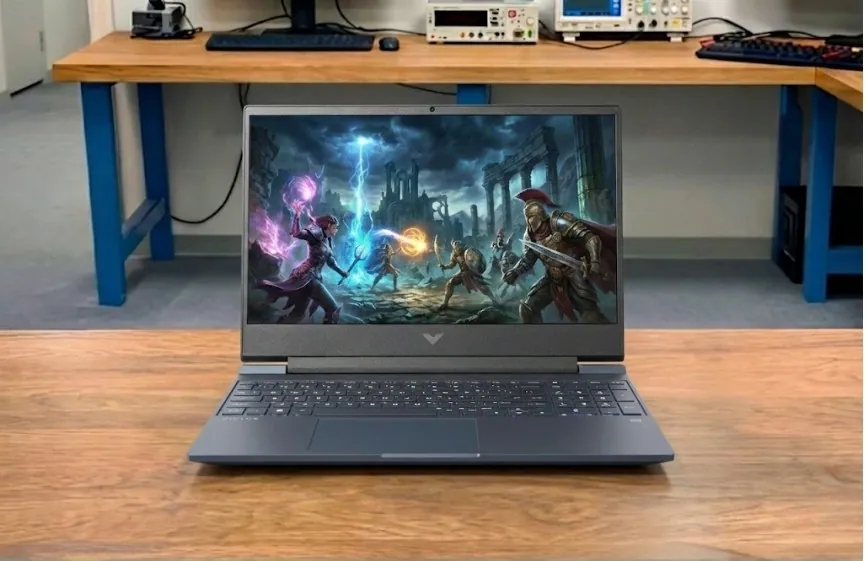 |
HP Victus 15 |
| Check Price |
 |
Lenovo Legion 5 Gen 10 |
| Check Price |
 |
Dell 14 Plus |
| Check Price |
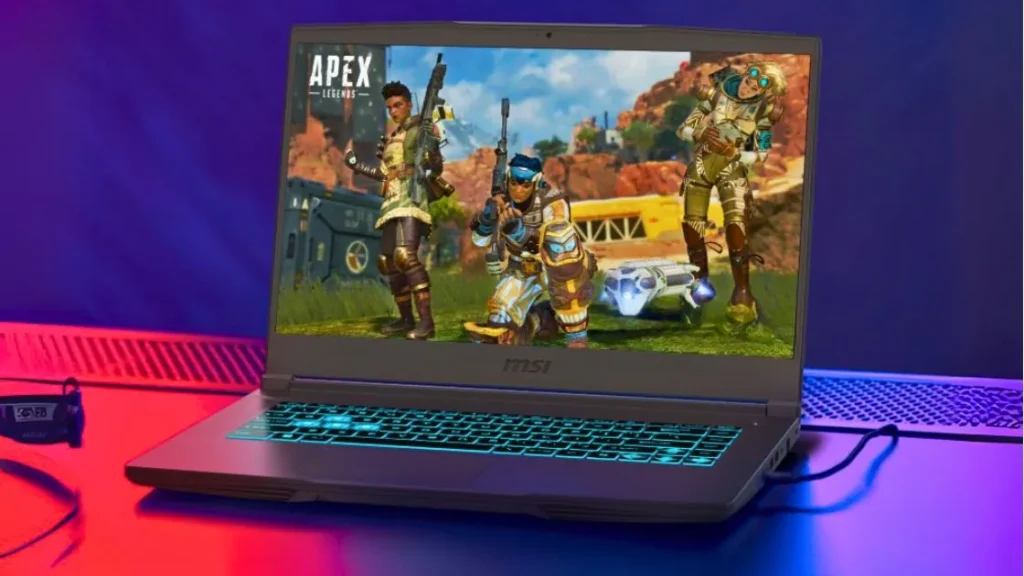 |
MSI Thin 15 |
| Check Price |
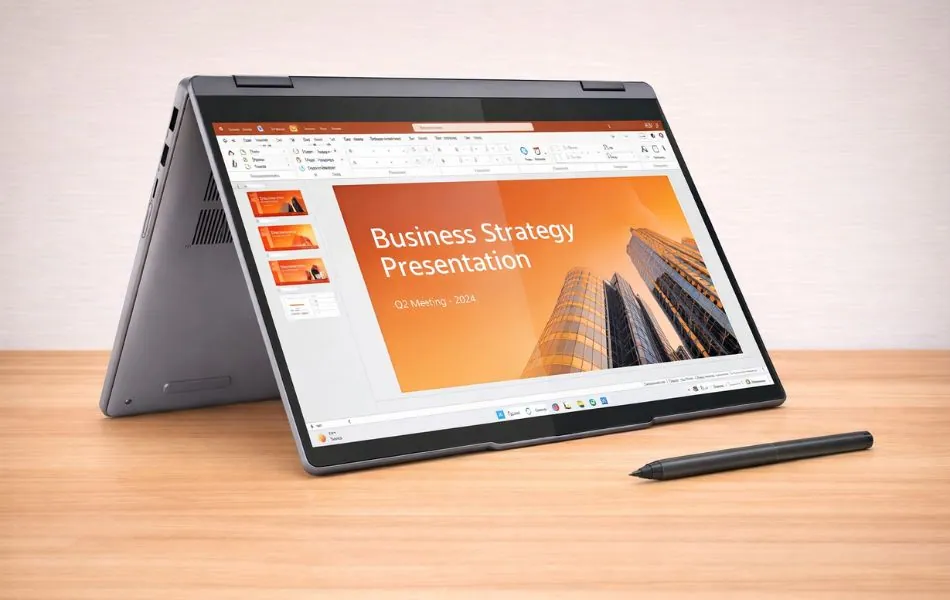 |
Lenovo IdeaPad Flex 5 |
| Check Price |
Lightweight Power for Everyday Work
1. Apple MacBook Air M4
Key Specs
| Processor | Apple M4 (10-core CPU) |
| Graphics | Apple M4 integrated GPU |
| Memory | 16GB |
| Storage | 256GB SSD |
| Display | 13.6-inch, IPS, 60Hz |
| Weight | 2.73 lbs (1.24 kg) |
Check Current Pricing
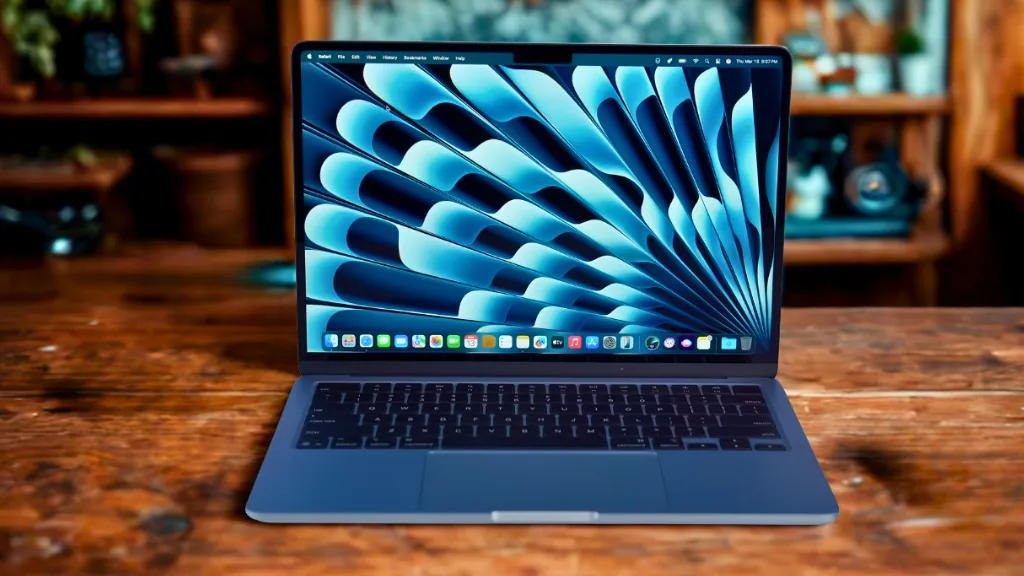
Powered by a dedicated integrated Apple M4 chip, the new Apple MacBook Air M4 represents a breakthrough in notebook performance. If you are an engineering student, the versatility of this notebook will be particularly appealing to you. It has a stunning screen, a well-designed keyboard with large keys, and a large trackpad that simplifies tasks. The Apple MacBook Air M4 has unique features that immediately catch people’s attention.
With up to 18 hours of battery life and impressive specs, it ensures a seamless and uninterrupted creative experience. Its sleek metal chassis, attractive aesthetic, and soothing gray and rounded screen edges enhance its attraction. The tactile experience of this laptop is truly outstanding.
It has a 13.6 inch Liquid Retina Display with 500 nits screen brightness and 2560×1664 pixels, It delivers fantastic screen brightness and image quality.
It’s a lightweight and portable notebook weighing only 2.7 pounds (1.22 kg), Making it one of the best laptops for engineering students working on tasks like Named Entity Linking (NEL) and dialogue systems.
The Apple MacBook Air M4 delivers extraordinary performance with its 10-core M4 chip CPU, providing best-in-class speed across various tasks. The laptop also has a 16-core Neural Engine that enhances the overall user experience and makes tasks feel fluid.
It also has an Apple 10-core M4 GPU, which is important for mechanical or architectural engineering students. It helps handle 3D modeling, rendering, and simulations smoothly and efficiently.
With 16GB of unified memory, programs load in seconds, and the 512GB SSD ensures fast boot times — a signature feature of Apple laptops.
These specs, combined with the ability to multitask online and offline smoothly, make the MacBook Air M4 an ideal choice for Engineering students.
In terms of connectivity, The laptop includes two Thunderbolt / USB 4 ports, a MagSafe charging port, and a headphone jack, such as a MagSafe charging port and a headphone jack.
Pros
✔ Sleek and ultra-portable design
✔ Long-lasting battery life
✔ Upgraded webcam (12MP Center Stage)
✔ Exceptional performance with the new M4 chip
✔ Fanless design for quiet operation
Cons
✘ No dedicated GPU for heavy gaming
✘ No USB Type-A port
Read Apple MacBook Air M4 Full Specifications and Review
Affordable Performance for Engineering


2. Acer Nitro V
Key Specs
| Processor | Intel Core i7-13620H |
| Graphics | NVIDIA GeForce RTX 4050 |
| Memory | 16GB DDR5 |
| Storage | 1TB SSD |
| Display | 15.6-inch Full HD IPS display, 165Hz |
| Weight | 4.66 lbs (2.11 kg) |
Check Current Pricing
Engineering students will love the Nitro V’s versatility. It’s perfect for running software like SolidWorks or programming in Python, while also allowing for smooth gaming in your downtime.
The high-refresh-rate display makes working with detailed CAD models a breeze, while the cooling system ensures stability during long simulations. Its powerful performance, generous storage capacity, and affordable price make it one of the best student laptops of 2026.
Performance
The Acer Nitro V is a performance-focused laptop designed for multitasking, programming, 3D modeling, and simulations.
Powered by an Intel Core i7-13620H processor and an RTX 4050 GPU, it effortlessly runs engineering applications like MATLAB, AutoCAD, ANSYS, and CAD rendering software. With 16GB of DDR5 memory and a 1TB fourth-generation SSD, you’ll get ultra-fast responsiveness and ample storage for project files.
Display and Design
The 15.6-inch FHD IPS panel with a 165Hz refresh rate ensures smooth visuals and accurate colors, making it easy to navigate software interfaces, CAD drawings, or simply relax while gaming.
Its weight is only 4.66 pounds, making slightly lighter than most gaming laptops, which makes it perfect for students carrying around labs and classrooms.
The RGB backlit keyboard is both stylish and perfect for late-night coding sessions.
Other Features
The Acer Nitro V features dual-fan cooling and NitroSense intelligent control, ensuring even overheating won’t affect high-performance workloads.
It also boasts a robust suite of connectivity, including Thunderbolt 4, HDMI 2.1, multiple USB ports, Wi-Fi 6, and Bluetooth 5.2. The speaker system delivers clear sound quality for online classes or presentations, and its 8-hour battery life ensures reliable operation even during the long days of college life.
Why It’s Special
This budget-friendly laptop stands out because it features a 13th Gen Intel processor, RTX 40 Series graphics, DDR5 memory, and a massive 1TB SSD—features rarely seen in this price range. For engineering students, it strikes the perfect balance of performance, storage, and design.
Pros
✔ Affordable price for gaming specs
✔ Smooth 165Hz display
✔ Good GPU for 1080p gaming
✔ Upgradeable RAM and storage
✔ Decent port selection
Cons
✘ Battery life is quite short
✘ Plastic build feels a bit cheap
Read Acer Nitro V 16: Full Specifications and Benchmarks
Built for Students Who Need Extra Power
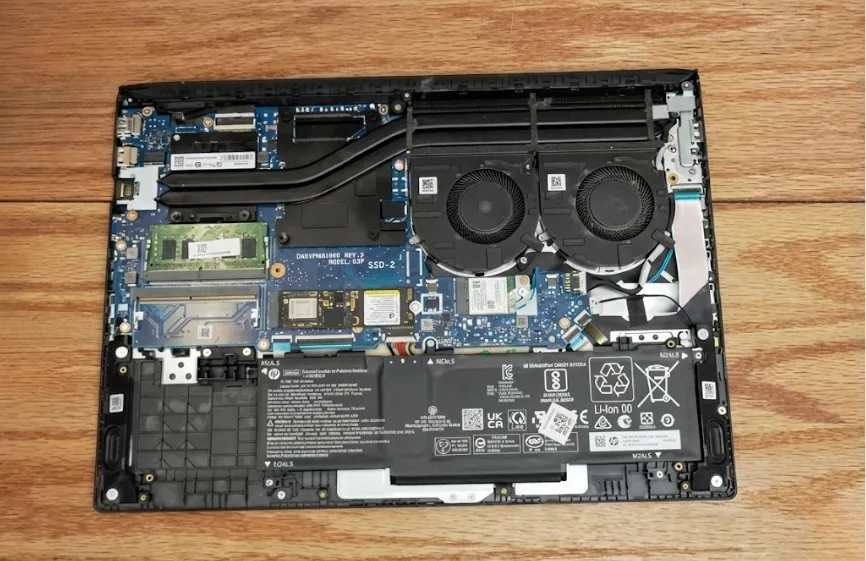
3. HP Victus 15
Key Specs
| Processor | AMD Ryzen 5 7535HS |
| Graphics | NVIDIA RTX 2050 |
| Memory | 16GB DDR5 |
| Storage | 512GB SSD |
| Display | 15.6″ FHD (1920×1080) Anti-glare, 144Hz |
| Weight | 5.06 lbs (2.29 kg) |
Check Current Pricing
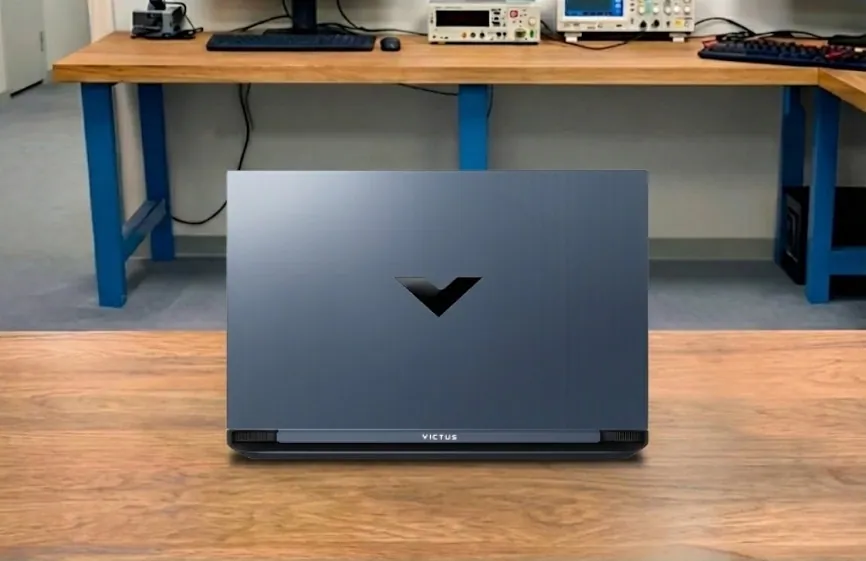
Engineering students often need laptops that can handle more than just web browsing and note-taking. The HP Victus 15 is a solid option for those on a budget who still need performance for software like AutoCAD, MATLAB, or SolidWorks.
One of the best parts of this laptop is its balance between price and power. The Ryzen 5 7535HS processor paired with 16GB DDR5 memory can run coding environments, simulation tools, and large data sets without freezing. During testing, projects in MATLAB and circuit simulation software loaded quickly, and multitasking with browsers, coding IDEs, and PDF files felt smooth.
The NVIDIA RTX 2050 graphics card is not just useful for games but also for 3D modeling and design software. Tasks like rendering models in AutoCAD or testing lightweight simulations benefit from this dedicated GPU. This makes the Victus more flexible compared to laptops with integrated graphics.
The 15.6-inch screen is sharp and smooth with its 144Hz refresh rate, which helps when scrolling through long projects or detailed diagrams.
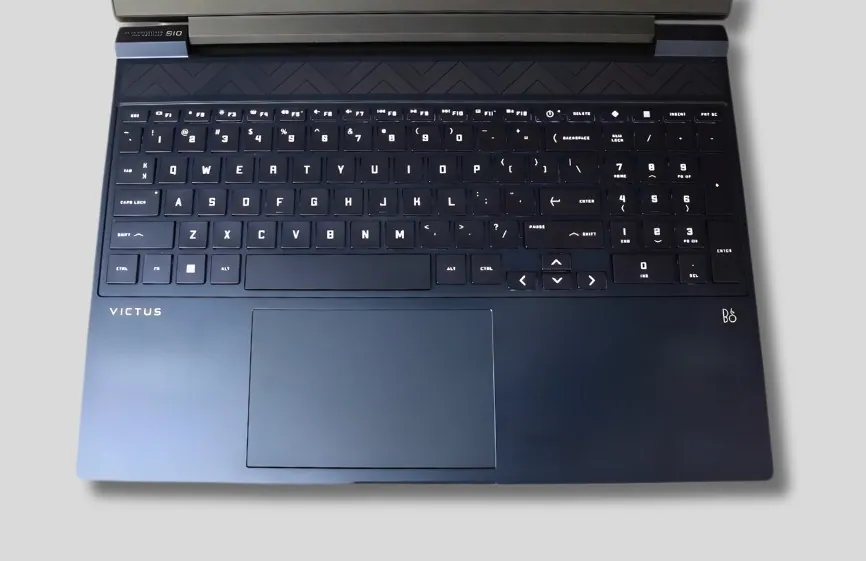
The backlit keyboard is comfortable for writing reports and assignments, even late at night. The build is plastic but sturdy enough for daily use. Brightness is limited to 250 nits, so classrooms with bright sunlight may be a challenge.
Battery life is average, lasting around 4 to 5 hours with mixed use, so it is best carried with a charger. Against cheaper models like the Acer Aspire 3, the Victus clearly performs better in engineering tasks. Premium laptops such as the Dell XPS or MacBook Pro deliver stronger portability and battery but cost far more. For engineering students who want reliable performance on a budget, the HP Victus 15 is a dependable choice.
Who is it Best For: Engineering students who need a budget-friendly laptop that can handle CAD, MATLAB, and coding projects without slowing down.
Who Should Skip It: You need very long battery life or want a premium design with high color accuracy for professional graphics work.
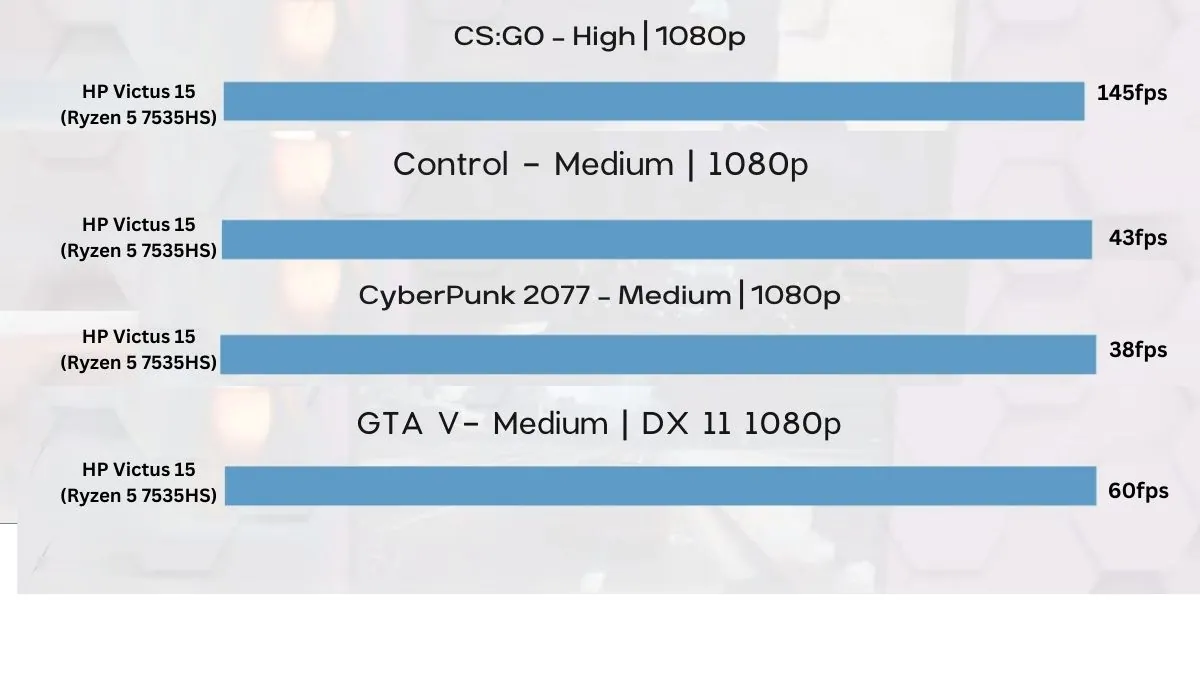
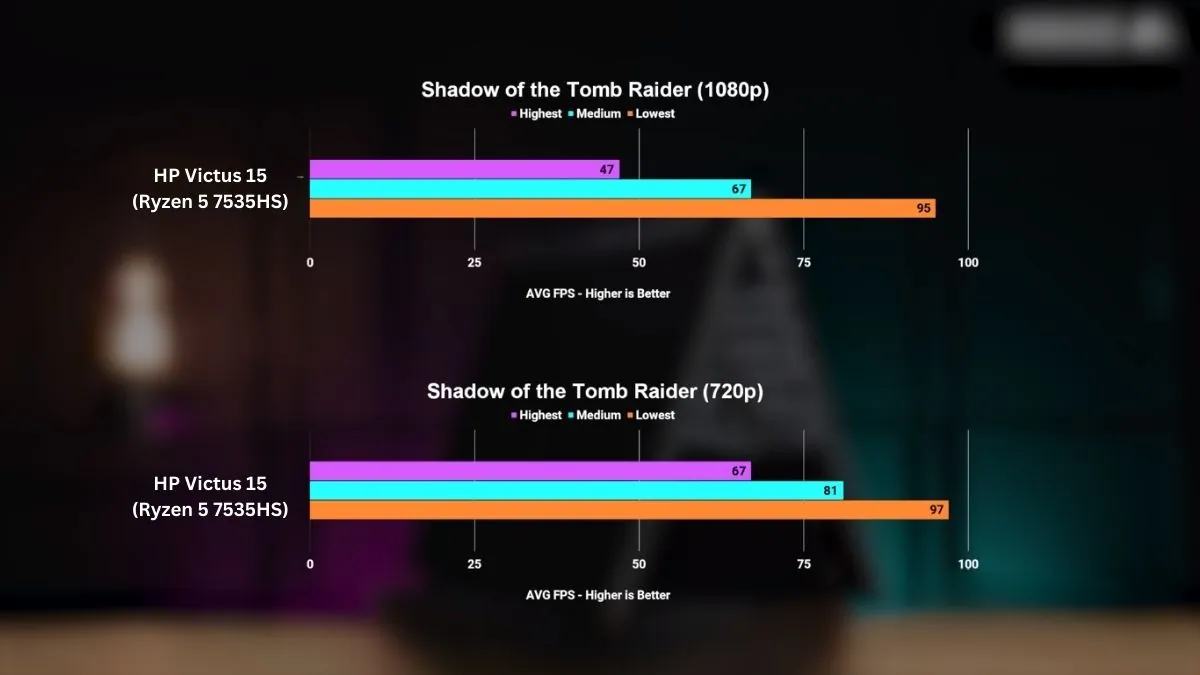
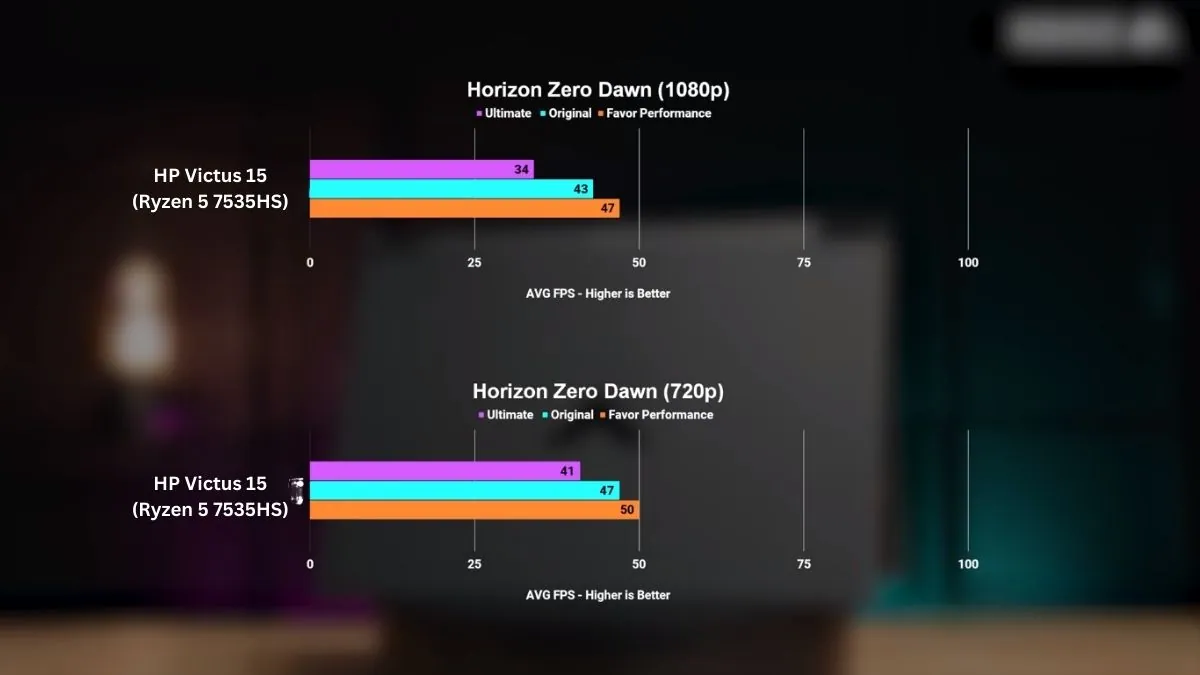
Benchmarks and Test
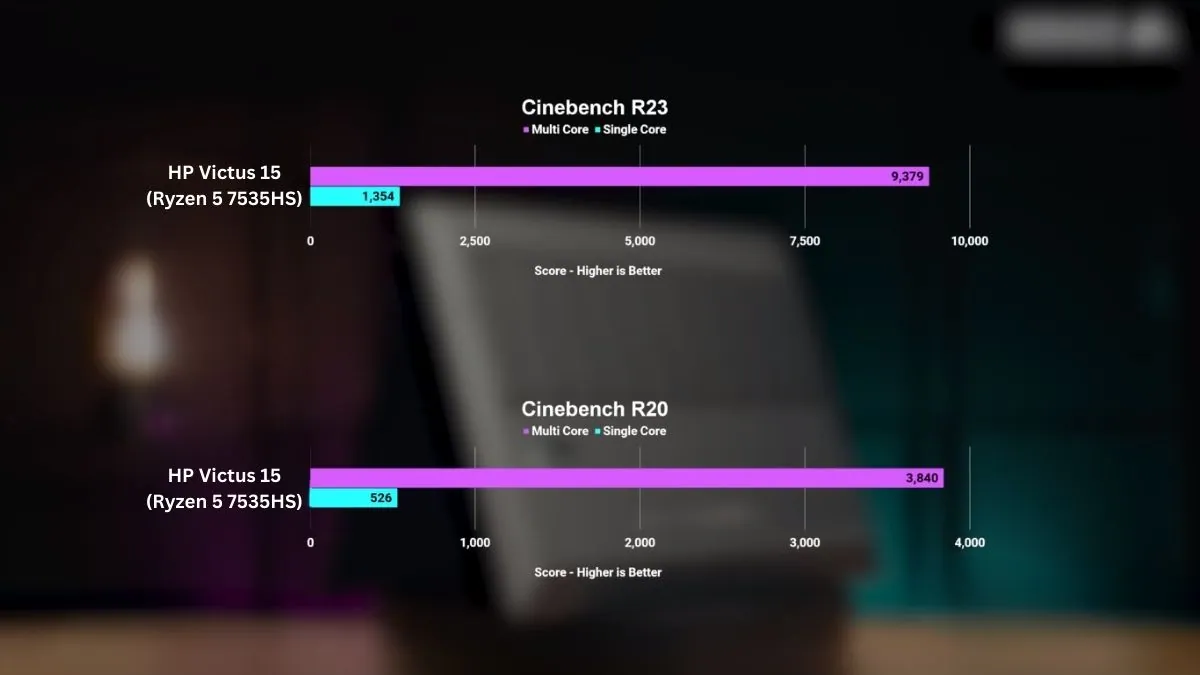
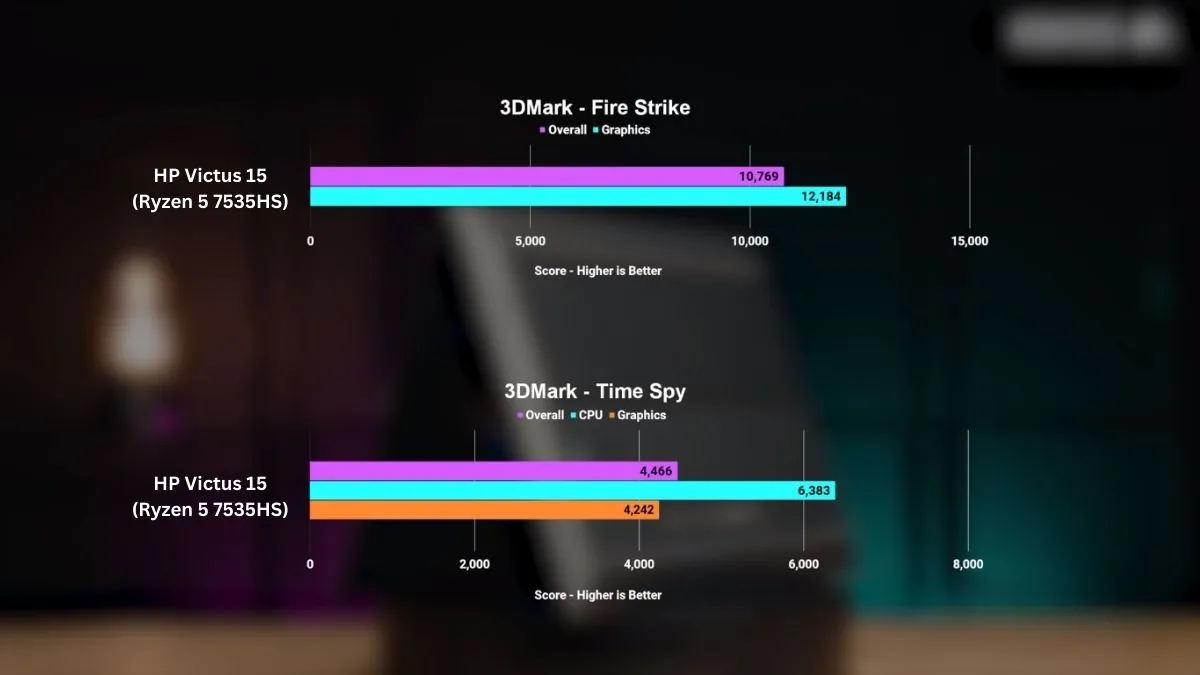
In our review, the Ryzen 5 7535HS with RTX 2050 achieved a Cinebench R23 single-core score of 1354 and a multi-core score of 9379. These results suggest it can handle compilation, modeling, and multitasking well enough for engineering students.
Pros
✔ Runs CAD and MATLAB smoothly at this price
✔ Dedicated GPU helps in 3D modeling and rendering
✔ 144Hz display keeps diagrams and text sharp
✔ Comfortable backlit keyboard for long work hours
✔ Strong value for budget engineering students
Cons
✘ Battery life is average
✘ Plastic build feels basic
✘ Screen brightness is low for outdoor classrooms
See our full HP Victus 15 Review
Powerful Performance on a Student Budget
4. Lenovo Legion 5 Gen 10
Key Specs
| Processor | AMD Ryzen 7 260 |
| Graphics | NVIDIA GeForce RTX 5060 |
| Memory | 16GB DDR5 |
| Storage | 512GB SSD |
| Display | 15.3-inch WUXGA (1920 × 1200), 165Hz |
| Weight | 5.4 lbs (2.45 kg) |
Check Current Pricing
The Lenovo Legion 5 Gen 10 is a powerful yet competitively priced gaming laptop, making it a strong choice for engineering and data science students who need high performance without stepping into premium pricing. It proves that you can get serious computing power at a reasonable cost.
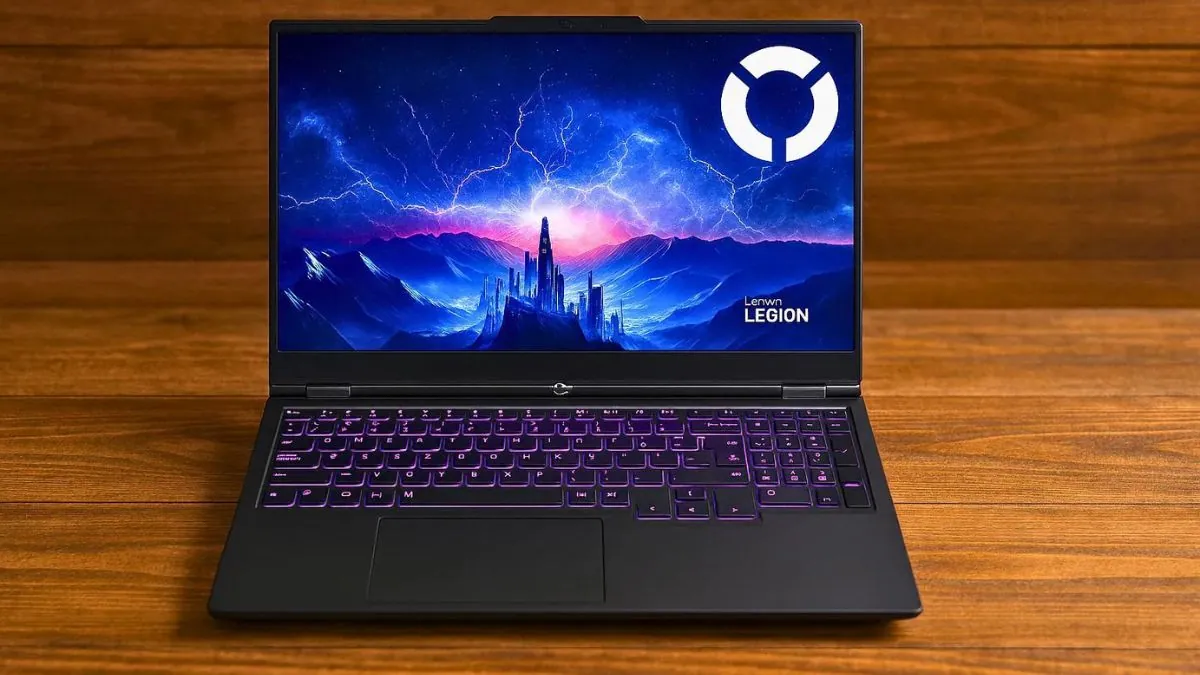
One of its standout features is the impressive 15.3-inch WUXGA IPS anti-glare display with a 165Hz refresh rate. It delivers sharp visuals, accurate colors with 100% sRGB coverage, and a smooth viewing experience that feels modern and immersive. The 16:10 aspect ratio also provides extra vertical space, which is useful for coding, data analysis, and productivity.
Gaming and GPU-intensive tasks run smoothly on this laptop. The NVIDIA GeForce RTX 5060 with 8GB GDDR7 VRAM ensures stable frame rates and strong performance in demanding games and GPU-accelerated workloads such as simulations, rendering, and machine learning tasks.
At its core, the Lenovo Legion 5 Gen 10 is powered by the AMD Ryzen 7 260 processor with 8 cores and 16 threads. This processor delivers excellent multitasking performance and high clock speeds, allowing the system to handle gaming, parallel workloads, and heavy multitasking efficiently.
The 16GB DDR5 RAM running at high speed is sufficient for modern games, data processing, and multitasking. In addition, the laptop includes a fast 512GB PCIe Gen 4 NVMe SSD, which provides quick boot times, fast file access, and reliable performance for large projects and datasets.
Lenovo continues its strong reputation for keyboards with the Legion 5 Gen 10. The full-sized backlit keyboard is comfortable for long typing and gaming sessions, and the backlighting makes it easy to use in low-light environments.
In terms of connectivity, the laptop offers a practical selection of ports, including USB-A, USB-C, HDMI, and Ethernet, covering most everyday needs for external displays and peripherals. While it does not focus on workstation-level ports, the available options are sufficient for gaming, study, and professional use.
As with most high-performance gaming laptops, battery life is not its strongest point. The Legion 5 Gen 10 is designed to deliver maximum performance when plugged in, while battery runtime is best suited for light tasks rather than extended unplugged gaming or heavy workloads.
Pros
✔ Strong CPU and GPU performance for gaming and data-heavy tasks
✔ Smooth 165Hz display with accurate colors
✔ Handles multitasking and large workloads well
✔ Comfortable keyboard for long sessions
✔ Good value for the performance offered
Cons
✘ Battery life is limited under heavy use
✘ Bulky compared to thin-and-light laptops
✘ Not ideal for frequent travel
Smart Performance in a Compact Design
5. Dell 14 Plus
Key Specs
| Processor | Intel Core Ultra 7 256V |
| Graphics | Intel Arc Graphics |
| Memory | 16GB LPDDR5X |
| Storage | 1TB SSD |
| Display | 14-inch 2.5K , 60Hz |
| Weight | 3.5 lbs (1.6 kg) |
Check Current Pricing
The Dell 14 Plus secures its place with a solid mix of performance, modern design, and practical features that are hard to ignore for engineering students.
A capable multi-core processor helps handle complex calculations, simulations, and everyday engineering tasks. The Dell 14 Plus is powered by the Intel Core Ultra 7-256V processor, which delivers strong performance and efficiency for coding, analysis, and productivity-focused workloads.
Having sufficient memory is essential for multitasking, simulations, and working with large datasets. This laptop comes with 16GB of LPDDR5X RAM, which allows smooth multitasking and responsive performance. It also includes a fast 1TB SSD, ensuring quick boot times, fast file access, and ample storage for projects and software.
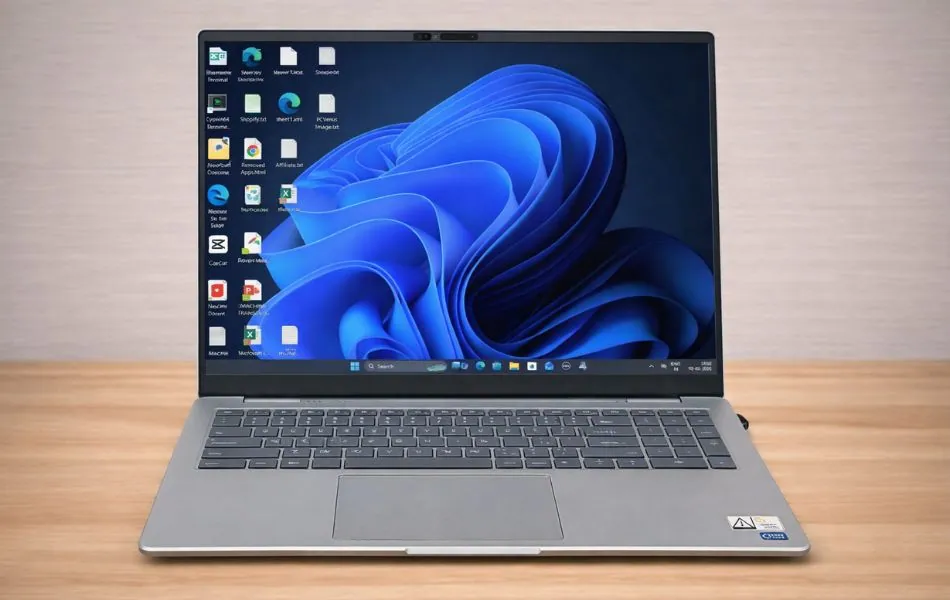
Windows 11 runs as the operating system and manages overall performance efficiently. The laptop also features a backlit keyboard with a dedicated Copilot key, making it comfortable to work during late-night study sessions or in low-light environments.
It features a 14-inch 2.5K (2560 × 1600) display with a 16:10 aspect ratio, offering sharp visuals and extra vertical space. This higher-resolution screen is well suited for coding, reading documentation, design work, and multitasking. Intel Arc integrated graphics handle everyday graphical tasks smoothly, making it suitable for light creative work and engineering applications that do not rely on a dedicated GPU.
For connectivity, the Dell 14 Plus supports modern wireless standards and includes a practical selection of ports through USB-C and USB-A options, allowing easy connection to external displays, storage devices, and peripherals. Its lightweight design makes it easy to carry between classes, labs, and study spaces, adding to its portability.
Pros
✔ Strong performance for engineering and coding tasks
✔ Sharp 2.5K display with extra vertical space
✔ Smooth multitasking with 16GB RAM
✔ Lightweight and easy to carry daily
✔ Fast SSD ensures quick boot and file access
Cons
✘ No dedicated GPU for heavy simulations
✘ RAM is not upgradeable
✘ Not ideal for advanced 3D or ML workloads
Best Performance-Focused Thin Laptop
6. MSI Thin 15
Key Specs
| Processor | 13th Gen Intel Core i7-13620H |
| GPU | NVIDIA GeForce RTX 4050 |
| RAM | 16GB DDR4 |
| Storage | 512GB SSD |
| Display | 15.6-inch FHD (1920 × 1080), IPS 144Hz |
| Weight | 4.1 pounds (1.86 kg) |
Check Current Pricing
The MSI Thin 15 is one of the most affordable laptops for engineering students in 2026. It strikes the perfect balance between performance, portability, and affordability.
Powered by a 13th Gen Intel Core i7 processor and an RTX 4050 GPU, it’s more than capable of handling daily coursework, AutoCAD, MATLAB, SolidWorks, Python programming, and lightweight simulations.
Performance
With 16GB of DDR5 memory and a 512GB NVMe SSD, it easily handles multitasking, whether you’re running a programming environment, engineering software, or multiple Chrome browser tabs.
The RTX 4050 also supports AI/ML workloads, making it an ideal and future-proof choice for students interested in machine learning and deep learning courses.
Display and Design
The 15.6-inch Full HD IPS display with a 144Hz refresh rate provides a crisp viewing experience during programming, design work, and gaming breaks. With slim bezels and a weight of 7.43 pounds (3.37 kg), it’s incredibly portable and perfect for carrying around campus. Its sleek, professional design makes it suitable for both classroom teaching and personal use.
Other Features
The backlit keyboard keeps you comfortable even during long coding sessions, while Cooler Boost technology helps control heat during resource-intensive tasks. Connectivity options include USB Type-C, HDMI, multiple USB 3.2 ports, Wi-Fi 6E, and Bluetooth 5.3, allowing you to easily connect peripherals and external displays.
Why It’s Special
The MSI Thin 15 is unique in that it offers flagship-level performance for engineering students at an affordable price. Its powerful Intel i7 CPU, dedicated RTX 4050 GPU, and thin design make it an ideal laptop for academic work, simulations, and even light gaming.
Pros
✔ Lightweight design for daily carrying
✔ Quiet operation even under load
✔ Good color accuracy on the high refresh rate display
✔ MSI Center software is intuitive and useful
✔ Expandable RAM for future needs
✔ Competitive pricing
✔ Solid build quality with minimal flex
Cons
✘ GPU limits high-end gaming potential
✘ Battery provides mediocre endurance
✘ No webcam (dealbreaker for online classes)
Smart Performance in a Compact Design
7. Lenovo IdeaPad Flex 5
Key Specs
| Processor | AMD Ryzen AI 5 340 |
| Graphics | Integrated AMD Radeon 840M |
| Memory | 16GB LPDDR5X |
| Storage | 512GB SSD |
| Display | 14-inch WUXGA (1920 × 1200), 60Hz |
| Weight | 3.53 lbs (1.6 kg) |
Check Current Pricing
Check out the Lenovo IdeaPad Flex 5 2-in-1 laptop, which stands out as a practical and versatile option for engineering students who need flexibility and portability.
This slim and stylish device is less than an inch thick when closed and features a 2-in-1 design, allowing it to be used both as a laptop and a tablet. It comes with a Lenovo Digital Pen, making it useful for note-taking, sketching, diagram creation, and other creative or academic tasks.
You can use the digital pen directly on the touchscreen to capture ideas and annotations. The laptop is powered by integrated AMD Radeon 840M graphics, delivering smooth visuals for everyday tasks. It features a 14-inch WUXGA IPS touchscreen display with a resolution of 1920 × 1200 pixels and narrow bezels on all sides. The 360-degree hinge allows the screen to be positioned comfortably in laptop, tent, stand, or tablet mode.
Under the hood, the Lenovo IdeaPad Flex 5 is powered by the AMD Ryzen AI 5 340 processor with 6 cores and 12 threads, paired with 16GB of LPDDR5X memory. This configuration handles multitasking, browsing, coding, numerical analysis, and productivity tasks smoothly. Storage is managed by a fast 512GB PCIe SSD, ensuring quick boot times and fast file access.
The processor can boost up to 4.8 GHz, providing responsive performance for daily workloads. For connectivity, it supports Wi-Fi 7 and Bluetooth 5.4, along with a useful selection of ports for external displays, storage devices, and accessories.
Battery performance is suitable for a full day of light to moderate use, and the system supports fast charging to quickly regain usable battery time when needed.
Weighing approximately 3.53 pounds (1.6 kg), the IdeaPad Flex 5 is easy to carry around campus or between classes. It runs on Windows 11 Home and includes a backlit keyboard, making it comfortable to use in low-light environments.
Pros
✔ Flexible 2-in-1 design for notes, sketches, and study
✔ Smooth multitasking for daily engineering tasks
✔ Touchscreen with pen support for better productivity
✔ Lightweight and easy to carry on campus
✔ Good connectivity with modern wireless support
Cons
✘ No dedicated GPU for heavy simulations
✘ Not ideal for advanced CAD or 3D workloads
✘ Average display brightness for outdoor use
Final Words
In engineering, getting a good budget-friendly laptop is like finding a reliable sidekick. This guide has taken you through a list of top laptops that balance performance and price.
Remember, it’s not just about cost; it’s about picking a laptop that fits your engineering needs. Whether you choose the power-packed Apple MacBook Air M4 or the affordable Acer Aspire 3, each option is a smart choice for your engineering journey.
Your laptop is more than a device; it’s your partner in creativity and problem-solving. So, pick the right budget-friendly laptop, and here’s to your exciting journey in engineering.
FAQs
What kind of laptop do I need for engineering?
Engineering students should invest in a powerful and portable laptop since they need to carry it to college, university, or school. If a laptop lacks portability, difficulties may arise when taking it outdoors.
Students often use laptops in various places, so it’s crucial to consider weight before selecting.
Gaming Laptops
A gaming laptop stands out as the optimal choice for engineering students. It boasts a powerful processor, a dedicated graphics card, ample RAM, and storage—essential for tasks like 3D rendering, coding, machine learning, CAD, MATLAB, etc.
Traditional/Business Laptops
While traditional and business laptops are suitable, a gaming laptop takes the lead for engineering work. Traditional student laptops offer good battery life and portability, making them versatile for various tasks.
Touchscreen/2-in-1 Notebooks
Touchscreen laptops, while portable with decent battery life, may not match the power of gaming or traditional laptops.
Although 2-in-1 notebooks have unique features like presentation and drawing capabilities, they might not meet the demanding requirements of engineering tasks. Engineering students often need more powerful components, such as processors and graphics cards, which are less available in 2-in-1 notebooks.
How much RAM do I need for engineering?
The amount of RAM a laptop needs depends on your specific engineering tasks. Generally, a laptop with 8GB of new-generation RAM is sufficient for programming, compiling, and video editing.
However, for more demanding applications such as 3D modeling and simulation, opting for a laptop with at least 16GB of memory is advisable.
Selecting a laptop with 16GB or more RAM ensures you won’t need to upgrade the memory in the next few years. Laptops are less customizable than PCs after purchase, making it more challenging to upgrade components. Therefore, a laptop with plenty of memory is recommended from the start.
How much storage space do I need for engineering?
It’s always a good idea to check the system requirements for the specific engineering software you’ll use and consider your long-term storage needs.
For everyday task like writing documents, browsing the internet, and doing basic computer work, a laptop with 256GB of storage is usually good enough.
If you’re using special programs like AutoCAD, 3D modeling, or rendering software, getting a laptop with 512GB of storage or more is better. These programs often need much space for big project files and data.
If you’re editing videos or running simulations that create big files, you might need a laptop with 1TB of storage or more.
If you plan to use many engineering programs simultaneously or work on big projects, it’s a good idea to have even more storage, like 1TB or more.
Do I need a dedicated graphics card for engineering tasks?
For day-to-day tasks, an integrated graphics card is usually sufficient.
If you’re on a tight budget and primarily doing basic engineering tasks, then an integrated graphics card will be enough. However, if your work involves more graphics-intensive applications, it is recommended to purchase a laptop with a dedicated GPU.
A dedicated graphics card may not be necessary for all engineering tasks, but it can significantly improve the performance of specific applications.
Tasks involving 3D modeling, rendering, simulation, complex analysis, and virtualization may also benefit from a dedicated graphics card, especially if your software is optimized for GPU acceleration.
Check the system requirements for the engineering software you will use. Some applications are designed to take advantage of dedicated GPUs, and having a dedicated GPU can significantly improve performance.
What is the best operating system for engineering students?
Windows is often a good choice due to its compatibility with engineering software. But if your programming or personal preferences lead you to choose macOS or Linux, ensure the software you need is compatible. Check with your academic institution or engineering department for specific recommendations or requirements.
Windows: Most people use Windows, the first choice for engineering students. It is a powerful and flexible system that can be used with many different software programs. It is very easy to use, especially for those just starting.
macOS: macOS is the system that runs on Apple computers. It is a special system known for its stability, speed, and high security. Engineering students love it because it works better with CAD software and other engineering programs than any other operating system.
Linux: Linux is a special operating system that’s free to use and can be changed a lot. It’s not as common as Windows or macOS, but many engineering students like it because they can make it just how they want it and it’s powerful.