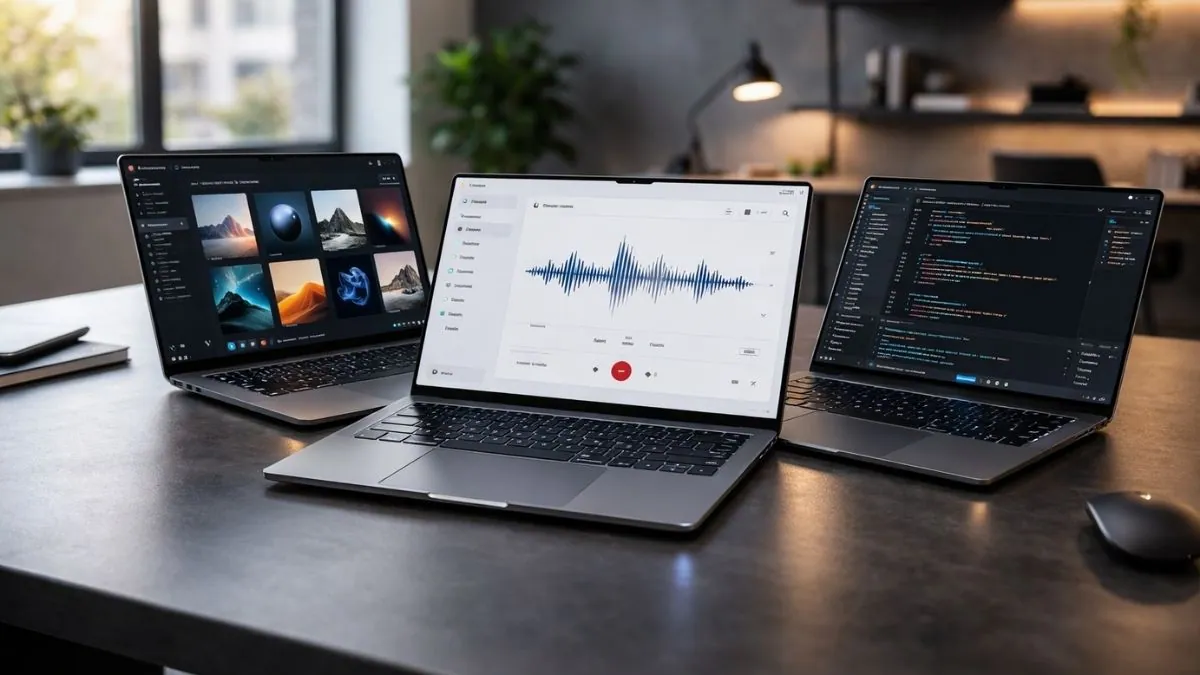
AI laptops are now appearing in the mid-range market, not just in premium models.
Many new systems include dedicated NPUs capable of delivering 40 to 50 TOPS of on-device AI performance, which is the baseline required for features such as Copilot+ in Windows 11.
In our evaluation, the difference becomes noticeable during sustained multitasking. Laptops with modern AI processors such as Snapdragon X, Ryzen AI, or Intel Core Ultra handle live transcription, background effects, and AI-assisted tools without placing constant load on the CPU. Older systems without NPUs rely more heavily on cloud processing and can consume more battery during similar tasks.
This guide focuses on affordable AI laptops in the $700 to $1,500 range. We compare how well each system balances real AI capability, battery behavior, and long-term usability rather than simply listing processors that include the word “AI.”
Quick Overview: Affordable AI Laptops in 2026
| Image | Product | Feature | Price |
|---|---|---|---|
 | Microsoft Surface Laptop 7 |
| Check Price |
 | ASUS Vivobook 16 |
| Check Price |
 | Acer Swift 14 AI |
| Check Price |
 | HP Omnibook 5 |
| Check Price |
 | ASUS TUF Gaming A14 |
| Check Price |
Recent Updates
See what’s changed in this article
February 26, 2026: Added the “How We Test” section to clarify our evaluation process. Verified the availability of all selected laptops and confirmed that the current recommendations remain relevant and competitive for 2026.
October 16, 2021: Article originally published.
How We Evaluated These Budget AI Laptops
To select the best affordable AI laptops in 2026, we focused on real student workloads rather than marketing labels. Each model was assessed based on how it performs during everyday use, including multitasking, AI-assisted tools, video calls, and extended study sessions.
We prioritized laptops with dedicated NPUs capable of running on-device AI features such as Copilot+, transcription, and background enhancements. TOPS ratings were considered, but practical responsiveness during real use mattered more than headline numbers.
Performance was evaluated under sustained workloads to ensure systems remained stable during long sessions. Battery efficiency, portability, keyboard comfort, and display quality were also factored in, since these directly affect daily campus use.
Only models that deliver meaningful AI capability within the $700–$1,500 range were included. Benchmark results from tools such as Geekbench, Cinebench, and 3DMark were referenced where relevant, but always considered alongside real-world usability.
View our full laptop testing and review process
What Makes a Laptop AI-Ready?
A laptop is considered AI-ready when it includes hardware designed to process AI tasks locally rather than relying entirely on cloud services. The key component is a dedicated Neural Processing Unit (NPU).
An NPU is optimized for tasks such as voice recognition, live captions, transcription, image enhancement, and background video effects. By handling these processes separately from the CPU and GPU, the system can improve efficiency and reduce battery consumption during sustained use.
Laptops without an NPU can still run AI applications, but many features may depend more heavily on cloud processing or consume additional system resources. Devices with modern NPUs are better equipped to support on-device AI features introduced in newer operating system updates.
Processor families that currently include dedicated AI hardware include:
- Qualcomm Snapdragon X Plus and X Elite
- AMD Ryzen AI (7000/8000 series with XDNA architecture)
- Intel Core Ultra processors (Meteor Lake and newer)
- Apple M-series chips with Neural Engine
It is also important to note that some AI features are platform-specific. For example, certain Windows Copilot+ capabilities require compatible Windows hardware, while Apple’s Neural Engine supports AI features within macOS applications.
An AI-ready laptop should therefore be evaluated not only by processor name but also by operating system support and software compatibility.
Our Top Pick – Best AI Laptops on a Budget
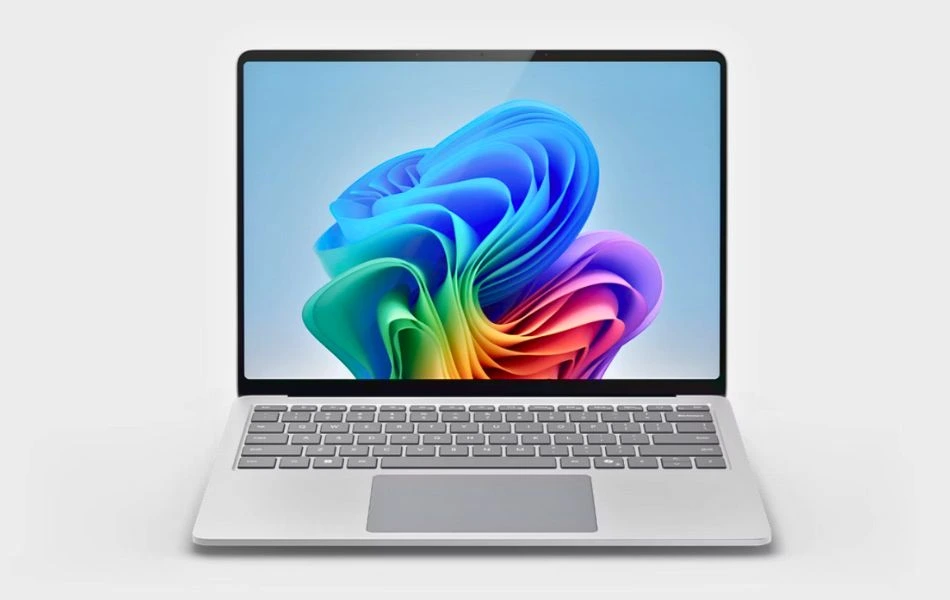
1. Microsoft Surface Laptop 7
Best for Portability & AI-Powered Productivity
Key Specifications
| Processor (CPU) | Snapdragon X Plus |
| AI Engine (NPU) | Qualcomm Hexagon NPU |
| RAM | 16GB LPDDR5X |
| Storage | 256GB SSD |
| Display | 13.8″ HDR Touchscreen, Razor-Thin Bezel |
| Graphics | Integrated Adreno GPU |
| Battery Life | Up to 20 Hours |
| Weight | Approx. 2.9 lbs (1.3 kg) |
| Operating System | Windows 11 Home (Copilot+ PC) |
If you’re a student looking for a modern, premium laptop with built-in AI tools, the Microsoft Surface Laptop 7 is just that. It’s lightweight, quiet, and has on-device Copilot+ features like Recall and Cocreator, making it a smart companion for college life.
Performance
The Snapdragon X Plus 10-core CPU works with a dedicated Qualcomm Hexagon NPU to make AI tasks like document summarization, transcription, real-time translation, and image generation a breeze right on the device. It’s built as a Copilot+ PC, which means native support for advanced features like Recall, Cocreator, and Studio Effects.
The 16GB RAM and fast SSD ensure seamless multitasking with tools like Word, Chrome, and OneNote. Although it doesn’t include a discrete GPU, the integrated Adreno graphics can handle light design work and video calls with ease.
Display and design
The 13.8-inch HDR touchscreen delivers sharp visuals and vibrant colors – ideal for watching lectures, browsing, and AI image previews. With a lightweight aluminum body and all-day battery life (up to 20 hours), it’s perfect for moving around campus.
Other features
The Surface Laptop comes with features like Wi-Fi 6E, Bluetooth 5.3, a 1440p webcam with AI enhancements, and studio effects for clear video calls. The new Recall feature (coming in an update) helps students find old files, emails, or browser history like a personal timeline.
Why It Stands Out
Unlike other laptops on this list, the Surface Laptop 13 is fanless, lightweight, and one of the first laptops with full Copilot+ integration. It’s not meant for gaming or graphics-heavy work, but it excels at intelligent productivity with unmatched portability and a great user experience.
Ideal For
It’s perfect for students who want a lightweight, all-day laptop with smart AI features. It’s a great choice for note taking, online classes, and those exploring new tools like Copilot or Recall.
Pros
✔ Copilot+ AI features: Recall, Cocreator, subtitle translation
✔ Lightweight and premium design
✔ Up to 20 hours of battery life
✔ Brilliant HDR touchscreen
✔ Quiet, fanless operation
Cons
✘ Only 256GB storage — not ideal for media-heavy users
✘ No discrete GPU for heavy visual workloads
✘ Some AI features (like Recall) require future updates
Want full benchmarks and detailed testing?: Read our complete Microsoft Surface Laptop 7 review
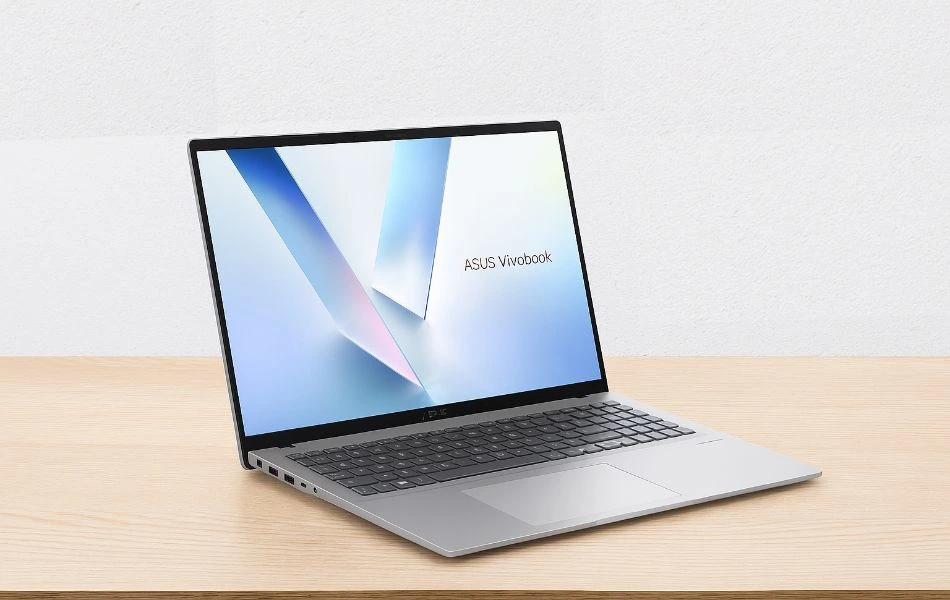
2. ASUS Vivobook 16
Best for Built in AI-Powered Notebook
Key Specifications
| CPU (Processor) | AMD Ryzen AI 7 350 |
| GPU | AMD Radeon 880M |
| RAM | 16GB LPDDR5 |
| Storage | 1TB PCIe Gen 4 SSD |
| Screen | 16″ WUXGA (1920×1200), 300 nits, anti-glare |
| Weight | 4.14 lbs (1.88 kg) |
| Battery | Up to 8 hours |
The ASUS Vivobook 16 is a perfect combination of size, speed, and storage for students who need space and savings to work with. It is a great choice for students who want AI tools and traditional laptop features in a larger chassis.
Performance
Powered by the AMD Ryzen AI 7 350, this laptop runs apps smoothly and also enables AI tasks such as real-time transcription, noise filtering, and generative image support via Copilot+. The integrated Radeon 880M GPU performs well for light editing, presentations, and creative school tasks. With AMD’s XDNA NPU (50 TOPS), AI features run right on the laptop – no internet required.
Display and Design
The 16-inch WUXGA screen gives you more space for multitasking and studying comfortably. It is anti-glare and bright enough for studying indoors. The build is sleek but sturdy, and despite being a little heavy, the large screen makes it ideal for a home or dorm setup.
Other features
The Vivobook 16 includes a backlit keyboard, a webcam with privacy shutter, an AI noise-cancelling mic, and Windows 11 Copilot+. Ports include USB-A, USB-C, HDMI, and a 3.5mm jack—enough for most students’ needs.
Why It Stands Out
The Vivobook 16 stands out with its large display and 1TB SSD—not common in AI laptops under $800. It gives you a strong screen and plenty of storage, as well as reliable Ryzen AI performance.
Ideal For
It’s ideal for students who want a big screen, strong specifications, and built-in AI tools without spending more than ₹800. Great for multitaskers, remote learners, and budget-conscious creators.
Pros
✔ Ryzen AI 7 + 50 TOPS NPU
✔ Large 16″ screen and full-size keyboard
✔ 1TB SSD and 16GB RAM
✔ Strong AI support with Copilot+
✔ Good value under $800
Cons
✘ Slightly heavier than other models
✘ Battery life is average (~8 hours)
✘ No discrete GPU for high-end rendering
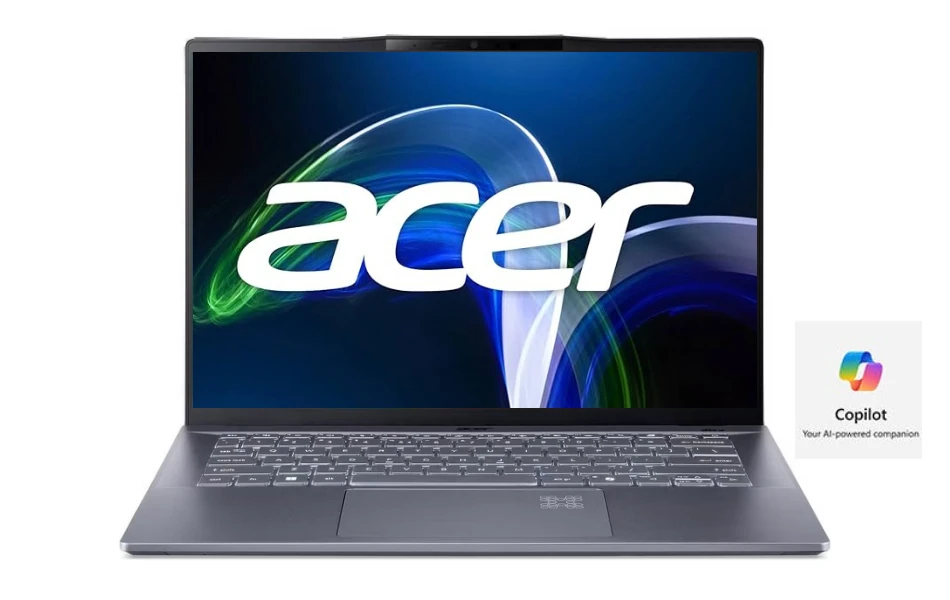
3. Acer Swift 14 AI
Premium Build & All-Day Battery
Key Specifications
| CPU (Processor) | Snapdragon X Plus |
| GPU | Integrated Qualcomm Adreno GPU |
| RAM | 16GB LPDDR5X |
| Storage | 1TB PCIe Gen 4 SSD |
| Screen | 14.5″ WQXGA (2560×1600), 120Hz, 400 nits |
| Weight | 2.9 lbs (1.3 kg) |
| Battery | Up to 24 hours (video playback) |
The Acer Swift 14 AI is a lightweight and powerful device built for the next-generation student workflow. It delivers stunning visuals, efficient AI computing, and great battery life in a single stylish package.
Performance
The Snapdragon X Plus 10-core CPU is paired with a powerful Hexagon NPU (45 TOPS) for fast, private, on-device AI execution. Whether you’re using AI image tools, creating automatic captions, or browsing with multiple tabs open, everything feels snappy and seamless.
With 16GB of fast RAM and a spacious 1TB SSD, storage and speed won’t leave you behind. Its fanless design also makes it whisper-quiet – great for study rooms or libraries.
Display and Design
The 14.5-inch WQXGA display is sharp, smooth (120Hz), and bright enough in any light. The 16:10 aspect ratio makes multitasking easy, and it’s perfect for students who switch between taking notes, researching, and video content. The aluminum chassis gives a premium feel without any extra weight.
Other Features
It includes the latest Wi-Fi 7, a sharp 1440p webcam with AI Studio effects, a CoPilot key, and an IR sensor for quick login. It’s a completely future-ready setup with a long-lasting battery – up to 24 hours for video playback.
Why it’s special
No other laptop in this group combines a high-resolution 120Hz display, all-day battery, and Wi-Fi 7 in a CoPilot+ design. It’s the most balanced device for students who want premium technology without the bulky weight.
Ideal For
It’s best for students who want a modern AI-first experience, premium build, and long battery life – all in a lightweight and stylish device.
Pros
✔ Copilot+ PC with 45 TOPS NPU
✔ Ultra-long battery life (up to 24 hrs)
✔ 120Hz bright and crisp display
✔ Lightweight, aluminum build
✔ Wi-Fi 7 and sharp 1440p webcam
Cons
✘ No discrete GPU for advanced rendering
✘ Higher price than basic student models
✘ Some apps may still optimize better for Intel/AMD
Benchmark Test Result
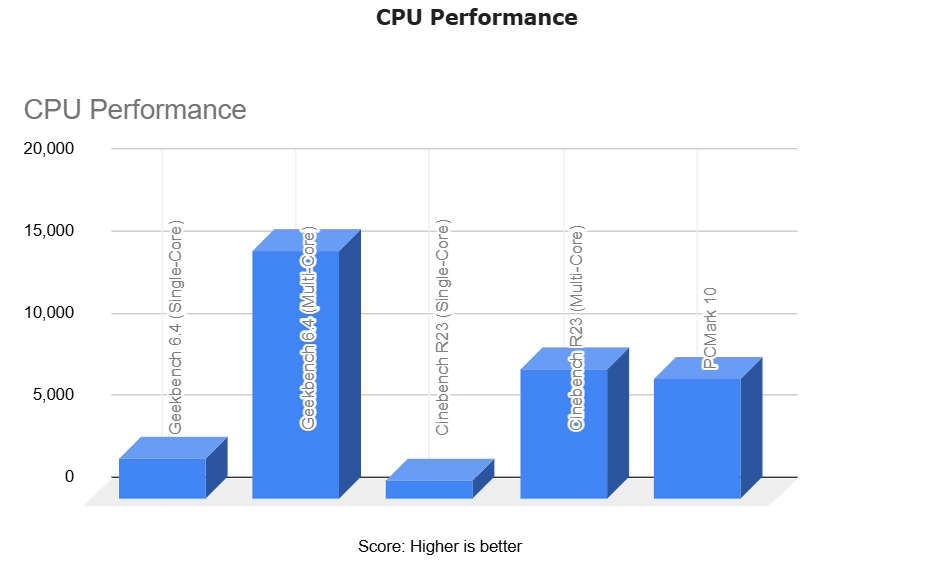
The Acer Swift 14 AI has best-in-class performance.
It scores 15,159 in the Geekbench multi-core test and 7,941 in the Cinebench R23 test, showing its strong CPU performance.
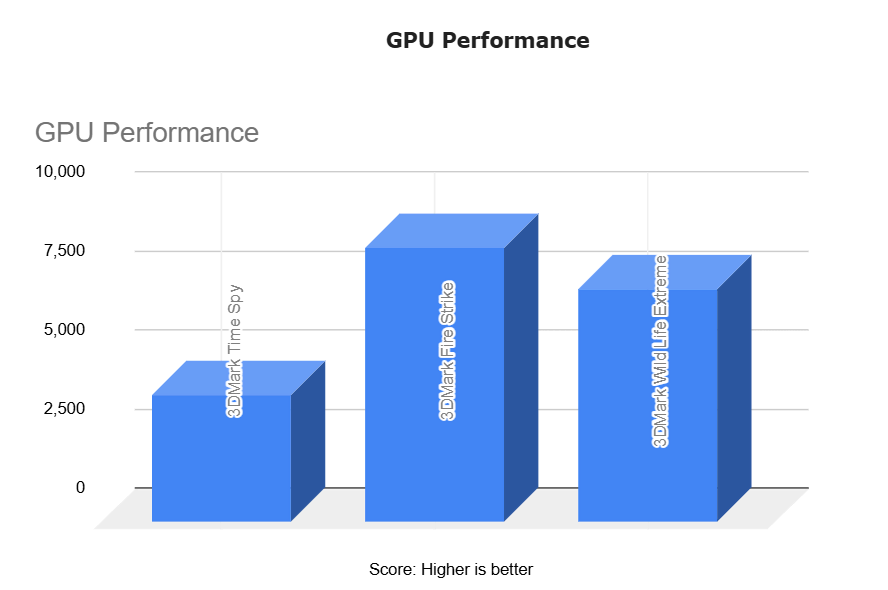
GPU tests such as 3DMark Time Spy (4,028 points) show its integrated graphics card is very good.
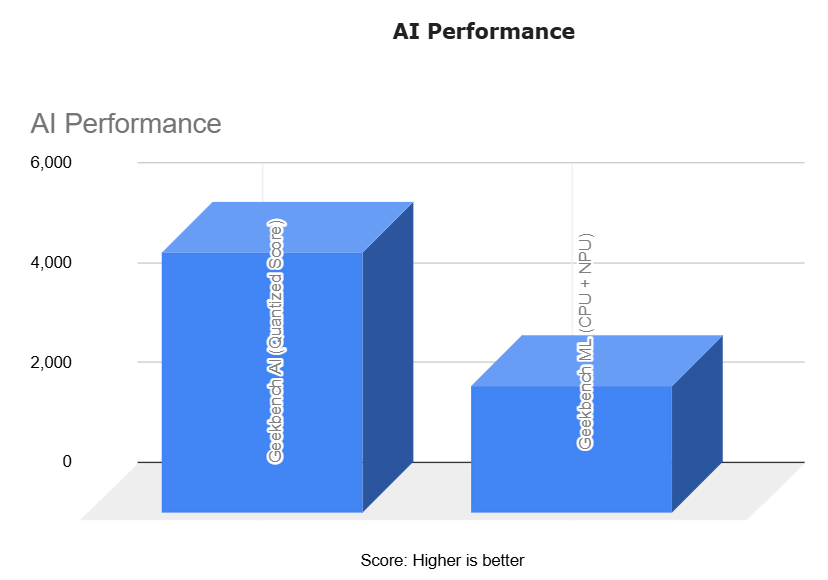
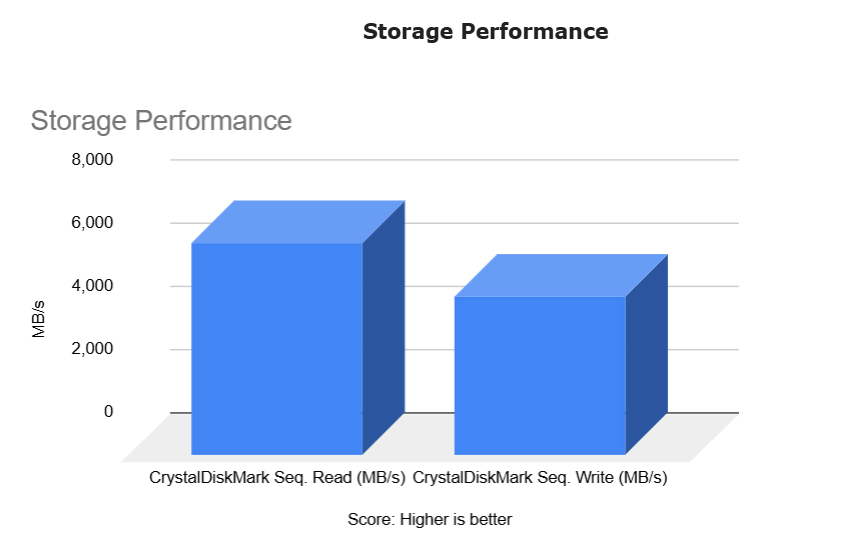
SSD speeds of up to 6,700 MB/s and AI benchmarks score of 5,218 in Geekbench AI are a testament to its strong Copilot+ performance.
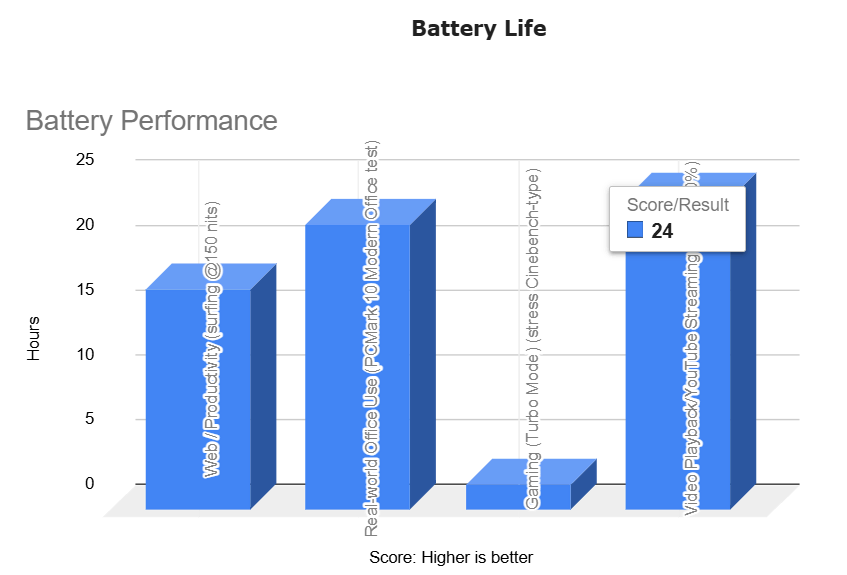
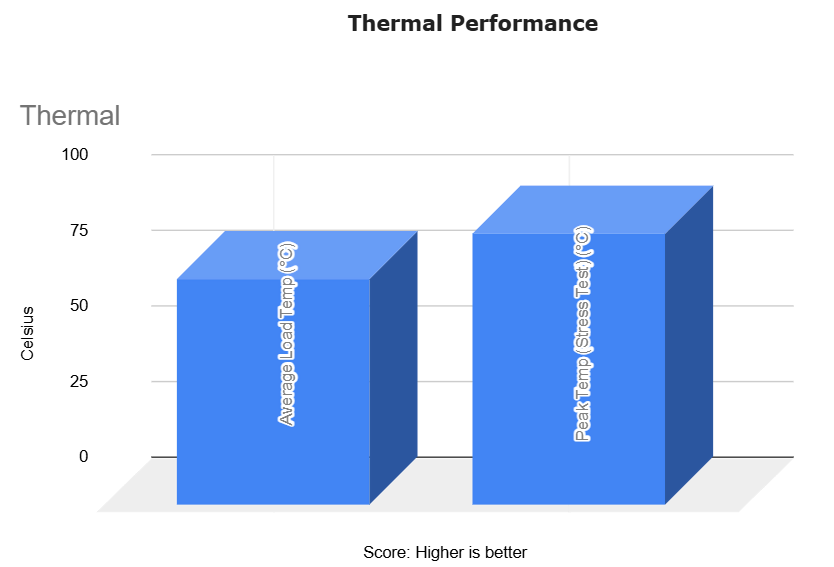
Despite its fanless design, it maintains good temperature control under high load. Most impressive of all is its battery life – up to 24 hours of video playback and more than 22 hours of real-world office use.
Want full benchmarks and detailed testing?: Read Acer Swift 14 AI: Full Specifications and Benchmarks
4. HP Omnibook 5
Cheapest AI Laptop
Key Specifications
| CPU (Processor) | AMD Ryzen AI 7 350 |
| GPU | Integrated AMD Radeon 880M |
| RAM | 16GB LPDDR5 |
| Storage | 1TB PCIe Gen 4 SSD |
| Screen | 16″ WUXGA (1920×1200), Touchscreen, 300 nits |
| Weight | 4.0 lbs (1.81 kg) |
| Battery | 52Wh, fast charging (50% in 30 mins) |
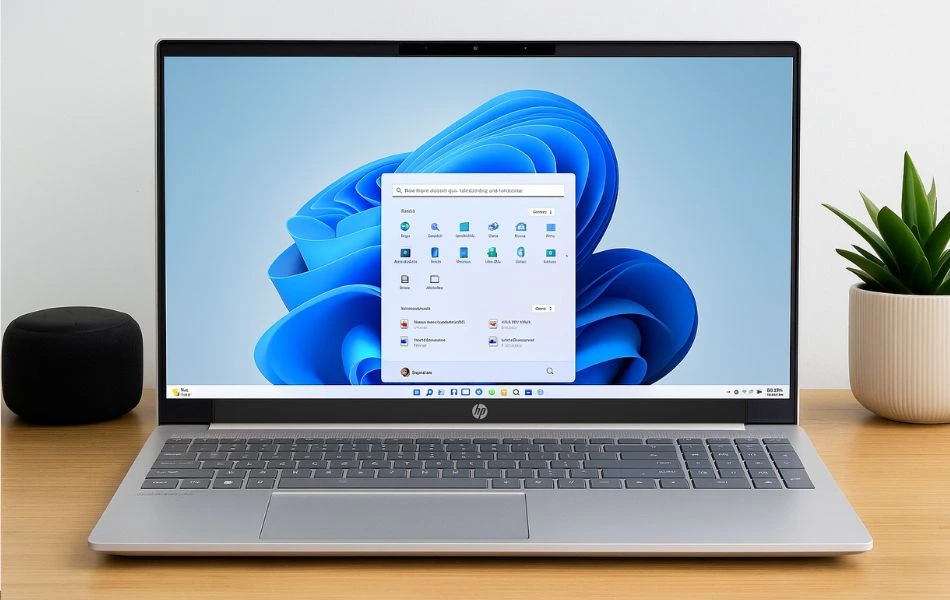
The HP Omnibook 5 blends AI power and productivity tools in a versatile 16-inch touchscreen design. It is an all-rounder $500, and built for students who work simultaneously on writing, presentations, and numeric work.
Performance
The AMD Ryzen AI 7 350 is optimized for modern workloads and includes a dedicated XDNA NPU with 50 TOPS capability. It easily handles AI use cases like transcription, live noise filtering, and AI art – all locally, without dependency on the internet.
The integrated Radeon 880M GPU and 16GB of RAM ensure quick rendering for school projects or light editing. With a 1TB SSD, there is ample storage for large files like assignments, videos, and even RAW photos or software tools.
Display and Design
The 16-inch WUXGA touchscreen gives you a large canvas for studying, designing, or browsing. Although this laptop is a bit bulky, the extra screen space and numeric keypad make it a great choice for those who prefer a desktop-like experience in a portable format.
Other Features
It includes a backlit keyboard, FHD IR webcam with privacy shutter, and AI noise-cancelling mic – useful for video calls and online classes. It charges fast (up to 50% in 30 minutes) and supports Windows 11 Copilot+.
Why it’s special
It’s the only AI laptop with a touchscreen and full numeric keypad, blending interactivity and productivity. It’s a great choice for students who need more than just portability.
Ideal For
It’s ideal for students who love a big screen, want AI power, and want strong performance for multitasking, editing, and long study sessions.
Pros
✔ Ryzen AI 7 with 50 TOPS NPU
✔ Spacious 16″ touchscreen with numeric keypad
✔ Fast 1TB SSD and 16GB RAM
✔ AI noise canceling and privacy-focused features
✔ Great for productivity and remote learning
Cons
✘ Slightly heavier than compact 14″ models
✘ Average battery life (~7–8 hours)
✘ No discrete GPU for pro-level creative tasks
5. ASUS TUF Gaming A14
Best Budget Gaming Laptop for AI
Key Specifications
| CPU (Processor) | AMD Ryzen 7 8845HS |
| GPU | NVIDIA GeForce RTX 4050 |
| RAM | 16GB LPDDR5X |
| Storage | 512GB PCIe Gen 4 SSD |
| Screen | 14″ WQXGA (2560×1600), 165Hz |
| Weight | Approx. 3.9 lbs (1.8 kg) |
| Battery | ~8+ hours (typical use) |
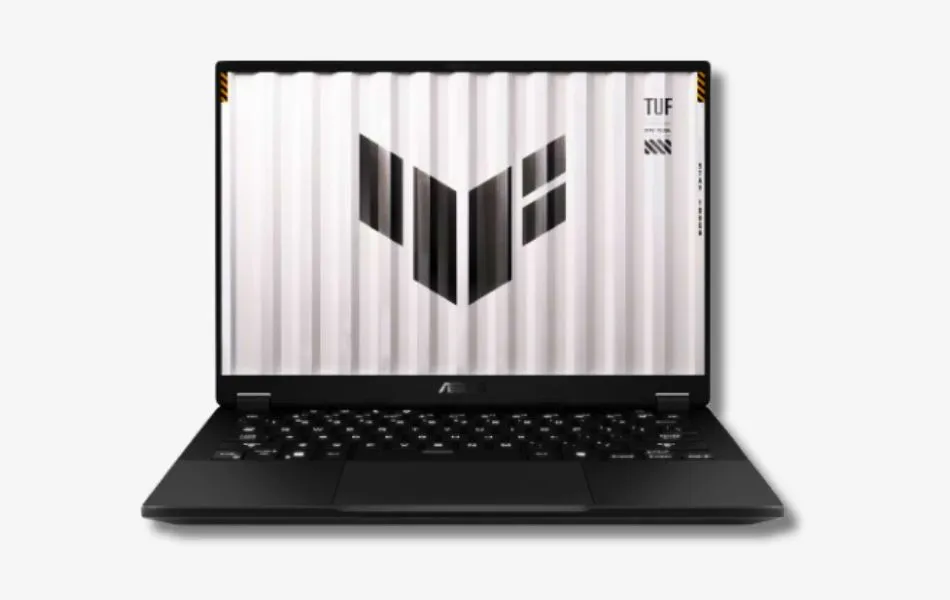
The ASUS TUF A14 is the only AI-enabled laptop on this list with dedicated graphics. It is designed for students who play games, render, or want to handle powerful creative tasks along with AI workloads.
Performance
The AMD Ryzen 7 8845HS is a fast and reliable chip capable of handling heavy workloads including gaming, video editing, and 3D modeling. With the RTX 4050 discrete GPU, this laptop can easily handle modern AAA games, rendering tasks, and software like Blender, Unreal Engine, or Premiere Pro.
What makes this model stand out is its MUX switch and AI support – giving you low latency while gaming and Copilot+ readiness for productivity tasks. You get an excellent balance between AI performance and graphics horsepower.
Display and Design
It features a 14-inch WQXGA 165Hz display with G-SYNC and 100% sRGB – perfect for fast-paced gaming or precise colour editing. Despite its gaming DNA, the A14 is relatively compact and features a sturdy, military-grade chassis and clean design.
Other Features
It includes a full-size RGB backlit keyboard, advanced cooling system, MUX switch, and all major ports for accessories. AI support comes via Copilot, noise cancellation, and camera tools built into Windows 11.
Why it’s special
This is the only laptop on the list that has a dedicated GPU and MUX switch, making it the best choice for design, game development, or engineering students who want strong AI support as well.
Ideal For
It’s perfect for students who want to play games, create or run demanding software, as well as use modern AI features for studies, content or productivity.
Pros
✔ Powerful combo: CPU+GPU
✔ 165Hz WQXGA screen with G-SYNC and 100% sRGB
✔ Great for gaming, editing, and AI productivity
✔ Rugged build with RGB keyboard
✔ AI-enhanced webcam and mic support
Cons
✘ Heavier than ultra-portables
✘ Shorter battery life under load
Full Comparisons: Affordable/Budget AI Laptops
| Image | Laptop Model | CPU | GPU | RAM | Storage | Display | Battery | Ports | Cooling | Special Features |
|---|---|---|---|---|---|---|---|---|---|---|
| Microsoft Surface Laptop 7 | Snapdragon X Plus | Adreno Integrated | 16GB LPDDR5X | 256GB SSD | 13.8″ HDR Touch | Up to 20 hrs | USB-C, Surface Connect | Fanless | Copilot+, Recall, 1440p Cam |
| ASUS Vivobook 16 (AI 7 350) | Ryzen AI 7 350 | Radeon 880M | 16GB LPDDR5 | 1TB SSD | 16″ WUXGA Anti-Glare | Up to 8 hrs | HDMI, USB-A/C, Audio | Dual Fan | Backlit KB, AI Mic, Webcam |
| Acer Swift 14 AI (X Plus) | Snapdragon X Plus | Adreno Integrated | 16GB LPDDR5X | 1TB SSD | 14.5″ WQXGA 120Hz | Up to 24 hrs | USB-C, TB4, HDMI | Fanless | Wi-Fi 7, Copilot+, 1440p Cam |
| HP Omnibook 5 (AI 7 350) | Ryzen AI 7 350 | Radeon 880M | 16GB LPDDR5 | 1TB SSD | 16″ WUXGA Touchscreen | ~7–8 hrs | USB-C, HDMI, USB-A | Vents + Dual Heat Pipe | Touchscreen, NumPad, Copilot+ |
| ASUS TUF Gaming A14 | Ryzen 7 8845HS | RTX 4050 6GB | 16GB LPDDR5X | 512GB SSD | 14″ WQXGA 165Hz | ~7–8 hrs | HDMI, USB-C, RJ-45 | Dual Fan, MUX Switch | RGB KB, G-SYNC, Copilot+ |
If you want a more advanced laptop, Check this: Best Laptops for Deep Learning, ML, and AI Development
What Should You Look For in a Laptop with AI
Your priorities are a little different – you want something fast, reliable, lightweight and future-ready, and you don’t want to spend too much.
Here are the things that really matter when choosing an AI-ready laptop for daily use, school, college or university:
1. AI Power (NPU + Copilot+ Features)
Look for a laptop with a processor that includes an NPU (Neural Processing Unit) — this is what allows your laptop to run AI tools directly, like live transcriptions, ChatGPT, Google Gemini, Cocreator, or Windows Recall. If it’s labeled as a Copilot+ PC, even better — that means it’s been built specifically with AI features in mind.
2. Performance That Lasts
You’ll want at least 16GB of RAM (for smooth multitasking) and a fast SSD (512GB or more if you can). Whether you’re writing papers, editing videos, or keeping 25 Chrome tabs open, this combo will keep things snappy and responsive.
3. Battery Life and Portability
No one wants to carry a charger around all day. Try to choose something under 1.5 kg (3.3 lbs) with 10 or more hours of battery life. Snapdragon-based laptops are especially good at this, but some AMD Ryzen AI models are great too.
4. Display and Keyboard
Your eyes and fingers will thank you later. Go for a bright, sharp display (IPS or OLED if possible) and a comfortable backlit keyboard — especially helpful during late-night study sessions.
5. Price vs. Value
Most good AI laptops fall in the $600 to $1,500 range. It’s okay to spend a little more for better performance or battery life, especially if it’ll last you a few years. Don’t forget to check for student discounts from brands like Dell, HP, Microsoft, and Apple — or wait for back-to-school or holiday sales.
Why This Laptop Ranks Higher in the Affordable AI Category
This model ranks higher because it combines a modern AI-capable processor with a practical memory and storage configuration at a price point where competitors often compromise.
Several laptops in the same range include AI-branded processors but ship with 8GB of RAM or limited storage, which restricts real-world usability. This configuration avoids that limitation, pairing its NPU-equipped processor with sufficient memory and fast NVMe storage for sustained academic workloads.
It does not lead in raw performance or graphics power, and it is not positioned as a premium design showcase. Its advantage lies in balance. Within the affordable AI segment, it delivers current on-device AI support without sacrificing the baseline specifications that determine everyday usability.
How We Can Actually Use AI Laptops
If you are wondering how an AI laptop can make a difference in your everyday life, the short answer is: a lot. These devices are not only faster, but also smarter. They help you save time, stay organized, and get more done with less effort.
Here are some practical ways students can benefit from AI-powered laptops:
Coding and Development
AI laptops are great for computer science or engineering students. With tools like GitHub Copilot and VS Code IntelliSense, you can get real-time code suggestions, debug faster, and build projects more efficiently. Some models even run local AI models for coding assistance – no internet required.
Smarter Note-Taking and Transcription
Imagine being able to record a lecture and instantly get an AI-generated summary or searchable transcript, all on your laptop, without having to upload the file anywhere. That’s what features like Recall and AI voice transcription are built for. It’s perfect for continuing conversations with fast-paced professors or reviewing complex topics later.
Image and Video Editing with AI Tools
Creative students working with photos or videos will appreciate the built-in AI tools that make editing faster. Features like automatic background removal, smart filters, and AI cutouts are now available in apps like Adobe Express, Canva, or Clipchamp, and run even more smoothly with a good NPU.
Online Classes, Multitasking, and More
AI can make online learning even more seamless. Features like AI-powered noise cancellation, automatic background blur during video calls, and live captions help create a distraction-free virtual classroom. And with plenty of RAM and a fast SSD, you can run your browser, video calls, notes, and media apps, all simultaneously, without any interruptions.
Long-Term Relevance: What to Consider
Laptop hardware cycles are slower than software changes. Students often keep their devices for four or more years, so compatibility with upcoming operating system updates and application requirements matters.
Many new AI features are now processed locally rather than entirely in the cloud. Systems with dedicated NPUs and modern processors are better positioned to support these features as operating systems integrate them more deeply. Devices without this hardware may still function well for traditional tasks but could have limited access to certain on-device AI tools over time.
Memory and storage also affect longevity. A configuration with 16GB or more of RAM and a fast NVMe SSD provides enough headroom for evolving development tools and AI-assisted applications throughout a typical degree cycle.
Rather than focusing on “future-proofing,” it is more practical to choose a system that aligns with current hardware standards and offers consistent software support over the next several years.
Student Budget Tips: Getting the Best Deal on an AI Laptop
Buying a new AI laptop doesn’t have to empty your wallet. With the right timing and a few smart strategies, you can get a high-performing, future-ready machine without overspending.
Here we have added some simple, effective tips to help you save money and still get the features you need.
1. Shop Smart Around Prime Day, Back-to-School, and Holiday Sales
Retailers often offer big discounts during Amazon Prime Day, back-to-school season, Black Friday, and New Year’s clearance events. If you’re not in a rush, try shopping around these times — you can often save $100 to $300 on the same model.
2. Use Student Discounts from Major Brands
Many laptop brands offer special discounts for students. For example:
Dell has its Dell Advantage for Students program.
HP offers discounts through its Education Store.
Apple offers lower prices and free gifts (such as AirPods) with MacBooks through its Apple Education Store.
Before checking out, always look for the student discount section or sign up using your college email to get the savings.
3. Know Your Trade-Offs: Integrated vs. Discrete Graphics
If your work doesn’t involve heavy design, video editing, or gaming, you can save money by choosing a laptop with integrated graphics (such as an AMD Radeon or Adreno GPU). These are great options for AI tools, note taking, browsing, and productivity.
But if you’re interested in creative software, game development, or architecture, it may be worth spending more money for a model with a dedicated GPU (such as an RTX 4050). Just make sure you’re actually using that extra power – otherwise, it’s better to invest in longer battery life or more storage.
Final Buying Checklist
Before making your final decision, confirm the following:
✔ A modern processor with a dedicated NPU
✔ At least 16GB RAM and 512GB NVMe SSD
✔ Real-world battery life suitable for daily campus use
✔ Copilot+ certification or verified AI-capable processor
✔ Ports and display size that match your workflow
✔ Weight and build quality appropriate for regular travel
✔ Fits your budget without sacrificing long-term usability
A laptop that meets these criteria will handle current AI tools while remaining practical for everyday academic tasks.
Conclusion: Which AI Laptop Should You Choose?
Each laptop in this guide is suited to a different type of student and workload.
Best Overall Value: ASUS Vivobook 16
Offers balanced AI capability, solid storage, and dependable everyday performance.
Best for Portability: Acer Swift 14 AI or Microsoft Surface Laptop
Lightweight designs with strong battery efficiency for students who move between classes.
Best for Creative or Gaming Workloads: ASUS TUF Gaming A14
Includes a dedicated GPU for students who need additional graphics performance.
Best Touchscreen Option: HP Omnibook 5
Provides a larger interactive display that works well for note-taking and visual tasks.
Choose the model that matches how you actually work each day. Practical fit matters more than headline specifications.
Frequently Asked Questions (FAQ)
1. What is an AI laptop and how is it different from a regular laptop?
An AI laptop has a special chip called an NPU (neural processing unit) that allows it to run artificial intelligence tasks directly on the device. Unlike normal laptops that rely on the cloud for tasks like voice transcription or image generation, AI laptops can complete these tasks faster with better privacy and less battery usage.
2. Do I really need an AI laptop as a student?
It depends on how you use your laptop. If you mostly browse the web and write documents, a traditional laptop will work just fine. But if you want features like AI-powered note-taking, real-time captions, or copilot integration, an AI laptop is a great way to make your device future-ready.
3. What is a Copilot+ PC?
Copilot+ PCs are Microsoft’s label for a new generation of AI-ready Windows laptops. These laptops have high-performance NPUs, long battery life, and support for features like Recall, Cocreator, and advanced multitasking – all designed to run locally without an internet connection.
4. Which processor is best for AI laptops: Intel, AMD, or Snapdragon?
All three have their strengths:
Snapdragon X Plus/Elite: Best battery life, fanless, great for portability
AMD Ryzen AI: Strong multitasking with powerful NPUs (up to 50 TOPS)
Intel Core Ultra: Balanced performance with wide app compatibility
If you’re focused on AI features and efficiency, Snapdragon and Ryzen AI chips currently offer the best native support.
5. Can AI laptops run regular apps and games?
Yes! AI laptops can run all the standard apps like Microsoft Office, Chrome, Zoom, and Adobe Creative Suite. Some models (like the ASUS TUF Gaming A14) even include dedicated GPUs, making them capable of handling games, 3D rendering, and heavy creative tasks.
6. Are AI laptops worth it for future updates?
Absolutely. AI features are being incorporated more deeply into Windows and macOS, and many of the upcoming tools will require an NPU to work efficiently. If you plan to keep your laptop for 3-5 years, choosing a laptop with AI hardware now will help you stay updated and avoid missing out on next-generation features.