Python, Python, Python!!! It is becoming very popular nowadays. Many developers are using it and its demand is increasing because it is simple, versatile, and easy for the users. Programmers use it in many different fields, such as the health sector, education, and business.
If you want to do coding using the Python programming language, you need a better laptop. There are many laptops to choose from, so choosing the right one may take some time. You should think about how much performance you need on your laptop for Python development.
If you’re looking for advice on which laptop to buy for Python, it depends on what you want to use it for. Some people may need a powerful laptop with a lot of storage, while others may need a more basic laptop.
It’s important to remember that many developers use more than one programming language, so you may need a laptop that can handle different types of software.
Factors to Consider When Choosing a Python Laptop
Budget
You don’t need a luxury or ultra-premium laptop for Python programming. Even if you’re on a tight budget, you can code in Python on an affordable laptop. If your budget is a little higher, around $1000 or more, you can find laptops that come with Python and programming capabilities.
Before buying a laptop, consider increasing your budget a bit to get a better laptop. Laptops don’t change as often as phones or other gadgets, so you’ll have them for four or five years. Choose the specifications of the laptop based on your budget.
Processing power
The performance of your laptop depends on the type of processor and the amount of RAM. Before choosing a laptop, check which generation processor it has as the newer generation generally performs better.
For Python or other programming, a new generation Intel Core i5 or Ryzen 5 processor is recommended. A dedicated graphics card is not necessary, an integrated graphics card will do. However, it is recommended to have at least 8GB of RAM. For better performance over five years, consider 16GB of RAM with a dedicated graphics card.
Display
Before choosing a laptop for programming, consider its screen size. Python programming is often done by engineers or developers who need portability. A laptop with a 15-inch display is a good choice, as it balances portability with a screen large enough for programming. If you also want to use your laptop for gaming, a screen size of 16 inches or larger may be better.
When looking at a display, consider the resolution, type of display, and technology used. Higher resolution and new display technologies can improve your viewing experience and make programming more comfortable.
Operating system
Many developers prefer to use the Linux operating system because of its lightweight nature and high performance, especially for programming. Although Python can run on Windows and Mac operating systems, Linux is often considered the best choice for coding due to its flexibility and compatibility with many programming tools and languages.
Storage
To code effectively on a laptop, it is recommended to use a solid-state drive (SSD) as the primary storage. SSDs provide good performance and durability. However, if cost is a concern, a hard disk drive (HDD) may also be considered. HDDs are more affordable but are slower and can consume more power.
SSDs are preferred for programming as they produce faster output and are more reliable. Unlike HDDs, SSDs have no moving parts and are composed of a single circuit, making them less prone to mechanical failure. This can result in a longer lifespan of your laptop.
Keyboard and trackpad quality
A comfortable keyboard and a responsive trackpad are a must for programming. Since coding involves a lot of typing, choose a laptop with proper keyboard spacing, good key travel, and tactile feedback.
A backlit keyboard is also useful for working in low-light conditions. Additionally, the large, precise trackpad with gesture support can improve your workflow, especially if you’re using Linux or Mac.
Cooling and Thermal Management
Programming can sometimes involve running resource-intensive tasks, such as testing software, running virtual machines, or processing large datasets.
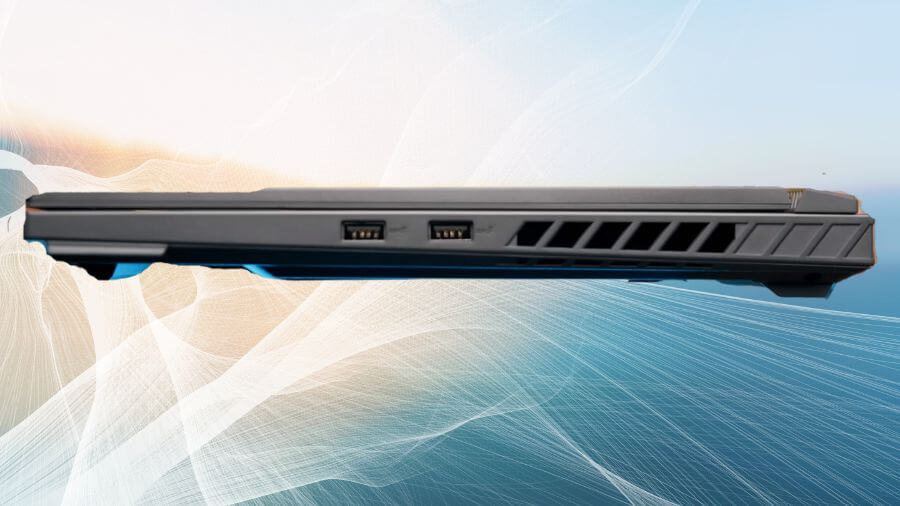
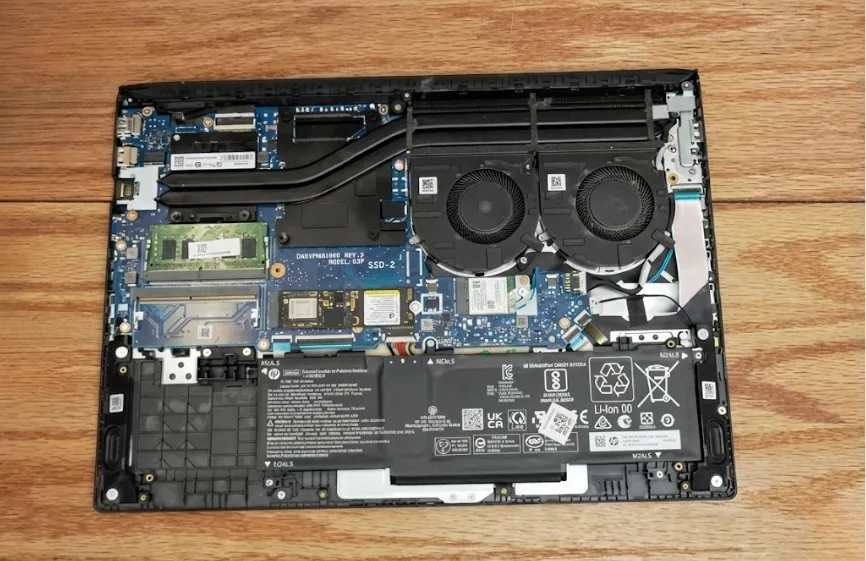
A laptop with a good cooling system will help maintain performance and prevent overheating. Thin laptops have limited cooling solutions, so if you plan on performing heavy tasks, consider a laptop with a well-ventilated chassis and efficient cooling fans.
Upgradability
Since program requirements can change over time, it’s a good idea to choose a laptop that allows for hardware upgrades. Choose a laptop with upgradeable RAM and storage. Some laptops allow you to increase the RAM to 32GB or add an additional SSD, which can help extend the life of the device.
Port Selection and Expandability
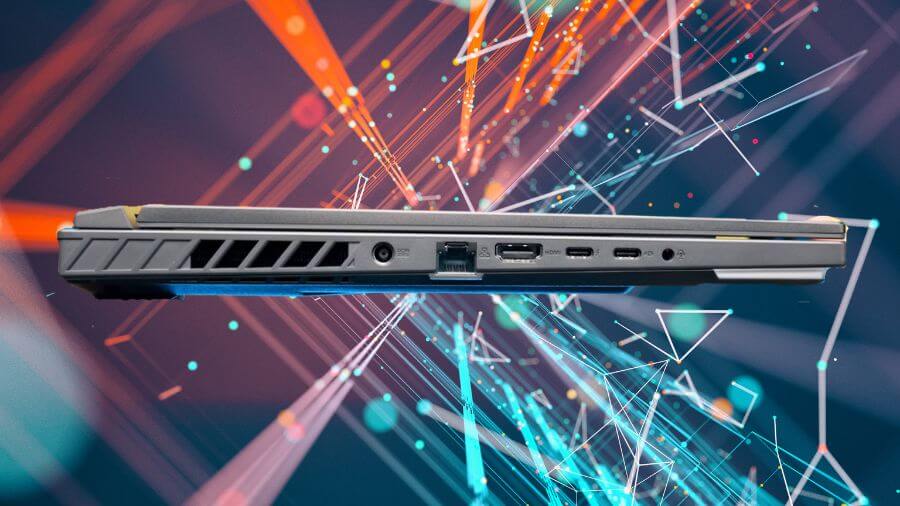
Programmers often need multiple ports to connect external displays, USB drives, and other peripherals. Look for a laptop with a variety of ports, including:
- USB-C / Thunderbolt enables fast data transfer and is future-proof.
- If you plan to use an external monitor, you’ll need HDMI/DisplayPort.
- Multiple USB-A ports can be used to connect peripherals such as a mouse, keyboard or external storage.
- SD card slot (optional if you are using a microcontroller or embedded system).
Battery Efficiency and Power Management
While battery life is mentioned, power efficiency is just as important. Laptops with good power management features, such as high-performance standby mode and adaptive brightness, can improve battery performance.
If you plan to work on the go, consider buying an Ultrabook with long battery life instead of a power-hungry gaming laptop.
The Best Laptops for Python Programming: Top Pick
| Image | Product | Feature | Price |
|---|---|---|---|
High-performance
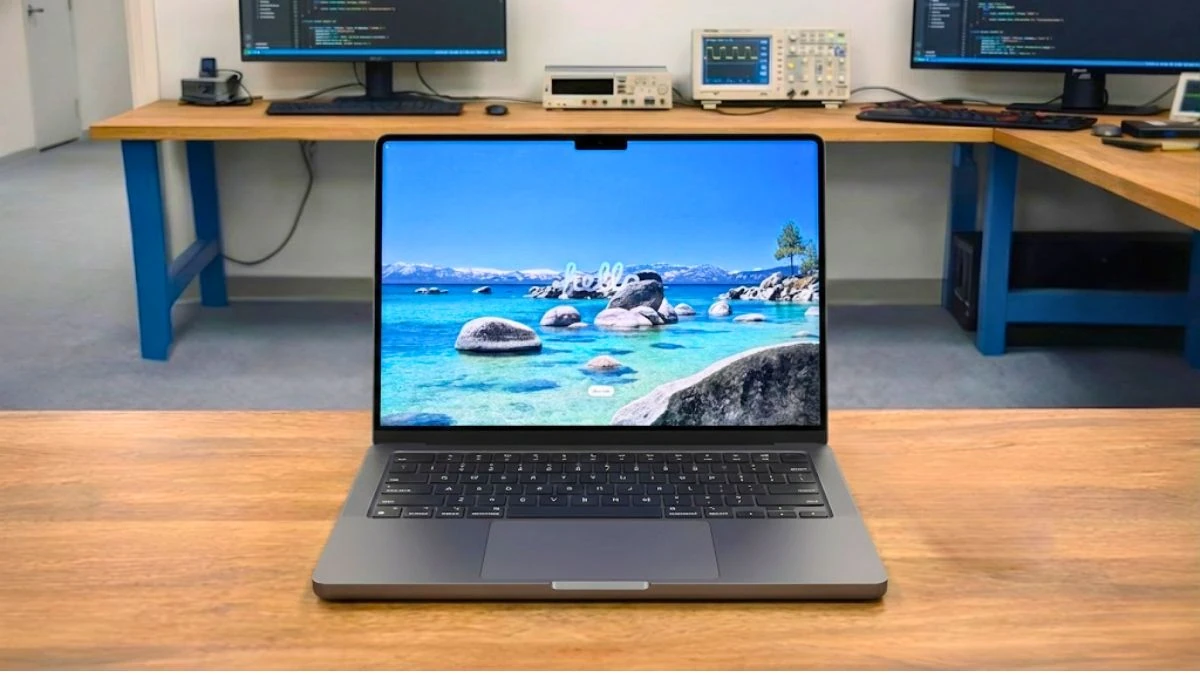 |
Apple MacBook Pro M5 |
| Check Price |
Mid-range
 |
Acer Nitro V |
| Check Price |
Budget-friendly 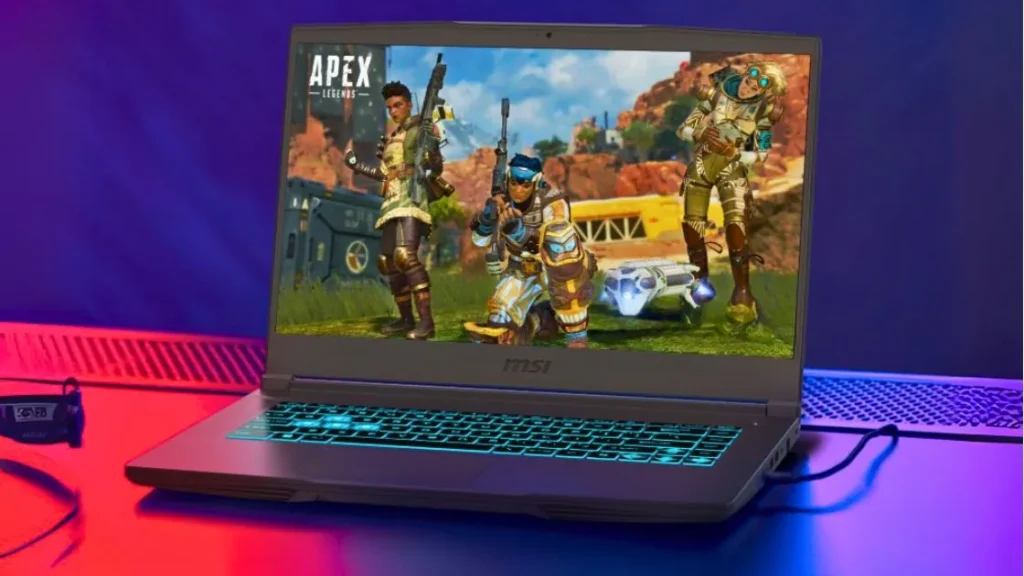 |
MSI Thin 15 |
| Check Price |
High-performance laptops (for demanding tasks):
Best macOS Laptop for AI Researchers


1. Apple MacBook Pro M5
Key Specs
| Processor | Apple M5 (10-Core) |
| Graphics | Apple M5 (10-Core) |
| Memory | 16GB LPDDR5X |
| Storage | 512GB SSD |
| Display | 14.2 inches, 3024 × 1964 pixels, 120Hz |
| Weight | 3.42 lbs (1.55 kg) |
Check Current Pricing
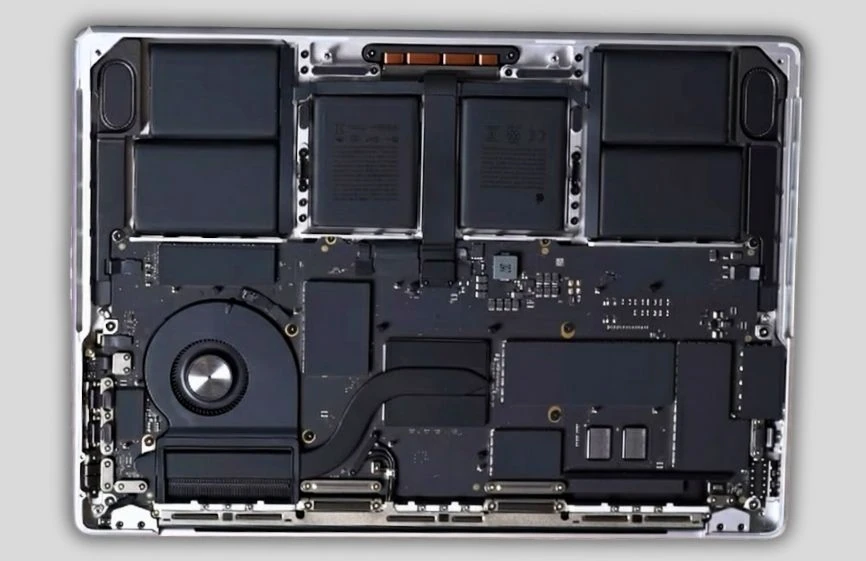
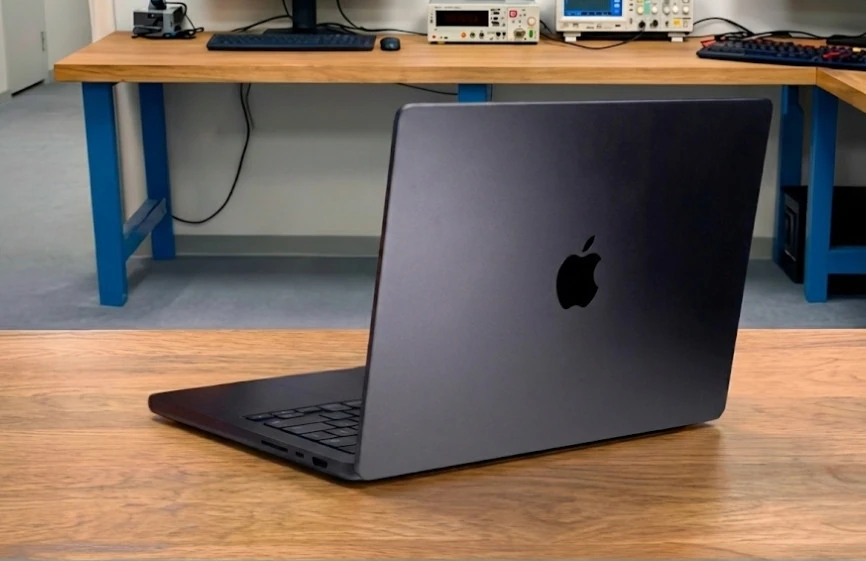
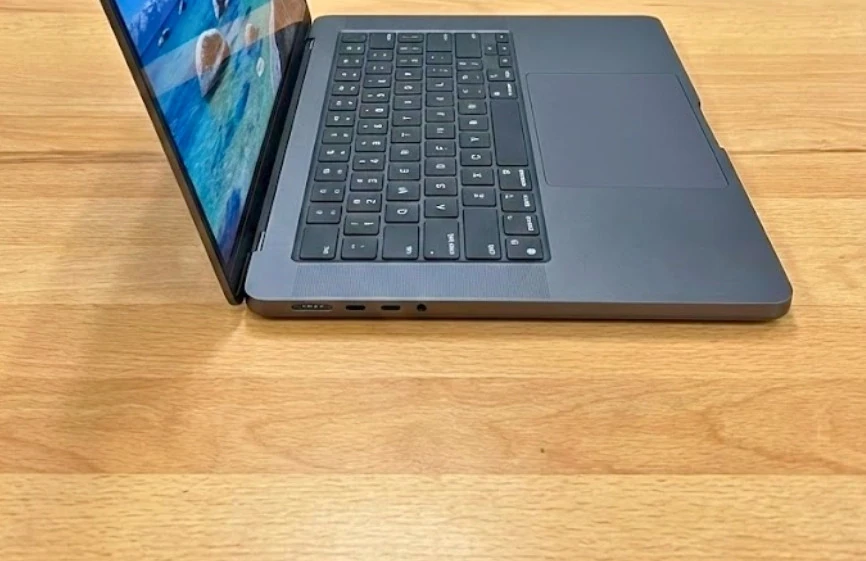
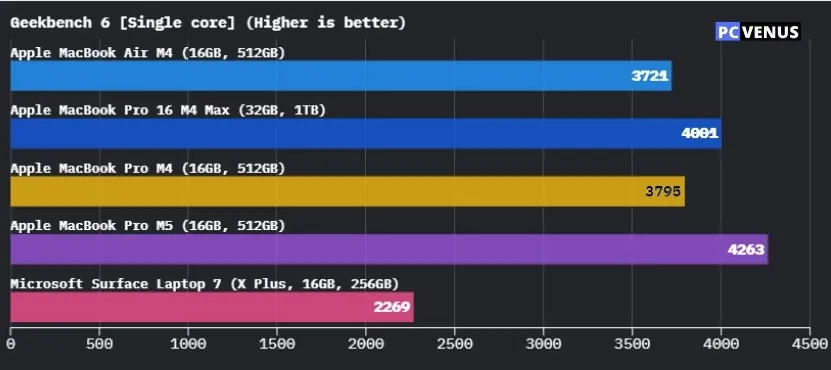
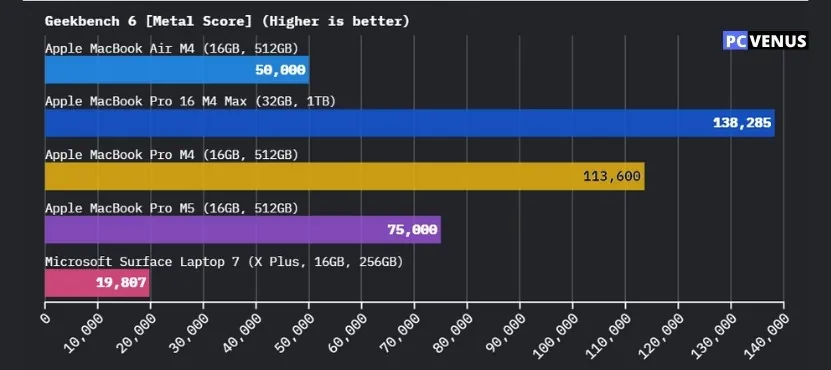
The Apple MacBook Pro M5 is a standout choice for Python programmers, powered by Apple’s M5 chip, which ensures the swift execution of coding tasks. With its advanced Neural Engine, it excels at accelerating machine learning workloads, providing both speed and efficiency.
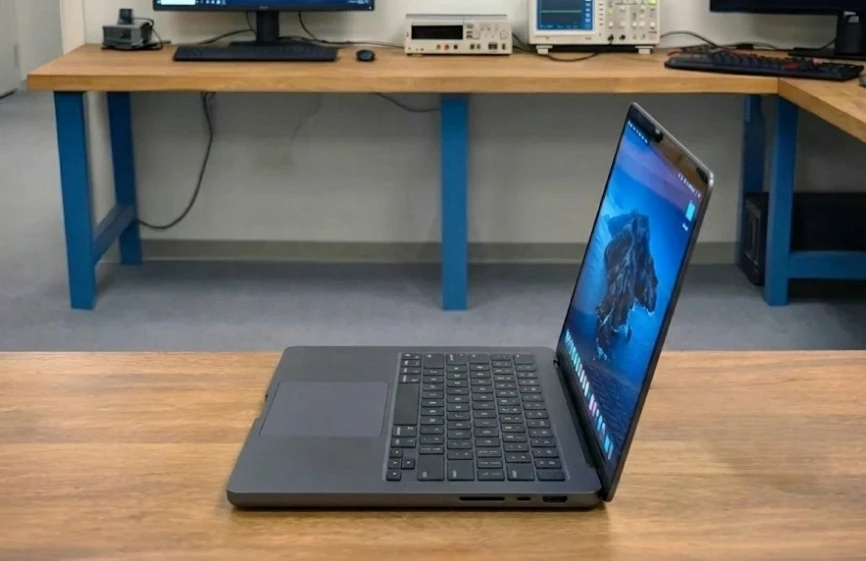
One of its key features is the 14.2-inch Liquid Retina XDR display, boasting a screen resolution of 3024 × 1964. This vibrant display supports True Tone and the P3 wide color gamut, delivering incredibly clear and vivid visuals that enhance the overall coding experience.
The integrated 10-core GPU significantly boosts performance for graphics-intensive tasks, making it ideal for programming projects that require additional graphical power.
The laptop’s FaceTime HD camera and multi-microphone array ensure clear video chats and conference calls, while the 1080p resolution offers improved image quality for online communication.
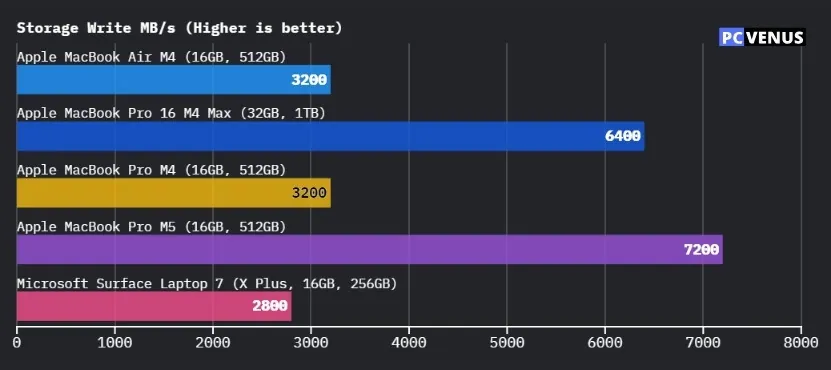
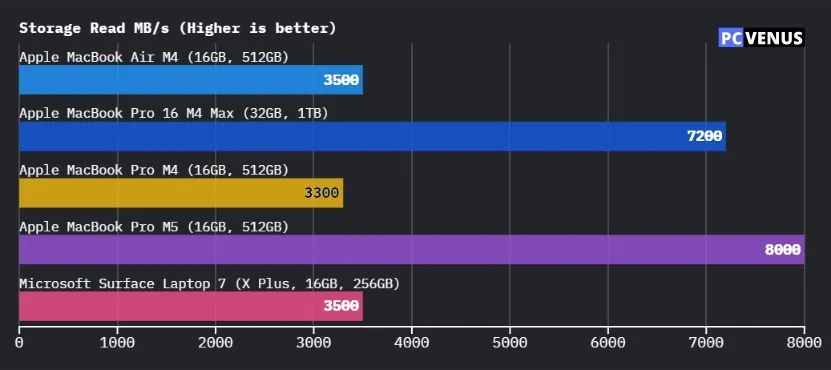
In terms of performance, the MacBook Pro M5 features 16GB of unified memory and a 512GB SSD, ensuring smooth multitasking and fast access to files and applications.
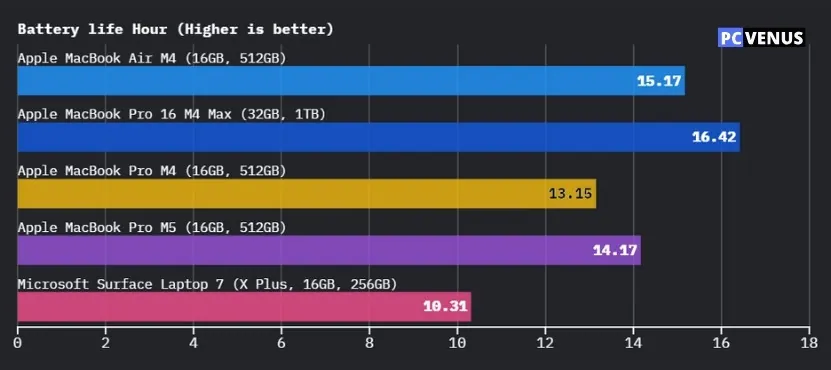
Thanks to its high-capacity lithium-polymer battery, this laptop offers up to 24 hours of video playback, making it ideal for extended coding sessions, even while traveling.
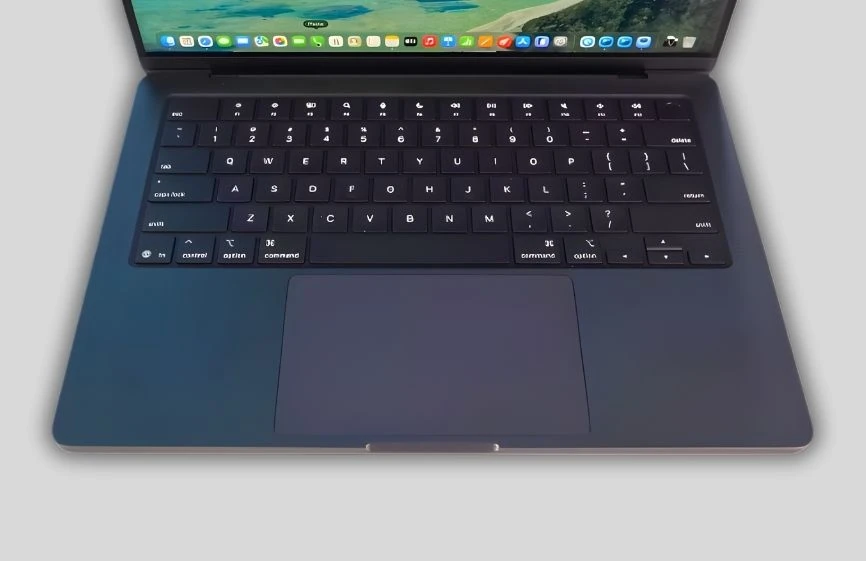
Weighing just 3.41 pounds (1.55 kg), the MacBook Pro M5 is portable and convenient. It also features a sleek design and a comfortable keyboard, enhancing portability and everyday usability.
Overall, with its exceptional performance, stunning display, and long battery life, the Apple MacBook Pro M5 is a top choice for Python programmers seeking a reliable and efficient coding companion.
Pros
✔ Excellent performance for coding and development
✔ Stunning Liquid Retina XDR display
✔ Long battery life for extended work sessions
✔ Lightweight and premium build quality
✔ Smooth multitasking and fast file access
Cons
✘ Expensive compared to many alternatives
✘ Limited upgrade options
✘ Not ideal for heavy 3D or gaming workloads
Read our Apple MacBook Pro M5 Review
Best High-Performance Laptop for AI & ML
2. ASUS ROG Strix G16
Key Specs
| Processor | Intel’s Core i7-14650HX |
| Graphics | NVIDIA’s RTX 5060 |
| Memory | 32GB DDR5 |
| Storage | 1TB SSD |
| Display | 16-inch QHD, 240Hz |
| Weight | 5.51 lb (2.50 kg) |
Check Current Pricing
Overall Performance and Daily Use
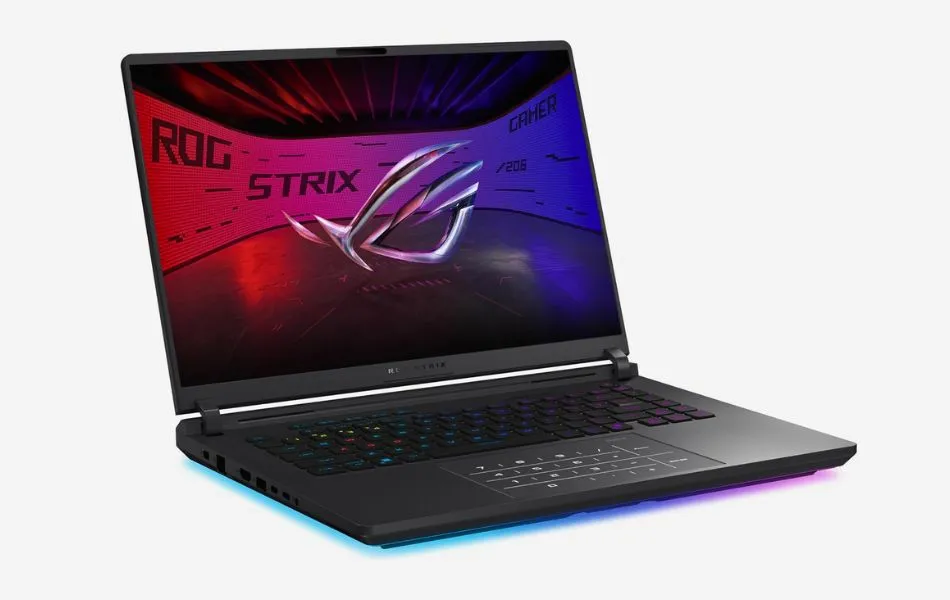
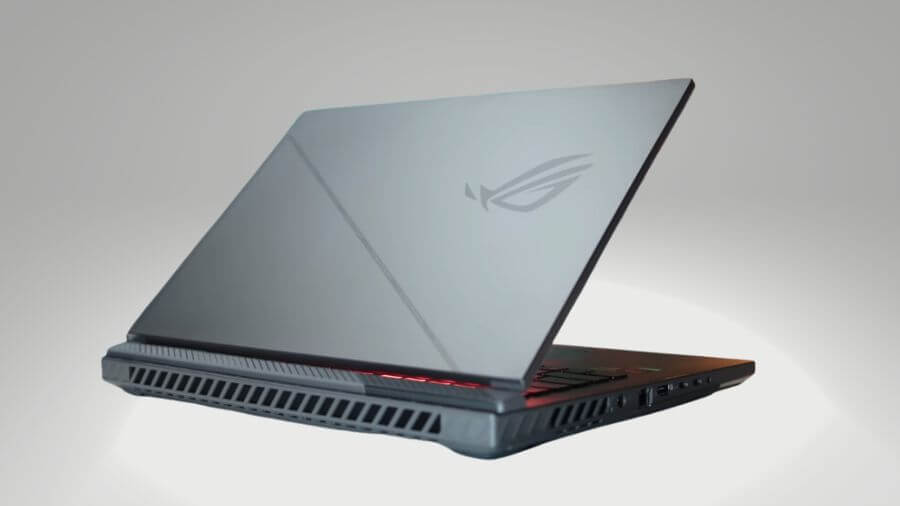
The ASUS ROG Strix G16 is one of those laptops that feels powerful the moment you use it.
It comes with Intel’s Core i7-14650HX and NVIDIA’s RTX 5060, and this combo makes it capable of handling almost every kind of task. Whether I was playing demanding games, coding in Python, or editing 4K videos, performance remained consistently smooth.
In gaming tests, Cyberpunk 2077 Phantom Liberty ran at around 90 FPS on 1080p Ultra settings, and held steady even in the low 70s on 1440p High. Assassin’s Creed Mirage easily crossed 100 FPS, while Valorant crossed 200 FPS, which really shows off the 165Hz refresh rate. For creative tasks, Adobe Premiere handled 4K video editing without stutters, and multitasking between heavy Chrome tabs and coding tools was seamless.
The 16-inch FHD+ display is another achievement. At 165Hz, every frame feels smooth, and ASUS has added an anti-glare coating that makes the screen easy to see in bright rooms. Colours are rich and contrast is sharp, so it works just as well for content creation as it does for gaming.
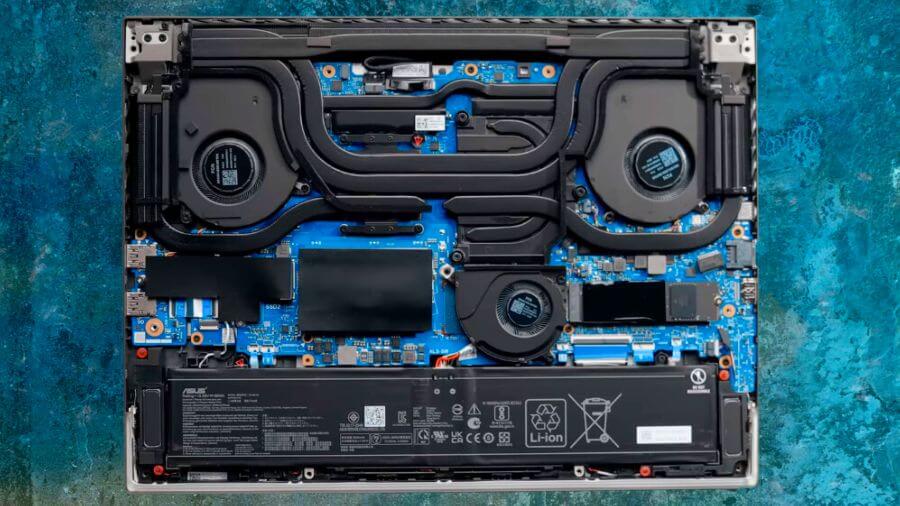
Cooling is one of the laptop’s strongest features. ASUS has used a tri-fan setup with liquid metal and vapour chambers, keeping temperatures between 72-82°C even during long periods of play. Yes, the fans are noticeable, but they aren’t loud or distracting. With headphones on, you won’t have to think about them much.
Battery life is as you’d expect from a performance-focused machine. You can get about 1.5 to 2 hours of gaming without being plugged in, and up to 6 hours of light work like browsing, watching videos, or working on documents. This is not a laptop for all-day travel, but the battery is decent for its performance.
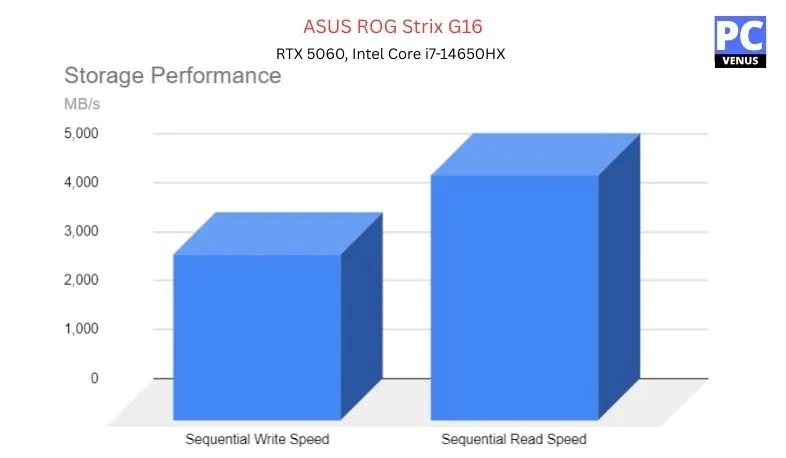
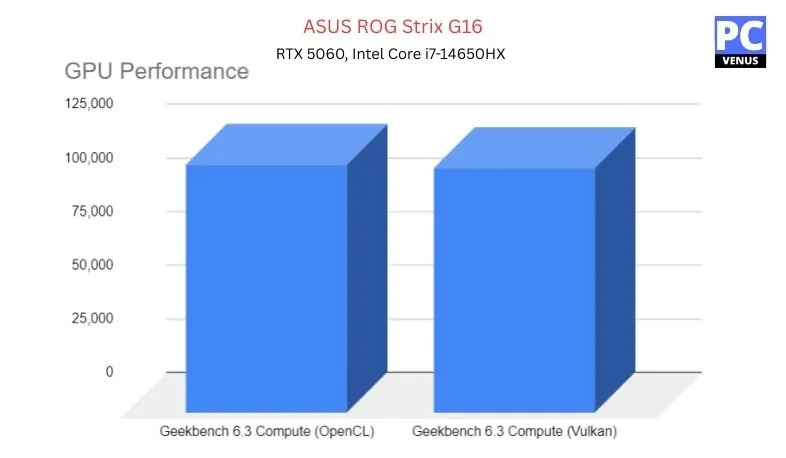
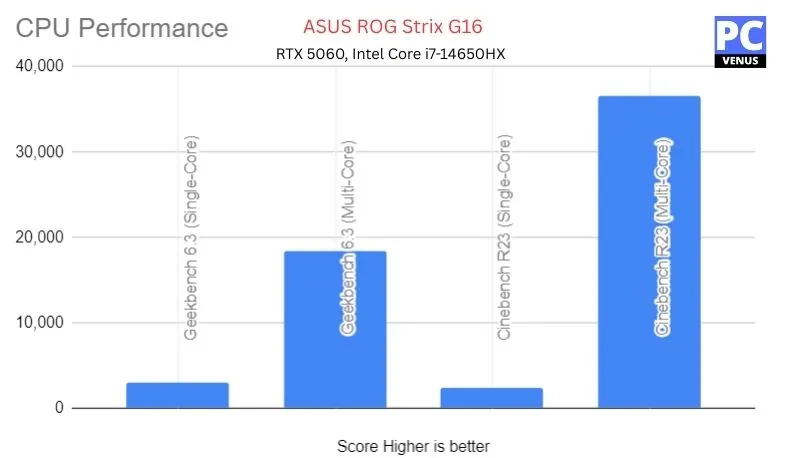
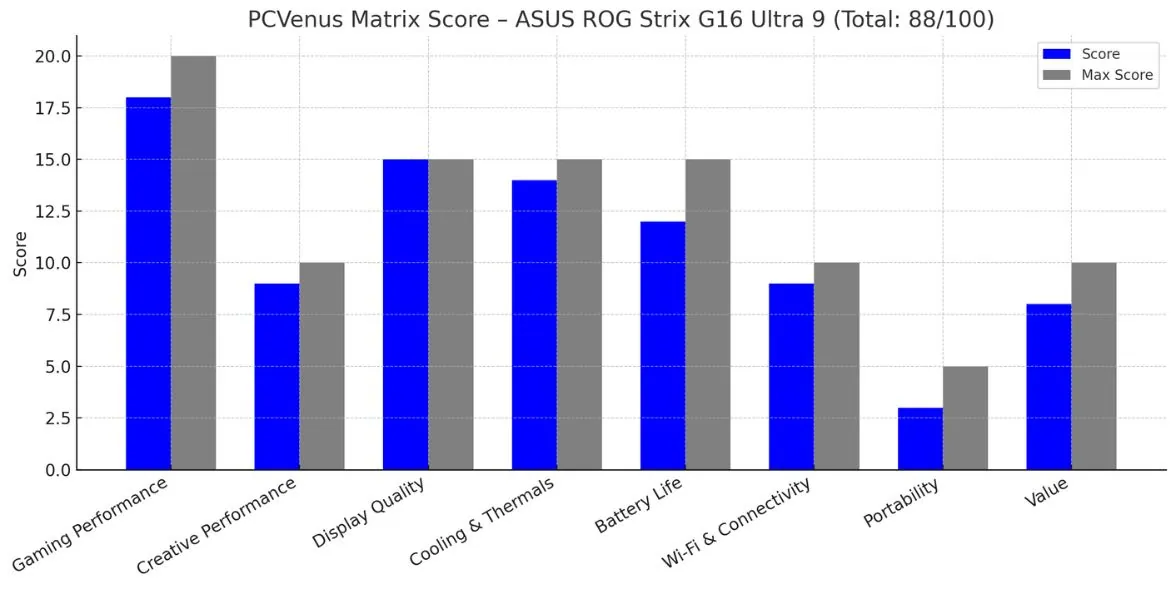
Benchmarks Test – ASUS ROG Strix G16
| Category | Test | Score/Result |
|---|---|---|
| CPU (Intel Core i7-14650HX) | Geekbench 6.3 Single-Core | 2,971 |
| Geekbench 6.3 Multi-Core | 18,470 | |
| Cinebench R23 Multi-Core | 36,577 | |
| GPU (NVIDIA RTX 5060) | Geekbench 6.3 Compute (Vulkan) | 114,377 |
| Overwatch 2 (1920×1200, Ultra) | 165 FPS | |
| Shadow of the Tomb Raider (1080p, Max) | 118 FPS | |
| Storage (1TB PCIe Gen 4 SSD) | Sequential Read | ~5,000 MB/s |
| Sequential Write | ~3,400 MB/s |
Pros
✔ Slim and portable design for its class
✔ Smooth 1080p Ultra and 1440p High performance
✔ Cooling system keeps temps stable under load
✔ 165Hz display with anti-glare coating looks sharp
Cons
✘ Battery drains quickly under heavy gaming
✘ Slightly heavier than ultrabooks
Read our ASUS ROG Strix G16 Gaming Laptop Review
Mid-range (Balance of performance and affordability)
Overall Best Laptop


1. Acer Nitro V
Key Specs
| Processor | Intel Core i5-13420H |
| Graphics | NVIDIA RTX 5050 |
| Memory | 16GB DDR5 |
| Storage | 512GB SSD |
| Display | 15.6-inch FHD (1920 x 1080) IPS, 165Hz Refresh Rate |
| Weight | 5.06 lbs (2.29 kg) |
Check Current Pricing
If you’re an engineering student or require a laptop for Python programming, consider this Acer Nitro V 15, which is positioned in the budget gaming segment.
The Acer Nitro V 15 is a versatile laptop that caters to both gaming and programming needs. While it is designed with gamers in mind, its updated specifications also make it suitable for Python programming and development tasks.
Equipped with a 13th-generation Intel Core i5-13420H processor, the Nitro V 15 delivers smooth gaming performance and boosts productivity for programming tasks such as compiling, debugging, and multitasking. Its NVIDIA GeForce RTX 5050 graphics card with 8GB GDDR7 VRAM adds significant value and provides strong rendering performance for programming projects and GPU-accelerated workloads.
The laptop’s 15.6-inch Full HD display with a 165Hz refresh rate enhances the gaming experience while also offering a comfortable and responsive workspace for coding tasks. The dedicated RTX 5050 graphics with modern ray tracing and AI acceleration support make it useful for machine learning experiments and graphics-related development work.
The Nitro V 15 also features a backlit keyboard that adds to its gaming-focused design. It includes essential ports and connectivity options such as USB Type-C, multiple USB ports, HDMI, Ethernet, and Wi-Fi 6, ensuring smooth connectivity with external devices and peripherals.
Overall, the Acer Nitro V 15 delivers a balanced mix of performance, features, and affordability, making it a strong choice for gaming enthusiasts and Python programming students on a budget. With its powerful processor, modern dedicated graphics, and solid connectivity options, it serves as a reliable laptop for both gaming and programming needs.
Pros
✔ Strong performance for gaming and programming
✔ Smooth high-refresh display
✔ Dedicated graphics for ML and GPU tasks
✔ Fast and responsive daily use
✔ Good value for budget buyers
Cons
✘ Battery life is average
✘ Slightly bulky design
✘ Not ideal for portability
See our full Acer Nitro V Review
Best Budget HP Laptop for Gaming
2. HP Victus 15
Key Specs
| Processor | AMD Ryzen 7 7445HS |
| Graphics | NVIDIA RTX 4050 |
| Memory | 16GB DDR5 |
| Storage | 512GB SSD |
| Display | 15.6″ FHD, 144Hz, IPS |
| Weight | 5.06 lbs (2.29 kg) |
Check Current Pricing
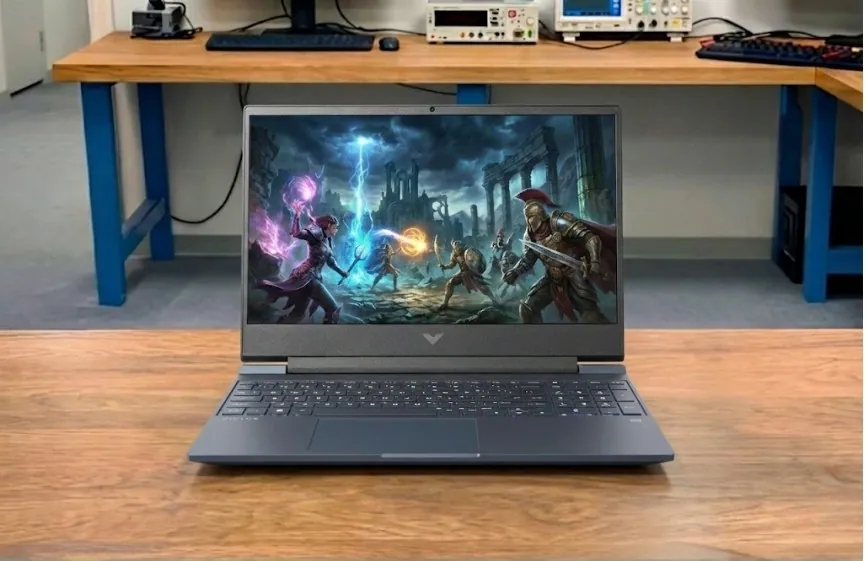
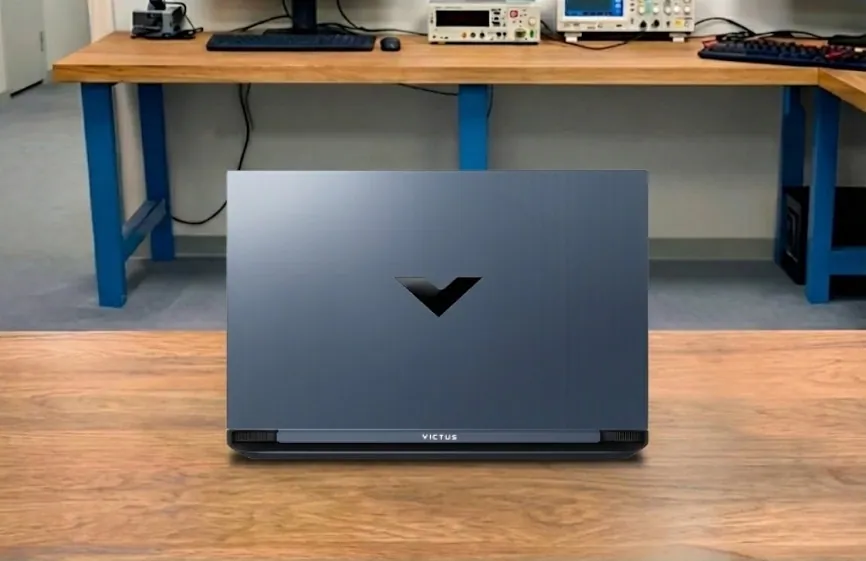
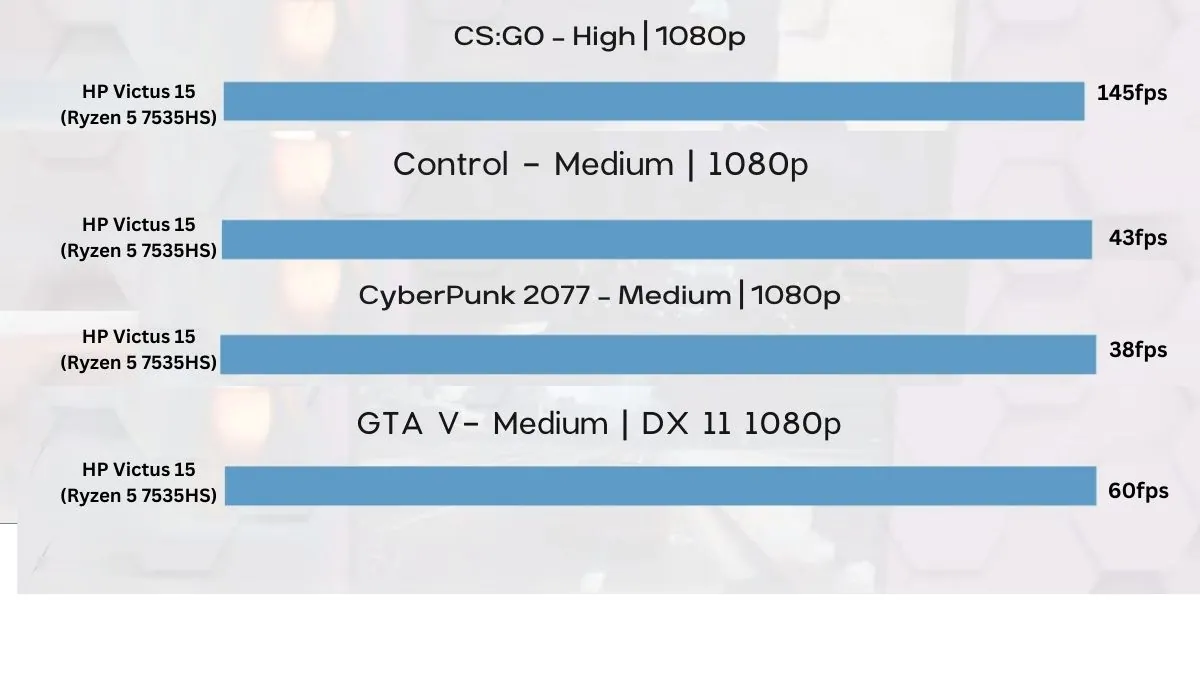
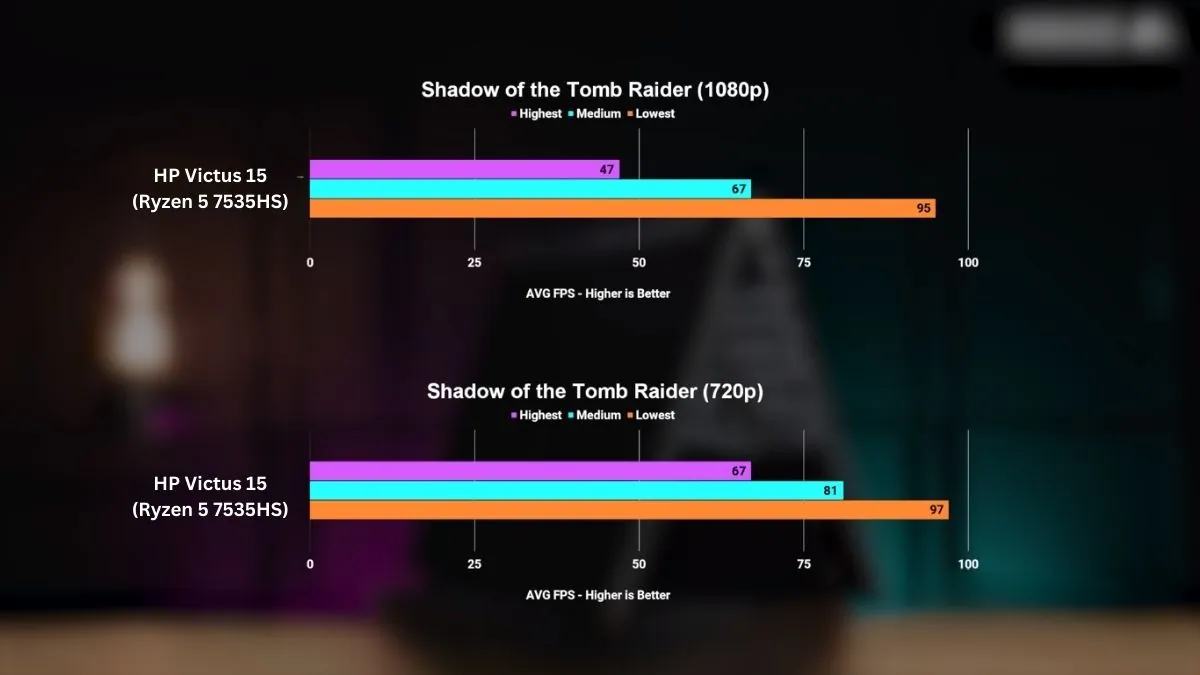
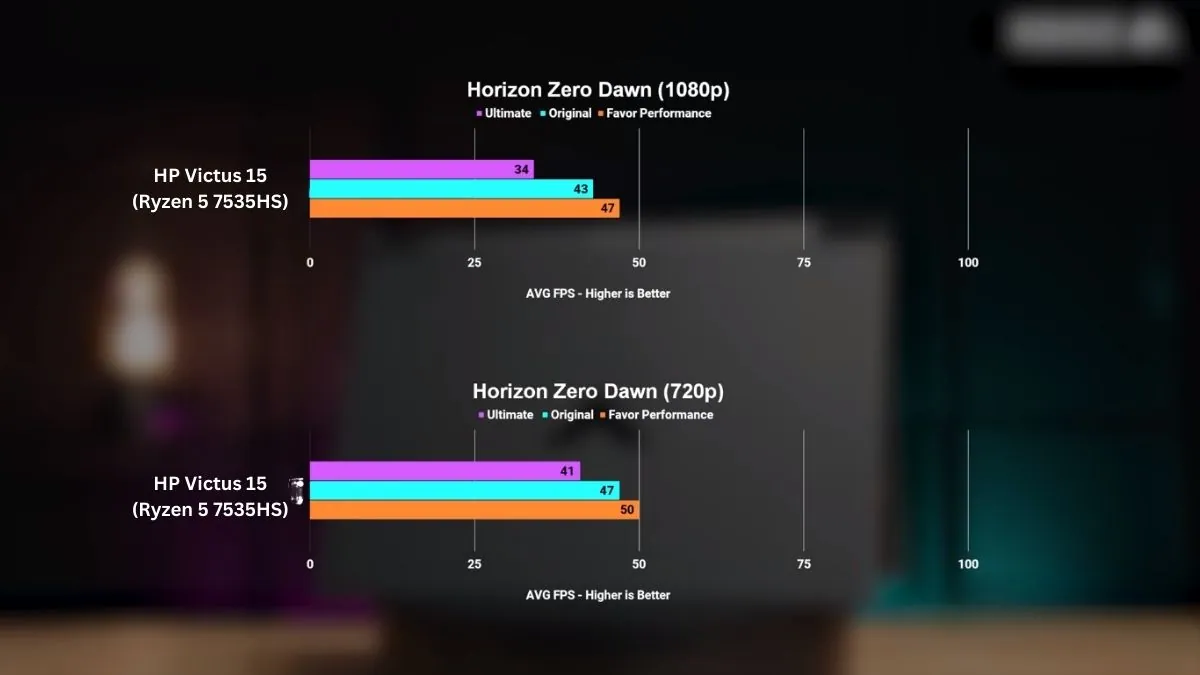
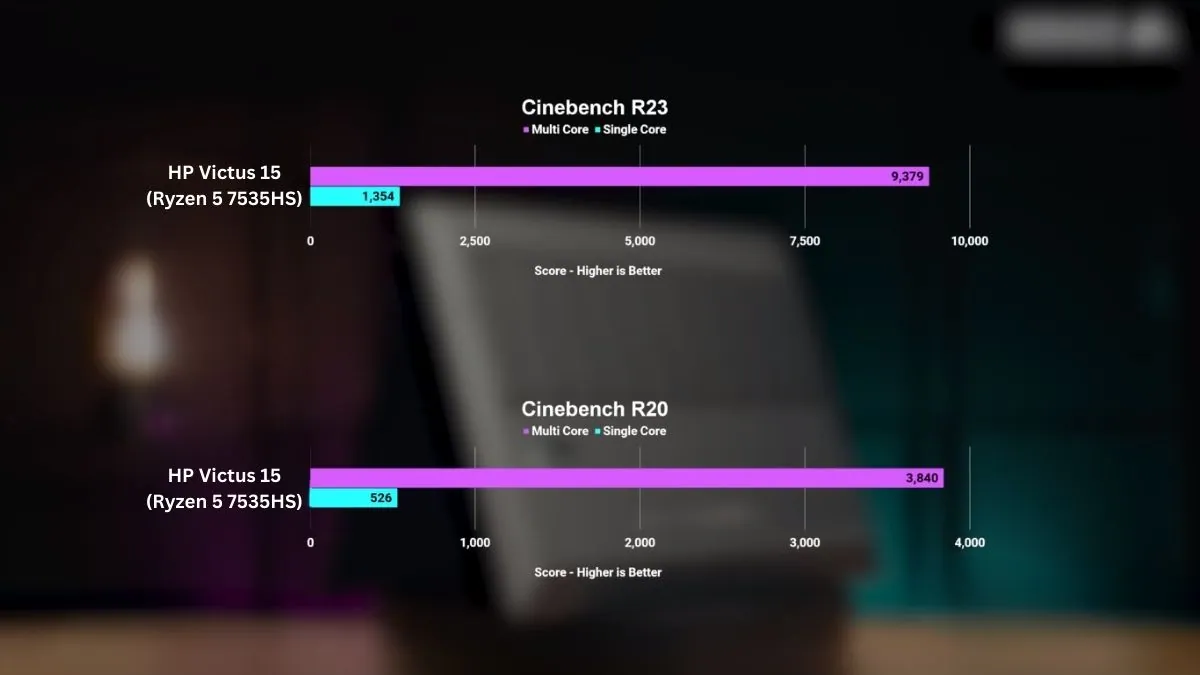
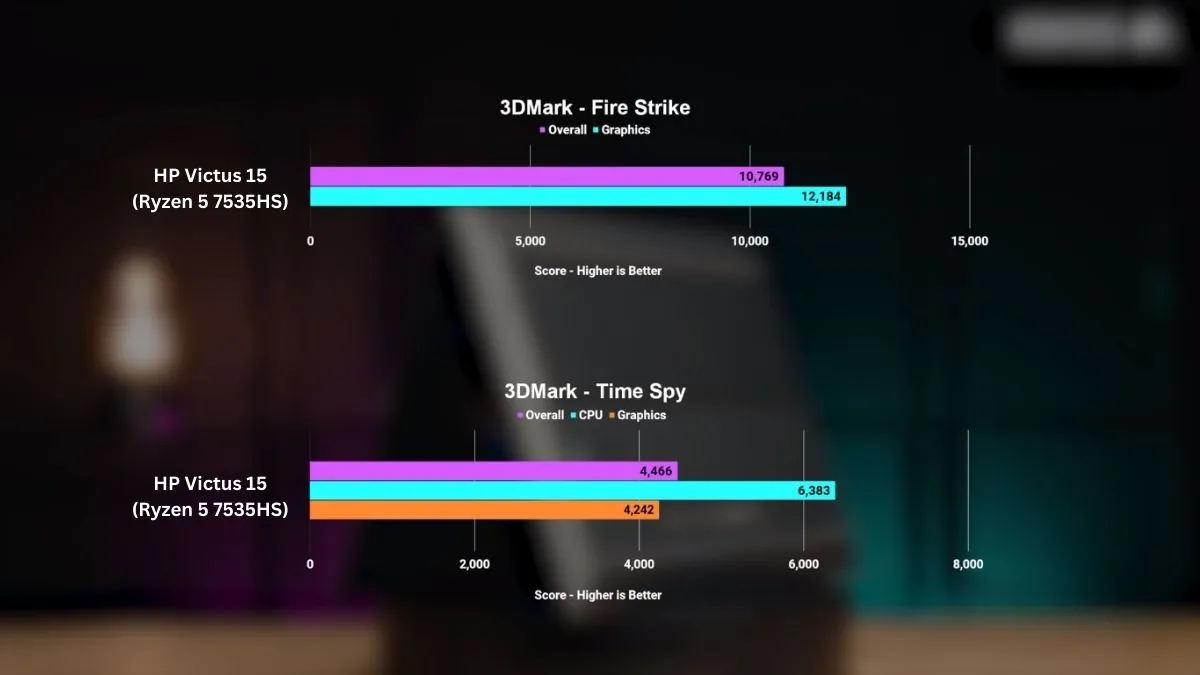
The HP Victus 15 is an excellent choice for Python programming enthusiasts, offering a strong balance between performance and affordability. Powered by an AMD Ryzen 7 7445HS processor and NVIDIA GeForce RTX 4050 graphics with 6GB VRAM, this laptop ensures smooth execution of Python code, making compiling, debugging, and multitasking tasks efficient and responsive.
The vibrant 15.6-inch Full HD, 144Hz, anti-glare IPS display provides ample screen space for coding activities, delivering smooth visuals and wide viewing angles that enhance clarity during long programming sessions.
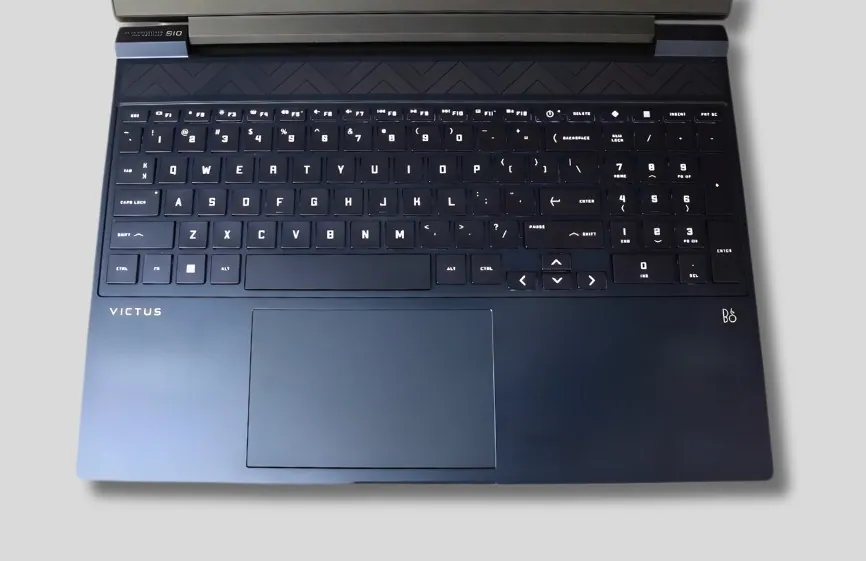
With Wi-Fi 6 connectivity, the Victus 15 enables seamless access to online resources, supporting collaborative coding, cloud-based tools, and virtual meetings. Its sturdy build quality and ergonomic design ensure comfort and durability during extended usage. The backlit keyboard improves visibility in low-light environments, while the spacious touchpad allows smooth and accurate navigation.
While the laptop delivers strong performance and usability, its pricing makes it a solid option for performance-focused programmers. Positioned in the mid-range gaming segment, it offers a compelling mix of power and value for users who need more than basic integrated graphics.
While opting for a higher-tier GPU would further improve graphics-heavy workloads, the RTX 4050 already delivers a strong balance of performance for programming, light machine learning, and GPU-accelerated tasks. For most Python developers, this level of graphics performance is more than sufficient.
Overall, with its robust processing power, reliable connectivity, and competitive pricing, the HP Victus 15 stands out as a strong choice for Python programming enthusiasts who want solid performance without overspending.
Pros
✔ Smooth performance for Python programming and multitasking
✔ High-refresh 144Hz display for comfortable long sessions
✔ Dedicated graphics for GPU-accelerated tasks
✔ Solid build quality with backlit keyboard
✔ Good value for performance-focused users
Cons
✘ Battery life is average
✘ Slightly bulky design
✘ Not ideal for ultra-portable use
See our full HP Victus 15 Review
Budget-friendly options (suitable for beginners)
Best For Portability
1. MSI Thin 15
Key Specs
| Processor | 13th Gen Intel Core i7-13620H |
| GPU | NVIDIA GeForce RTX 4050 |
| RAM | 16GB DDR4 |
| Storage | 512GB SSD |
| Display | 15.6-inch FHD (1920 × 1080), IPS 144Hz |
| Weight | 4.1 pounds (1.86 kg) |
Check Current Pricing
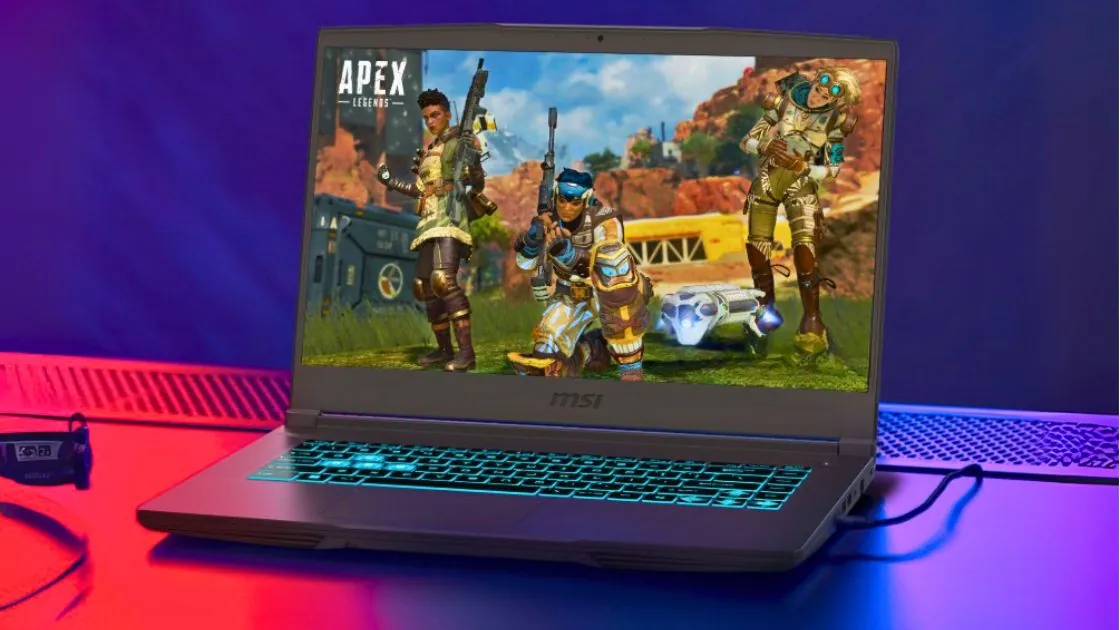
The MSI Thin 15 is an excellent laptop that strikes a balance between performance and portability, making it ideal for students and professionals working on Python programming, data analysis, and AI/ML projects.
Powered by the latest Intel Core i7 processor and RTX 4050 GPU, it easily handles not only programming but also heavy simulations, rendering, and multitasking.
Performance
For Python developers, this laptop excels at handling Jupyter Notebook, TensorFlow, PyTorch, Pandas, and NumPy workloads. Its 16GB of DDR5 memory ensures smooth multitasking in IDEs like PyCharm, VS Code, and Spyder, while the 1TB Gen4 SSD provides fast read and write speeds for datasets.
The RTX 4050 GPU provides additional advantages for machine learning, data visualization, and GPU-accelerated libraries.
Display and Design
The 15.6-inch FHD IPS display with a 144Hz refresh rate ensures crisp visuals whether you’re coding, debugging, or visualizing data in Python. Its slim bezels make the display feel even more immersive, though at 7.43 pounds (3.37 kg), it’s heavier than a typical programming laptop and more suitable for desk use than frequent travel.
Other Features
The MSI Thin 15 features Wi-Fi 6E for fast connectivity, a backlit keyboard for late-night coding sessions, and a robust cooling system to prevent overheating during extended Python compiling or training sessions. Battery life averages around six hours, which is quite good for a high-performance laptop.
Why It’s Special
The MSI Thin 15 is an excellent laptop for streamers, combining gaming performance, advanced encoding support, and multitasking capabilities at an affordable price. The RTX 4050 GPU and DDR5 RAM make it future-proof, plus its portability means you can stream from home, in the studio, or on the go.
Pros
✔ Lightweight design for daily carrying
✔ Quiet operation even under load
✔ Good color accuracy on the high refresh rate display
✔ MSI Center software is intuitive and useful
✔ Expandable RAM for future needs
✔ Competitive pricing
✔ Solid build quality with minimal flex
Cons
✘ GPU limits high-end gaming potential
✘ Battery provides mediocre endurance
✘ No webcam (dealbreaker for online classes)
Best 2-in-1 Laptop for Productivity
2. Lenovo Yoga 7i 2-in-1
Key Specs
| Processor | Intel Core Ultra 7 155U |
| Graphics | Intel integrated graphics |
| Memory | 16GB DDR5 |
| Storage | 1TB SSD |
| Display | 16-inch 2K touchscreen (2048 × 1280), 60Hz |
| Weight | 4.4 lbs (2.0 kg) |
Check Current Pricing
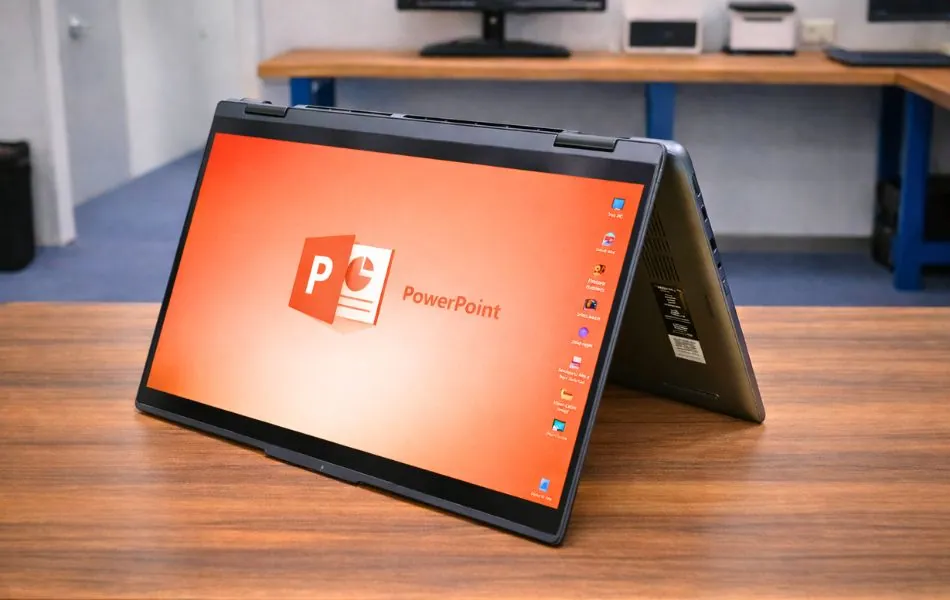
The Lenovo Yoga 7i is a strong choice for users looking for a premium yet versatile 2-in-1 laptop, making it well suited for Python programming and everyday productivity tasks. Powered by an Intel Core Ultra 7 155U processor, it delivers smooth and efficient performance for coding, compiling, and executing Python scripts with ease.
With a 16-inch 2K touchscreen display, the Yoga 7i provides ample screen space for coding and multitasking, offering sharp clarity and excellent visibility. Equipped with Intel integrated graphics, it ensures smooth multitasking, which is essential for handling programming workloads and everyday applications. While it does not feature a dedicated GPU, it still delivers reliable performance for productivity and light creative tasks.
Versatility is a key highlight of the Lenovo Yoga 7i, making it an ideal option for students and professionals who need both performance and flexibility. With a wide range of ports including USB-C with Thunderbolt 4, USB-A, HDMI, and a headphone jack, connectivity is seamless, allowing easy connection to external devices and peripherals. The laptop also supports fast and stable wireless connectivity for online resources and collaboration.
On the other hand, the Lenovo Yoga 7i is a well-balanced productivity laptop, featuring 16GB DDR5 RAM and a 1TB PCIe SSD. Combined with its large 2K touchscreen and a comfortable backlit keyboard with fingerprint reader, it offers convenience for programming, data visualization, and daily work.
While its battery life is designed to last through a full workday under normal usage, heavier workloads may reduce overall runtime. Connectivity remains strong with Wi-Fi 6E and Bluetooth support, ensuring smooth and reliable wireless performance.
Overall, the Lenovo Yoga 7i is an excellent choice for Python programming, productivity, and professional use, offering strong performance, flexibility, and premium features in a refined design. Whether you are a student or a working professional, this laptop delivers a well-rounded experience with modern hardware and thoughtful design.
Pros
✔ Smooth performance for coding and multitasking
✔ Large, sharp touchscreen display
✔ Flexible 2-in-1 design for work and creativity
✔ Fast storage and responsive system
✔ Premium build with modern connectivity
Cons
✘ Integrated graphics limit heavy workloads
✘ Battery life varies with usage
✘ More expensive than basic laptops
How to Choose a Laptop for Python Programming
To select the best laptop for Python programming, it is important to understand the required specifications.
It is essential to know what performance is required for specific programming tasks and which components can provide that performance. You can research this information, but following the recommendations and knowing your expectations will make it easier to choose the right laptop.
Look for a laptop with excellent performance, maximum RAM, and ample storage. For Python programming, a standard graphics card should suffice. Consider other factors like battery life, portability, quality of the operating system, build quality, available RAM and storage slots, and the possibility of upgrades.
It may not be possible to get all these features in a single laptop, but prioritizing the most important features will help you make the right choice.
FAQs
Can I use a budget laptop for Python Programming?
Yes, if your budget is low then you can use a cheap laptop for Python programming but it will not give that much better performance. You should keep the priority that the laptop should have enough RAM, storage, graphics card, and good processing power.
What operating systems can I use for Python coding?
Python Developers often prefer Linux and macOS due to their Strong terminal access, Native Python tools, and open-source nature. The best operating system for Python depends on your personal preferences and comfort level. If you are familiar with Windows, it is perfectly fine to use it for Python development. However, if you’re considering switching or are brand new to programming, Linux and macOS may provide a more streamlined experience.
How much RAM do I need for Python programming?
Python programming is not as memory-intensive as deep learning or MATLAB programming. So, if your laptop has 8 GB of RAM, preferably from the new generation, whose frequency is more than 3200 MHz, you will be able to handle Python programming tasks comfortably. However, it would be even better to choose a laptop with 16GB or more RAM to meet your development needs in the future.
Final Words
All of our selections are made with careful consideration of whether the programming can run and how fast. To ensure we provide accurate and up-to-date information, we have thoroughly reviewed online sources and collected feedback. If you find any of the above-mentioned laptops attractive, you can be assured that it will serve you well for learning Python programming.
However, if you are still unsure about which laptop to buy, or if you have specific budget constraints, please feel free to leave a comment. We will provide personalized recommendations based on your needs and budget. With our expertise, you can easily find the right laptop for your Python programming journey.