
Newly restored hotspot temperature monitoring for NVIDIA’s GeForce RTX 50 Series graphics cards is giving users a clearer look at GPU cooling performance and, in a few reported cases, has uncovered unusually high temperatures that prompted a board partner to recommend an after-sales inspection.
The reports come just days after popular hardware monitoring utilities restored access to hotspot sensor data that had previously been unavailable on RTX 50 Series GPUs.
GeForce RTX 50 Series owners could only check the standard GPU temperature because hotspot sensor data was not available through NVIDIA‘s public software interface. That has now changed. Hardware monitoring tools such as HWMonitor, HWiNFO, and AIDA64 can now read hotspot temperatures using alternative methods, giving users access to thermal data that was previously hidden.
A small number of RTX 50 Series owners have reported unusually high hotspot temperatures after testing the newly available sensor data. One report involved a Colorful iGame GeForce RTX 5080 Vulcan White, where the hotspot temperature reportedly reached nearly 100°C during testing, even though the average GPU temperature remained within the normal range.
After reviewing the results, Colorful’s customer support advised the owner to first check the PC’s airflow and remove any dust buildup. If the hotspot temperature continued to exceed 95°C under heavy workloads, the company recommended sending the graphics card in for an after-sales inspection to rule out a possible cooling or hardware issue.
Another report came from the owner of a Colorful iGame RTX 5090D Advanced OC. During testing, the hotspot temperature reportedly climbed to around 112°C, while the average GPU temperature stayed much lower. The owner also noted a temperature gap of about 35°C between the GPU and hotspot sensors, even with the graphics card’s cooling fans running at nearly 3,000 RPM.
The reports have drawn attention from the PC hardware community, but they do not appear to point to a widespread problem with GeForce RTX 50 Series graphics cards. So far, only a small number of users have reported unusually high hotspot temperatures, and there is no evidence that the issue affects NVIDIA’s Blackwell lineup as a whole.
The reports do, however, highlight why hotspot monitoring matters. The standard GPU temperature, a hotspot sensor measures the hottest point on the graphics processor.
A large gap between the average GPU temperature and the hotspot reading can sometimes indicate uneven cooler contact, thermal interface issues, mounting pressure problems, or localized heat buildup that may eventually lead to thermal throttling or reduced performance.
The renewed availability of hotspot readings has also sparked discussion about why the data was unavailable in the first place. NVIDIA still does not provide official public access to hotspot sensors through its NVAPI interface, meaning third-party utilities rely on alternative methods to display the information.
Not all hardware monitoring tools will support hotspot temperature readings on RTX 50 Series graphics cards. While HWMonitor, HWiNFO, and AIDA64 can now display the sensor data, MSI Afterburner is not expected to add the feature. According to Afterburner developer Unwinder, NVIDIA does not publicly expose the hotspot and VRAM temperature interfaces, and MSI has decided not to use unofficial methods to access those sensors.
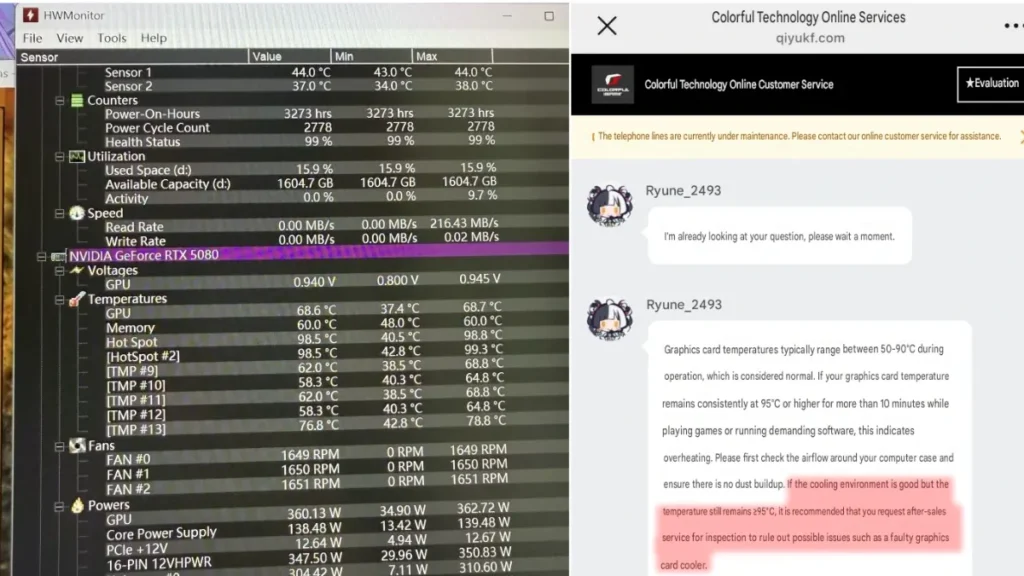
Hotspot temperature readings give PC users another way to check how well their graphics card is being cooled. A GPU can show normal operating temperatures while a small area of the chip runs much hotter than the rest. By monitoring hotspot temperatures, users can more easily spot potential cooling problems, especially if they notice unusually high fan speeds, thermal throttling, or inconsistent gaming performance.
More users are expected to check hotspot temperatures now that support is available in several monitoring tools. As more real-world results are shared, it should become easier to tell whether these cases are isolated incidents or a broader issue affecting certain RTX 50 Series graphics cards.
Also Read: NVIDIA Confirms RTX 5070 Laptop GPU With 12GB GDDR7
Users who notice unusually high hotspot temperatures should first check their PC’s airflow, clean any dust from the case and cooling system, and make sure the graphics card is getting enough airflow. If hotspot temperatures remain unusually high even after those checks, the next step is to contact the graphics card manufacturer to arrange an inspection or request warranty support.
Sources: NGA, UNIKO’s Hardware(X)